
How to automatically sign out on-line Outlook account at PC shut down?


tfwul

Well-known member
Member
Local time
10:21 PM
Posts
32
OS
Windows 11 Pro x64
Right now my online Outlook account is always available.
Desktop app data is password protected.
Google/Gmail password protected.
Anyone having access to my PC also has access to Outlook online.

To avoid this:
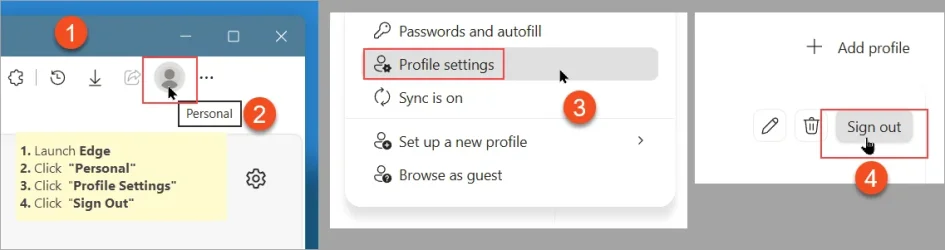
1. Launch Edge
2. Click "Personal" in the toolbar
3. Click "Profile Settings"
4. Click "Sign Out"
5. CLose Edge

Q: I wonder whether it would be possible to automate this at system shutdown.

Thanks.
 

Attachments
  • SnagIt-22092026 052040.webp
    SnagIt-22092026 052040.webp
    20.9 KB · Views: 3

My Computer My Computer

At a glance

Windows 11 Pro x64Intel Core Ultra 9 285K, S185132GB (DDR5-5600)Asus GeForce RTX 5060 Ti, 8GB, Dual OC
OS
Windows 11 Pro x64
Computer type
PC/Desktop
CPU
Intel Core Ultra 9 285K, S1851
Motherboard
Asus ProArt Z890 Creator WiFi
Memory
32GB (DDR5-5600)
Graphics Card(s)
Asus GeForce RTX 5060 Ti, 8GB, Dual OC
Monitor(s) Displays
Asus ProArt OLED PA32UCDM
Screen Resolution
3840 x 2160
Hard Drives
1x Samsung 9100 Pro 1TB, PCIe 5.0 NVMe M.2, 2x Samsung 9100 Pro 4TB, PCIe 5.0 NVMe M.2
PSU
Corsair RM850e (2025)
Case
Corsair 5000T
Cooling
be quiet! Dark Rock Pro 5, 4x Noctua NF-A14x25 G2 LS-PWM (140mm)
Keyboard
Das Keyboard 4 Pro
Mouse
Logitech MX Master 4
Internet Speed
1Gbps
Browser
Microsoft Edge (Default)
Antivirus
Windows Security/Microsoft Defender

Sounds like a job for any good macro software (click the stuff, then do a shutdown, in that order). I use AlomWare Toolbox myself but AutoHotkey should be able to do it as well.
 

My Computer My Computer

At a glance

Windows 11 Pro
OS
Windows 11 Pro
Anyone having access to my PC also has access to Outlook online.
If you login to Windows using MS account, they do not, because profile's data is also encrypted.
But you could disable browser's login and it will force you to login to MS webpages manually.
 

My Computer My Computer

At a glance

Home2FH2CanAMD Ryzen 5 8600G (07/24)2x32GB Kingston FURY DDR5 5600 MHz CL36 @5200...ASROCK Radeon RX 6600 Challenger D 8G @48FPS ...
OS
Home2FH2Can
Computer type
PC/Desktop
CPU
AMD Ryzen 5 8600G (07/24)
Motherboard
ASROCK B650M-HDV/M.2 (07/24) BIOS 4.43 AGESA ComboAM5 1.3.0.1b Patch A (07/26)
Memory
2x32GB Kingston FURY DDR5 5600 MHz CL36 @5200 CL40 (07/24)
Graphics Card(s)
ASROCK Radeon RX 6600 Challenger D 8G @48FPS (08/24)
Sound Card
Creative Sound BlasterX AE-5 Plus (05/24)
Monitor(s) Displays
24" Philips 24M1N3200ZS/00 (05/24)
Screen Resolution
1920×1080@165Hz via DP1.4
Hard Drives
Kingston KC3000 NVMe 2TB (05/24)
ADATA XPG GAMMIX S11 Pro 512GB (07/19)
PSU
Seasonic Core GM 550 Gold (04/24)
Case
Fractal Design Define 7 Mini with 3x Noctua NF-P14s/12@555rpm (04/24)
Cooling
Noctua NH-U12S with Noctua NF-P12 (04/24)
Keyboard
HP Pavilion Wired Keyboard 300 (07/24) + Rabalux 76017 Parker (01/24)
Mouse
Logitech M330 Silent Plus (07/26)
Internet Speed
500/100 Mbps via RouterOS (05/21) & TCP Optimizer
Browser
Edge, Brave for YouTube, LibreWolf for FB
Antivirus
NextDNS blocking 50% Traffic
Other Info
Phone: Motorola Moto G86 (02/26)
Backup: Hasleo Backup Suite (PreOS)
Headphones: Sennheiser RS170 (09/10)
Chair: Huzaro Force 4.4 Grey Mesh (05/24)
Notifier: Xiaomi Mi Band 9 Milanese (10/24)
FlexCore USB-C 3.2 Gen 1 (M) to LAN (F) (08/25)
What risk are you trying to mitigate by explicitly logging out of the session?

Outlook email, when you login, asks if you want to keep you logged in, if you reply "no" to that, closing the browser suffices to keep you out of the malbox.
 

My Computer My Computer

At a glance

Windows 11
OS
Windows 11
Computer type
PC/Desktop
First of all: sorry for the delay.

Many thanks for the replies.

I continued searching for some sort of a solution for this, but I believe there is none, or better, I have not found any.

Microsoft seems to have decided that once you have disabled the logon password (i.e. the password needed to unlock your PC after start), then there is -no- option for a 'second layer' of protection as far as online matters is concerned.

Should you need to turn in your PC for whatever repair or additional hardware, then it is an uncomfortable feeling that email, OneDrive, etc. can be accessed without problems.
Even though the guys at the repair shop may not do so.

Anyway, thanks again.
 

My Computer My Computer

At a glance

Windows 11 Pro x64Intel Core Ultra 9 285K, S185132GB (DDR5-5600)Asus GeForce RTX 5060 Ti, 8GB, Dual OC
OS
Windows 11 Pro x64
Computer type
PC/Desktop
CPU
Intel Core Ultra 9 285K, S1851
Motherboard
Asus ProArt Z890 Creator WiFi
Memory
32GB (DDR5-5600)
Graphics Card(s)
Asus GeForce RTX 5060 Ti, 8GB, Dual OC
Monitor(s) Displays
Asus ProArt OLED PA32UCDM
Screen Resolution
3840 x 2160
Hard Drives
1x Samsung 9100 Pro 1TB, PCIe 5.0 NVMe M.2, 2x Samsung 9100 Pro 4TB, PCIe 5.0 NVMe M.2
PSU
Corsair RM850e (2025)
Case
Corsair 5000T
Cooling
be quiet! Dark Rock Pro 5, 4x Noctua NF-A14x25 G2 LS-PWM (140mm)
Keyboard
Das Keyboard 4 Pro
Mouse
Logitech MX Master 4
Internet Speed
1Gbps
Browser
Microsoft Edge (Default)
Antivirus
Windows Security/Microsoft Defender
Even though the guys at the repair shop may not do so.
Well before I - or anyone I have dealings with - decide this course of action, I always
- run the browsers privavcy and security wipe
- run Wise Disk Cleaner with the passwords delete option turned on
- Run Glary Utilities clean up also with the wipe passords option turned on

Additionally there are some browsers that obey the user's wishes by not keeping passwords and/or wiping passwords on exit

But as long as the user thinks the sun shines out of everything Microsoft, it's gonna continue to be gloomy times
 

My Computers My Computers

  • At a glance

    Windows 11 2xH2 (latest update ... forever anal)Intel i5-124008GBNVIDIA GeForce GT730
    OS
    Windows 11 2xH2 (latest update ... forever anal)
    Computer type
    PC/Desktop
    Manufacturer/Model
    HP Slim S01
    CPU
    Intel i5-12400
    Memory
    8GB
    Graphics Card(s)
    NVIDIA GeForce GT730
    Sound Card
    OOBE
    Monitor(s) Displays
    Acer 32"
    Screen Resolution
    1920x1080
    Hard Drives
    512GB KIOXIA NVMe
    1TB SATA SSD
    PSU
    OOBE
    Case
    OOBE
    Cooling
    OOBE
    Keyboard
    BT
    Mouse
    BT
    Browser
    Brave FFox Chrome Opera
    Antivirus
    KIS
  • At a glance

    Windows 11 Pro 2xH2 (latest update ... 4ever ...i7-1165G7 @ 2.80GHzIntel Iris Xe Graphics
    Operating System
    Windows 11 Pro 2xH2 (latest update ... 4ever anal)
    Computer type
    Laptop
    Manufacturer/Model
    HP Pavillion 15
    CPU
    i7-1165G7 @ 2.80GHz
    Graphics card(s)
    Intel Iris Xe Graphics
    Hard Drives
    Samsung NVMe 512GB
    + numerous/multiple SSD Type C USB enclosures
    Internet Speed
    NBN FTTN 50
    Browser
    Brave
    Antivirus
    KIS
I continued searching for some sort of a solution for this, but I believe there is none, or better, I have not found any.
Macros, like I said. So you can run it to do your logout steps in your first post, and then shut down the PC after. All from a hotkey when you're using Edge and want to quit it and then shut the PC down.
 

My Computer My Computer

At a glance

Windows 11 Pro
OS
Windows 11 Pro

Latest Support Threads

Back
Top Bottom





