Right now my online Outlook account is always available.
Desktop app data is password protected.
Google/Gmail password protected.
Anyone having access to my PC also has access to Outlook online.
To avoid this:
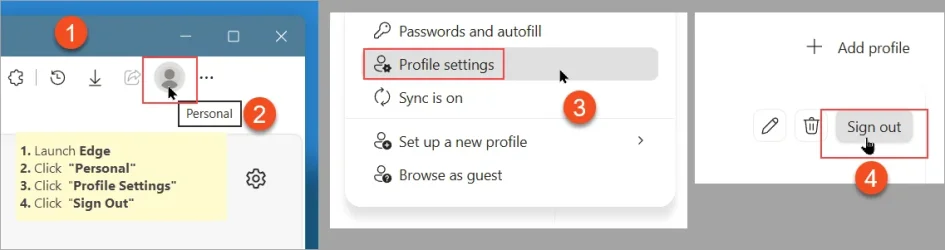
1. Launch Edge
2. Click "Personal" in the toolbar
3. Click "Profile Settings"
4. Click "Sign Out"
5. CLose Edge
Q: I wonder whether it would be possible to automate this at system shutdown.
Thanks.
Desktop app data is password protected.
Google/Gmail password protected.
Anyone having access to my PC also has access to Outlook online.
To avoid this:
1. Launch Edge
2. Click "Personal" in the toolbar
3. Click "Profile Settings"
4. Click "Sign Out"
5. CLose Edge
Q: I wonder whether it would be possible to automate this at system shutdown.
Thanks.
Attachments
My Computer
At a glance
Windows 11 Pro x64Intel Core Ultra 9 285K, S185132GB (DDR5-5600)Asus GeForce RTX 5060 Ti, 8GB, Dual OC
- OS
- Windows 11 Pro x64
- Computer type
- PC/Desktop
- CPU
- Intel Core Ultra 9 285K, S1851
- Motherboard
- Asus ProArt Z890 Creator WiFi
- Memory
- 32GB (DDR5-5600)
- Graphics Card(s)
- Asus GeForce RTX 5060 Ti, 8GB, Dual OC
- Monitor(s) Displays
- Asus ProArt OLED PA32UCDM
- Screen Resolution
- 3840 x 2160
- Hard Drives
- 1x Samsung 9100 Pro 1TB, PCIe 5.0 NVMe M.2, 2x Samsung 9100 Pro 4TB, PCIe 5.0 NVMe M.2
- PSU
- Corsair RM850e (2025)
- Case
- Corsair 5000T
- Cooling
- be quiet! Dark Rock Pro 5, 4x Noctua NF-A14x25 G2 LS-PWM (140mm)
- Keyboard
- Das Keyboard 4 Pro
- Mouse
- Logitech MX Master 4
- Internet Speed
- 1Gbps
- Browser
- Microsoft Edge (Default)
- Antivirus
- Windows Security/Microsoft Defender