How to Change Screen Scaling & Size of Screen W11


franto1992

Member
Local time
12:10 AM
Posts
3
OS
Windows 11
Hello Gyus

I tried everythin can u please help me how can i fix this problem.

In short::


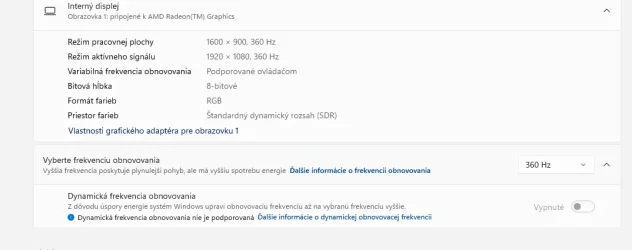
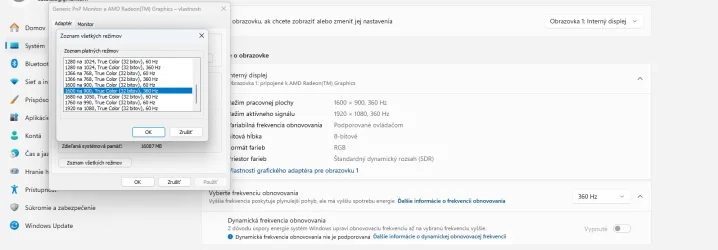
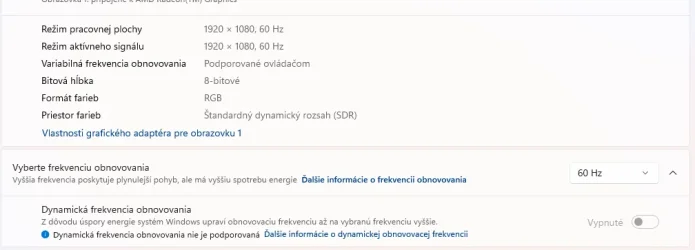
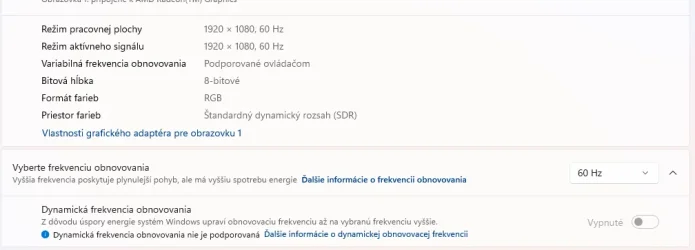
I try to change my resoluiton to 1920x1080 i get 60HZ i try change 60 hz to 360hz my screen drops back to 1600x900 60hz but i can change to 360...

i tried everythin any idea please guys...

Thanks
 

Attachments
  • Snímka obrazovky 2026-10-13 224123.webp
    Snímka obrazovky 2026-10-13 224123.webp
    27.7 KB · Views: 1
  • Snímka obrazovky 2026-10-13 224142.webp
    Snímka obrazovky 2026-10-13 224142.webp
    29.7 KB · Views: 1
  • Snímka obrazovky 2026-10-13 224616.webp
    Snímka obrazovky 2026-10-13 224616.webp
    63.9 KB · Views: 1

My Computer My Computer

At a glance

Windows 11AMD Ryzen 9 5900HX with Radeon Graphics (3.30...32GNVIDIA GeForce RTX 3080 Laptop GPU (16 GB) AM...
OS
Windows 11
Computer type
Laptop
Manufacturer/Model
ROG Strix G733QSA
CPU
AMD Ryzen 9 5900HX with Radeon Graphics (3.30 GHz)
Memory
32G
Graphics Card(s)
NVIDIA GeForce RTX 3080 Laptop GPU (16 GB) AMD Radeon(TM) Graphics (496 MB)
I'd be surprised if a laptop could handle such a high refresh rate. It looks like it is reverting to a screen size it can handle that rate. If you lower the refresh rate to say 240mhz, can it handle that. It may take a bit of playing with different refresh rates to see what the maximum the laptop will handle at full HD.
 

My Computer My Computer

At a glance

Windows 11 Pro 25H2 26200.7922Intel Core i9 13900F2 x Kingston Fury 32gb DDR5 5600 BeastGigabyte Eagle (Nvidia) RTX 3060
OS
Windows 11 Pro 25H2 26200.7922
Computer type
PC/Desktop
Manufacturer/Model
Local shop built (KC Computers Ltd)
CPU
Intel Core i9 13900F
Motherboard
Gigabyte Z690 Gaming X (rev. 1.0/1.1) - (BIOS: F32 09 18 2025)
Memory
2 x Kingston Fury 32gb DDR5 5600 Beast
Graphics Card(s)
Gigabyte Eagle (Nvidia) RTX 3060
Sound Card
Chord Async USB 44.1kHz - 384kHz 2Qute DAC
Monitor(s) Displays
Gigabyte AORUS FO32U2 32” OLED Flat Gaming Monitor, 0.03ms, KVM, 250 cd/m2, FreeSync Premium Pro, HDR True Black 400
Screen Resolution
3840 x 2160 (UHD), 240Hz
Hard Drives
1 x KINGSTON NVMe M.2 SSDSKC3000D2048G 2TB
1 x Samsung SSD 870 EVO 250GB
2 x Crucial CT4000MX500SSD1 4TB
2 x Crucial CT2000MX500SSD1 2TB
1 x Crucial CT250MX500SSD1 250.0 GB
PSU
Gigabyte 750w
Case
Fractal Torrent
Cooling
Stock Intel CPU, 2 x Fractal 180mm PWM (front), 3 x Fractal 140mm PWM (bottom)
Keyboard
Logitech MX Mechanical Wireless Illuminated Performance Keyboard
Mouse
Logitech MX Master 3S Wireless Performance Mouse
Internet Speed
900 Mbps/900 Mbps Trooli FTTP
Browser
Firefox
Antivirus
Eset Nod32
Have only 2 options 60 and 360 was no problem before...
 

My Computer My Computer

At a glance

Windows 11AMD Ryzen 9 5900HX with Radeon Graphics (3.30...32GNVIDIA GeForce RTX 3080 Laptop GPU (16 GB) AM...
OS
Windows 11
Computer type
Laptop
Manufacturer/Model
ROG Strix G733QSA
CPU
AMD Ryzen 9 5900HX with Radeon Graphics (3.30 GHz)
Memory
32G
Graphics Card(s)
NVIDIA GeForce RTX 3080 Laptop GPU (16 GB) AMD Radeon(TM) Graphics (496 MB)
The G733QSA is supposed to support 360Hz at 1920X1080.

It may be made more complicated because the laptop uses an Optimus setup, where the integrated graphics would be used for low-performance applications, with the nVidia graphics used for things like gaming.

Do you have the nVidia app (or the older nVidia control panel) installed? Do you get the same settings in that as for Windows?

Asus seems to not offer many downloadable drivers for the G733QSA. There is a BIOS available for download, if it's a) newer than what you have and b) you're willing to take the (slight) risk of bricking the laptop. There is also a download for a BIOS to be used to fix things if the update goes wrong.

Is there any way to force the use of only the nVidia drivers in the laptop's BIOS settings?
 

My Computers My Computers

  • At a glance

    Windows 11 26300.9278Amd Threadripper 7970X128GB (4 X 32) G.Skill DDR5 6400 (RDIMM)Gigabyte RTX 4090 OC
    OS
    Windows 11 26300.9278
    Computer type
    PC/Desktop
    Manufacturer/Model
    homebuilt
    CPU
    Amd Threadripper 7970X
    Motherboard
    Gigabyte TRX50 Aero D Rev. 1.0
    Memory
    128GB (4 X 32) G.Skill DDR5 6400 (RDIMM)
    Graphics Card(s)
    Gigabyte RTX 4090 OC
    Sound Card
    none (USB to speakers), Realtek
    Monitor(s) Displays
    Innocn 32" OLED
    Screen Resolution
    3840 X 2160 @ 60Hz
    Hard Drives
    Crucial T700 2TB M.2 NVME SSD
    WD 4TB Blue SATA SSD
    Seagate 18TB IronWolf Pro
    PSU
    BeQuiet! Straight Power 12 1500W
    Case
    Lian Li 011 Dynamic Evo XL
    Cooling
    SilverStone Technology XE360-TR5, with 3 Phanteks T30 fans
    Keyboard
    Cherry KC 500 MX LP (mechanical)
    Mouse
    Logitech M500s (wired)
    Internet Speed
    2000/250 Mbps (down/up)
    Other Info
    xFinity gateway
  • At a glance

    windows 11 26300.9278Intel I9-13900K64GB G.Skill DDR5-6000Gigabyte RTX 3090 ti
    Operating System
    windows 11 26300.9278
    Computer type
    PC/Desktop
    Manufacturer/Model
    homebuilt
    CPU
    Intel I9-13900K
    Motherboard
    Asus RoG Strix Z690-E
    Memory
    64GB G.Skill DDR5-6000
    Graphics card(s)
    Gigabyte RTX 3090 ti
    Sound Card
    built in Realtek
    Monitor(s) Displays
    Philips 27E1N8900 27" OLED
    Screen Resolution
    3840 X 2160 @60Hz
    Hard Drives
    WDC SN850 1TB
    8TB Seagate Ironwolf
    4TB Seagate Ironwolf
    PSU
    eVGA SuperNOVA 1300 GT
    Case
    Lian Li 011 Dynamic Evo
    Cooling
    Corsair iCUE H150i ELITE CAPELLIX Liquid CPU Cooler
    Keyboard
    Cherry Streaming (wired)
    Mouse
    Logitech M500s (wired)
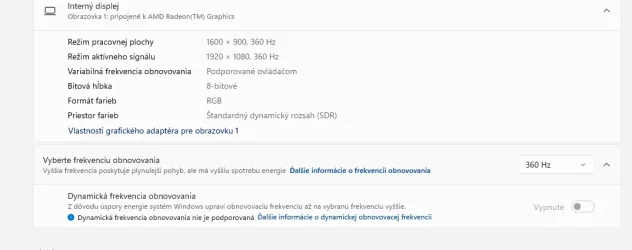
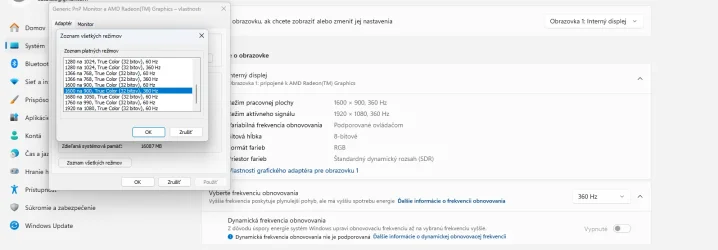
I did a bios Update same thing but if i put in razor Cport this hapening:
 

Attachments

  • Snímka obrazovky 2026-10-13 224123.webp
    Snímka obrazovky 2026-10-13 224123.webp
    27.7 KB · Views: 1
  • Snímka obrazovky 2026-10-13 224142.webp
    Snímka obrazovky 2026-10-13 224142.webp
    29.7 KB · Views: 1
  • Snímka obrazovky 2026-10-13 224616.webp
    Snímka obrazovky 2026-10-13 224616.webp
    63.9 KB · Views: 1

My Computer My Computer

At a glance

Windows 11AMD Ryzen 9 5900HX with Radeon Graphics (3.30...32GNVIDIA GeForce RTX 3080 Laptop GPU (16 GB) AM...
OS
Windows 11
Computer type
Laptop
Manufacturer/Model
ROG Strix G733QSA
CPU
AMD Ryzen 9 5900HX with Radeon Graphics (3.30 GHz)
Memory
32G
Graphics Card(s)
NVIDIA GeForce RTX 3080 Laptop GPU (16 GB) AMD Radeon(TM) Graphics (496 MB)
Back
Top Bottom