How to check if your Secure Boot certs are updated. (three methods)


You need to reset the bootloader back to 2011. Once done, you can turn secure boot back on.

Type the following commands one at a time with administrator privileges:


Mountvol s: /s

del s:\*.* /f /s /q

bcdboot %systemroot% /s S:

A safer method (without wiping the EFI's contents, because other features might be keeping files stored there) is:
Code:
mountvol S: /s
copy \Windows\Boot\EFI\bootmgfw.efi S:\EFI\Microsoft\Boot\bootmgfw.efi
mountvol S: /d
 

My Computer My Computer

At a glance

Windows 7
OS
Windows 7
A safer method (without wiping the EFI's contents, because other features might be keeping files stored there) is:
Code:
mountvol S: /s
copy \Windows\Boot\EFI\bootmgfw.efi S:\EFI\Microsoft\Boot\bootmgfw.efi
mountvol S: /d
Good catch, I posted the wrong commands. Yours were what I should have posted. Thanks!
 

My Computer My Computer

At a glance

Windows 11
OS
Windows 11
A safer method (without wiping the EFI's contents, because other features might be keeping files stored there) is:
Code:
mountvol S: /s
copy \Windows\Boot\EFI\bootmgfw.efi S:\EFI\Microsoft\Boot\bootmgfw.efi
mountvol S: /d
@garlin
Is there a way to un-revoke the CA2011, till the date that Microsoft decides to revoke it for good in June 2026?
Thanks for your help.
 

My Computer My Computer

At a glance

Windows 11 Pro 25H2Intel I9-9900K64GBNVIDIA RTX 2060
OS
Windows 11 Pro 25H2
Computer type
PC/Desktop
Manufacturer/Model
Dell XPS 8930
CPU
Intel I9-9900K
Memory
64GB
Graphics Card(s)
NVIDIA RTX 2060
Sound Card
NVIDIA High Definition Audio
Monitor(s) Displays
4k Samsung
Screen Resolution
3840 x 2160
Hard Drives
512GB NVMe, ADATA SU 800, 2TB HDD
Due to the UEFI security model, you can't delete an already enrolled cert from Windows.

What you can do:
- If your UEFI menu allows, manually delete PCA 2011 from the DBX variable​
- Otherwise, clear the entire DBX variable​
- If that's not supported, delete all the variables (Setup Mode), and repeat the update process without the revocation.​

Hopefully you have a relatively "modern" UEFI and you get an option to delete individual certs from DBX. The reason you can't do this from Windows is an attacker would have the same abilities as you. Therefore the override has to be done physically from the UEFI menu.
 

My Computer My Computer

At a glance

Windows 7
OS
Windows 7
Due to the UEFI security model, you can't delete an already enrolled cert from Windows.

What you can do:
- If your UEFI menu allows, manually delete PCA 2011 from the DBX variable​
- Otherwise, clear the entire DBX variable​
- If that's not supported, delete all the variables (Setup Mode), and repeat the update process without the revocation.​

Hopefully you have a relatively "modern" UEFI and you get an option to delete individual certs from DBX. The reason you can't do this from Windows is an attacker would have the same abilities as you. Therefore the override has to be done physically from the UEFI menu.
Any problem with this before MS officially revokes CA2011?
1771017354500.webp

1771017618519.webp
 

My Computer My Computer

At a glance

Windows 11 Pro 25H2Intel I9-9900K64GBNVIDIA RTX 2060
OS
Windows 11 Pro 25H2
Computer type
PC/Desktop
Manufacturer/Model
Dell XPS 8930
CPU
Intel I9-9900K
Memory
64GB
Graphics Card(s)
NVIDIA RTX 2060
Sound Card
NVIDIA High Definition Audio
Monitor(s) Displays
4k Samsung
Screen Resolution
3840 x 2160
Hard Drives
512GB NVMe, ADATA SU 800, 2TB HDD
As long as you're aware of how to update (or revert) your boot files, and any bootable media; there is no disadvantage to closing the UEFI security hole exposed by Black Lotus. This is done for your security, so other bad actors can't copy the Black Lotus rootkit trick.

If a smart enough script determines your UEFI has met all the requirements, then enjoy the security benefits. Mostly it's the squeamish that don't want to revoke their certs now. But you're personally better educated at this stage, fear shouldn't be a reason to roll back the changes.

Assuming you're staying at W10 22H2, W11 24H2/25H2 or moving to 26H2, all your bases are covered. It's folks installing or re-installing older Windows releases who will get a rude surprise that Secure Boot doesn't allow their system to run.

Most of fear in this Secure Boot process is MS's fault because they can't seem to find an articulate Product Manager (like the former Windows Insider folks) to write plain English explanations for what the problem is, how it's going to be fixed, and when should we expect changes. Instead responsibility appears to be scattered across different teams.
 

My Computer My Computer

At a glance

Windows 7
OS
Windows 7
Intel Compute Stick STK1A32SC w/fully updated Windows 10 32bit installation. (Yeah, I know.....). Here's what I have done:


View attachment 163197
View attachment 163198
View attachment 163193
View attachment 163195
View attachment 163199
View attachment 163200

As you can see, I used MOSBY to do the update in the bios. It seemed to go just fine, but now when I enable secure boot, I get the error message "A bootable device has not been detected." Boots fine without secure boot enabled. I'm really, REALLY stumped at this point. Any advice anyone has would be greatly appreciated. I've done, checked, redone, rechecked, SO many times now, I'm about to pull what's left of my hair out. Thanks in advance. :-)
You can disregard. I did the entire process again this morning starting with a bootloader reset. It worked the first time. Not even sure were my error was previously.

All appears to be right in the world, at least for now. :-)
 

My Computer My Computer

At a glance

Windows 10, Windows 11, Ubuntu, Android
OS
Windows 10, Windows 11, Ubuntu, Android
Computer type
PC/Desktop
Failed again after third reboot. Same error message. I give up....at least for now.

:confused:
 

My Computer My Computer

At a glance

Windows 10, Windows 11, Ubuntu, Android
OS
Windows 10, Windows 11, Ubuntu, Android
Computer type
PC/Desktop
Hi there,

i just registered here, because it seems as if there was not enough profound knowledge about this topic in German-speaking forums.

Could somebody of you tell me if i have to follow further steps, especially with the "Microsoft UEFI CA 2023, the "Microsoft Option ROM UEFI CA 2023" and the "none"-output under "Current UEFI DBX"?

I read through many threads on elevenforum, but can't quite sort out what to do now and what to avoid, as there seem to be different opinions.


My output reads as follows:

-----

Secure Boot status: Enabled

Manufacturer: Gigabyte Technology Co., Ltd. Model: B560 AORUS PRO AX BIOS: American Megatrends International, LLC., F14b, F14b, ALASKA - 1072009 Windows version: 25H2 (Build 26200.8037)

Detected x64 UEFI architecture. Ensure that this is correct for valid DBX results.

Secure Boot status: Enabled

Current UEFI PK
√ GIGABYTE

Default UEFI PK
√ GIGABYTE

Current UEFI KEK
√ Microsoft Corporation KEK CA 2011 (revoked: False)
√ Microsoft Corporation KEK 2K CA 2023 (revoked: False)
√ GIGABYTE (revoked: False)

Default UEFI KEK
√ Microsoft Corporation KEK CA 2011 (revoked: False)
√ Microsoft Corporation KEK 2K CA 2023 (revoked: False)
√ GIGABYTE (revoked: False)

Current UEFI DB
√ Microsoft Windows Production PCA 2011 (revoked: False)
√ Microsoft Corporation UEFI CA 2011 (revoked: False)
√ Windows UEFI CA 2023 (revoked: False)
X Microsoft UEFI CA 2023
X Microsoft Option ROM UEFI CA 2023
√ GIGABYTE (revoked: False)

Default UEFI DB
√ Microsoft Windows Production PCA 2011 (revoked: False)
√ Microsoft Corporation UEFI CA 2011 (revoked: False)
√ Windows UEFI CA 2023 (revoked: False)
X Microsoft UEFI CA 2023
X Microsoft Option ROM UEFI CA 2023
√ GIGABYTE (revoked: False)

Current UEFI DBX
2025-10-14 (v1.6.0) [x64] : SUCCESS: 431 successes detected
Windows Bootmgr SVN : None
Windows cdboot SVN : None
Windows wdsmgfw SVN : None

-----

I would love some advice if i am done so far, or if there are additional steps to take.

I am btw still getting the 1801-error in my event manager.

Oh, and btw: Many thanks for your helpful script!

greetings :)
 

My Computer My Computer

At a glance

Windows 11
OS
Windows 11
Computer type
PC/Desktop
Manufacturer/Model
self built
Current UEFI DB
√ Microsoft Windows Production PCA 2011 (revoked: False)
√ Microsoft Corporation UEFI CA 2011 (revoked: False)
√ Windows UEFI CA 2023 (revoked: False)
X Microsoft UEFI CA 2023
X Microsoft Option ROM UEFI CA 2023
√ GIGABYTE (revoked: False)
You're missing Microsoft UEFI CA 2023, but that's only needed by Linux. And the Option ROM (might be needed by some GPU's).

Code:
reg add HKEY_LOCAL_MACHINE\SYSTEM\CurrentControlSet\Control\Secureboot /v AvailableUpdates /t REG_DWORD /d 0x1800 /f
powershell Start-ScheduledTask -TaskName "\Microsoft\Windows\PI\Secure-Boot-Update"

Current UEFI DBX
2025-10-14 (v1.6.0) [x64] : SUCCESS: 431 successes detected
Windows Bootmgr SVN : None
Windows cdboot SVN : None
Windows wdsmgfw SVN : None
PCA 2011 has not been revoked yet. This step is still optional for now, but Windows will do that later this year.

Code:
reg add HKEY_LOCAL_MACHINE\SYSTEM\CurrentControlSet\Control\Secureboot /v AvailableUpdates /t REG_DWORD /d 0x282 /f
powershell Start-ScheduledTask -TaskName "\Microsoft\Windows\PI\Secure-Boot-Update"
 

My Computer My Computer

At a glance

Windows 7
OS
Windows 7
Hi garlin,

thanks for your reply. So i won't care about the "Microsoft"-ones anymore, nice.

What would the first two commands you posted exactly change in my list?

I think i won't revoke the 2011, if i don't need to. But would i get a version output under SVN then?
 

My Computer My Computer

At a glance

Windows 11
OS
Windows 11
Computer type
PC/Desktop
Manufacturer/Model
self built
Hi garlin,

thanks for your reply. So i won't care about the "Microsoft"-ones anymore, nice.

What would the first two commands you posted exactly change in my list?

I think i won't revoke the 2011, if i don't need to. But would i get a version output under SVN then?


How to do the SVN Update...​

Open Terminal (Admin), and run the following two commands, one at a time.

reg add HKEY_LOCAL_MACHINE\SYSTEM\CurrentControlSet\Control\Secureboot /v AvailableUpdates /t REG_DWORD /d 0x200 /f

Start-ScheduledTask -TaskName "\Microsoft\Windows\PI\Secure-Boot-Update"
 

My Computers My Computers

  • At a glance

    Win 11 Home ♦♦♦26200.8875 ♦♦♦♦♦♦♦25H2AMD Ryzen 7 3700XG.Skill (F4-3200C14D-16GTZKW)EVGA RTX 2070 (08G-P4-2171-KR)
    OS
    Win 11 Home ♦♦♦26200.8875 ♦♦♦♦♦♦♦25H2
    Computer type
    PC/Desktop
    Manufacturer/Model
    Built by Ghot® [May 2020]
    CPU
    AMD Ryzen 7 3700X
    Motherboard
    Asus Pro WS X570-ACE (BIOS 5302)
    Memory
    G.Skill (F4-3200C14D-16GTZKW)
    Graphics Card(s)
    EVGA RTX 2070 (08G-P4-2171-KR)
    Sound Card
    Realtek ALC1220P / ALC S1220A
    Monitor(s) Displays
    Dell U3011 30"
    Screen Resolution
    2560 x 1600
    Hard Drives
    2x Samsung 860 EVO 500GB,
    WD 4TB Black FZBX - SATA III,
    WD 8TB Black FZBX - SATA III,
    DRW-24B1ST CD/DVD Burner
    PSU
    PC Power & Cooling 750W Quad EPS12V
    Case
    Cooler Master ATCS 840 Tower
    Cooling
    CM Hyper 212 EVO (push/pull)
    Keyboard
    Ducky DK9008 Shine II Blue LED
    Mouse
    Logitech Optical M-100
    Internet Speed
    300/300
    Browser
    Firefox (latest)
    Antivirus
    Bitdefender Total Security
    Other Info
    Speakers: Klipsch Pro Media 2.1
  • At a glance

    Windows XP Pro 32bit w/SP3AMD Athlon 64 X2 5000+ (OC'd @ 3.2Ghz)TWIN2X2048-6400C4DHX (2 x 1GB, DDR2 800)EVGA 256-P2-N758-TR GeForce 8600GT SSC
    Operating System
    Windows XP Pro 32bit w/SP3
    Computer type
    PC/Desktop
    Manufacturer/Model
    Built by Ghot® (not in use)
    CPU
    AMD Athlon 64 X2 5000+ (OC'd @ 3.2Ghz)
    Motherboard
    ASUS M2N32-SLI Deluxe Wireless Edition
    Memory
    TWIN2X2048-6400C4DHX (2 x 1GB, DDR2 800)
    Graphics card(s)
    EVGA 256-P2-N758-TR GeForce 8600GT SSC
    Sound Card
    Onboard
    Monitor(s) Displays
    ViewSonic G90FB Black 19" Professional (CRT)
    Screen Resolution
    up to 2048 x 1536
    Hard Drives
    WD 36GB 10,000rpm Raptor SATA
    Seagate 80GB 7200rpm SATA
    Lite-On LTR-52246S CD/RW
    Lite-On LH-18A1P CD/DVD Burner
    PSU
    PC Power & Cooling Silencer 750 Quad EPS12V
    Case
    Generic Beige case, 80mm fans
    Cooling
    ZALMAN 9500A 92mm CPU Cooler
    Keyboard
    Logitech Classic Keybooard 200
    Mouse
    Logitech Optical M-BT96a
    Internet Speed
    300/300
    Browser
    Firefox 3.x ??
    Antivirus
    Symantec (Norton)
    Other Info
    Still assembled, still runs. Haven't turned it on for 15 years?
0x1800 -> Add both MS UEFI CA 2023 & Option ROM certs

You don't get any SVN numbers without revoking PCA 2011 or applying DBXUpdateSVN.bin. DBXUpdateSVN can be applied without revoking PCA 2011, but it's one of those "don't make unnecessary changes right now, because it leads to more confusion".

It's easier to track your Secure Boot progress if you treat revocation as "all or nothing" instead of doing partial steps.

WMI-TPM event logs will probably spew more "errors", but they're actually informational messages categorized as errors to get your full attention.
 

My Computer My Computer

At a glance

Windows 7
OS
Windows 7
Hi there,

i just registered here, because it seems as if there was not enough profound knowledge about this topic in German-speaking forums.

Could somebody of you tell me if i have to follow further steps, especially with the "Microsoft UEFI CA 2023, the "Microsoft Option ROM UEFI CA 2023" and the "none"-output under "Current UEFI DBX"?

I read through many threads on elevenforum, but can't quite sort out what to do now and what to avoid, as there seem to be different opinions.


My output reads as follows:

-----
In order to get rid off those 1801 TPM errors; run the following commands first (powershell as admin)
reg add HKEY_LOCAL_MACHINE\SYSTEM\CurrentControlSet\Control\SecureBoot /v AvailableUpdates /t REG_DWORD /d 0x5944 /f
schtasks /run /tn "\Microsoft\Windows\PI\Secure-Boot-Update"

Then read this post; (Get the latest script from cjee21)
In order to get rid of those None values, read this post;
If the values are not 7.0, 3.0 and 3.0 that means you have not updated your Windows to the current version.

You can solve all red crosses inside the current section of the UEFI DB. (Those are the currently active and the most important ones)
If there are red crosses in the default section of the UEFI DB; They can only be solved by a BIOS update.
If there isn't one. Don't worry, important is that the current settings of the UEFI DBX are green. Those are the ones that must be in order.
Goodluck.
 

My Computers My Computers

  • At a glance

    Win 11 Pro 25H2 Build 26200.8894, Zorin OS ProIntel® Core™ i7-12700KF 12th Gen. (S1700)32GB DDR5 5600-36 Vengeance (2x16)PCIe4.0 Asus NVIDIA RTX3060Ti
    OS
    Win 11 Pro 25H2 Build 26200.8894, Zorin OS Pro
    Computer type
    PC/Desktop
    Manufacturer/Model
    Self built
    CPU
    Intel® Core™ i7-12700KF 12th Gen. (S1700)
    Motherboard
    ASUS Prime Z690-A, BIOS v4505 (Z690 Intel Chipset)
    Memory
    32GB DDR5 5600-36 Vengeance (2x16)
    Graphics Card(s)
    PCIe4.0 Asus NVIDIA RTX3060Ti
    Sound Card
    Onboard; Realtek
    Monitor(s) Displays
    34" LG 34UC79G-B Curved 21:9 144Hz
    Screen Resolution
    2560x1080 (No HDR)
    Hard Drives
    250Gb Samsung 870PRO NVMe (Win 11 Pro)
    1Tb Samsung 980PRO NVMe
    1Tb Samsung 970EVO NVMe
    2Tb Samsung 990PRO NVMe with heatsink.
    4Tb WDC WD40EZRZ Blue SATA (Int.)
    4Tb WDC WD40EZRZ Blue SATA (Int.)
    3Tb WDC WD30EFRZ Red SATA (Int.)
    256Gb Samsung 840PRO SSD (RHEL 9,5)
    256Gb Samsung 850PRO SSD (Zorin OS Pro 18)
    PSU
    Coolermaster 850W V2 Gold with internal 12cm exaust fan
    Case
    Be-Quiet Pure Base 600.
    Cooling
    3x Be-Quiet! 12/14cm "Silent Wings 4" casefans, 1x Arctic Freezer i35 CPU towerblock with fan.
    Keyboard
    Steelseries APEX 7 keyboard.
    Mouse
    Logitech G-502 Hero
    Internet Speed
    1Gb
    Browser
    Brave
    Antivirus
    F-Secure
    Other Info
    No Noise system.
    256Gb Kingston Travler USB 3.0 drive.
    64Gb Sandisk USB 3.2 drive. (Ventoy)
    8Gb Philips USB 3.0 drive. (Win. Inst.)
    8Gb Philips USB 3.0 drive. (Rescue disk)
    2Tb WD USB 3.0 Passport drive.
    USB Ext. 500Gb WD SATA drive.
    External USB 3.0 C.A. CD/DVD* burner.
  • At a glance

    Windows 11 Pro 25H2Intel® Core™ i7-6700K 6th Gen. (S1151)32Gb DDR4 2400 Corsair Vengeance (4x8)ASUS GeForce GTX1080
    Operating System
    Windows 11 Pro 25H2
    Computer type
    PC/Desktop
    Manufacturer/Model
    Selfbuild
    CPU
    Intel® Core™ i7-6700K 6th Gen. (S1151)
    Motherboard
    ASUS Maximus VIII Ranger (Intel Chipset Z170)
    Memory
    32Gb DDR4 2400 Corsair Vengeance (4x8)
    Graphics card(s)
    ASUS GeForce GTX1080
    Sound Card
    Onboard; Realtek
    Monitor(s) Displays
    LG IPS277L 27" WideLED, IPS
    Screen Resolution
    1920x1080
    Hard Drives
    Samsung 850 Pro SSD
    PSU
    Zalman ZM600-HP with internal exhaust fan. Heatpipes & Modular cables.
    Case
    Cooler Master Aero
    Cooling
    Scythe Mugen 4 dual fan towerblock.
    Keyboard
    Red Dragon
    Mouse
    Red Dragon
    Internet Speed
    1Gb
    Browser
    Chrome
    Antivirus
    F-Secure
Thanks, much appreciated! :)
 

My Computer My Computer

At a glance

Windows 11
OS
Windows 11
Computer type
PC/Desktop
Manufacturer/Model
self built
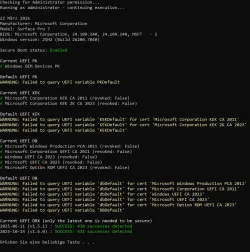
Is it okay to have no output for the defaults on a Surface Pro 7?:
 

Attachments

  • CHeck-UEFISecureBootVariables.webp
    CHeck-UEFISecureBootVariables.webp
    208.5 KB · Views: 5

My Computer My Computer

At a glance

Windows 11
OS
Windows 11
Computer type
PC/Desktop
Manufacturer/Model
self built
Hi,

that one will give me:

---

Secure Boot: ON
Virtualization Based Security: ON
BitLocker on (C:) ON
ERROR: Failed to read UEFI Secure Boot settings.
Die Variable ist zurzeit nicht definiert: 0xC0000100

---
 

My Computer My Computer

At a glance

Windows 11
OS
Windows 11
Computer type
PC/Desktop
Manufacturer/Model
self built
Try this fixed version (not released yet).
 

Attachments

My Computer My Computer

At a glance

Windows 7
OS
Windows 7
Hi garlin, thank you!

Same output unfortunately.
 

My Computer My Computer

At a glance

Windows 11
OS
Windows 11
Computer type
PC/Desktop
Manufacturer/Model
self built
Back
Top Bottom