How to delete spurious Windows account?


I have no idea what you mean that C:\Users\John returns. It is supposed to be there.
Please forget Firefox for this moment. You have to deal with your account problem before dealing with anything else. To know how to deal with this we have to know where your user account files are located.

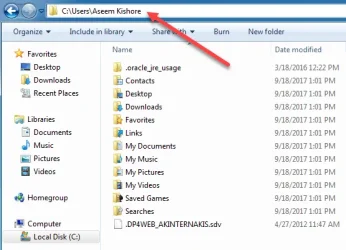
1. You are logged into John. Open file explorer. Browse to the folder C:\Users. How many accounts are listed there? What are their names. A screenshot would be really helpful.

2.Expand C:\users\John RIGHT click on the Documents folder there. Select Properties.

3. Specifically tell me what it says under Location. (Like in the screenshot I gave you above)

4, Also right click on each of the other user folders and select properties
what is location of desktop, pictures, and videos folders

5. Then open each of those folders. Are all your files there?

5, restart the computer and sign into John Liebson account. In file explorer right click and select properties on documents, desktop, and pictures folders. What is the location listed there for each of those folders?
Open the folders. Are all your files there?

I'm sorry to ask so much of you. If a poster does not remember exactly what he did to cause a problem, we are flying blind in trying to get to a solution.. As I mentioned in my very first post, it is my belief it is all related to onedrive. Do you know how to take screenshots and how to post them here? That would make it so much easier if we could actually see these things.
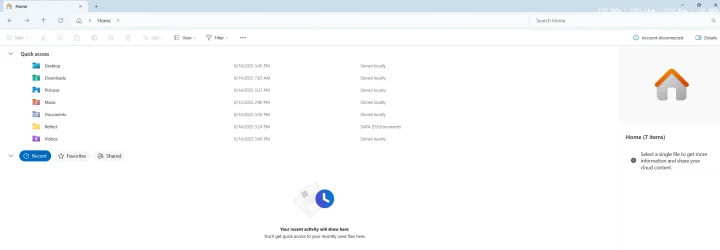
I certainly qualify, as I only rarely use File Manager. Your instructions are leading me in the proper directions, such as posting a screenshot,but first I have to browse to get to the document. I don't know how to browse in File Manager, which when I open it, I see some Quick Access icons and a list of recent actions or whatever. I looked up "Browse," and received the usual meaningless responses. I tried to search for C:\Users. to no avail.

Do NOT apologize for asking much of me, that is endemic in my past life, especially as a fire chief; you are being extremely helpful, end of argument, done, closed, other than my continued appreciation. One of the first things I learned as fire chief is to explain to new volunteers with no exposure to the fire service is that there are two ways that they are rewarded: The feeling of having done a good job, working as a group, and the like, plus the occasional thank-you from someone you have helped.

As another personal aside, when I started my first department, I had had very little exposure to the fire service, so I had to quickly invent the training, etc., needed, as there was only one mutual aid department even close to us, very few published training manuals, etc.
 

My Computer My Computer

At a glance

Windows 11 PRO 25H2 (OS Build 26200.6725)Intel Core i7-13700 2.10GHz32 GBNVidia GetForce RTX 4060 Ti
OS
Windows 11 PRO 25H2 (OS Build 26200.6725)
Computer type
PC/Desktop
Manufacturer/Model
Dell XPS 8960
CPU
Intel Core i7-13700 2.10GHz
Motherboard
Dell
Memory
32 GB
Graphics Card(s)
NVidia GetForce RTX 4060 Ti
Sound Card
Realtec
Monitor(s) Displays
Dell U2722D
Screen Resolution
2560 x 1440
Hard Drives
1024GB SSD boot drive; 2TB Internal Mechanical Hard Disc; WD My Passport (1Tb) external; My Passport Ultra (2Tb) external
Keyboard
Dell
Mouse
MX Master 3
Internet Speed
40Mbps (Bonded DSL)
Browser
Firefox (default)
Antivirus
Malwarebytes, MS Defender AV

Go to the File Manager (Windows Explorer) Yellow Folder in your taskbar. Looking through the folders is called Browsing.
On the left panel, Expand This PC, (click the down arrow next to it showing the sub folders underneath it) then Expand (C:) then expand Users folder.
Do you have John folder there? (example is a different user name)
If so, Right click the John folder and choose Properties. What does Location say?

1755123831301.webp
 

My Computer My Computer

At a glance

Windows 11 Pro Insider 64 bit 25H2 26200.5742Intel Core i7 9700K 3.6016 GBnVidia GEForce RTX 2060 Super
OS
Windows 11 Pro Insider 64 bit 25H2 26200.5742
Computer type
PC/Desktop
Manufacturer/Model
Gigabyte Z390 UD
CPU
Intel Core i7 9700K 3.60
Motherboard
Gigabyte Z390 UD
Memory
16 GB
Graphics Card(s)
nVidia GEForce RTX 2060 Super
Sound Card
onboard
Monitor(s) Displays
Two 27" Dell 4K monitors
Screen Resolution
3840 x 2160
Hard Drives
M.2 NVME SSD, 500 GB; Two 2TB Mechanical HDD's
PSU
850w PSU
Case
Cyberpower PC
Cooling
Water cooled
Keyboard
Backlit Cyberpower gaming keyboard
Mouse
Backlit Cyberpower gaming mouse
Internet Speed
1 GB mbps
Browser
Brave
Antivirus
Windows Security
Go to the File Manager (Windows Explorer) Yellow Folder in your taskbar. Looking through the folders is called Browsing.
On the left panel, Expand This PC, (click the down arrow next to it showing the sub folders underneath it) then Expand (C:) then expand Users folder.
Do you have John folder there? (example is a different user name)
If so, Right click the John folder and choose Properties. What does Location say?

View attachment 142194

I am totally lost: I have, in the past, been able to use the manager without much trouble. Now, even after a restart a day or two ago, when I open the program, what I see is shown in the image in this reply, and no matter what I click on, I don't get anywhere meaningful. Not Much.webp
 

My Computer My Computer

At a glance

Windows 11 PRO 25H2 (OS Build 26200.6725)Intel Core i7-13700 2.10GHz32 GBNVidia GetForce RTX 4060 Ti
OS
Windows 11 PRO 25H2 (OS Build 26200.6725)
Computer type
PC/Desktop
Manufacturer/Model
Dell XPS 8960
CPU
Intel Core i7-13700 2.10GHz
Motherboard
Dell
Memory
32 GB
Graphics Card(s)
NVidia GetForce RTX 4060 Ti
Sound Card
Realtec
Monitor(s) Displays
Dell U2722D
Screen Resolution
2560 x 1440
Hard Drives
1024GB SSD boot drive; 2TB Internal Mechanical Hard Disc; WD My Passport (1Tb) external; My Passport Ultra (2Tb) external
Keyboard
Dell
Mouse
MX Master 3
Internet Speed
40Mbps (Bonded DSL)
Browser
Firefox (default)
Antivirus
Malwarebytes, MS Defender AV
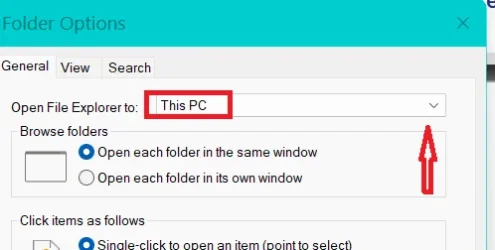
Make file explorer easier for yourself. In file explorer click the 3 dots. Select Options. Click the drop arrow and choose This PC. Apply. OK.

Screenshot 2025-08-15 095502.webp
 

My Computers My Computers

  • At a glance

    Windows 11 Pro 25H2 26200.8875i9-10900 10 core 20 threads32 gbnone-Intel UHD Graphics 630
    OS
    Windows 11 Pro 25H2 26200.8875
    Computer type
    PC/Desktop
    Manufacturer/Model
    Dell Optiplex 7080
    CPU
    i9-10900 10 core 20 threads
    Motherboard
    DELL 0J37VM
    Memory
    32 gb
    Graphics Card(s)
    none-Intel UHD Graphics 630
    Sound Card
    Integrated Realtek
    Monitor(s) Displays
    Benq 27
    Screen Resolution
    2560x1440
    Hard Drives
    2x1tb Solidigm m.2 nvme /External drives 512gb Samsung m.2 sata+2tb Kingston m2.nvme
    PSU
    500w
    Case
    MT
    Cooling
    Dell Premium
    Keyboard
    Logitech wired
    Mouse
    Logitech wireless
    Internet Speed
    so slow I'm too embarrassed to tell
    Browser
    #1 Edge #2 Firefox
    Antivirus
    Defender+MWB Premium
  • At a glance

    Windows 11 Pro 24H2 26200.8875AMD Ryzen 7 6800U32 gbintegrated
    Operating System
    Windows 11 Pro 24H2 26200.8875
    Computer type
    PC/Desktop
    Manufacturer/Model
    Beelink Mini PC SER5
    CPU
    AMD Ryzen 7 6800U
    Memory
    32 gb
    Graphics card(s)
    integrated
    Sound Card
    integrated
    Monitor(s) Displays
    Benq 27
    Screen Resolution
    2560x1440
    Hard Drives
    1TB Crucial nvme
    Keyboard
    Logitech wired
    Mouse
    Logitech wireless
    Internet Speed
    still too embarrassed to tell
    Browser
    Firefox
    Antivirus
    Defender
    Other Info
    System 3 is non compliant Dell 9020 i7-4770/24gb ram Win11 PRO 26200.8875
Make file explorer easier for yourself. In file explorer click the 3 dots. Select Options. Click the drop arrow and choose This PC. Apply. OK.

View attachment 142355
I can assure you that I would be happy to click the three dots, and were I able to do that , I am certain that those trying to help me wold be happy as we.ll.

However, I do not see any dots in file I uploaded a short while ago, not have I found out how to find them.

I would suspect that this is not much worse tan the downlink for a program I paid for now insists on downloading instead a link to the free demonstration version that I used to see if I wanted to pay for the version that I cannot obtain. The vendor has been duly notified, or perhaps dully notified.
 

My Computer My Computer

At a glance

Windows 11 PRO 25H2 (OS Build 26200.6725)Intel Core i7-13700 2.10GHz32 GBNVidia GetForce RTX 4060 Ti
OS
Windows 11 PRO 25H2 (OS Build 26200.6725)
Computer type
PC/Desktop
Manufacturer/Model
Dell XPS 8960
CPU
Intel Core i7-13700 2.10GHz
Motherboard
Dell
Memory
32 GB
Graphics Card(s)
NVidia GetForce RTX 4060 Ti
Sound Card
Realtec
Monitor(s) Displays
Dell U2722D
Screen Resolution
2560 x 1440
Hard Drives
1024GB SSD boot drive; 2TB Internal Mechanical Hard Disc; WD My Passport (1Tb) external; My Passport Ultra (2Tb) external
Keyboard
Dell
Mouse
MX Master 3
Internet Speed
40Mbps (Bonded DSL)
Browser
Firefox (default)
Antivirus
Malwarebytes, MS Defender AV
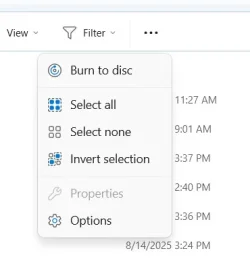
The Three Dots are just to right of View on the Toolbar
You can also hold down the Windows Key +E keys on the keyboard to open Windows File Explorer


My Computer My Computer

At a glance

Windows 11 Pro Insider 64 bit 25H2 26200.5742Intel Core i7 9700K 3.6016 GBnVidia GEForce RTX 2060 Super
OS
Windows 11 Pro Insider 64 bit 25H2 26200.5742
Computer type
PC/Desktop
Manufacturer/Model
Gigabyte Z390 UD
CPU
Intel Core i7 9700K 3.60
Motherboard
Gigabyte Z390 UD
Memory
16 GB
Graphics Card(s)
nVidia GEForce RTX 2060 Super
Sound Card
onboard
Monitor(s) Displays
Two 27" Dell 4K monitors
Screen Resolution
3840 x 2160
Hard Drives
M.2 NVME SSD, 500 GB; Two 2TB Mechanical HDD's
PSU
850w PSU
Case
Cyberpower PC
Cooling
Water cooled
Keyboard
Backlit Cyberpower gaming keyboard
Mouse
Backlit Cyberpower gaming mouse
Internet Speed
1 GB mbps
Browser
Brave
Antivirus
Windows Security
The Three Dots are just to right of View on the Toolbar
You can also hold down the Windows Key +E keys on the keyboard to open Windows File Explorer

I had seen those those three dots, but what they reported did not seem overly useful to me, so I thought that perhaps I was using the wrong dots.

Three Dots.webp
 

My Computer My Computer

At a glance

Windows 11 PRO 25H2 (OS Build 26200.6725)Intel Core i7-13700 2.10GHz32 GBNVidia GetForce RTX 4060 Ti
OS
Windows 11 PRO 25H2 (OS Build 26200.6725)
Computer type
PC/Desktop
Manufacturer/Model
Dell XPS 8960
CPU
Intel Core i7-13700 2.10GHz
Motherboard
Dell
Memory
32 GB
Graphics Card(s)
NVidia GetForce RTX 4060 Ti
Sound Card
Realtec
Monitor(s) Displays
Dell U2722D
Screen Resolution
2560 x 1440
Hard Drives
1024GB SSD boot drive; 2TB Internal Mechanical Hard Disc; WD My Passport (1Tb) external; My Passport Ultra (2Tb) external
Keyboard
Dell
Mouse
MX Master 3
Internet Speed
40Mbps (Bonded DSL)
Browser
Firefox (default)
Antivirus
Malwarebytes, MS Defender AV
3 dots and then Options.
 

My Computer My Computer

At a glance

Windows 11 Pro Insider 64 bit 25H2 26200.5742Intel Core i7 9700K 3.6016 GBnVidia GEForce RTX 2060 Super
OS
Windows 11 Pro Insider 64 bit 25H2 26200.5742
Computer type
PC/Desktop
Manufacturer/Model
Gigabyte Z390 UD
CPU
Intel Core i7 9700K 3.60
Motherboard
Gigabyte Z390 UD
Memory
16 GB
Graphics Card(s)
nVidia GEForce RTX 2060 Super
Sound Card
onboard
Monitor(s) Displays
Two 27" Dell 4K monitors
Screen Resolution
3840 x 2160
Hard Drives
M.2 NVME SSD, 500 GB; Two 2TB Mechanical HDD's
PSU
850w PSU
Case
Cyberpower PC
Cooling
Water cooled
Keyboard
Backlit Cyberpower gaming keyboard
Mouse
Backlit Cyberpower gaming mouse
Internet Speed
1 GB mbps
Browser
Brave
Antivirus
Windows Security
Go to the File Manager (Windows Explorer) Yellow Folder in your taskbar. Looking through the folders is called Browsing.
On the left panel, Expand This PC, (click the down arrow next to it showing the sub folders underneath it) then Expand (C:) then expand Users folder.
Do you have John folder there? (example is a different user name)
If so, Right click the John folder and choose Properties. What does Location say?

View attachment 142194
Finally, some progress. even in what may be the right direction. I did not find a John folder, but there is a jlieb folder,the one that can be found by scrolling down through C:\ until you find Users. About the only time I click on that is to find jlieb, and there find Downloads. I have found that that folder sometimes has downloaded entries that do not appear id my D:\Downloads folder.

Now that I have finally, after rereading some of the replies in this thread, managed to get this far; what is next?
 

My Computer My Computer

At a glance

Windows 11 PRO 25H2 (OS Build 26200.6725)Intel Core i7-13700 2.10GHz32 GBNVidia GetForce RTX 4060 Ti
OS
Windows 11 PRO 25H2 (OS Build 26200.6725)
Computer type
PC/Desktop
Manufacturer/Model
Dell XPS 8960
CPU
Intel Core i7-13700 2.10GHz
Motherboard
Dell
Memory
32 GB
Graphics Card(s)
NVidia GetForce RTX 4060 Ti
Sound Card
Realtec
Monitor(s) Displays
Dell U2722D
Screen Resolution
2560 x 1440
Hard Drives
1024GB SSD boot drive; 2TB Internal Mechanical Hard Disc; WD My Passport (1Tb) external; My Passport Ultra (2Tb) external
Keyboard
Dell
Mouse
MX Master 3
Internet Speed
40Mbps (Bonded DSL)
Browser
Firefox (default)
Antivirus
Malwarebytes, MS Defender AV
Finally, some progress. even in what may be the right direction. I did not find a John folder, but there is a jlieb folder,the one that can be found by scrolling down through C:\ until you find Users. About the only time I click on that is to find jlieb, and there find Downloads. I have found that that folder sometimes has downloaded entries that do not appear id my D:\Downloads folder.

Now that I have finally, after rereading some of the replies in this thread, managed to get this far; what is next?
“jlieb” - does that happen to be the first 5 letters of your email address?
 

My Computer My Computer

At a glance

Windows 11 Pro
OS
Windows 11 Pro
In the C:\Users\jlieb folder, you can right click any User folder, Downloads or anything else, and choose the Location tab.
You can Move that download folder to the D:\Downloads folder. It will add the files in there to the D:\Downloads folder and anytime you have a download it will go to this folder.
Your jlieb profile may be your Microsoft Account if it shows an email address.
If you want to remove this profile. First make an Image file of your computer and save it to a USB HDD, also make a System Restore point.

then go to Search and type sysdm.cpl and press Enter
go to the Advanced tab, under User Profiles, click the Settings button
Select the jlieb profile and click the Delete box.
Be sure you are backed up first.
 

My Computer My Computer

At a glance

Windows 11 Pro Insider 64 bit 25H2 26200.5742Intel Core i7 9700K 3.6016 GBnVidia GEForce RTX 2060 Super
OS
Windows 11 Pro Insider 64 bit 25H2 26200.5742
Computer type
PC/Desktop
Manufacturer/Model
Gigabyte Z390 UD
CPU
Intel Core i7 9700K 3.60
Motherboard
Gigabyte Z390 UD
Memory
16 GB
Graphics Card(s)
nVidia GEForce RTX 2060 Super
Sound Card
onboard
Monitor(s) Displays
Two 27" Dell 4K monitors
Screen Resolution
3840 x 2160
Hard Drives
M.2 NVME SSD, 500 GB; Two 2TB Mechanical HDD's
PSU
850w PSU
Case
Cyberpower PC
Cooling
Water cooled
Keyboard
Backlit Cyberpower gaming keyboard
Mouse
Backlit Cyberpower gaming mouse
Internet Speed
1 GB mbps
Browser
Brave
Antivirus
Windows Security
“jlieb” - does that happen to be the first 5 letters of your email address?
Yes, Centurylink account, which still receives a lot]r of s[am, and a few accounts that i cannot move to my Gmail account. A few weeks ago I went through the lengthy USPS form to create a Gmail account in place of my Clink one. For security reasons you can not change an account,just stop using it. Rather similar to the mail delivery where we live, my new account was not delivered, but I did get a notice to try again.
 

My Computer My Computer

At a glance

Windows 11 PRO 25H2 (OS Build 26200.6725)Intel Core i7-13700 2.10GHz32 GBNVidia GetForce RTX 4060 Ti
OS
Windows 11 PRO 25H2 (OS Build 26200.6725)
Computer type
PC/Desktop
Manufacturer/Model
Dell XPS 8960
CPU
Intel Core i7-13700 2.10GHz
Motherboard
Dell
Memory
32 GB
Graphics Card(s)
NVidia GetForce RTX 4060 Ti
Sound Card
Realtec
Monitor(s) Displays
Dell U2722D
Screen Resolution
2560 x 1440
Hard Drives
1024GB SSD boot drive; 2TB Internal Mechanical Hard Disc; WD My Passport (1Tb) external; My Passport Ultra (2Tb) external
Keyboard
Dell
Mouse
MX Master 3
Internet Speed
40Mbps (Bonded DSL)
Browser
Firefox (default)
Antivirus
Malwarebytes, MS Defender AV
Yes, Centurylink account, which still receives a lot]r of s[am, and a few accounts that i cannot move to my Gmail account. A few weeks ago I went through the lengthy USPS form to create a Gmail account in place of my Clink one. For security reasons you can not change an account,just stop using it. Rather similar to the mail delivery where we live, my new account was not delivered, but I did get a notice to try again.
Ok… But you use that email address for your Microsoft account, correct? If so, what you accidentally did was converted your local account to a Microsoft account. If you and it changed back to a local account, follow these three tutorials in the order listed:


My Computer My Computer

At a glance

Windows 11 Pro
OS
Windows 11 Pro
Ok… But you use that email address for your Microsoft account, correct? If so, what you accidentally did was converted your local account to a Microsoft account. If you and it changed back to a local account, follow these three tutorials in the order listed:


I have returned to haunt you, or perhaps a bit more accurately I have returned to this thread after having dealt with a number of more pressing problems.

I was following the first of the three tutorials, and want to ascertain if much of it I did not see as apparently I already had a local account after getting rid of the Microsoft entry; when I clicked on that, I then saw "Local Account". and no further steps.

I am being cautions given the problems I have been dealing with that have taken a great deal of time, so I just want to be sure that all is okay so far and that I can now proceed to Tutorial number 2.
 

My Computer My Computer

At a glance

Windows 11 PRO 25H2 (OS Build 26200.6725)Intel Core i7-13700 2.10GHz32 GBNVidia GetForce RTX 4060 Ti
OS
Windows 11 PRO 25H2 (OS Build 26200.6725)
Computer type
PC/Desktop
Manufacturer/Model
Dell XPS 8960
CPU
Intel Core i7-13700 2.10GHz
Motherboard
Dell
Memory
32 GB
Graphics Card(s)
NVidia GetForce RTX 4060 Ti
Sound Card
Realtec
Monitor(s) Displays
Dell U2722D
Screen Resolution
2560 x 1440
Hard Drives
1024GB SSD boot drive; 2TB Internal Mechanical Hard Disc; WD My Passport (1Tb) external; My Passport Ultra (2Tb) external
Keyboard
Dell
Mouse
MX Master 3
Internet Speed
40Mbps (Bonded DSL)
Browser
Firefox (default)
Antivirus
Malwarebytes, MS Defender AV
I have returned to haunt you, or perhaps a bit more accurately I have returned to this thread after having dealt with a number of more pressing problems.

I was following the first of the three tutorials, and want to ascertain if much of it I did not see as apparently I already had a local account after getting rid of the Microsoft entry; when I clicked on that, I then saw "Local Account". and no further steps.

I am being cautions given the problems I have been dealing with that have taken a great deal of time, so I just want to be sure that all is okay so far and that I can now proceed to Tutorial number 2.
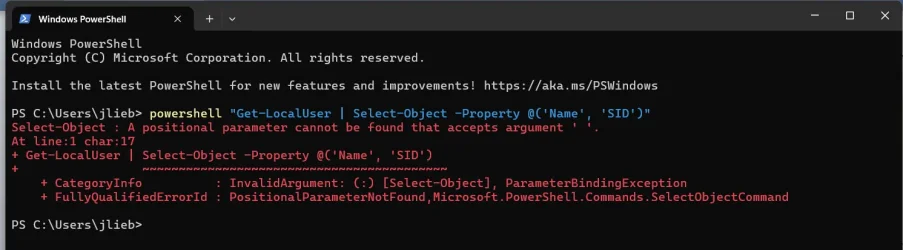
I was finally running Tutorial Two when I encountered the fatal error shown on the image attached to this reply. I don't believe that I made an error prior to the step in question, as I am the administrator and thus I think that that account is already open before I had to stop and post this.
 

Attachments

  • Powershell Problem.webp
    Powershell Problem.webp
    57.8 KB · Views: 2

My Computer My Computer

At a glance

Windows 11 PRO 25H2 (OS Build 26200.6725)Intel Core i7-13700 2.10GHz32 GBNVidia GetForce RTX 4060 Ti
OS
Windows 11 PRO 25H2 (OS Build 26200.6725)
Computer type
PC/Desktop
Manufacturer/Model
Dell XPS 8960
CPU
Intel Core i7-13700 2.10GHz
Motherboard
Dell
Memory
32 GB
Graphics Card(s)
NVidia GetForce RTX 4060 Ti
Sound Card
Realtec
Monitor(s) Displays
Dell U2722D
Screen Resolution
2560 x 1440
Hard Drives
1024GB SSD boot drive; 2TB Internal Mechanical Hard Disc; WD My Passport (1Tb) external; My Passport Ultra (2Tb) external
Keyboard
Dell
Mouse
MX Master 3
Internet Speed
40Mbps (Bonded DSL)
Browser
Firefox (default)
Antivirus
Malwarebytes, MS Defender AV

Latest Support Threads

Back
Top Bottom