JavaScript is disabled. For a better experience, please enable JavaScript in your browser before proceeding.
You are using an out of date browser. It may not display this or other websites correctly.
You should upgrade or use an
alternative browser .
How to disable notification center while still enable calendar
Hello!
Have looked for a guide for a specific issue and not found an answer, found this forum and hope that someone else might had the same issue and might have a solution.
I would like to disable the notification center without disable the calendar.
I have tried to disable notification center through reg edit with this guide:
How to Enable or Disable Notification Center in Windows 11 .
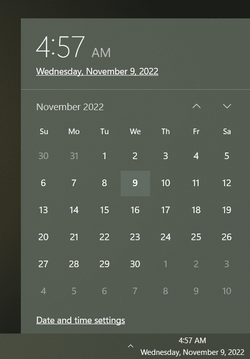
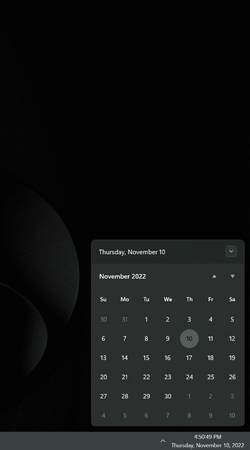
While it is successful at disabling the notification center it also disables the monthly calendar.
I was wondering if anyone knew a solution that hides notification center while still making the monthly calendar viewable?
I use windows 11 22621.755.
Kind regards
I was wondering if anyone knew a solution that hides notification center while still making the monthly calendar viewable?
You cannot do it -
natively !
Last edited: Nov 9, 2022
Windows 11 Pro PC/Desktop ASUS ROG Strix
Windows 11 Pro Laptop ASUS VivoBook
ASUS VivoBook 'Lite' ~ Windows 11 Home
Well-known member
Pro User
VIP
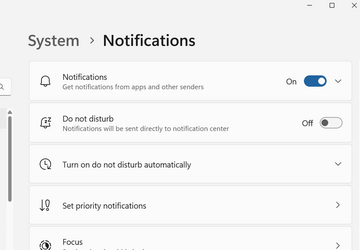
Does right-click of the clock and clicking the Notifications settings not give you this screen for making changes:
Win11 Pro RTM Version 24H2 Build 26100.4202 Intel Core i5 11th Gen. 2.40GHz 12GB Win11 Pro RTM Version 24H2 Build 26100.4202 Laptop Dell Vostro 3400 Intel Core i5 11th Gen. 2.40GHz 12GB 256GB SSD NVMe M.2
Win11 Pro RTM Version 24H2 Build 26100.4202 Intel Core i5 10th Gen. 2.90GHz 16GB Onboard, no VGA, using a DisplayPort-to-VGA a... Win11 Pro RTM Version 24H2 Build 26100.4202 PC/Desktop Dell Vostro 5890 Intel Core i5 10th Gen. 2.90GHz 16GB Onboard, no VGA, using a DisplayPort-to-VGA adapter 24" Dell 512GB SSD NVMe, 4TB Seagate HDD Firefox, Edge Windows Defender/Microsoft Security
Well-known member
Member
VIP
Does right-click of the clock and clicking the Notifications settings not give you this screen for making changes:
Sure, that works fine. But you still can't get rid of the notification area or the focus stuff. I have everything turned off and it's still there.
I don't mine the notification area, when there is a notification. I get one every so often from the security/virus scanner. That's fine. But when there isn't any notification, it should be gone. I would also like to get rid of that focus junk. I have no use for it and it just wastes space. I'm hoping that MS fixes this soon.
Windows 11 Home, 25H2, Latest OS Build Intel(R) Core(TM) i3-8145U CPU @ 2.10GHz 2.30... 8GB Windows 11 Home, 25H2, Latest OS Build Laptop HP 15-dw0xx Intel(R) Core(TM) i3-8145U CPU @ 2.10GHz 2.30 GHz 8GB 1366 x 768 930 GB Built In Wireless Logitech M325S Chrome 139.0.7258.128 Windows Defender Cygwin64
Windows 10 Home, Version 22H2, Build19045.3693 AMD E-300 with Radeon HD Graphics 1.30 GHz 10GB Radeon HD Graphics 1.30 GHz Windows 10 Home, Version 22H2, Build19045.3693 PC/Desktop HP Pavilion AMD E-300 with Radeon HD Graphics 1.30 GHz 10GB Radeon HD Graphics 1.30 GHz Realtek 15" 1280 x 1024 700 GB Wireless Wireless Chrome Windows Defender This computer is connected to my IC-735 radio.
3rd party...
Windows 11 Pro PC/Desktop ASUS ROG Strix
Windows 11 Pro Laptop ASUS VivoBook
ASUS VivoBook 'Lite' ~ Windows 11 Home
Well-known member
Member
VIP
Well, first you say "you can't do it" and then you say "third party". What "third party"?
Windows 11 Home, 25H2, Latest OS Build Intel(R) Core(TM) i3-8145U CPU @ 2.10GHz 2.30... 8GB Windows 11 Home, 25H2, Latest OS Build Laptop HP 15-dw0xx Intel(R) Core(TM) i3-8145U CPU @ 2.10GHz 2.30 GHz 8GB 1366 x 768 930 GB Built In Wireless Logitech M325S Chrome 139.0.7258.128 Windows Defender Cygwin64
Windows 10 Home, Version 22H2, Build19045.3693 AMD E-300 with Radeon HD Graphics 1.30 GHz 10GB Radeon HD Graphics 1.30 GHz Windows 10 Home, Version 22H2, Build19045.3693 PC/Desktop HP Pavilion AMD E-300 with Radeon HD Graphics 1.30 GHz 10GB Radeon HD Graphics 1.30 GHz Realtek 15" 1280 x 1024 700 GB Wireless Wireless Chrome Windows Defender This computer is connected to my IC-735 radio.
first you say "you can't do it"
Can't do it natively.
Edited !
then you say "third party". What "third party"?
StartAllBack
Windows 11 Pro PC/Desktop ASUS ROG Strix
Windows 11 Pro Laptop ASUS VivoBook
ASUS VivoBook 'Lite' ~ Windows 11 Home
Well-known member
Member
VIP
Windows 11 Home, 25H2, Latest OS Build Intel(R) Core(TM) i3-8145U CPU @ 2.10GHz 2.30... 8GB Windows 11 Home, 25H2, Latest OS Build Laptop HP 15-dw0xx Intel(R) Core(TM) i3-8145U CPU @ 2.10GHz 2.30 GHz 8GB 1366 x 768 930 GB Built In Wireless Logitech M325S Chrome 139.0.7258.128 Windows Defender Cygwin64
Windows 10 Home, Version 22H2, Build19045.3693 AMD E-300 with Radeon HD Graphics 1.30 GHz 10GB Radeon HD Graphics 1.30 GHz Windows 10 Home, Version 22H2, Build19045.3693 PC/Desktop HP Pavilion AMD E-300 with Radeon HD Graphics 1.30 GHz 10GB Radeon HD Graphics 1.30 GHz Realtek 15" 1280 x 1024 700 GB Wireless Wireless Chrome Windows Defender This computer is connected to my IC-735 radio.
You could go back to 21H2!!!
Windows 11 Pro PC/Desktop ASUS ROG Strix
Windows 11 Pro Laptop ASUS VivoBook
ASUS VivoBook 'Lite' ~ Windows 11 Home
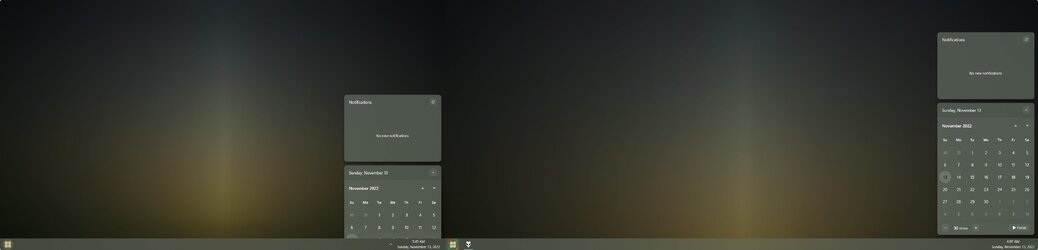
Another glitch with multiple monitors/mixed resolutions...
Clicking on one Calendar, then the other, the other remains half buried unless I restart Explorer!
(I stitched this screenshot together just for this example)
Windows 11 Pro PC/Desktop ASUS ROG Strix
Windows 11 Pro Laptop ASUS VivoBook
ASUS VivoBook 'Lite' ~ Windows 11 Home