
How to enable automatic update on Defender Antivirus


jimhow4545

Well-known member
Member
Local time
4:35 PM
Posts
169
OS
Wind 11 Pro 24H2 (Dev Channel)/23H2Beta (offline)
I had to manually clicked Check for updates and Security Intelligence Updates is downloaded.
 

My Computer My Computer

At a glance

Wind 11 Pro 24H2 (Dev Channel)/23H2Beta (offl...2 Intel Xeon 5680120 GbMSI(Nvidia) GeForce GTX 970
OS
Wind 11 Pro 24H2 (Dev Channel)/23H2Beta (offline)
Computer type
PC/Desktop
Manufacturer/Model
DELL T7500
CPU
2 Intel Xeon 5680
Memory
120 Gb
Graphics Card(s)
MSI(Nvidia) GeForce GTX 970
Monitor(s) Displays
Dell S2719DGF
Screen Resolution
2560 x 1440 (155Hz)
Hard Drives
Samsung 2TB 870 (24H2 Device)
Samsung 1TB 860 (23H2 Beta)
PSU
Dell 1100W
Antivirus
Premium Malwarebyte, AdwCleaner (Malwarebyte)
MS Defender typically updates automatically once a day. You may change this interval via Group Policy or PowerShell command. The second command below will display Defender's current configuration.
Powershell:
Set-MpPreference -SignatureUpdateInterval (1-24)

Get-MpPreference
 

My Computer My Computer

At a glance

Windows 11 Pro 25H2 26200.7840Intel Core i3-8145U16GB
OS
Windows 11 Pro 25H2 26200.7840
Computer type
Laptop
Manufacturer/Model
Lenovo IdeaPad L340
CPU
Intel Core i3-8145U
Memory
16GB
Hard Drives
500 GB M2 1 TB HDD
Internet Speed
400 MB
Browser
Chrome | Edge
Antivirus
Microsoft Defender | Block unknown executables | Various ASR rules enabled | Smart App Control
MS Defender typically updates automatically once a day. You may change this interval via Group Policy or PowerShell command. The second command below will display Defender's current configuration.
Powershell:
Set-MpPreference -SignatureUpdateInterval (1-24)

Get-MpPreference
I don’t know where to look for in here:
 

Attachments

  • IMG_2562.jpeg
    IMG_2562.jpeg
    189.6 KB · Views: 3
  • IMG_2561.jpeg
    IMG_2561.jpeg
    209.2 KB · Views: 3

My Computer My Computer

At a glance

Wind 11 Pro 24H2 (Dev Channel)/23H2Beta (offl...2 Intel Xeon 5680120 GbMSI(Nvidia) GeForce GTX 970
OS
Wind 11 Pro 24H2 (Dev Channel)/23H2Beta (offline)
Computer type
PC/Desktop
Manufacturer/Model
DELL T7500
CPU
2 Intel Xeon 5680
Memory
120 Gb
Graphics Card(s)
MSI(Nvidia) GeForce GTX 970
Monitor(s) Displays
Dell S2719DGF
Screen Resolution
2560 x 1440 (155Hz)
Hard Drives
Samsung 2TB 870 (24H2 Device)
Samsung 1TB 860 (23H2 Beta)
PSU
Dell 1100W
Antivirus
Premium Malwarebyte, AdwCleaner (Malwarebyte)
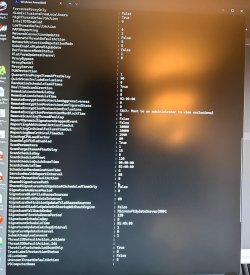
I don’t know where to look for in here:
Look for SignatureUpdateInterval. Unless you've previously made changes via Group Policy or with PowerShell, or with some 3rd party app, what the Get-MpPreference command will show you are all the default settings. If you run the 1st command I posted with your chosen value, and then run the 2nd, you'll see -SignatureUpdateInterval shows your new value.
 

My Computer My Computer

At a glance

Windows 11 Pro 25H2 26200.7840Intel Core i3-8145U16GB
OS
Windows 11 Pro 25H2 26200.7840
Computer type
Laptop
Manufacturer/Model
Lenovo IdeaPad L340
CPU
Intel Core i3-8145U
Memory
16GB
Hard Drives
500 GB M2 1 TB HDD
Internet Speed
400 MB
Browser
Chrome | Edge
Antivirus
Microsoft Defender | Block unknown executables | Various ASR rules enabled | Smart App Control
It is possible that your PC is infected, you might want to check with additional anti-malware scanners.


My Computer My Computer

At a glance

Home26H2CanAMD Ryzen 5 8600G (07/24)2x32GB Kingston FURY DDR5 5600 MHz CL36 @5200...ASROCK Radeon RX 6600 Challenger D 8G @48FPS ...
OS
Home26H2Can
Computer type
PC/Desktop
CPU
AMD Ryzen 5 8600G (07/24)
Motherboard
ASROCK B650M-HDV/M.2 (07/24) BIOS 4.21 AGESA ComboAM5 1.3.0.1 (04/26)
Memory
2x32GB Kingston FURY DDR5 5600 MHz CL36 @5200 CL36 (07/24)
Graphics Card(s)
ASROCK Radeon RX 6600 Challenger D 8G @48FPS (08/24)
Sound Card
Creative Sound BlasterX AE-5 Plus (05/24)
Monitor(s) Displays
24" Philips 24M1N3200ZS/00 (05/24)
Screen Resolution
1920×1080@165Hz via DP1.4
Hard Drives
Kingston KC3000 NVMe 2TB (05/24)
ADATA XPG GAMMIX S11 Pro 512GB (07/19)
PSU
Seasonic Core GM 550 Gold (04/24)
Case
Fractal Design Define 7 Mini with 3x Noctua NF-P14s/12@555rpm (04/24)
Cooling
Noctua NH-U12S with Noctua NF-P12 (04/24)
Keyboard
HP Pavilion Wired Keyboard 300 (07/24) + Rabalux 76017 Parker (01/24)
Mouse
Logitech M330 Silent Plus (01/26)
Internet Speed
500/100 Mbps via RouterOS (05/21) & TCP Optimizer
Browser
Edge, Brave for YouTube, LibreWolf for FB
Antivirus
NextDNS blocking 1/3 Traffic
Other Info
Phone: Motorola Moto G86 (02/26)
Backup: Hasleo Backup Suite (PreOS)
Headphones: Sennheiser RS170 (09/10)
Chair: Huzaro Force 4.4 Grey Mesh (05/24)
Notifier: Xiaomi Mi Band 9 Milanese (10/24)
FlexCore USB-C 3.2 Gen 1 (M) to LAN (F) (08/25)
The update interval is set to 0. That may indicate the presence of another security product.

You can check what's running with the following Powershell command
If there is another product listed other than Windows Defender and the product properly registeres with WSC (most of them do) then Windows Defender will disable itself
Powershell:
Get-CimInstance -Namespace root\SecurityCenter2 -class AntiVirusProduct
 

My Computer My Computer

At a glance

Linux Mint
OS
Linux Mint
Computer type
Laptop
Manufacturer/Model
System76 Lemur Pro
The update interval is set to 0. That may indicate the presence of another security product.

You can check what's running with the following Powershell command
If there is another product listed other than Windows Defender and the product properly registeres with WSC (most of them do) then Windows Defender will disable itself
Powershell:
Get-CimInstance -Namespace root\SecurityCenter2 -class AntiVirusProduct
here
 

Attachments

  • Screenshot 2024-11-01 161958.jpg
    Screenshot 2024-11-01 161958.jpg
    32.4 KB · Views: 2

My Computer My Computer

At a glance

Wind 11 Pro 24H2 (Dev Channel)/23H2Beta (offl...2 Intel Xeon 5680120 GbMSI(Nvidia) GeForce GTX 970
OS
Wind 11 Pro 24H2 (Dev Channel)/23H2Beta (offline)
Computer type
PC/Desktop
Manufacturer/Model
DELL T7500
CPU
2 Intel Xeon 5680
Memory
120 Gb
Graphics Card(s)
MSI(Nvidia) GeForce GTX 970
Monitor(s) Displays
Dell S2719DGF
Screen Resolution
2560 x 1440 (155Hz)
Hard Drives
Samsung 2TB 870 (24H2 Device)
Samsung 1TB 860 (23H2 Beta)
PSU
Dell 1100W
Antivirus
Premium Malwarebyte, AdwCleaner (Malwarebyte)
so SignatureUpdateInterval should be 1 instead 0?
 

My Computer My Computer

At a glance

Wind 11 Pro 24H2 (Dev Channel)/23H2Beta (offl...2 Intel Xeon 5680120 GbMSI(Nvidia) GeForce GTX 970
OS
Wind 11 Pro 24H2 (Dev Channel)/23H2Beta (offline)
Computer type
PC/Desktop
Manufacturer/Model
DELL T7500
CPU
2 Intel Xeon 5680
Memory
120 Gb
Graphics Card(s)
MSI(Nvidia) GeForce GTX 970
Monitor(s) Displays
Dell S2719DGF
Screen Resolution
2560 x 1440 (155Hz)
Hard Drives
Samsung 2TB 870 (24H2 Device)
Samsung 1TB 860 (23H2 Beta)
PSU
Dell 1100W
Antivirus
Premium Malwarebyte, AdwCleaner (Malwarebyte)
Well actually it looks like your system is scheduled to check for updates on the 8th of each month at 1:45am

Nevermind 8 means never check.

From an elevated Powershell prompt
Powershell:
Set-MpPreference -SignatureScheduleDay 0

That should enable signature checking
 

My Computer My Computer

At a glance

Linux Mint
OS
Linux Mint
Computer type
Laptop
Manufacturer/Model
System76 Lemur Pro
Well actually it looks like your system is scheduled to check for updates on the 8th of each month at 1:45am

Nevermind 8 means never check.

From an elevated Powershell prompt
Powershell:
Set-MpPreference -SignatureScheduleDay 0

That should enable signature checking
ok
 

My Computer My Computer

At a glance

Wind 11 Pro 24H2 (Dev Channel)/23H2Beta (offl...2 Intel Xeon 5680120 GbMSI(Nvidia) GeForce GTX 970
OS
Wind 11 Pro 24H2 (Dev Channel)/23H2Beta (offline)
Computer type
PC/Desktop
Manufacturer/Model
DELL T7500
CPU
2 Intel Xeon 5680
Memory
120 Gb
Graphics Card(s)
MSI(Nvidia) GeForce GTX 970
Monitor(s) Displays
Dell S2719DGF
Screen Resolution
2560 x 1440 (155Hz)
Hard Drives
Samsung 2TB 870 (24H2 Device)
Samsung 1TB 860 (23H2 Beta)
PSU
Dell 1100W
Antivirus
Premium Malwarebyte, AdwCleaner (Malwarebyte)
The update interval is set to 0. That may indicate the presence of another security product.
so SignatureUpdateInterval should be 1 instead 0?
No. 0 means that it is set to default, which is once every 24 hours. If you want it at 4 hour intervals, enter 4, for example.
 

My Computer My Computer

At a glance

Windows 11 Pro 25H2 26200.7840Intel Core i3-8145U16GB
OS
Windows 11 Pro 25H2 26200.7840
Computer type
Laptop
Manufacturer/Model
Lenovo IdeaPad L340
CPU
Intel Core i3-8145U
Memory
16GB
Hard Drives
500 GB M2 1 TB HDD
Internet Speed
400 MB
Browser
Chrome | Edge
Antivirus
Microsoft Defender | Block unknown executables | Various ASR rules enabled | Smart App Control
Well actually it looks like your system is scheduled to check for updates on the 8th of each month at 1:45am

Nevermind 8 means never check.

From an elevated Powershell prompt
Powershell:
Set-MpPreference -SignatureScheduleDay 0

That should enable signature checking
What exactly SignatureScheduleDay do?
 

My Computer My Computer

At a glance

Wind 11 Pro 24H2 (Dev Channel)/23H2Beta (offl...2 Intel Xeon 5680120 GbMSI(Nvidia) GeForce GTX 970
OS
Wind 11 Pro 24H2 (Dev Channel)/23H2Beta (offline)
Computer type
PC/Desktop
Manufacturer/Model
DELL T7500
CPU
2 Intel Xeon 5680
Memory
120 Gb
Graphics Card(s)
MSI(Nvidia) GeForce GTX 970
Monitor(s) Displays
Dell S2719DGF
Screen Resolution
2560 x 1440 (155Hz)
Hard Drives
Samsung 2TB 870 (24H2 Device)
Samsung 1TB 860 (23H2 Beta)
PSU
Dell 1100W
Antivirus
Premium Malwarebyte, AdwCleaner (Malwarebyte)
No. 0 means that it is set to default, which is once every 24 hours. If you want it at 4 hour intervals, enter 4, for example.
Got it
 

My Computer My Computer

At a glance

Wind 11 Pro 24H2 (Dev Channel)/23H2Beta (offl...2 Intel Xeon 5680120 GbMSI(Nvidia) GeForce GTX 970
OS
Wind 11 Pro 24H2 (Dev Channel)/23H2Beta (offline)
Computer type
PC/Desktop
Manufacturer/Model
DELL T7500
CPU
2 Intel Xeon 5680
Memory
120 Gb
Graphics Card(s)
MSI(Nvidia) GeForce GTX 970
Monitor(s) Displays
Dell S2719DGF
Screen Resolution
2560 x 1440 (155Hz)
Hard Drives
Samsung 2TB 870 (24H2 Device)
Samsung 1TB 860 (23H2 Beta)
PSU
Dell 1100W
Antivirus
Premium Malwarebyte, AdwCleaner (Malwarebyte)
Back
Top Bottom




