How to Enable HEVC


kenakahn

New member
Local time
9:40 AM
Posts
3
OS
Windows 11
I installed the HEVC codec app from the Microsoft store. I verified that the app was installed. However, I can't play a video that I've been told requires this codes. The video plays fine in VLC because (I' ve been told) that it has this codec built in. How do I verify if the HEVC codec is actually enabled. If it isn't, how do I enable it?
 

My Computer

System One

  • OS
    Windows 11
If the HEVC video is located in the *.mkv, then in the browser it is not played.
 

My Computer

System One

  • OS
    Microsoft Windows 11 Home
    Computer type
    PC/Desktop
    Manufacturer/Model
    MSI MS-7D98
    CPU
    Intel Core i5-13490F
    Motherboard
    MSI B760 GAMING PLUS WIFI
    Memory
    2 x 16 Patriot Memory (PDP Systems) PSD516G560081 6400MT (32-37-37-74); 1.35V)
    Graphics Card(s)
    GIGABYTE GeForce RTX 4070 WINDFORCE OC 12G (GV-N4070WF3OC-12GD)
    Sound Card
    Bluetooth Аудио
    Monitor(s) Displays
    INNOCN 15K1F
    Screen Resolution
    1920 x 1080
    Hard Drives
    WD_BLACK SN770 250GB
    KINGSTON SNV2S1000G (ELFK0S.6)
    PSU
    Thermaltake Toughpower GF3 1000W
    Case
    CG560 - DeepCool
    Cooling
    ID-COOLING SE-224-XTS / 2 x 140Mm Fan - rear and top; 3 x 120Mm - front
    Keyboard
    Corsair K70 RGB TKL
    Mouse
    Corsair KATAR PRO XT
    Internet Speed
    100 Mbps
    Browser
    Firefox
    Antivirus
    Microsoft Defender Antivirus
    Other Info
    https://www.userbenchmark.com/UserRun/66553205
Admittedly, I'm not sure of the correct way of testing HEVC in Windows 11 (at least if you didn't do an upgrade from older version where it was still included). I guess you can try the video in either Microsoft Media Player or Movies & TV (if you still have purchased content). I don't think it applies to browsers though. I use VLC, although Media Player looks better, but I even went to install K-lite Codec Pack...there was comments on the page at the time that you still needed to pay Microsoft for the HEVC support.
 

My Computers

System One System Two

  • OS
    Windows 11
    Computer type
    PC/Desktop
    Manufacturer/Model
    Custom
    CPU
    Intel i7-7700K
    Motherboard
    Asus Prime Z-270A
    Memory
    32GB 2666Mhz (Kingston Hyper X Fury)
    Graphics Card(s)
    Asus Nvidia 1050Ti
    Sound Card
    N/A
    Monitor(s) Displays
    Samsung C27F390
    Screen Resolution
    1920 x 1080
    Hard Drives
    1TB Western Digital SN770 (System) and 2TB Western Digital SN770 (Storage)
    Antivirus
    Windows Security
  • Operating System
    Windows 11 Home
    Computer type
    Laptop
    Manufacturer/Model
    Dell/XPS 15 9510
    CPU
    i9-11900H
    Motherboard
    Unknown
    Memory
    32GB
    Graphics card(s)
    Integrated Intel and Nvidia 3050Ti
    Sound Card
    Integrated (Realtek)
    Monitor(s) Displays
    None
    Screen Resolution
    1920 x 1200 (non-Touch)
    Hard Drives
    2TB SK Hynix P41 Platinum
    Antivirus
    Windows Security
How do I verify if the HEVC codec is actually enabled. If it isn't, how do I enable it?
There is no enabling the codec, you download and install it , once installed it is automatically enabled. I am sure it should work with almost any media player. If you are trying to watch something within a browser , the codec does not work that way.
I am curious as to where you downloaded the codec from? If it was from any other source than the Microsoft store I wouldn't trust it. Also the HEVC codec is a paid codec from Microsoft , meaning it must be purchased. It was only offered for free for a limited time years ago.
 

My Computer

System One

  • OS
    Windows 11 Pro 25H2 v26200.7171
    Computer type
    PC/Desktop
    Manufacturer/Model
    self built
    CPU
    Intel I9-12900k Adler Lake
    Motherboard
    Gigabyte Z790 Gaming Plus AX
    Memory
    Corsair Vengeance 64GB DDR5
    Graphics Card(s)
    Realtek
    Monitor(s) Displays
    Samsung Curved 23"
    Screen Resolution
    1920x1080
    Hard Drives
    9 Drives total: Two 1TB M.2 SSD's, Three internal Seagate Barracuda 1TB HDD's , 4 Western Digital External removable drives , 3 @ 1TB each and 1 8TB
    Case
    Antec Flux Pro
    Cooling
    ID Cooling FX 240 Pro
    Browser
    Firefox
    Antivirus
    Bitdefender
t.webp


Explorer

mkv-hevc.webp

mp4-hevc.webp
 

My Computer

System One

  • OS
    Microsoft Windows 11 Home
    Computer type
    PC/Desktop
    Manufacturer/Model
    MSI MS-7D98
    CPU
    Intel Core i5-13490F
    Motherboard
    MSI B760 GAMING PLUS WIFI
    Memory
    2 x 16 Patriot Memory (PDP Systems) PSD516G560081 6400MT (32-37-37-74); 1.35V)
    Graphics Card(s)
    GIGABYTE GeForce RTX 4070 WINDFORCE OC 12G (GV-N4070WF3OC-12GD)
    Sound Card
    Bluetooth Аудио
    Monitor(s) Displays
    INNOCN 15K1F
    Screen Resolution
    1920 x 1080
    Hard Drives
    WD_BLACK SN770 250GB
    KINGSTON SNV2S1000G (ELFK0S.6)
    PSU
    Thermaltake Toughpower GF3 1000W
    Case
    CG560 - DeepCool
    Cooling
    ID-COOLING SE-224-XTS / 2 x 140Mm Fan - rear and top; 3 x 120Mm - front
    Keyboard
    Corsair K70 RGB TKL
    Mouse
    Corsair KATAR PRO XT
    Internet Speed
    100 Mbps
    Browser
    Firefox
    Antivirus
    Microsoft Defender Antivirus
    Other Info
    https://www.userbenchmark.com/UserRun/66553205
Thanks for the detailed response. I downloaded the HEVC app from the Microsoft store (for a low..low price of $0.99). I installed it and verified that Windows does recognized that the app has been installed. I tried running your command but it didn't work

> Get-AppxPackage -AllUsers | select Name PackageFullName PackageUserInformation | where-object {$_.Name -like "*hevc"} | FL

Select-Object : A positional parameter cannot be found that accepts argument 'PackageFullName'.
At line:1 char:29
+ ... -AllUsers | select Name PackageFullName PackageUserInformation | wher ...

Can you see what I'm doing wrong. I am running power shell with admin.
 

My Computer

System One

  • OS
    Windows 11
You omitted the commas and the asterisk after hevc. Try:
Code:
Get-AppxPackage -AllUsers | select Name, PackageFullName, PackageUserInformation | where-object {$_.Name -like "*hevc*"} | FL
 

My Computer

System One

  • OS
    Win 11 25H2
    Computer type
    PC/Desktop
    Manufacturer/Model
    custom
    CPU
    intel i7-8700
    Motherboard
    Asus Z370 TUF Gaming
    Memory
    32Gb
    Graphics Card(s)
    Intel iGPU
    Sound Card
    Realtek
    Hard Drives
    Samsung
    PSU
    Corsair
    Cooling
    Fans
You can check via edge://gpu whether it is properly installed and activable

capture_08112025_214138.webp
 

My Computer

System One

  • OS
    Home26H2Can
    Computer type
    PC/Desktop
    CPU
    AMD Ryzen 5 8600G (07/24)
    Motherboard
    ASROCK B650M-HDV/M.2 (07/24) BIOS 4.21 AGESA ComboAM5 1.3.0.1 (04/26)
    Memory
    2x32GB Kingston FURY DDR5 5600 MHz CL36 @5200 CL36 (07/24)
    Graphics Card(s)
    ASROCK Radeon RX 6600 Challenger D 8G @48FPS (08/24)
    Sound Card
    Creative Sound BlasterX AE-5 Plus (05/24)
    Monitor(s) Displays
    24" Philips 24M1N3200ZS/00 (05/24)
    Screen Resolution
    1920×1080@165Hz via DP1.4
    Hard Drives
    Kingston KC3000 NVMe 2TB (05/24)
    ADATA XPG GAMMIX S11 Pro 512GB (07/19)
    PSU
    Seasonic Core GM 550 Gold (04/24)
    Case
    Fractal Design Define 7 Mini with 3x Noctua NF-P14s/12@555rpm (04/24)
    Cooling
    Noctua NH-U12S with Noctua NF-P12 (04/24)
    Keyboard
    HP Pavilion Wired Keyboard 300 (07/24) + Rabalux 76017 Parker (01/24)
    Mouse
    Logitech M330 Silent Plus (01/26)
    Internet Speed
    500/100 Mbps via RouterOS (05/21) & TCP Optimizer
    Browser
    Edge, Brave for YouTube, LibreWolf for FB
    Antivirus
    NextDNS blocking 1/3 Traffic
    Other Info
    Phone: Motorola Moto G86 (02/26)
    Backup: Hasleo Backup Suite (PreOS)
    Headphones: Sennheiser RS170 (09/10)
    Chair: Huzaro Force 4.4 Grey Mesh (05/24)
    Notifier: Xiaomi Mi Band 9 Milanese (10/24)
    FlexCore USB-C 3.2 Gen 1 (M) to LAN (F) (08/25)
You omitted the commas and the asterisk after hevc. Try:
Code:
Get-AppxPackage -AllUsers | select Name, PackageFullName, PackageUserInformation | where-object {$_.Name -like "*hevc*"} | FL
Thanks.. I fixed the command that resulted with this

1755368391999.webp

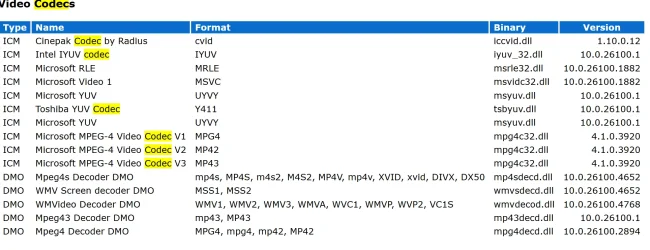
From Media Player I then issued Help->About Media Player Legacy->Technical Support Information

1755368168864.webp
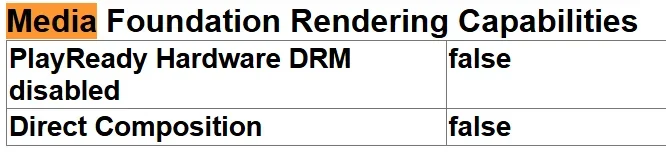
Issuing edge://gpu

1755368320580.webp
So the question is whether HEVC is actually installed and active and can be used to play MP4 videos from an app without the codec built-in (e.g. VLC).
 

My Computer

System One

  • OS
    Windows 11
I don't have any HEVC .MP4 but I found a movie in .MKV instead.
They work fine with PotPlayer (I don't remember adding anything to it) and also with VLC (that seems to have a libpacketizer hevc plugin that I might have added). Too long ago to remember.
I got a screen capture from both. The movie is Dune - Part Two (2024) (1080p BluRay x265 HEVC 10bit AAC 7.1 Tigole)


PotPlayer:
PotPlayer HEVC.webp

VLC
VLC HEVC.webp
 

My Computer

System One

  • OS
    Windows 11 Pro for Workstations 25H2 26200.8655
    Computer type
    PC/Desktop
    Manufacturer/Model
    ASRock
    CPU
    6C+4c Intel 13th Gen Intel(R) Core(TM) i5-13400, 4100 M
    Motherboard
    ASRock B660M-HDV
    Memory
    64 GB
    Graphics Card(s)
    NVIDIA GeForce RTX 4060, Intel UHD Graphics 730
    Sound Card
    Realtek
    Monitor(s) Displays
    AOC 24V2W1G5
    Screen Resolution
    1920x1080
    Hard Drives
    Samsung SSD 990 Pro with Heatsink
    Keyboard
    Logitech
    Mouse
    Logitech
    Internet Speed
    1GB
    Antivirus
    Windows Defender

Latest Support Threads

Back
Top Bottom