JavaScript is disabled. For a better experience, please enable JavaScript in your browser before proceeding.
You are using an out of date browser. It may not display this or other websites correctly.
You should upgrade or use an
alternative browser .
how to fully turn off VPN in Network and Internet settings
I wondered if there was something I could do to turn off the whole VPN function since using a reg file won't do it and I have never used a VPN on my desktop PC somehow it's turned on and i am weary of something might be discovering my internet.
Windows 11 Home 25H2 AMD Ryzen 7 7700X-8-Core Processor 32GB Nvidia Geforce RTX 3060 Windows 11 Home 25H2 PC/Desktop AMD Ryzen 7 7700X-8-Core Processor Asus TUF Gaming B650E-E WIFI 32GB Nvidia Geforce RTX 3060 Asus TUF Gaming VG32VQM5B 1920x1080 Samsung 1TB 990 EVO Plus ReDragon Surara K582 Asus TUF Gaming Gen 2 M3 Brave
Hi,
A VPN is not turned on by default in Windows.
Are you subscribing to a VPN service provider?
Did you turn it on in one of the browsers?
What makes you think you are actually using a VPN?
All Branches but Stable AMD Ryzen 7 7735HS 3200-4500 Mhz 8 cores x 2 32 GB DDR5 Radeon Graphic / NVIDIA GeForce RTX 4060 8 GB... All Branches but Stable Laptop Acer Nitro ANV15-51 AMD Ryzen 7 7735HS 3200-4500 Mhz 8 cores x 2 Sportage_RBH 32 GB DDR5 Radeon Graphic / NVIDIA GeForce RTX 4060 8 GB GDDR6 AMD/Realtek(R) Audio Integrated Monitor (15.3"vis) FHD 1920X1080 16:9 144Hz KINGSTON OM8SEP4512Q-AA 1TB 19V DC 6.32 A 120 W Dual Fans MS Bluetooth Fiber 1GB Cox -us & 1GB Orange-fr Edge Canary- Firefox Nightly-Chrome Dev-Chrome Dev Windows Defender
Windows 11 Beta AMD A9-9420 8 GB of DDR4 AMD Radeon R5 Windows 11 Beta Laptop Asus X751BP AMD A9-9420 8 GB of DDR4 AMD Radeon R5 1600x900 Seagate 1 TB
Active member
Member
Thread Starter
Hi,
A VPN is not turned on by default in Windows.
Are you subscribing to a VPN service provider?
Did you turn it on in one of the browsers?
What makes you think you are actually using a VPN?
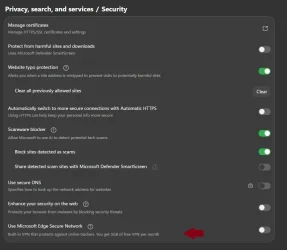
View attachment 175934 View attachment 175935
I'm not using any sort of VPN, and No I didn't turn it on in any of the browsers I use and it's showing that it's on in the network and internet settings and i don't intend to use one.
Windows 11 Home 25H2 AMD Ryzen 7 7700X-8-Core Processor 32GB Nvidia Geforce RTX 3060 Windows 11 Home 25H2 PC/Desktop AMD Ryzen 7 7700X-8-Core Processor Asus TUF Gaming B650E-E WIFI 32GB Nvidia Geforce RTX 3060 Asus TUF Gaming VG32VQM5B 1920x1080 Samsung 1TB 990 EVO Plus ReDragon Surara K582 Asus TUF Gaming Gen 2 M3 Brave
Active member
Member
Thread Starter
All i know is that it's on somehow and I never use a VPN nor have connected one to my Desktop PC
Windows 11 Home 25H2 AMD Ryzen 7 7700X-8-Core Processor 32GB Nvidia Geforce RTX 3060 Windows 11 Home 25H2 PC/Desktop AMD Ryzen 7 7700X-8-Core Processor Asus TUF Gaming B650E-E WIFI 32GB Nvidia Geforce RTX 3060 Asus TUF Gaming VG32VQM5B 1920x1080 Samsung 1TB 990 EVO Plus ReDragon Surara K582 Asus TUF Gaming Gen 2 M3 Brave
I'm not using any sort of VPN, and No I didn't turn it on in any of the browsers I use and it's showing that it's on in the network and internet settings and i don't intend to use one.
How can you state you are not using a VPN and at the same time do not want to have it on?
Can you take a screenshot and post where it says you are using a VPN please?
All Branches but Stable AMD Ryzen 7 7735HS 3200-4500 Mhz 8 cores x 2 32 GB DDR5 Radeon Graphic / NVIDIA GeForce RTX 4060 8 GB... All Branches but Stable Laptop Acer Nitro ANV15-51 AMD Ryzen 7 7735HS 3200-4500 Mhz 8 cores x 2 Sportage_RBH 32 GB DDR5 Radeon Graphic / NVIDIA GeForce RTX 4060 8 GB GDDR6 AMD/Realtek(R) Audio Integrated Monitor (15.3"vis) FHD 1920X1080 16:9 144Hz KINGSTON OM8SEP4512Q-AA 1TB 19V DC 6.32 A 120 W Dual Fans MS Bluetooth Fiber 1GB Cox -us & 1GB Orange-fr Edge Canary- Firefox Nightly-Chrome Dev-Chrome Dev Windows Defender
Windows 11 Beta AMD A9-9420 8 GB of DDR4 AMD Radeon R5 Windows 11 Beta Laptop Asus X751BP AMD A9-9420 8 GB of DDR4 AMD Radeon R5 1600x900 Seagate 1 TB
All i know is that it's on somehow and I never use a VPN nor have connected one to my Desktop PC
That tells me absolutely nothing, sadly.
All Branches but Stable AMD Ryzen 7 7735HS 3200-4500 Mhz 8 cores x 2 32 GB DDR5 Radeon Graphic / NVIDIA GeForce RTX 4060 8 GB... All Branches but Stable Laptop Acer Nitro ANV15-51 AMD Ryzen 7 7735HS 3200-4500 Mhz 8 cores x 2 Sportage_RBH 32 GB DDR5 Radeon Graphic / NVIDIA GeForce RTX 4060 8 GB GDDR6 AMD/Realtek(R) Audio Integrated Monitor (15.3"vis) FHD 1920X1080 16:9 144Hz KINGSTON OM8SEP4512Q-AA 1TB 19V DC 6.32 A 120 W Dual Fans MS Bluetooth Fiber 1GB Cox -us & 1GB Orange-fr Edge Canary- Firefox Nightly-Chrome Dev-Chrome Dev Windows Defender
Windows 11 Beta AMD A9-9420 8 GB of DDR4 AMD Radeon R5 Windows 11 Beta Laptop Asus X751BP AMD A9-9420 8 GB of DDR4 AMD Radeon R5 1600x900 Seagate 1 TB
Active member
Member
Thread Starter
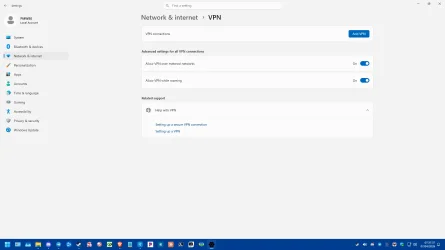
this is in the Network and Internet settings in VPN
New image.webp
35.5 KB
· Views: 2
Windows 11 Home 25H2 AMD Ryzen 7 7700X-8-Core Processor 32GB Nvidia Geforce RTX 3060 Windows 11 Home 25H2 PC/Desktop AMD Ryzen 7 7700X-8-Core Processor Asus TUF Gaming B650E-E WIFI 32GB Nvidia Geforce RTX 3060 Asus TUF Gaming VG32VQM5B 1920x1080 Samsung 1TB 990 EVO Plus ReDragon Surara K582 Asus TUF Gaming Gen 2 M3 Brave
this is in the Network and Internet settings in VPN
And you don't have one.
The button says
ADD VPN .
So there's none present.
The other options apply if you had a VPN.
You are welcome.
All Branches but Stable AMD Ryzen 7 7735HS 3200-4500 Mhz 8 cores x 2 32 GB DDR5 Radeon Graphic / NVIDIA GeForce RTX 4060 8 GB... All Branches but Stable Laptop Acer Nitro ANV15-51 AMD Ryzen 7 7735HS 3200-4500 Mhz 8 cores x 2 Sportage_RBH 32 GB DDR5 Radeon Graphic / NVIDIA GeForce RTX 4060 8 GB GDDR6 AMD/Realtek(R) Audio Integrated Monitor (15.3"vis) FHD 1920X1080 16:9 144Hz KINGSTON OM8SEP4512Q-AA 1TB 19V DC 6.32 A 120 W Dual Fans MS Bluetooth Fiber 1GB Cox -us & 1GB Orange-fr Edge Canary- Firefox Nightly-Chrome Dev-Chrome Dev Windows Defender
Windows 11 Beta AMD A9-9420 8 GB of DDR4 AMD Radeon R5 Windows 11 Beta Laptop Asus X751BP AMD A9-9420 8 GB of DDR4 AMD Radeon R5 1600x900 Seagate 1 TB
Active member
Member
Thread Starter
And you don't have one.ADD VPN
i clearly don't use it but why does it tell me it's on
Windows 11 Home 25H2 AMD Ryzen 7 7700X-8-Core Processor 32GB Nvidia Geforce RTX 3060 Windows 11 Home 25H2 PC/Desktop AMD Ryzen 7 7700X-8-Core Processor Asus TUF Gaming B650E-E WIFI 32GB Nvidia Geforce RTX 3060 Asus TUF Gaming VG32VQM5B 1920x1080 Samsung 1TB 990 EVO Plus ReDragon Surara K582 Asus TUF Gaming Gen 2 M3 Brave
i clearly don't use it but why does it tell me it's on
I give up.
Good luck to you. Seems you are going to need it.
All Branches but Stable AMD Ryzen 7 7735HS 3200-4500 Mhz 8 cores x 2 32 GB DDR5 Radeon Graphic / NVIDIA GeForce RTX 4060 8 GB... All Branches but Stable Laptop Acer Nitro ANV15-51 AMD Ryzen 7 7735HS 3200-4500 Mhz 8 cores x 2 Sportage_RBH 32 GB DDR5 Radeon Graphic / NVIDIA GeForce RTX 4060 8 GB GDDR6 AMD/Realtek(R) Audio Integrated Monitor (15.3"vis) FHD 1920X1080 16:9 144Hz KINGSTON OM8SEP4512Q-AA 1TB 19V DC 6.32 A 120 W Dual Fans MS Bluetooth Fiber 1GB Cox -us & 1GB Orange-fr Edge Canary- Firefox Nightly-Chrome Dev-Chrome Dev Windows Defender
Windows 11 Beta AMD A9-9420 8 GB of DDR4 AMD Radeon R5 Windows 11 Beta Laptop Asus X751BP AMD A9-9420 8 GB of DDR4 AMD Radeon R5 1600x900 Seagate 1 TB
Well-known member
Pro User
VIP
There is no VPN service shown to be on/working???? The advanced setting options are meaningless.
Windows 11 2xH2 (latest update ... forever anal) Intel i5-12400 8GB NVIDIA GeForce GT730 Windows 11 2xH2 (latest update ... forever anal) PC/Desktop HP Slim S01 Intel i5-12400 8GB NVIDIA GeForce GT730 OOBE Acer 32" 1920x1080 512GB KIOXIA NVMe OOBE OOBE OOBE BT BT Brave FFox Chrome Opera KIS
Windows 11 Pro 2xH2 (latest update ... 4ever ... i7-1165G7 @ 2.80GHz Intel Iris Xe Graphics Windows 11 Pro 2xH2 (latest update ... 4ever anal) Laptop HP Pavillion 15 i7-1165G7 @ 2.80GHz Intel Iris Xe Graphics Samsung NVMe 512GB NBN FTTN 50 Brave KIS
Active member
Member
Thread Starter
There is no VPN service shown to be on/working???? The advanced setting options are meaningless.
i tried that but after rebooting it turns itself back on
Windows 11 Home 25H2 AMD Ryzen 7 7700X-8-Core Processor 32GB Nvidia Geforce RTX 3060 Windows 11 Home 25H2 PC/Desktop AMD Ryzen 7 7700X-8-Core Processor Asus TUF Gaming B650E-E WIFI 32GB Nvidia Geforce RTX 3060 Asus TUF Gaming VG32VQM5B 1920x1080 Samsung 1TB 990 EVO Plus ReDragon Surara K582 Asus TUF Gaming Gen 2 M3 Brave
i tried that but after rebooting it turns itself back on
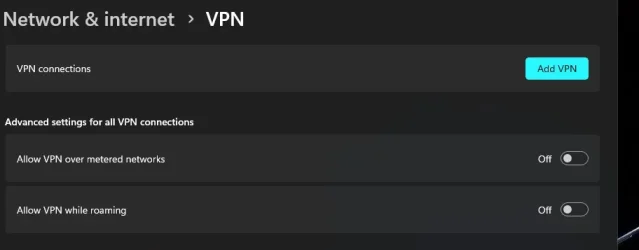
Wrong again. After reboot:
All Branches but Stable AMD Ryzen 7 7735HS 3200-4500 Mhz 8 cores x 2 32 GB DDR5 Radeon Graphic / NVIDIA GeForce RTX 4060 8 GB... All Branches but Stable Laptop Acer Nitro ANV15-51 AMD Ryzen 7 7735HS 3200-4500 Mhz 8 cores x 2 Sportage_RBH 32 GB DDR5 Radeon Graphic / NVIDIA GeForce RTX 4060 8 GB GDDR6 AMD/Realtek(R) Audio Integrated Monitor (15.3"vis) FHD 1920X1080 16:9 144Hz KINGSTON OM8SEP4512Q-AA 1TB 19V DC 6.32 A 120 W Dual Fans MS Bluetooth Fiber 1GB Cox -us & 1GB Orange-fr Edge Canary- Firefox Nightly-Chrome Dev-Chrome Dev Windows Defender
Windows 11 Beta AMD A9-9420 8 GB of DDR4 AMD Radeon R5 Windows 11 Beta Laptop Asus X751BP AMD A9-9420 8 GB of DDR4 AMD Radeon R5 1600x900 Seagate 1 TB
Active member
Member
Thread Starter
Wrong again. After reboot:
View attachment 175944
i tried that as well but both turned themselves back on and yes i did turn them off before reboot and after reboot both of those settings turned back on
Windows 11 Home 25H2 AMD Ryzen 7 7700X-8-Core Processor 32GB Nvidia Geforce RTX 3060 Windows 11 Home 25H2 PC/Desktop AMD Ryzen 7 7700X-8-Core Processor Asus TUF Gaming B650E-E WIFI 32GB Nvidia Geforce RTX 3060 Asus TUF Gaming VG32VQM5B 1920x1080 Samsung 1TB 990 EVO Plus ReDragon Surara K582 Asus TUF Gaming Gen 2 M3 Brave
Well-known member
Pro User
VIP
i tried that as well but both turned themselves back on and yes i did turn them off before reboot and after reboot both of those settings turned back on
Are you logged in as an Administrator?
Are you sure you haven't unknowingly installed a demo/trial-type VPN bundled with some other software installed??
Windows 11 2xH2 (latest update ... forever anal) Intel i5-12400 8GB NVIDIA GeForce GT730 Windows 11 2xH2 (latest update ... forever anal) PC/Desktop HP Slim S01 Intel i5-12400 8GB NVIDIA GeForce GT730 OOBE Acer 32" 1920x1080 512GB KIOXIA NVMe OOBE OOBE OOBE BT BT Brave FFox Chrome Opera KIS
Windows 11 Pro 2xH2 (latest update ... 4ever ... i7-1165G7 @ 2.80GHz Intel Iris Xe Graphics Windows 11 Pro 2xH2 (latest update ... 4ever anal) Laptop HP Pavillion 15 i7-1165G7 @ 2.80GHz Intel Iris Xe Graphics Samsung NVMe 512GB NBN FTTN 50 Brave KIS
Active member
Member
Thread Starter
Are you logged in as an Administrator?
Yes i am logged in as an admin and I haven't ever put any sort of VPN demo trial type and i'm usually pretty careful when it comes to those
Windows 11 Home 25H2 AMD Ryzen 7 7700X-8-Core Processor 32GB Nvidia Geforce RTX 3060 Windows 11 Home 25H2 PC/Desktop AMD Ryzen 7 7700X-8-Core Processor Asus TUF Gaming B650E-E WIFI 32GB Nvidia Geforce RTX 3060 Asus TUF Gaming VG32VQM5B 1920x1080 Samsung 1TB 990 EVO Plus ReDragon Surara K582 Asus TUF Gaming Gen 2 M3 Brave
Well-known member
Power User
VIP
@
IgnaciaIce
The Brave Browser (which your computer details indicates you use) has a built-in (paid) VPN Service; and a quick internet search suggests that Windows is able to identify the presence of that service even when it is not activated.
The report would seem to provide positive confirmation of your required VPN status by Windows
macOS 14.x (plus Windows 11, Debian, FreeBSD ... Apple M1 Max (T6001) - 8 performance 2 effici... 32GB LPDDR5 Apple M1 Max (32-core) macOS 14.x (plus Windows 11, Debian, FreeBSD for ARM64) Laptop MacBook Pro M1 MAX Apple M1 Max (T6001) - 8 performance 2 efficiency cores 32GB LPDDR5 Apple M1 Max (32-core) a) 1TB SSD + + 1TB SD Card + external SSD Drives 1. Safari 2. DuckDuckGo -
Windows 11 Pro, plus VirtualBox VMs: various ... i7 32GB Windows 11 Pro, plus VirtualBox VMs: various Windows & Linux Laptop Microsoft Surface Laptop Studio i7 32GB 1TB SSD, plus external SSDs for Virtual Machines etc. 1. MS Edge 2. DuckDuckGo Defender
Active member
Member
Thread Starter
The Brave Browser (which your computer details indicates you use) has a built-in (paid) VPN Service; and a quick internet search suggests that Windows is able to identify the presence of that service even if it is not activated.
I must have forgotten that was on
Windows 11 Home 25H2 AMD Ryzen 7 7700X-8-Core Processor 32GB Nvidia Geforce RTX 3060 Windows 11 Home 25H2 PC/Desktop AMD Ryzen 7 7700X-8-Core Processor Asus TUF Gaming B650E-E WIFI 32GB Nvidia Geforce RTX 3060 Asus TUF Gaming VG32VQM5B 1920x1080 Samsung 1TB 990 EVO Plus ReDragon Surara K582 Asus TUF Gaming Gen 2 M3 Brave