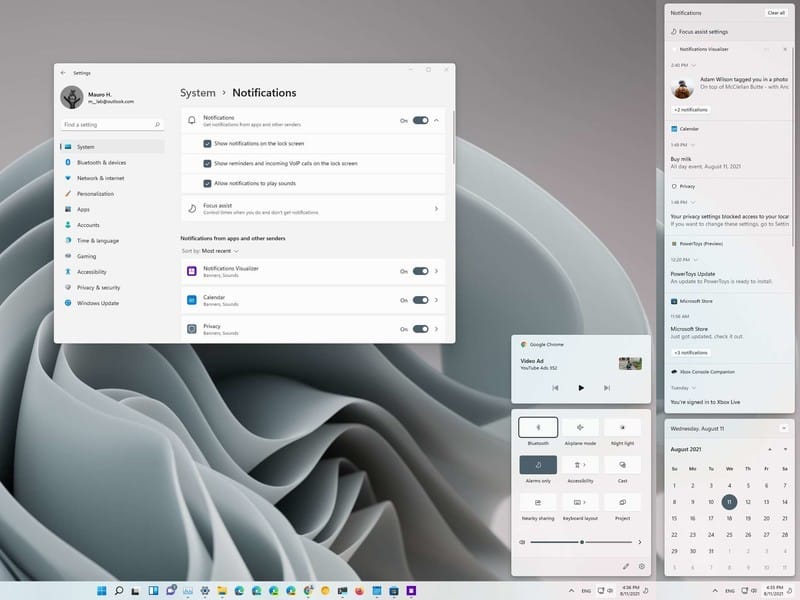
How to get 'action centre' icon back with all its tiles, the Windows 10 way?


iwant2knownl

Well-known member
Local time
6:58 PM
Posts
3
OS
Windows 11
When I use 'shell:::{05d7b0f4-2121-4eff-bf6b-ed3f69b894d9}' to get into settings and enable 'action centre' switch and click the 'OK' button, it doesn't work the way it was with Windows 10.
So I wondered if there's some kind of override command to put the 'action centre' icon back in system tray with all its tiles such as 'all settings' (control panel), etc?
Something similar like boot into save mode using the F8 key during (re)boot by using the 'bcdedit /set {default} bootmenupolicy legacy' command to override default setting.
That still works in Windows 11 today.
The thing is that I'd like to tweak Windows the way it is most comfortable for me as long as possible.
Hope someone can help me here.
 
Windows Build/Version
Version 10.0.22000.613

My Computer My Computer

At a glance

Windows 11i732GB
OS
Windows 11
Computer type
PC/Desktop
Manufacturer/Model
Self built
CPU
i7
Motherboard
Asus
Memory
32GB
Hard Drives
PCI-e M2 SSD

My Computers My Computers

  • At a glance

    Windows 11 Pro 25H2 26200.9168i9-10900 10 core 20 threads32 gbnone-Intel UHD Graphics 630
    OS
    Windows 11 Pro 25H2 26200.9168
    Computer type
    PC/Desktop
    Manufacturer/Model
    Dell Optiplex 7080
    CPU
    i9-10900 10 core 20 threads
    Motherboard
    DELL 0J37VM
    Memory
    32 gb
    Graphics Card(s)
    none-Intel UHD Graphics 630
    Sound Card
    Integrated Realtek
    Monitor(s) Displays
    Benq 27
    Screen Resolution
    2560x1440
    Hard Drives
    2x1tb Solidigm m.2 nvme /External drives 512gb Samsung m.2 sata+2tb Kingston m2.nvme
    PSU
    500w
    Case
    MT
    Cooling
    Dell Premium
    Keyboard
    Logitech wired
    Mouse
    Logitech wireless
    Internet Speed
    so slow I'm too embarrassed to tell
    Browser
    #1 Edge #2 Firefox
    Antivirus
    Defender+MWB Premium
  • At a glance

    Windows 11 Pro 24H2 26200.9168AMD Ryzen 7 6800U32 gbintegrated
    Operating System
    Windows 11 Pro 24H2 26200.9168
    Computer type
    PC/Desktop
    Manufacturer/Model
    Beelink Mini PC SER5
    CPU
    AMD Ryzen 7 6800U
    Memory
    32 gb
    Graphics card(s)
    integrated
    Sound Card
    integrated
    Monitor(s) Displays
    Benq 27
    Screen Resolution
    2560x1440
    Hard Drives
    1TB Crucial nvme
    Keyboard
    Logitech wired
    Mouse
    Logitech wireless
    Internet Speed
    still too embarrassed to tell
    Browser
    Firefox
    Antivirus
    Defender
  • System 3 is non compliant Dell 9020 i7-4770/24gb ram Win11 PRO 26200.9168
@glasskuter, I already did indead ... so things are no longer centralised.
I'm used to Windows through the years, yet this doesn't make things any easier though.
For a 'regular user', this may be a bit troublesome.
Change is not always progress in my opinion.
 

My Computer My Computer

At a glance

Windows 11i732GB
OS
Windows 11
Computer type
PC/Desktop
Manufacturer/Model
Self built
CPU
i7
Motherboard
Asus
Memory
32GB
Hard Drives
PCI-e M2 SSD
Change is not always progress
No it's not but with each new version of Windows MS giveth and taketh away.. Some of it is because they think it's what we need and some due to pure aesthetics. I've been doing this a long time and have learned to just roll with change, because it is inevitable. It doesn't make it any easier to accept or explain their reasoning behind it.
 

My Computers My Computers

  • At a glance

    Windows 11 Pro 25H2 26200.9168i9-10900 10 core 20 threads32 gbnone-Intel UHD Graphics 630
    OS
    Windows 11 Pro 25H2 26200.9168
    Computer type
    PC/Desktop
    Manufacturer/Model
    Dell Optiplex 7080
    CPU
    i9-10900 10 core 20 threads
    Motherboard
    DELL 0J37VM
    Memory
    32 gb
    Graphics Card(s)
    none-Intel UHD Graphics 630
    Sound Card
    Integrated Realtek
    Monitor(s) Displays
    Benq 27
    Screen Resolution
    2560x1440
    Hard Drives
    2x1tb Solidigm m.2 nvme /External drives 512gb Samsung m.2 sata+2tb Kingston m2.nvme
    PSU
    500w
    Case
    MT
    Cooling
    Dell Premium
    Keyboard
    Logitech wired
    Mouse
    Logitech wireless
    Internet Speed
    so slow I'm too embarrassed to tell
    Browser
    #1 Edge #2 Firefox
    Antivirus
    Defender+MWB Premium
  • At a glance

    Windows 11 Pro 24H2 26200.9168AMD Ryzen 7 6800U32 gbintegrated
    Operating System
    Windows 11 Pro 24H2 26200.9168
    Computer type
    PC/Desktop
    Manufacturer/Model
    Beelink Mini PC SER5
    CPU
    AMD Ryzen 7 6800U
    Memory
    32 gb
    Graphics card(s)
    integrated
    Sound Card
    integrated
    Monitor(s) Displays
    Benq 27
    Screen Resolution
    2560x1440
    Hard Drives
    1TB Crucial nvme
    Keyboard
    Logitech wired
    Mouse
    Logitech wireless
    Internet Speed
    still too embarrassed to tell
    Browser
    Firefox
    Antivirus
    Defender
  • System 3 is non compliant Dell 9020 i7-4770/24gb ram Win11 PRO 26200.9168
That's a problem that MS have now. They produced a pig of an OS with 11 (essentially a skinned up 10 with much less functionality)
At least the likes of Apple progress their OS's with each release without stabbing common sense in the back, ChromeOS by default gets better with every release as it just couldn't get any worse so that's progressive.
 

My Computer My Computer

At a glance

Windows 11 Pro Beta, 11 Dev, W11 CanaryAMD Ryzen™ 9 5900HX32GBNVIDIA® GeForce RTX™ 3070 8GB GDDR6
OS
Windows 11 Pro Beta, 11 Dev, W11 Canary
Computer type
Laptop
Manufacturer/Model
Dell Alienware M15 Ryzen Edition R6
CPU
AMD Ryzen™ 9 5900HX
Memory
32GB
Graphics Card(s)
NVIDIA® GeForce RTX™ 3070 8GB GDDR6
Hard Drives
1 x Samsung 980 Pro 1TB
1 x Samsung 970 Evo Plus 1TB
Sorry for bumping this thread after about a year, but there IS a way to get the classic Windows 10 Action Center in Windows 11!
Step 1. Open the registry editor,
Step 2. Go to HKEY_LOCAL_MACHINE\SOFTWARE\Microsoft\Windows\CurrentVersion\
Step 3. Create a new key called "Control Center"
Step 4. Create a new DWORD named "UseLiteLayout"
Step 5. Set the value to 1.
OR put the following .reg file and run it:
Code:
Windows Registry Editor Version 5.00

[HKEY_LOCAL_MACHINE\SOFTWARE\Microsoft\Windows\CurrentVersion\Control Center]
"UseLiteLayout"=dword:00000001
Step 6. Restart the computer
And then you can finally use the old action center!
Although it's a little buggy, it still works!

1709745951667.png
 
Last edited by a moderator:

My Computer My Computer

At a glance

Windows 11
OS
Windows 11
Computer type
PC/Desktop
Manufacturer/Model
Apple / BootCamp

Latest Support Threads

Back
Top Bottom