Windows 11 version 22H2 build 22621.521+
Source:

 blogs.windows.com
See also:
 www.elevenforum.com
 www.elevenforum.com
 www.elevenforum.com
 www.elevenforum.com
 www.elevenforum.com
 www.elevenforum.com
It is recommended to wait until Windows 11 22H2 is available via Windows Update.
Today, Panos Panay announced the release and availability of the Windows 11 2022 Update, the latest version of Windows 11. Windows is a key component of how more than a billion people connect, learn, play and work. In this blog I’ll share how to get the 2022 Update (also known as Windows 11, version 22H21), details on our approach to delivering continuous innovation including improvements to the update experience, and information for commercial and education customers.
How to get the update
Starting today, the first major update to Windows 11 is now available for users who want to update. Our launch approach to Windows 11 leverages our well-established update systems and processes. The measured and phased rollout will offer the update via Windows Update when data shows that your device is ready, as our objective is to provide a quality update experience. We will initially ramp up the offering availability in the first weeks as we monitor quality signals. If we detect that your device may have an issue, such as an application incompatibility, we may put a safeguard hold in place and not offer the update until that issue is resolved. To learn more about the status of the Windows 11 rollout, safeguard holds and which holds may be applied to your device, visit Windows release health. Learn more about the ways to install Windows 11.
Windows 11 devices
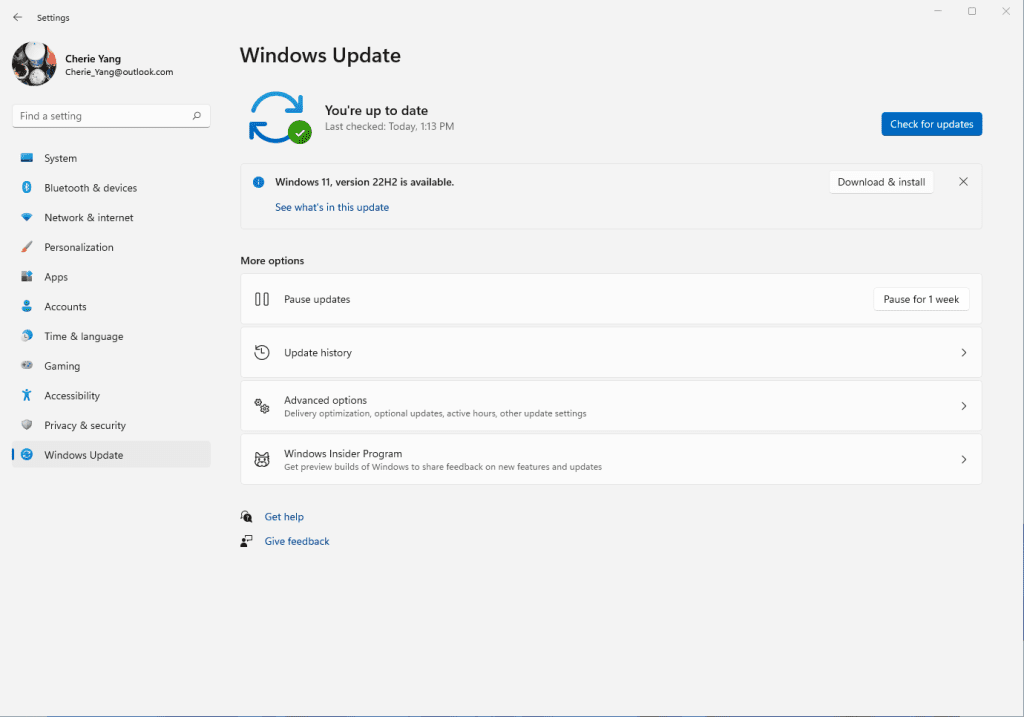
Users with eligible devices running Windows 11, version 21H2 who are interested in experiencing the latest feature update and are ready to install this release on their device can choose to do so by opening Windows Update settings (Settings > Windows Update) and selecting Check for updates2. For more information on the 2022 Update experience for Windows 11 devices, watch this video.
Check Windows Updates
Windows 10 devices
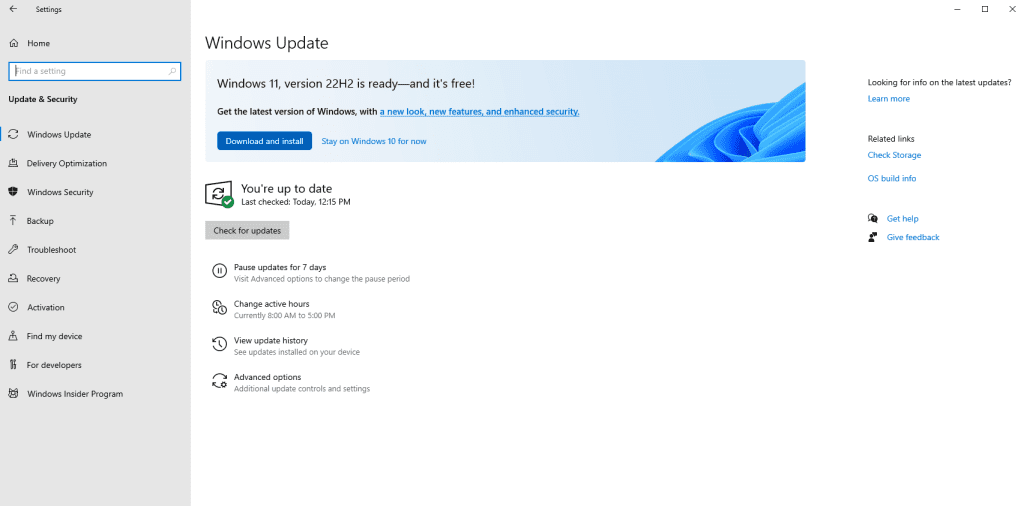
If you are running Windows 10 today, you can check to see if your device is eligible (i.e., meets the minimum system requirements for Windows 11) to upgrade using the PC Health Check app. You can then check to see if Windows 11, version 22H2 is ready for your specific device by opening Windows Update settings (Settings > Update & Security > Windows Update) and selecting Check for updates3,4. If your device is eligible and the upgrade is ready, the option to download and install will appear: If you are ready to install Windows 11, simply select Download and install5,6. For more information on the Windows 11 upgrade experience for Window 10 devices, watch this video.
Delivering continuous innovation and value
Our delivery approach leverages the well-established feature and monthly security update systems and processes used for the +1.4 billion Windows 10 and Windows 11 devices we have shipped and serviced over the past six years. Windows 11 will continue to have an annual feature update cadence, released in the second half of the calendar year that marks the start of the support lifecycle, with 24 months of support for Home and Pro editions and 36 months of support for Enterprise and Education editions.
We are committed to delivering continuous innovation by releasing new features into Windows 11 with increased frequency via our servicing technology (like a monthly update) and Microsoft Store updates, in addition to our annual update process. Our goal is to provide you with the best experiences year-round, when new features are ready based on quality and reliability, via our familiar processes. Today we are also announcing that a new set of experiences including the Tabbed File explorer, considered a component of the 2022 Update for all editions, will be ready this October. We will share more information and documentation when we initially make these features available. We plan a phased rollout timed with the October optional non-security preview release for these features and then they will be made broadly available in the November 2022 security update release7. Going forward we will continue to announce, document and deliver new features and experiences when they are ready (learn more).
We have listened to feedback on the overall Windows Update experience and are excited to announce two substantial improvements to the update experience for both feature and monthly updates for the Windows 11 2022 Update.
- Smaller and faster installation of updates: We have significantly reduced the download size of feature updates, by ~450MB for many users. We’ve also reduced download and installation time of the monthly cumulative update, as well as reclaimed hundreds of megabytes of disk footprint to give back to the user. Learn more about these improvements.
- Windows Update and carbon awareness: Windows will try to schedule update installations at specific times of day when doing so may result in lower carbon emissions. Many electrical grids are powered by multiple sources, including renewables and fossil fuels. When available, Windows 11 will now prioritize installing updates in the background at times when greater amounts of clean energy sources (like wind, solar and hydro) are available (find out more in this article).
Information for commercial and education customers
Windows 11 is built on the consistent, compatible and familiar Windows 10 foundation you know, and it was designed for hybrid workforces. You can plan for, prepare and deploy Windows 11 alongside Windows 10 using the same processes, policies and management applications. For new information about the latest features for commercial organizations in Windows 11, version 22H2, see our latest Commercial blog.
We recommend IT administrators begin targeted deployments now as part of their regular Windows Update motion. For the latest resources and tools, check out our post on Tools to support Windows 11 deployment. In addition, to help make Windows 11 deployment easier, we encourage you to leverage the built in Windows 11 Readiness report in Microsoft Endpoint Manager and/or Endpoint Analytics to help identify eligible devices that meet the Windows 11 minimum system requirements for an upgrade.
Windows 11, version 22H2 is available through familiar channels and processes including Windows Server Update Services (WSUS), Windows Update for Business and the Volume Licensing Service Center (VLSC)8 for phased deployment using Microsoft Endpoint Manager or other endpoint management solutions. September 20, 2022 marks the start of the 36 months of servicing support lifecycle for Enterprise and Education editions of Windows 11, version 22H2.
Experience the latest innovation in the Windows 11 2022 Update
We all need the latest technology to keep pace with working, learning, connecting and playing, and installing the 2022 Update is the best way you can keep your Windows device protected and productive. This also enables your device to receive the continuous innovation we will deliver over the next year with the 2022 Update.
As I have previously noted, for customers who are using a device that is not eligible for Windows 11, Windows 10 is a great place to be. Windows 10 will be serviced through Oct. 14, 2025 and we have announced that the next feature update to Windows 10, version 22H2, is coming next month, continuing to offer you both support and choice with Windows. As in the past, we will closely monitor the rollout of Windows 11 and continue to share timely information on the status of the rollout and known issues (open and resolved) across all Windows feature and monthly updates via the Windows release health dashboard and @WindowsUpdate. Please continue to tell us about your experience by providing comments or suggestions via Feedback Hub.
1 Consistent numerical version names across annual releases (“version 22H2” as released in the second half of the 2022 calendar year).
2 Eligible Windows 11 devices must have installed the June 2022 non-security preview release or later to update to Windows 11, version 22H2.
3 Eligible Windows 10 devices must be on version 2004 or later, and have installed the April 2022 non-security preview release or later, to upgrade directly to Windows 11.
4 Certain features require specific hardware; see Windows 11 specifications for more information.
5 New Windows 11 users will be shown and need to accept the Microsoft Software License Terms after selecting “Download and install” before the download will commence.
6 Starting with Windows 11, version 22H2, the Pro edition will require internet connectivity during the initial device setup only, and if you choose to setup the device for personal use, a Microsoft account will also be required for setup.
7 Updates and upgrades to Windows 11, version 22H2 post the November security update date will automatically receive the new October features.
8 Downloads in the VLSC and similar channels may be delayed.
Source:
How to get the Windows 11 2022 Update
Today, Panos Panay announced the release and availability of the Windows 11 2022 Update, the latest version of Windows 11. Windows is a key component of how more than a billion peop
blogs.windows.com
See also:
Windows 11 2022 Update (22H2) now available
Windows 11 version 22H2 build 22621.521 https://www.elevenforum.com/t/how-to-get-the-windows-11-2022-update-22h2.9051/ Today, the Windows 11 2022 Update rolls out in 190+ countries. The last few years have brought enduring changes in the ways we live, work and learn, with the PC playing a...
www.elevenforum.com
What is new for IT pros in Windows 11 version 22H2
Today, I'm going to walk you through a few of the new features and capabilities for IT pros in Windows 11, version 22H2—and outline the resources available to help you update or upgrade the devices across your organization. First, I'm happy to share that Windows 11, version 22H2, also known as...
www.elevenforum.com
What is new in Windows 11 version 22H2
Windows 11, version 22H2 is a feature update for Windows 11. It includes all features and fixes in previous cumulative updates to Windows 11, version 21H2, the original Windows 11 release version. This article lists the new and updated features IT Pros should know. Windows 11, version 22H2...
www.elevenforum.com
Faster. Smaller. Windows 11 version 22H2 update fundamentals
With the release of Windows 11, version 21H2, Microsoft made significant improvements to Windows's strong update foundation. This included a redesigned cumulative update resulting in a 40% reduced package size, reduced download size for those devices more current than others, improved update...
www.elevenforum.com
Create Windows 11 Bootable USB Installation Media
This tutorial will show you how to create a bootable USB flash drive used to install Windows 11 with UEFI support. You can use a Windows 11 installation USB flash drive to clean install, upgrade, reset, or repair Windows 11. The installation USB can also be used as a recovery drive to boot to...
www.elevenforum.com
Download Official Windows 11 ISO file from Microsoft
This tutorial will show you how to download an official Windows Server or Windows 11 64-bit or ARM64 ISO file from Microsoft. Microsoft provides ISO files for Windows Server and Windows 11 to download. You can use these ISO files to clean install or in-place upgrade Windows 11. The Flight Hub...
www.elevenforum.com
Last edited: