How to get the Windows 11 2022 Update (22H2)


Windows 11 version 22H2 build 22621.521+

It is recommended to wait until Windows 11 22H2 is available via Windows Update.


Today, Panos Panay announced the release and availability of the Windows 11 2022 Update, the latest version of Windows 11. Windows is a key component of how more than a billion people connect, learn, play and work. In this blog I’ll share how to get the 2022 Update (also known as Windows 11, version 22H21), details on our approach to delivering continuous innovation including improvements to the update experience, and information for commercial and education customers.

How to get the update​

Starting today, the first major update to Windows 11 is now available for users who want to update. Our launch approach to Windows 11 leverages our well-established update systems and processes. The measured and phased rollout will offer the update via Windows Update when data shows that your device is ready, as our objective is to provide a quality update experience. We will initially ramp up the offering availability in the first weeks as we monitor quality signals. If we detect that your device may have an issue, such as an application incompatibility, we may put a safeguard hold in place and not offer the update until that issue is resolved. To learn more about the status of the Windows 11 rollout, safeguard holds and which holds may be applied to your device, visit Windows release health. Learn more about the ways to install Windows 11.

Windows 11 devices​

Users with eligible devices running Windows 11, version 21H2 who are interested in experiencing the latest feature update and are ready to install this release on their device can choose to do so by opening Windows Update settings (Settings > Windows Update) and selecting Check for updates2. For more information on the 2022 Update experience for Windows 11 devices, watch this video.

Check Windows Updates
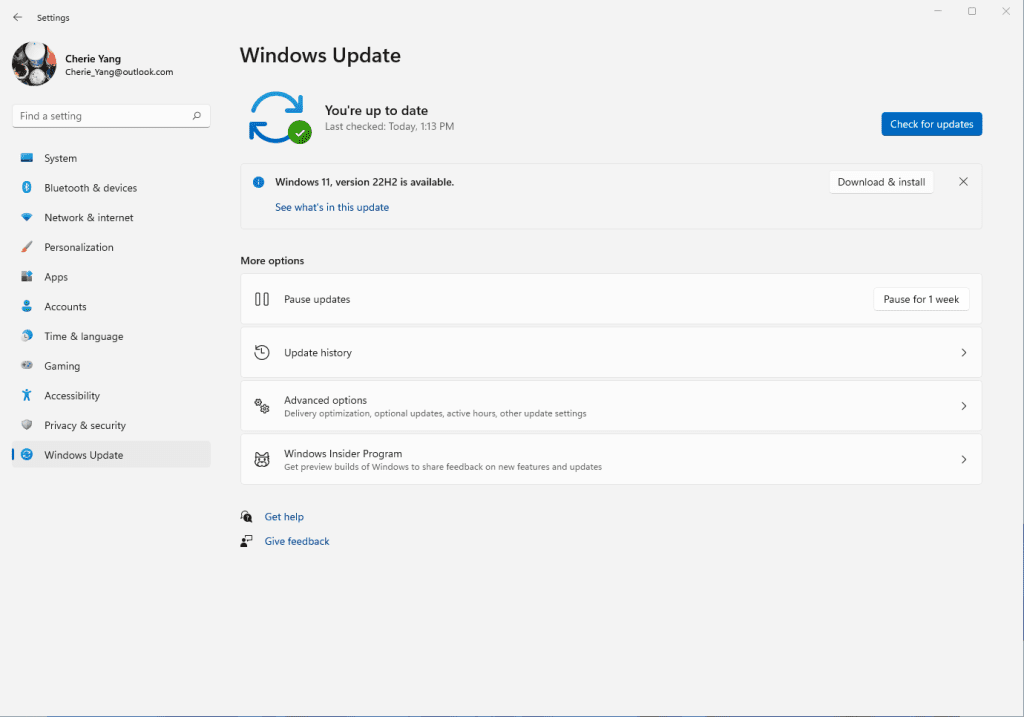

Windows 11 update screen

Windows 10 devices​

If you are running Windows 10 today, you can check to see if your device is eligible (i.e., meets the minimum system requirements for Windows 11) to upgrade using the PC Health Check app. You can then check to see if Windows 11, version 22H2 is ready for your specific device by opening Windows Update settings (Settings > Update & Security > Windows Update) and selecting Check for updates3,4. If your device is eligible and the upgrade is ready, the option to download and install will appear: If you are ready to install Windows 11, simply select Download and install5,6. For more information on the Windows 11 upgrade experience for Window 10 devices, watch this video.
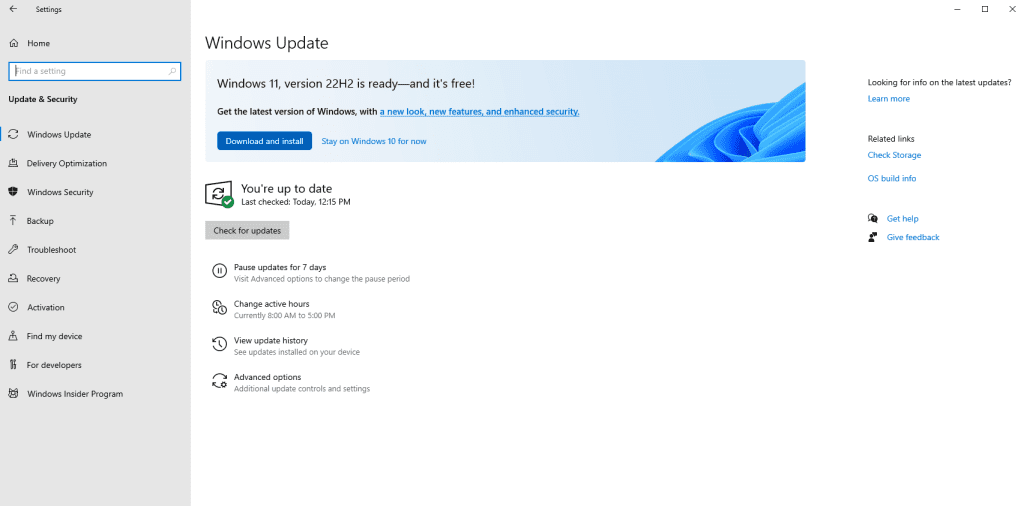
Windows 11 update screen for Windows 10

Delivering continuous innovation and value​

Our delivery approach leverages the well-established feature and monthly security update systems and processes used for the +1.4 billion Windows 10 and Windows 11 devices we have shipped and serviced over the past six years. Windows 11 will continue to have an annual feature update cadence, released in the second half of the calendar year that marks the start of the support lifecycle, with 24 months of support for Home and Pro editions and 36 months of support for Enterprise and Education editions.

We are committed to delivering continuous innovation by releasing new features into Windows 11 with increased frequency via our servicing technology (like a monthly update) and Microsoft Store updates, in addition to our annual update process. Our goal is to provide you with the best experiences year-round, when new features are ready based on quality and reliability, via our familiar processes. Today we are also announcing that a new set of experiences including the Tabbed File explorer, considered a component of the 2022 Update for all editions, will be ready this October. We will share more information and documentation when we initially make these features available. We plan a phased rollout timed with the October optional non-security preview release for these features and then they will be made broadly available in the November 2022 security update release7. Going forward we will continue to announce, document and deliver new features and experiences when they are ready (learn more).

We have listened to feedback on the overall Windows Update experience and are excited to announce two substantial improvements to the update experience for both feature and monthly updates for the Windows 11 2022 Update.
  • Smaller and faster installation of updates: We have significantly reduced the download size of feature updates, by ~450MB for many users. We’ve also reduced download and installation time of the monthly cumulative update, as well as reclaimed hundreds of megabytes of disk footprint to give back to the user. Learn more about these improvements.
  • Windows Update and carbon awareness: Windows will try to schedule update installations at specific times of day when doing so may result in lower carbon emissions. Many electrical grids are powered by multiple sources, including renewables and fossil fuels. When available, Windows 11 will now prioritize installing updates in the background at times when greater amounts of clean energy sources (like wind, solar and hydro) are available (find out more in this article).

Information for commercial and education customers​

Windows 11 is built on the consistent, compatible and familiar Windows 10 foundation you know, and it was designed for hybrid workforces. You can plan for, prepare and deploy Windows 11 alongside Windows 10 using the same processes, policies and management applications. For new information about the latest features for commercial organizations in Windows 11, version 22H2, see our latest Commercial blog.

We recommend IT administrators begin targeted deployments now as part of their regular Windows Update motion. For the latest resources and tools, check out our post on Tools to support Windows 11 deployment. In addition, to help make Windows 11 deployment easier, we encourage you to leverage the built in Windows 11 Readiness report in Microsoft Endpoint Manager and/or Endpoint Analytics to help identify eligible devices that meet the Windows 11 minimum system requirements for an upgrade.

Windows 11, version 22H2 is available through familiar channels and processes including Windows Server Update Services (WSUS), Windows Update for Business and the Volume Licensing Service Center (VLSC)8 for phased deployment using Microsoft Endpoint Manager or other endpoint management solutions. September 20, 2022 marks the start of the 36 months of servicing support lifecycle for Enterprise and Education editions of Windows 11, version 22H2.

Experience the latest innovation in the Windows 11 2022 Update​

We all need the latest technology to keep pace with working, learning, connecting and playing, and installing the 2022 Update is the best way you can keep your Windows device protected and productive. This also enables your device to receive the continuous innovation we will deliver over the next year with the 2022 Update.

As I have previously noted, for customers who are using a device that is not eligible for Windows 11, Windows 10 is a great place to be. Windows 10 will be serviced through Oct. 14, 2025 and we have announced that the next feature update to Windows 10, version 22H2, is coming next month, continuing to offer you both support and choice with Windows. As in the past, we will closely monitor the rollout of Windows 11 and continue to share timely information on the status of the rollout and known issues (open and resolved) across all Windows feature and monthly updates via the Windows release health dashboard and @WindowsUpdate. Please continue to tell us about your experience by providing comments or suggestions via Feedback Hub.

1 Consistent numerical version names across annual releases (“version 22H2” as released in the second half of the 2022 calendar year).

2 Eligible Windows 11 devices must have installed the June 2022 non-security preview release or later to update to Windows 11, version 22H2.

3
Eligible Windows 10 devices must be on version 2004 or later, and have installed the April 2022 non-security preview release or later, to upgrade directly to Windows 11.

4 Certain features require specific hardware; see
Windows 11 specifications for more information.

5
New Windows 11 users will be shown and need to accept the Microsoft Software License Terms after selecting “Download and install” before the download will commence.

6 Starting with Windows 11, version 22H2, the Pro edition will require internet connectivity during the initial device setup only, and if you choose to setup the device for personal use, a Microsoft account will also be required for setup.

7 Updates and upgrades to Windows 11, version 22H2 post the November security update date will automatically receive the new October features.

8 Downloads in the VLSC and similar channels may be delayed.

Source:

See also:
 
Last edited:
I don't have any experience with ISOs, and don't have any backup either. Not safe to use the Windows 11 Install Assistant for this?


There's really only two ways to get 22H2.

One is through Windows Update, the other is with an ISO.
Back in the day when we used to "buy" a Windows DVD... all that was, was an ISO image burned to a DVD.

These days you can just skip the "burn to a DVD" part.
We just right click the ISO image and choose: Mount.
It mounts the ISO image on a virtual DVD. Then we just open File Explorer, find the virtual DVD and run setup.exe

That's pretty much all there is to it.

Having a backup is just common sense. IF anything goes wrong, you can just restore from the backup.
Backup/restore is like System Restore... but unlike System Restore... it works. :-)


But, like @flashh4 said... you can also just wait. There's nothing really special about 22H2.


Just for something to ponder... here is a tutorial and a short version, for an In-Place Upgrade...


Here is the short version of the In-place upgrade tutorial...

DISABLE non-Microsoft:
a) antivirus software
b) firewall software
c) drive encryption software

Make a full OS backup with a program like Macrium Reflect (free)
Macrium Software | Macrium Reflect Free

Go here and get the Windows 11 ISO (use the 3rd option, like in the pic below), and save the ISO to your desktop.
Download Windows 11
The ISO must be downloaded in the same language as you are using in Windows, to be able to keep your Programs and Files.

000000 Win 11 ISO.png


Right click the ISO image and choose: MOUNT
Open File Explorer and you will see a new drive letter. It will "look" like a DVD optical drive.
Double click the new drive letter to open it.
Find setup.exe and double click it to start the in-place upgrade.

Choose the Keep personal files and apps option.

After it's all done... to UNmount the ISO image, right click the new drive letter and choose: EJECT.


The ONLY thing you will lose is some of your personalizations. Your programs and data will be intact.
 
Last edited:

My Computers My Computers

  • At a glance

    Win 11 Home ♦♦♦26200.8875 ♦♦♦♦♦♦♦25H2AMD Ryzen 7 3700XG.Skill (F4-3200C14D-16GTZKW)EVGA RTX 2070 (08G-P4-2171-KR)
    OS
    Win 11 Home ♦♦♦26200.8875 ♦♦♦♦♦♦♦25H2
    Computer type
    PC/Desktop
    Manufacturer/Model
    Built by Ghot® [May 2020]
    CPU
    AMD Ryzen 7 3700X
    Motherboard
    Asus Pro WS X570-ACE (BIOS 5302)
    Memory
    G.Skill (F4-3200C14D-16GTZKW)
    Graphics Card(s)
    EVGA RTX 2070 (08G-P4-2171-KR)
    Sound Card
    Realtek ALC1220P / ALC S1220A
    Monitor(s) Displays
    Dell U3011 30"
    Screen Resolution
    2560 x 1600
    Hard Drives
    2x Samsung 860 EVO 500GB,
    WD 4TB Black FZBX - SATA III,
    WD 8TB Black FZBX - SATA III,
    DRW-24B1ST CD/DVD Burner
    PSU
    PC Power & Cooling 750W Quad EPS12V
    Case
    Cooler Master ATCS 840 Tower
    Cooling
    CM Hyper 212 EVO (push/pull)
    Keyboard
    Ducky DK9008 Shine II Blue LED
    Mouse
    Logitech Optical M-100
    Internet Speed
    300/300
    Browser
    Firefox (latest)
    Antivirus
    Bitdefender Total Security
    Other Info
    Speakers: Klipsch Pro Media 2.1
  • At a glance

    Windows XP Pro 32bit w/SP3AMD Athlon 64 X2 5000+ (OC'd @ 3.2Ghz)TWIN2X2048-6400C4DHX (2 x 1GB, DDR2 800)EVGA 256-P2-N758-TR GeForce 8600GT SSC
    Operating System
    Windows XP Pro 32bit w/SP3
    Computer type
    PC/Desktop
    Manufacturer/Model
    Built by Ghot® (not in use)
    CPU
    AMD Athlon 64 X2 5000+ (OC'd @ 3.2Ghz)
    Motherboard
    ASUS M2N32-SLI Deluxe Wireless Edition
    Memory
    TWIN2X2048-6400C4DHX (2 x 1GB, DDR2 800)
    Graphics card(s)
    EVGA 256-P2-N758-TR GeForce 8600GT SSC
    Sound Card
    Onboard
    Monitor(s) Displays
    ViewSonic G90FB Black 19" Professional (CRT)
    Screen Resolution
    up to 2048 x 1536
    Hard Drives
    WD 36GB 10,000rpm Raptor SATA
    Seagate 80GB 7200rpm SATA
    Lite-On LTR-52246S CD/RW
    Lite-On LH-18A1P CD/DVD Burner
    PSU
    PC Power & Cooling Silencer 750 Quad EPS12V
    Case
    Generic Beige case, 80mm fans
    Cooling
    ZALMAN 9500A 92mm CPU Cooler
    Keyboard
    Logitech Classic Keybooard 200
    Mouse
    Logitech Optical M-BT96a
    Internet Speed
    300/300
    Browser
    Firefox 3.x ??
    Antivirus
    Symantec (Norton)
    Other Info
    Still assembled, still runs. Haven't turned it on for 15 years?
don't have any backup
Not safe to use
Indeed.
It is not safe for you to do anything.

Start making backups onto external disks or accept that everything on your computer is at risk and commit to reinstalling & re-setting up from scratch whenever there's a problem.

All the best,
Denis
 

My Computer My Computer

At a glance

Windows 11 Home x64 Version 25H2 Build 26200....
OS
Windows 11 Home x64 Version 25H2 Build 26200.8037
I followed Pirilampo2 and did a Repair install and everything seems to be working. Be aware that any custom configuration of apps you have installed may/will need attention.
 

My Computer My Computer

At a glance

Windows 11 Pro; 21H2, Build 22000.1281AMD Ryzen 3 3250 with Radeon Graphics8gbAMD Graphics
OS
Windows 11 Pro; 21H2, Build 22000.1281
Computer type
Laptop
Manufacturer/Model
Dell 3525
CPU
AMD Ryzen 3 3250 with Radeon Graphics
Memory
8gb
Graphics Card(s)
AMD Graphics
Sound Card
AMD high definition audio device; Realtek audio
Screen Resolution
1980x1020
There's really only two ways to get 22H2.

One is through Windows Update, the other is with an ISO.
Back in the day when we used to "buy" a Windows DVD... all that was, was an ISO image burned to a DVD.

These days you can just skip the "burn to a DVD" part.
We just right click the ISO image and choose: Mount.
It mounts the ISO image on a virtual DVD. Then we just open File Explorer, find the virtual DVD and run setup.exe

That's pretty much all there is to it.

Having a backup is just common sense. IF anything goes wrong, you can just restore from the backup.
Backup/restore is like System Restore... but unlike System Restore... it works. :-)


But, like @flashh4 said... you can also just wait. There's nothing really special about 22H2.


Just for something to ponder... here is a tutorial and a short version, for an In-Place Upgrade...


Here is the short version of the In-place upgrade tutorial...

DISABLE non-Microsoft:
a) antivirus software
b) firewall software
c) drive encryption software

Make a full OS backup with a program like Macrium Reflect (free)
Macrium Software | Macrium Reflect Free

Go here and get the Windows 11 ISO (use the 3rd option, like in the pic below), and save the ISO to your desktop.
Download Windows 11
The ISO must be downloaded in the same language as you are using in Windows, to be able to keep your Programs and Files.

View attachment 40239


Right click the ISO image and choose: MOUNT
Open File Explorer and you will see a new drive letter. It will "look" like a DVD optical drive.
Double click the new drive letter to open it.
Find setup.exe and double click it to start the in-place upgrade.

Choose the Keep personal files and apps option.

After it's all done... to UNmount the ISO image, right click the new drive letter and choose: EJECT.


The ONLY thing you will lose is some of your personalizations. Your programs and data will be intact.
Thanks!
I tried and failed with way more complicated ways of doing this, like making USBs with ISO on them ...
This worked well and the PC is now on the latest beta.
 

My Computer My Computer

At a glance

Windows 11i9-9900KGigabyte RTX3080
OS
Windows 11
Computer type
PC/Desktop
CPU
i9-9900K
Motherboard
ASUS ROG MAXIMUS CODE XI
Graphics Card(s)
Gigabyte RTX3080
I just used the windows media creation tool. When finished opened usb drive in file explorer and found setup, clicked on it and setup went ahead with no issue not even a warning about non compliant cpu. Note, didn't boot from usb just ran straight from explorer.
One real plus with update is that my Cannon scanner now works without having to manually restart WIM service.
 

My Computer My Computer

At a glance

Windows 11 25H2Intel(R) Core(TM) i5-6600 CPU @ 3.30GHz16 GBIntel 530 On Board
OS
Windows 11 25H2
Computer type
PC/Desktop
Manufacturer/Model
Self Built
CPU
Intel(R) Core(TM) i5-6600 CPU @ 3.30GHz
Motherboard
Gigabyte B150
Memory
16 GB
Graphics Card(s)
Intel 530 On Board
Sound Card
Realtek On Board
Monitor(s) Displays
Samsung
Hard Drives
Samsung 850 SSD
PSU
be quite Straight Power 11
Case
be quite Pure Base 600
Keyboard
MS USB
Mouse
Logitech Wireless
Internet Speed
550 m/b/s
Browser
Edge
Antivirus
Windows Security
While WindowsPCHealthCheck was telling me that my system is compatible I did not get the update in windows update . I used Windows11InstallationAssistant and it updated my PC to 22H22.
 

My Computer My Computer

At a glance

WindowsIntel i7-12800HX32 GB DDR5 4800 MHz dual-channelNVIDIA® GeForce RTX™ 3070 Ti
OS
Windows
Computer type
Laptop
Manufacturer/Model
Lenovo Legion 7i
CPU
Intel i7-12800HX
Memory
32 GB DDR5 4800 MHz dual-channel
Graphics Card(s)
NVIDIA® GeForce RTX™ 3070 Ti
Sound Card
Steinberg UR44
Hard Drives
1 TB SSD (M.2 NVMe PCIe 4.0 x4
2 TB SSD Samsung 980 PRO NNMe
Browser
Firefox
Antivirus
Windows Defender + Malwarebytes
It seems that with 22H2 appraiserres.dll is required for the installer, (if deleted the setup cannot continue),....
It has to exist, that's all. I replace it with a zero length file, made by creating a New Text Document then renaming it.
 

My Computers My Computers

  • At a glance

    Windows 11 HomeAMD Athlon Silver 3050U8GBRadeon Graphics
    OS
    Windows 11 Home
    Computer type
    Laptop
    Manufacturer/Model
    Acer Aspire 3 A315-23-R9VY
    CPU
    AMD Athlon Silver 3050U
    Memory
    8GB
    Graphics Card(s)
    Radeon Graphics
    Monitor(s) Displays
    laptop screen
    Screen Resolution
    1366x768 native resolution, up to 2560x1440 with Radeon Virtual Super Resolution
    Hard Drives
    1TB Samsung EVO 870 SSD (from April 2026: 250GB EVO 850)
    Internet Speed
    150 Mbps
    Browser
    Edge, Firefox
    Antivirus
    Defender
    Other Info
    fully 'Windows 11 ready' laptop. Windows 10 C: partition migrated from my old unsupported 'main machine' then upgraded to 11. A test migration ran Insider builds for 2 months. When 11 was released on 5th October 2021 it was re-imaged back to 10 and was offered the upgrade in Windows Update on 20th October. Windows Update offered the 22H2 Feature Update on 20th September 2022. It got the 23H2 Feature Update on 4th November 2023 through Windows Update, 24H2 on 3rd October 2024 through Windows Update by setting the Target Release Version for 24H2, and 25H2 on 30th September 2025 through Windows Update by setting the Target Release Version for 25H2.

    UPDATE - 11 April 2026: due to mechanical deterioration this PC has been retired from active duty. The OS with all software and files has been migrated to my System Seven in 'Other systems' to carry on as my general purpose 'main machine'.

    I've now clean installed 25H2 and used Garlin's scripts to update Secure Boot to CA 2023 and revoke the PCA 2011 certificates. It's new role is to test secure boot issues.
  • At a glance

    Windows 11 ProIntel® Core™ i5-520M8GB(integrated graphics) Intel HD Graphics
    Operating System
    Windows 11 Pro
    Computer type
    Laptop
    Manufacturer/Model
    Dell Latitude E4310
    CPU
    Intel® Core™ i5-520M
    Motherboard
    0T6M8G
    Memory
    8GB
    Graphics card(s)
    (integrated graphics) Intel HD Graphics
    Screen Resolution
    1366x768
    Hard Drives
    500GB Crucial MX500 SSD
    Browser
    Firefox, Edge
    Antivirus
    Defender
    Other Info
    unsupported machine: Legacy bios, MBR, TPM 1.2, upgraded from W10 to W11 using W10/W11 hybrid install media workaround.

    In-place upgrade to 22H2 using ISO and a workaround.
    Feature Update to 23H2 by manually installing the Enablement Package.
    In-place upgrade to 24H2 using hybrid 23H2/24H2 install media.
    Upgraded to 25H2 by Enablement Package.

    Also running Insider Dev, and Canary builds and Windows 10 as native boot .vhdx.
  • My SYSTEM THREE is a Dell Latitude 5410, i7-10610U, 32GB RAM, 512GB NVMe ssd, supported device running Windows 11 Pro.

    My SYSTEM FOUR is a 2-in-1 convertible Lenovo Yoga 11e 20DA, Celeron N2930, 8GB RAM, 256GB ssd. Unsupported device: currently running Win10 Pro, plus Win11 Pro RTM and Insider Dev, Beta, and RP 24H2 as native boot vhdx.

    My SYSTEM FIVE is a Dell Latitude 3190 2-in-1, Pentium Silver N5030, 8GB RAM, 1TB NVMe ssd, supported device running Windows 11 Pro, plus Insider Beta, Dev, and Canary builds (and a few others) as a native boot .vhdx.

    My SYSTEM SIX is a Dell Latitude 5550, Core Ultra 7 165H, 64GB RAM, 1TB NVMe SSD, supported device, Windows 11 Pro 24H2, Hyper-V host machine. Updated to 25H2 on 30th September 2025.

    My SYSTEM SEVEN is a Lenovo Thinkpad T580, Intel Core i7-8650U, 16GB RAM, 512GB NVMe SSD + 2nd 512GB NVMe SSD, a supported device for Windows 11. This is my current general purpose 'main machine'. The installed Windows 11 Home from my System One has been migrated to this machine.
For the Love of Dog when will I be offered that update?!?
 

My Computer My Computer

At a glance

11 if on this site
OS
11 if on this site
I heard the Home Edition will "Take?" longer for Microsoft to get it out
 

My Computers My Computers

  • At a glance

    WiN11 ProXeon E5450 3.0GHZ (OC 3.6GHZ)8GB (2GBX4)NVIDIA Quadro K2200 4GB
    OS
    WiN11 Pro
    Computer type
    PC/Desktop
    Manufacturer/Model
    Custom 775 System
    CPU
    Xeon E5450 3.0GHZ (OC 3.6GHZ)
    Motherboard
    ASUS PQ5-EM
    Memory
    8GB (2GBX4)
    Graphics Card(s)
    NVIDIA Quadro K2200 4GB
    Sound Card
    Onboard
    Monitor(s) Displays
    ASUS 24"
    Screen Resolution
    1080p
    Hard Drives
    1TB|750GB USB, 3 SSDs 2 240GB 1 128GB, 750GB HDD
    PSU
    650WATT Rosewill
    Case
    Rosewill with side Window
    Cooling
    5 Fans and a big HSK for cpu
    Keyboard
    Rosewill RGB
    Mouse
    Rosewill RGB
    Internet Speed
    AT&T 150MB DL\UP
    Browser
    FireFox
    Antivirus
    None
    Other Info
    I'm lucky to even be here after 6yrs from my car accident
  • At a glance

    WiN10 LTSCi7 2670QM 2.20GHZ8GB (2X4GB) DUAL ChannelIntel HD Graphics 3000
    Operating System
    WiN10 LTSC
    Computer type
    Laptop
    Manufacturer/Model
    Hp 8460p
    CPU
    i7 2670QM 2.20GHZ
    Motherboard
    Hp 161C
    Memory
    8GB (2X4GB) DUAL Channel
    Graphics card(s)
    Intel HD Graphics 3000
    Sound Card
    Intel high Def (basically onboard)
    Screen Resolution
    1366x768
    Hard Drives
    OS 128GB l Storage (caddy) 320GB
    PSU
    AC (IDK the watts)
    Browser
    Firefox
    Antivirus
    Defender
    Other Info
    A USB 3.0 in the Express Card Slot
For the Love of Dog when will I be offered that update?!?

I heard the Home Edition will "Take?" longer for Microsoft to get it out
I have two fully supported devices that have been running 21H2 since last October. One has Home, the other Pro, both are quite new models.

The Acer machine with 11 Home (System One) was offered the update to 22H2 on the day it was released.
The slightly newer Dell with 11 Pro (System Three) is still waiting for it to be offered.
 

My Computers My Computers

  • At a glance

    Windows 11 HomeAMD Athlon Silver 3050U8GBRadeon Graphics
    OS
    Windows 11 Home
    Computer type
    Laptop
    Manufacturer/Model
    Acer Aspire 3 A315-23-R9VY
    CPU
    AMD Athlon Silver 3050U
    Memory
    8GB
    Graphics Card(s)
    Radeon Graphics
    Monitor(s) Displays
    laptop screen
    Screen Resolution
    1366x768 native resolution, up to 2560x1440 with Radeon Virtual Super Resolution
    Hard Drives
    1TB Samsung EVO 870 SSD (from April 2026: 250GB EVO 850)
    Internet Speed
    150 Mbps
    Browser
    Edge, Firefox
    Antivirus
    Defender
    Other Info
    fully 'Windows 11 ready' laptop. Windows 10 C: partition migrated from my old unsupported 'main machine' then upgraded to 11. A test migration ran Insider builds for 2 months. When 11 was released on 5th October 2021 it was re-imaged back to 10 and was offered the upgrade in Windows Update on 20th October. Windows Update offered the 22H2 Feature Update on 20th September 2022. It got the 23H2 Feature Update on 4th November 2023 through Windows Update, 24H2 on 3rd October 2024 through Windows Update by setting the Target Release Version for 24H2, and 25H2 on 30th September 2025 through Windows Update by setting the Target Release Version for 25H2.

    UPDATE - 11 April 2026: due to mechanical deterioration this PC has been retired from active duty. The OS with all software and files has been migrated to my System Seven in 'Other systems' to carry on as my general purpose 'main machine'.

    I've now clean installed 25H2 and used Garlin's scripts to update Secure Boot to CA 2023 and revoke the PCA 2011 certificates. It's new role is to test secure boot issues.
  • At a glance

    Windows 11 ProIntel® Core™ i5-520M8GB(integrated graphics) Intel HD Graphics
    Operating System
    Windows 11 Pro
    Computer type
    Laptop
    Manufacturer/Model
    Dell Latitude E4310
    CPU
    Intel® Core™ i5-520M
    Motherboard
    0T6M8G
    Memory
    8GB
    Graphics card(s)
    (integrated graphics) Intel HD Graphics
    Screen Resolution
    1366x768
    Hard Drives
    500GB Crucial MX500 SSD
    Browser
    Firefox, Edge
    Antivirus
    Defender
    Other Info
    unsupported machine: Legacy bios, MBR, TPM 1.2, upgraded from W10 to W11 using W10/W11 hybrid install media workaround.

    In-place upgrade to 22H2 using ISO and a workaround.
    Feature Update to 23H2 by manually installing the Enablement Package.
    In-place upgrade to 24H2 using hybrid 23H2/24H2 install media.
    Upgraded to 25H2 by Enablement Package.

    Also running Insider Dev, and Canary builds and Windows 10 as native boot .vhdx.
  • My SYSTEM THREE is a Dell Latitude 5410, i7-10610U, 32GB RAM, 512GB NVMe ssd, supported device running Windows 11 Pro.

    My SYSTEM FOUR is a 2-in-1 convertible Lenovo Yoga 11e 20DA, Celeron N2930, 8GB RAM, 256GB ssd. Unsupported device: currently running Win10 Pro, plus Win11 Pro RTM and Insider Dev, Beta, and RP 24H2 as native boot vhdx.

    My SYSTEM FIVE is a Dell Latitude 3190 2-in-1, Pentium Silver N5030, 8GB RAM, 1TB NVMe ssd, supported device running Windows 11 Pro, plus Insider Beta, Dev, and Canary builds (and a few others) as a native boot .vhdx.

    My SYSTEM SIX is a Dell Latitude 5550, Core Ultra 7 165H, 64GB RAM, 1TB NVMe SSD, supported device, Windows 11 Pro 24H2, Hyper-V host machine. Updated to 25H2 on 30th September 2025.

    My SYSTEM SEVEN is a Lenovo Thinkpad T580, Intel Core i7-8650U, 16GB RAM, 512GB NVMe SSD + 2nd 512GB NVMe SSD, a supported device for Windows 11. This is my current general purpose 'main machine'. The installed Windows 11 Home from my System One has been migrated to this machine.
  • Like
Reactions: WAI
It has to exist, that's all. I replace it with a zero length file, made by creating a New Text Document then renaming it.
Another simple alternative is to open the file with Notepad, delete the contents and select Save.
 

My Computer My Computer

At a glance

Windows 11
OS
Windows 11
Version 22H2 (OS Build 22621.521) ...... 9/27/22 ........... showed up in a update from MS today ! Took 35 minutes download & installed !!
 

My Computer My Computer

At a glance

Windows11 23H2 (OS Build 22631.2428)2.90 gigahertz Intel Core i7-1070016214 Megabytes Usable Installed Memor
OS
Windows11 23H2 (OS Build 22631.2428)
Computer type
PC/Desktop
Manufacturer/Model
HP HP ENVY TE01
CPU
2.90 gigahertz Intel Core i7-10700
Motherboard
Board: HP 8767 A (SMVB)
Memory
16214 Megabytes Usable Installed Memor
Hard Drives
1511.52 Gigabytes Usable Hard Drive Capacity
1418.15 Gigabytes Hard Drive Free Space
Keyboard
Logitech wireless
Mouse
M 185 wireless
Internet Speed
12 ms Jitter 8 ms Download 10.5 Mbps Upload 1.7
Browser
Edge & FF
Antivirus
Windows Defender
Hi again guys. Finally, today the 22H2 update showed up ready to install. I clicked "Download and Install", but it keeps throwing an error message at me. Error code 0x80246019. I tried download again, keep getting same message. Is there a fix for this? Thoughts and help greatly appreciated :)
 

My Computers My Computers

  • At a glance

    Windows 11 Version 25H2Processor: AMD Ryzen 7 8745HX with Radeon Gra...32 GBNvidia GeForce RTX 5060 8 GB
    OS
    Windows 11 Version 25H2
    Computer type
    Laptop
    Manufacturer/Model
    Lenovo Legion 5 Pro 16ADR10
    CPU
    Processor: AMD Ryzen 7 8745HX with Radeon Graphics
    Memory
    32 GB
    Graphics Card(s)
    Nvidia GeForce RTX 5060 8 GB
    Screen Resolution
    2560*1600
    Hard Drives
    2x 4TB NVME SSD's, both M2 2280 Form Factor
    Browser
    Microsoft Edge
    Antivirus
    Microsoft/Windows Defender
  • At a glance

    Windows 10 Home 64-Bit (Version 2004)AMD Ryzen 9 5900HX 3.30 GHz16 GBNvidia GeForce RTX 3080 16GB VRAM
    Operating System
    Windows 10 Home 64-Bit (Version 2004)
    Computer type
    Laptop
    Manufacturer/Model
    XoticPC (Xotic PC GP17)
    CPU
    AMD Ryzen 9 5900HX 3.30 GHz
    Memory
    16 GB
    Graphics card(s)
    Nvidia GeForce RTX 3080 16GB VRAM
A quick internet search suggests that a common cause of that error is having USB devices connected to the PC while an Update/Upgrade is being attempted. I would suggest you remove all non-essential USB devices when you try again (i.e. everything except any required USB Keyboard/Mouse).
 

My Computers My Computers

  • At a glance

    macOS 14.x (plus Windows 11, Debian, FreeBSD ...Apple M1 Max (T6001) - 8 performance 2 effici...32GB LPDDR5Apple M1 Max (32-core)
    OS
    macOS 14.x (plus Windows 11, Debian, FreeBSD for ARM64)
    Computer type
    Laptop
    Manufacturer/Model
    MacBook Pro M1 MAX
    CPU
    Apple M1 Max (T6001) - 8 performance 2 efficiency cores
    Memory
    32GB LPDDR5
    Graphics Card(s)
    Apple M1 Max (32-core)
    Hard Drives
    a) 1TB SSD + + 1TB SD Card + external SSD Drives
    Browser
    1. Safari 2. DuckDuckGo
    Antivirus
    -
  • At a glance

    Windows 11 Pro, plus VirtualBox VMs: various ...i732GB
    Operating System
    Windows 11 Pro, plus VirtualBox VMs: various Windows & Linux
    Computer type
    Laptop
    Manufacturer/Model
    Microsoft Surface Laptop Studio
    CPU
    i7
    Memory
    32GB
    Hard Drives
    1TB SSD, plus external SSDs for Virtual Machines etc.
    Browser
    1. MS Edge 2. DuckDuckGo
    Antivirus
    Defender
Hi again guys. I read through some threads on here about my error message, and one suggestion was to install W11 22H2 through an W11 ISO. I followed instructions, and now have 22H2 installed, yay! I do have a few quick questions though:

- After Install procedure and laptop reboot, I noticed that the ISO was no longer mounted, even though I mounted ISO prior to 22H2 install. Should I be concerned about that?

- Do I still need the ISO file after successful 22H2 install?

Thoughts and help appreciated :)
 

My Computers My Computers

  • At a glance

    Windows 11 Version 25H2Processor: AMD Ryzen 7 8745HX with Radeon Gra...32 GBNvidia GeForce RTX 5060 8 GB
    OS
    Windows 11 Version 25H2
    Computer type
    Laptop
    Manufacturer/Model
    Lenovo Legion 5 Pro 16ADR10
    CPU
    Processor: AMD Ryzen 7 8745HX with Radeon Graphics
    Memory
    32 GB
    Graphics Card(s)
    Nvidia GeForce RTX 5060 8 GB
    Screen Resolution
    2560*1600
    Hard Drives
    2x 4TB NVME SSD's, both M2 2280 Form Factor
    Browser
    Microsoft Edge
    Antivirus
    Microsoft/Windows Defender
  • At a glance

    Windows 10 Home 64-Bit (Version 2004)AMD Ryzen 9 5900HX 3.30 GHz16 GBNvidia GeForce RTX 3080 16GB VRAM
    Operating System
    Windows 10 Home 64-Bit (Version 2004)
    Computer type
    Laptop
    Manufacturer/Model
    XoticPC (Xotic PC GP17)
    CPU
    AMD Ryzen 9 5900HX 3.30 GHz
    Memory
    16 GB
    Graphics card(s)
    Nvidia GeForce RTX 3080 16GB VRAM
In my opinion 'Yes', you should retain the ISO as you never know when/if you might need to perform a 'Repair Install'.
 

My Computers My Computers

  • At a glance

    macOS 14.x (plus Windows 11, Debian, FreeBSD ...Apple M1 Max (T6001) - 8 performance 2 effici...32GB LPDDR5Apple M1 Max (32-core)
    OS
    macOS 14.x (plus Windows 11, Debian, FreeBSD for ARM64)
    Computer type
    Laptop
    Manufacturer/Model
    MacBook Pro M1 MAX
    CPU
    Apple M1 Max (T6001) - 8 performance 2 efficiency cores
    Memory
    32GB LPDDR5
    Graphics Card(s)
    Apple M1 Max (32-core)
    Hard Drives
    a) 1TB SSD + + 1TB SD Card + external SSD Drives
    Browser
    1. Safari 2. DuckDuckGo
    Antivirus
    -
  • At a glance

    Windows 11 Pro, plus VirtualBox VMs: various ...i732GB
    Operating System
    Windows 11 Pro, plus VirtualBox VMs: various Windows & Linux
    Computer type
    Laptop
    Manufacturer/Model
    Microsoft Surface Laptop Studio
    CPU
    i7
    Memory
    32GB
    Hard Drives
    1TB SSD, plus external SSDs for Virtual Machines etc.
    Browser
    1. MS Edge 2. DuckDuckGo
    Antivirus
    Defender
- After Install procedure and laptop reboot, I noticed that the ISO was no longer mounted, even though I mounted ISO prior to 22H2 install. Should I be concerned about that?
No. Setup copies the files it needs from the ISO, after the 1st reboot all it needs is now on the hard drive. A mounted ISO is no longer required.
- Do I still need the ISO file after successful 22H2 install?
Keep it in case you ever need to do a reinstall, but you don't need it mounted for Windows to be able to run.
 

My Computers My Computers

  • At a glance

    Windows 11 HomeAMD Athlon Silver 3050U8GBRadeon Graphics
    OS
    Windows 11 Home
    Computer type
    Laptop
    Manufacturer/Model
    Acer Aspire 3 A315-23-R9VY
    CPU
    AMD Athlon Silver 3050U
    Memory
    8GB
    Graphics Card(s)
    Radeon Graphics
    Monitor(s) Displays
    laptop screen
    Screen Resolution
    1366x768 native resolution, up to 2560x1440 with Radeon Virtual Super Resolution
    Hard Drives
    1TB Samsung EVO 870 SSD (from April 2026: 250GB EVO 850)
    Internet Speed
    150 Mbps
    Browser
    Edge, Firefox
    Antivirus
    Defender
    Other Info
    fully 'Windows 11 ready' laptop. Windows 10 C: partition migrated from my old unsupported 'main machine' then upgraded to 11. A test migration ran Insider builds for 2 months. When 11 was released on 5th October 2021 it was re-imaged back to 10 and was offered the upgrade in Windows Update on 20th October. Windows Update offered the 22H2 Feature Update on 20th September 2022. It got the 23H2 Feature Update on 4th November 2023 through Windows Update, 24H2 on 3rd October 2024 through Windows Update by setting the Target Release Version for 24H2, and 25H2 on 30th September 2025 through Windows Update by setting the Target Release Version for 25H2.

    UPDATE - 11 April 2026: due to mechanical deterioration this PC has been retired from active duty. The OS with all software and files has been migrated to my System Seven in 'Other systems' to carry on as my general purpose 'main machine'.

    I've now clean installed 25H2 and used Garlin's scripts to update Secure Boot to CA 2023 and revoke the PCA 2011 certificates. It's new role is to test secure boot issues.
  • At a glance

    Windows 11 ProIntel® Core™ i5-520M8GB(integrated graphics) Intel HD Graphics
    Operating System
    Windows 11 Pro
    Computer type
    Laptop
    Manufacturer/Model
    Dell Latitude E4310
    CPU
    Intel® Core™ i5-520M
    Motherboard
    0T6M8G
    Memory
    8GB
    Graphics card(s)
    (integrated graphics) Intel HD Graphics
    Screen Resolution
    1366x768
    Hard Drives
    500GB Crucial MX500 SSD
    Browser
    Firefox, Edge
    Antivirus
    Defender
    Other Info
    unsupported machine: Legacy bios, MBR, TPM 1.2, upgraded from W10 to W11 using W10/W11 hybrid install media workaround.

    In-place upgrade to 22H2 using ISO and a workaround.
    Feature Update to 23H2 by manually installing the Enablement Package.
    In-place upgrade to 24H2 using hybrid 23H2/24H2 install media.
    Upgraded to 25H2 by Enablement Package.

    Also running Insider Dev, and Canary builds and Windows 10 as native boot .vhdx.
  • My SYSTEM THREE is a Dell Latitude 5410, i7-10610U, 32GB RAM, 512GB NVMe ssd, supported device running Windows 11 Pro.

    My SYSTEM FOUR is a 2-in-1 convertible Lenovo Yoga 11e 20DA, Celeron N2930, 8GB RAM, 256GB ssd. Unsupported device: currently running Win10 Pro, plus Win11 Pro RTM and Insider Dev, Beta, and RP 24H2 as native boot vhdx.

    My SYSTEM FIVE is a Dell Latitude 3190 2-in-1, Pentium Silver N5030, 8GB RAM, 1TB NVMe ssd, supported device running Windows 11 Pro, plus Insider Beta, Dev, and Canary builds (and a few others) as a native boot .vhdx.

    My SYSTEM SIX is a Dell Latitude 5550, Core Ultra 7 165H, 64GB RAM, 1TB NVMe SSD, supported device, Windows 11 Pro 24H2, Hyper-V host machine. Updated to 25H2 on 30th September 2025.

    My SYSTEM SEVEN is a Lenovo Thinkpad T580, Intel Core i7-8650U, 16GB RAM, 512GB NVMe SSD + 2nd 512GB NVMe SSD, a supported device for Windows 11. This is my current general purpose 'main machine'. The installed Windows 11 Home from my System One has been migrated to this machine.
This is interesting, have not seen this before. On one of my PCs, finally today WU showed the 22H2 update was available. I started it. Download went fine, the update slowly completed....when it was at (I think) 89%, I walked away for awhile. I came back about an hour later, the laptop had restarted, yet Winver showed it was still on the latest production 21H2 release! There was nothing in History to suggest the update was installed or failed. Repeated restarts and WU shows no update available. I did the WU troubleshooter, still no update.

I wonder if I was in the middle of it getting "pulled", per Paul Thurrott?
 

My Computer My Computer

At a glance

Windows 11Apple M1 Max 10 core/4 CPU assigned to Parall...64GB/24GB assigned to Parallels 17 VMApple 32 core GPU
OS
Windows 11
Computer type
Laptop
Manufacturer/Model
Apple MacBook Pro 16" 2021
CPU
Apple M1 Max 10 core/4 CPU assigned to Parallels 17 VM
Motherboard
Apple Silicon M1 Max
Memory
64GB/24GB assigned to Parallels 17 VM
Graphics Card(s)
Apple 32 core GPU
Sound Card
Apple
Monitor(s) Displays
16.2" Liquid Retina XDR
Screen Resolution
3456-by-2234 native resolution at 254 psi
Hard Drives
4TB SSD
PSU
Apple
Case
Apple
Cooling
Apple
Keyboard
Apple
Mouse
N/A; Apple Trackpad
Internet Speed
1.2Gb/42Gb
Browser
Parallels 17 VM: MS Edge
Antivirus
Parallels 17 VM: MS Defender
For the Love of Dog when will I be offered that update?!?

Okay. I have four PCs. I needed 4 the way my old house was. My new one eliminated the need for my new laptop. Tried to give it to my wife but she loves her older PC. (She's giving up a beauty of an OLED, unbelievable.) Anyway 'my' laptop is seldom used and --

-- that's the one that got the update first. :ROFLMAO:

It went without a hitch. This morning I got another update on my main PC. Quick and again without a hitch. (Including an SFC check.)

Two to go.
 

My Computer My Computer

At a glance

11 if on this site
OS
11 if on this site
My new one eliminated the need for my new laptop..... Anyway 'my' laptop is seldom used and --

-- that's the one that got the update first. :ROFLMAO:
Yes, that's to be expected. MS have said the will be targeting the newest machines first, one's they they and their OEM partners have tested and expect to have a trouble free experience. After they get the telemetry back from that they should start ramp up the rollout..
 

My Computers My Computers

  • At a glance

    Windows 11 HomeAMD Athlon Silver 3050U8GBRadeon Graphics
    OS
    Windows 11 Home
    Computer type
    Laptop
    Manufacturer/Model
    Acer Aspire 3 A315-23-R9VY
    CPU
    AMD Athlon Silver 3050U
    Memory
    8GB
    Graphics Card(s)
    Radeon Graphics
    Monitor(s) Displays
    laptop screen
    Screen Resolution
    1366x768 native resolution, up to 2560x1440 with Radeon Virtual Super Resolution
    Hard Drives
    1TB Samsung EVO 870 SSD (from April 2026: 250GB EVO 850)
    Internet Speed
    150 Mbps
    Browser
    Edge, Firefox
    Antivirus
    Defender
    Other Info
    fully 'Windows 11 ready' laptop. Windows 10 C: partition migrated from my old unsupported 'main machine' then upgraded to 11. A test migration ran Insider builds for 2 months. When 11 was released on 5th October 2021 it was re-imaged back to 10 and was offered the upgrade in Windows Update on 20th October. Windows Update offered the 22H2 Feature Update on 20th September 2022. It got the 23H2 Feature Update on 4th November 2023 through Windows Update, 24H2 on 3rd October 2024 through Windows Update by setting the Target Release Version for 24H2, and 25H2 on 30th September 2025 through Windows Update by setting the Target Release Version for 25H2.

    UPDATE - 11 April 2026: due to mechanical deterioration this PC has been retired from active duty. The OS with all software and files has been migrated to my System Seven in 'Other systems' to carry on as my general purpose 'main machine'.

    I've now clean installed 25H2 and used Garlin's scripts to update Secure Boot to CA 2023 and revoke the PCA 2011 certificates. It's new role is to test secure boot issues.
  • At a glance

    Windows 11 ProIntel® Core™ i5-520M8GB(integrated graphics) Intel HD Graphics
    Operating System
    Windows 11 Pro
    Computer type
    Laptop
    Manufacturer/Model
    Dell Latitude E4310
    CPU
    Intel® Core™ i5-520M
    Motherboard
    0T6M8G
    Memory
    8GB
    Graphics card(s)
    (integrated graphics) Intel HD Graphics
    Screen Resolution
    1366x768
    Hard Drives
    500GB Crucial MX500 SSD
    Browser
    Firefox, Edge
    Antivirus
    Defender
    Other Info
    unsupported machine: Legacy bios, MBR, TPM 1.2, upgraded from W10 to W11 using W10/W11 hybrid install media workaround.

    In-place upgrade to 22H2 using ISO and a workaround.
    Feature Update to 23H2 by manually installing the Enablement Package.
    In-place upgrade to 24H2 using hybrid 23H2/24H2 install media.
    Upgraded to 25H2 by Enablement Package.

    Also running Insider Dev, and Canary builds and Windows 10 as native boot .vhdx.
  • My SYSTEM THREE is a Dell Latitude 5410, i7-10610U, 32GB RAM, 512GB NVMe ssd, supported device running Windows 11 Pro.

    My SYSTEM FOUR is a 2-in-1 convertible Lenovo Yoga 11e 20DA, Celeron N2930, 8GB RAM, 256GB ssd. Unsupported device: currently running Win10 Pro, plus Win11 Pro RTM and Insider Dev, Beta, and RP 24H2 as native boot vhdx.

    My SYSTEM FIVE is a Dell Latitude 3190 2-in-1, Pentium Silver N5030, 8GB RAM, 1TB NVMe ssd, supported device running Windows 11 Pro, plus Insider Beta, Dev, and Canary builds (and a few others) as a native boot .vhdx.

    My SYSTEM SIX is a Dell Latitude 5550, Core Ultra 7 165H, 64GB RAM, 1TB NVMe SSD, supported device, Windows 11 Pro 24H2, Hyper-V host machine. Updated to 25H2 on 30th September 2025.

    My SYSTEM SEVEN is a Lenovo Thinkpad T580, Intel Core i7-8650U, 16GB RAM, 512GB NVMe SSD + 2nd 512GB NVMe SSD, a supported device for Windows 11. This is my current general purpose 'main machine'. The installed Windows 11 Home from my System One has been migrated to this machine.
Back
Top Bottom