how to make full screen games black borders disappear


i think I am not going to bother i am going to try dxwnd and dgvoodo2 at the same time and see if they work perfect together just need to wait for an answer on the dxwnd discussion page
 

My Computer

System One

  • OS
    Windows 11 Pro X64 Version 25H2 Build 260200.6901
    Computer type
    PC/Desktop
    Manufacturer/Model
    Custom Build
    CPU
    Intel(R) Core(TM) i5-8400 CPU @ 2.80GHz
    Motherboard
    ASROCK B360M Pro4
    Memory
    24GB
    Graphics Card(s)
    NVIDIA GeForce GTX 960
    Sound Card
    Realtek(R) Audio 6.0.9231.1
    Monitor(s) Displays
    Generic Monitor (Dell S2721HN)
    Screen Resolution
    1920x1080
    Hard Drives
    CT240BX500SSD1
    EDILOCA ES106 500GB
    SATA SDD
    Keyboard
    TECKNET Wired Gaming Keyboard Model TK-B002
    Mouse
    Logitech G203 LIGHTSYNC Gaming Mouse
    Browser
    Firefox/Chrome
    Antivirus
    Malwarebytes
That's how I setup my very first wide screen tv. In my mind, I paid for wide screen and I want what I paid for. It did take a little getting use to. Now it drives me batty when the videos are stretched.
Today's 19" monitors are the same height as old 14" monitors (good old 19" 4:3 CRT monitors had the same height as a 24" 16:9 monitor). So naturally you want to make the most of it. Playing games or watching 4:3 movies with black bars is like using an old 14" monitor and very annoying. That's why I prefer everything stretched to fill the screen. Thankfully my Sony 19" TV has 1440x900 resolution (16:10) and I get more screen data than the typical 1366x768 19" monitors. Also stretching from 4:3 to 16:10 produces less distortion than stretching 4:3 to 16:9. Going from old monitor 1280x1024 to new monitor 1366x768 is very inconvenient and takes some time to get used to. You literally get 2/3 of the screen area you had before. Imagine the same resolution 1366x768 on an old 4:3 monitor with black bars top and bottom! Nightmare! Even worse, on a 16:9 monitor there are no black bars to expand the picture, it is cropped by the monitor frame! There is nothing you can do to get more screen area except to buy a 16:10 model or a more expensive 16:9 with higher native resolution.

Fun Fact: Good old MS-DOS games were at 320x200 resolution (CGA, EGA, VGA), which has aspect ratio of 16:10, but was stretched vertically to fill the 4:3 screen so it didn't look annoying, except of course of the lack of colors in EGA or CGA modes. Later some VGA games used Mode X (320x240 256 colors) which was 4:3 and looked nicer than standard VGA 320x200 256 colors. It also showed more game data at the same area.

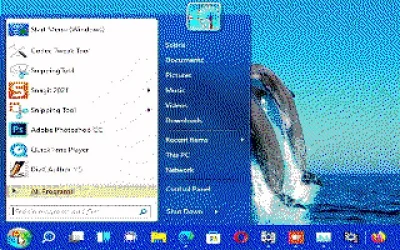
320x200 EGA 16 colors Windows 11 start menu.webp
Just in case you were wondering how Windows 11 would look like at EGA 320x200 16 colors (with dithering).

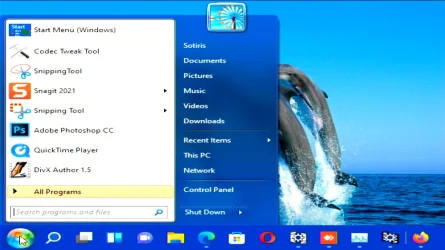
640x480 Windows 11 start menu.webp

And here is VGA 640x480 16 million colors version (such as on an old 14" CRT 640x480 monitor). Difficult to use, but doable. At least until your patience runs out :p
 
Last edited:

My Computers

System One System Two

  • OS
    Windows 11 Pro 23H2 (5699), 25H2 (8457)
    Computer type
    Laptop
    Manufacturer/Model
    Acer Extensa 5630EZ
    CPU
    Mobile DualCore Intel Core 2 Duo T7250, 2000 MHz
    Motherboard
    Acer Extensa 5630
    Memory
    4GB
    Graphics Card(s)
    Mobile Intel(R) GMA 4500M (Mobile 4 series)
    Sound Card
    Realtek ALC268 @ Intel 82801IB ICH9 - High Definition Audio Controller
    Monitor(s) Displays
    1
    Screen Resolution
    1280x800
    Hard Drives
    Samsung SSD 850 EVO 250GB SATA Device (250 GB, SATA-III)
    Internet Speed
    VDSL 50 Mbps
    Browser
    MICROSOFT EDGE
    Antivirus
    WINDOWS DEFENDER
    Other Info
    Legacy MBR installation, no TPM, no Secure Boot, no WDDM 2.0 graphics drivers, no SSE4.2, cannot get more unsupported ;) This is only my test laptop. I had installed Windows 11 here before upgrading my main PC. For my main PC I use everyday see my 2nd system specs.
  • Operating System
    Windows 11 Pro v25H2 (build 26200.8457)
    Computer type
    PC/Desktop
    Manufacturer/Model
    Custom-built PC
    CPU
    Intel Core-i7 3770 3.40GHz s1155 (3rd generation)
    Motherboard
    Asus P8H61 s1155 ATX
    Memory
    2x Kingston Hyper-X Blu 8GB DDR3-1600
    Graphics card(s)
    GIGABYTE GeForce RTX 3050 WINDFORCE OC V2 6GB (GV-N3050WF2OCV2-6GD)
    Sound Card
    Realtek HD audio (ALC887)
    Monitor(s) Displays
    Sony Bravia KDL-19L4000 19" LCD TV via VGA
    Screen Resolution
    1440x900 32-bit 60Hz
    Hard Drives
    WD Blue SA510 2.5 1000GB SSD as system disk, Western Digital Caviar Purple 4TB SATA III (WD40PURZ) as second
    PSU
    Thermaltake Litepower RGB 550W Full Wired
    Case
    SUPERCASE MIDI-TOWER
    Cooling
    Deepcool Gamma Archer CPU cooler, 1x 8cm fan at the back
    Keyboard
    Mitsumi 101-key PS/2
    Mouse
    Sunnyline OptiEye PS/2
    Internet Speed
    100Mbps
    Browser
    Microsoft Edge, Mozilla Firefox
    Antivirus
    Microsoft Windows Defender
    Other Info
    Legacy BIOS (MBR) installation, no TPM, no Secure Boot, WDDM 3.0 graphics drivers, WEI score 7.4
i'm going to try DxWnd + dgVoodoo2 and see if they work and not get any problems with alt tab crash
 

My Computer

System One

  • OS
    Windows 11 Pro X64 Version 25H2 Build 260200.6901
    Computer type
    PC/Desktop
    Manufacturer/Model
    Custom Build
    CPU
    Intel(R) Core(TM) i5-8400 CPU @ 2.80GHz
    Motherboard
    ASROCK B360M Pro4
    Memory
    24GB
    Graphics Card(s)
    NVIDIA GeForce GTX 960
    Sound Card
    Realtek(R) Audio 6.0.9231.1
    Monitor(s) Displays
    Generic Monitor (Dell S2721HN)
    Screen Resolution
    1920x1080
    Hard Drives
    CT240BX500SSD1
    EDILOCA ES106 500GB
    SATA SDD
    Keyboard
    TECKNET Wired Gaming Keyboard Model TK-B002
    Mouse
    Logitech G203 LIGHTSYNC Gaming Mouse
    Browser
    Firefox/Chrome
    Antivirus
    Malwarebytes
Just curious. What games are you trying to play full screen and how? If they are old Windows 98 games you can create a virtual machine in Hyper-V or VirtualBox or other application and install Windows 98 there. Then stretch the virtual desktop to fill your screen and switch the virtual machine to full screen to hide Windows 11 interface. I use a Windows 98 virtual machine with Glide emulator (3dfx proprietary hardware acceleration) to play Rayman 2 and other old games.
 

My Computers

System One System Two

  • OS
    Windows 11 Pro 23H2 (5699), 25H2 (8457)
    Computer type
    Laptop
    Manufacturer/Model
    Acer Extensa 5630EZ
    CPU
    Mobile DualCore Intel Core 2 Duo T7250, 2000 MHz
    Motherboard
    Acer Extensa 5630
    Memory
    4GB
    Graphics Card(s)
    Mobile Intel(R) GMA 4500M (Mobile 4 series)
    Sound Card
    Realtek ALC268 @ Intel 82801IB ICH9 - High Definition Audio Controller
    Monitor(s) Displays
    1
    Screen Resolution
    1280x800
    Hard Drives
    Samsung SSD 850 EVO 250GB SATA Device (250 GB, SATA-III)
    Internet Speed
    VDSL 50 Mbps
    Browser
    MICROSOFT EDGE
    Antivirus
    WINDOWS DEFENDER
    Other Info
    Legacy MBR installation, no TPM, no Secure Boot, no WDDM 2.0 graphics drivers, no SSE4.2, cannot get more unsupported ;) This is only my test laptop. I had installed Windows 11 here before upgrading my main PC. For my main PC I use everyday see my 2nd system specs.
  • Operating System
    Windows 11 Pro v25H2 (build 26200.8457)
    Computer type
    PC/Desktop
    Manufacturer/Model
    Custom-built PC
    CPU
    Intel Core-i7 3770 3.40GHz s1155 (3rd generation)
    Motherboard
    Asus P8H61 s1155 ATX
    Memory
    2x Kingston Hyper-X Blu 8GB DDR3-1600
    Graphics card(s)
    GIGABYTE GeForce RTX 3050 WINDFORCE OC V2 6GB (GV-N3050WF2OCV2-6GD)
    Sound Card
    Realtek HD audio (ALC887)
    Monitor(s) Displays
    Sony Bravia KDL-19L4000 19" LCD TV via VGA
    Screen Resolution
    1440x900 32-bit 60Hz
    Hard Drives
    WD Blue SA510 2.5 1000GB SSD as system disk, Western Digital Caviar Purple 4TB SATA III (WD40PURZ) as second
    PSU
    Thermaltake Litepower RGB 550W Full Wired
    Case
    SUPERCASE MIDI-TOWER
    Cooling
    Deepcool Gamma Archer CPU cooler, 1x 8cm fan at the back
    Keyboard
    Mitsumi 101-key PS/2
    Mouse
    Sunnyline OptiEye PS/2
    Internet Speed
    100Mbps
    Browser
    Microsoft Edge, Mozilla Firefox
    Antivirus
    Microsoft Windows Defender
    Other Info
    Legacy BIOS (MBR) installation, no TPM, no Secure Boot, WDDM 3.0 graphics drivers, WEI score 7.4
theme park inc and theme park world going to try both programmes together like i said and see what happens
 

My Computer

System One

  • OS
    Windows 11 Pro X64 Version 25H2 Build 260200.6901
    Computer type
    PC/Desktop
    Manufacturer/Model
    Custom Build
    CPU
    Intel(R) Core(TM) i5-8400 CPU @ 2.80GHz
    Motherboard
    ASROCK B360M Pro4
    Memory
    24GB
    Graphics Card(s)
    NVIDIA GeForce GTX 960
    Sound Card
    Realtek(R) Audio 6.0.9231.1
    Monitor(s) Displays
    Generic Monitor (Dell S2721HN)
    Screen Resolution
    1920x1080
    Hard Drives
    CT240BX500SSD1
    EDILOCA ES106 500GB
    SATA SDD
    Keyboard
    TECKNET Wired Gaming Keyboard Model TK-B002
    Mouse
    Logitech G203 LIGHTSYNC Gaming Mouse
    Browser
    Firefox/Chrome
    Antivirus
    Malwarebytes
Bingo! Like I said it is a Windows XP era game that also runs on Windows 95 and 98. Try the utilities you said, but I think it will be better if you install it on a Windows 98 or XP virtual machine. Switch the virtual machine to full screen and then select to stretch to fill the screen. Some years ago virtual machines didn't support 3D hardware acceleration and performance sucked. Now they support DirectX and Glide (with a Glide wrapper) and games look perfect. They also support OpenGL for a few games that have it but most require DirectX. I use VMware Workstation with the VMware SVGA II drivers (part of VMware Tools) and 3D acceleration enabled. Last time I checked, VMware Workstation cannot automatically download latest VMware Tools (probably the servers changed), but you can download them manually and install them. They come as an ISO (CD image) which you open with the virtual CD-ROM and start Setup.


Last edited:

My Computers

System One System Two

  • OS
    Windows 11 Pro 23H2 (5699), 25H2 (8457)
    Computer type
    Laptop
    Manufacturer/Model
    Acer Extensa 5630EZ
    CPU
    Mobile DualCore Intel Core 2 Duo T7250, 2000 MHz
    Motherboard
    Acer Extensa 5630
    Memory
    4GB
    Graphics Card(s)
    Mobile Intel(R) GMA 4500M (Mobile 4 series)
    Sound Card
    Realtek ALC268 @ Intel 82801IB ICH9 - High Definition Audio Controller
    Monitor(s) Displays
    1
    Screen Resolution
    1280x800
    Hard Drives
    Samsung SSD 850 EVO 250GB SATA Device (250 GB, SATA-III)
    Internet Speed
    VDSL 50 Mbps
    Browser
    MICROSOFT EDGE
    Antivirus
    WINDOWS DEFENDER
    Other Info
    Legacy MBR installation, no TPM, no Secure Boot, no WDDM 2.0 graphics drivers, no SSE4.2, cannot get more unsupported ;) This is only my test laptop. I had installed Windows 11 here before upgrading my main PC. For my main PC I use everyday see my 2nd system specs.
  • Operating System
    Windows 11 Pro v25H2 (build 26200.8457)
    Computer type
    PC/Desktop
    Manufacturer/Model
    Custom-built PC
    CPU
    Intel Core-i7 3770 3.40GHz s1155 (3rd generation)
    Motherboard
    Asus P8H61 s1155 ATX
    Memory
    2x Kingston Hyper-X Blu 8GB DDR3-1600
    Graphics card(s)
    GIGABYTE GeForce RTX 3050 WINDFORCE OC V2 6GB (GV-N3050WF2OCV2-6GD)
    Sound Card
    Realtek HD audio (ALC887)
    Monitor(s) Displays
    Sony Bravia KDL-19L4000 19" LCD TV via VGA
    Screen Resolution
    1440x900 32-bit 60Hz
    Hard Drives
    WD Blue SA510 2.5 1000GB SSD as system disk, Western Digital Caviar Purple 4TB SATA III (WD40PURZ) as second
    PSU
    Thermaltake Litepower RGB 550W Full Wired
    Case
    SUPERCASE MIDI-TOWER
    Cooling
    Deepcool Gamma Archer CPU cooler, 1x 8cm fan at the back
    Keyboard
    Mitsumi 101-key PS/2
    Mouse
    Sunnyline OptiEye PS/2
    Internet Speed
    100Mbps
    Browser
    Microsoft Edge, Mozilla Firefox
    Antivirus
    Microsoft Windows Defender
    Other Info
    Legacy BIOS (MBR) installation, no TPM, no Secure Boot, WDDM 3.0 graphics drivers, WEI score 7.4
Bingo! Like I said it is a Windows XP era game that also runs on Windows 95 and 98. Try the utilities you said, but I think it will be better if you install it on a Windows 98 or XP virtual machine. Switch the virtual machine to full screen and then select to stretch to fill the screen. Some years ago virtual machines didn't support 3D hardware acceleration and performance sucked. Now they support DirectX and Glide (with a Glide wrapper) and games look perfect. They also support OpenGL for a few games that have it but most require DirectX. I use VMware Workstation with the VMware SVGA II drivers (part of VMware Tools) and 3D acceleration enabled. Last time I checked, VMware Workstation cannot automatically download latest VMware Tools (probably the servers changed), but you can download them manually and install them. They come as an ISO (CD image) which you open with the virtual CD-ROM and start Setup.


will this work because I don't know how to use this programme as I have never used this programme before
 

My Computer

System One

  • OS
    Windows 11 Pro X64 Version 25H2 Build 260200.6901
    Computer type
    PC/Desktop
    Manufacturer/Model
    Custom Build
    CPU
    Intel(R) Core(TM) i5-8400 CPU @ 2.80GHz
    Motherboard
    ASROCK B360M Pro4
    Memory
    24GB
    Graphics Card(s)
    NVIDIA GeForce GTX 960
    Sound Card
    Realtek(R) Audio 6.0.9231.1
    Monitor(s) Displays
    Generic Monitor (Dell S2721HN)
    Screen Resolution
    1920x1080
    Hard Drives
    CT240BX500SSD1
    EDILOCA ES106 500GB
    SATA SDD
    Keyboard
    TECKNET Wired Gaming Keyboard Model TK-B002
    Mouse
    Logitech G203 LIGHTSYNC Gaming Mouse
    Browser
    Firefox/Chrome
    Antivirus
    Malwarebytes
All of methods that mentioned here can be work.
All you have to do is trying them. ;-)
 

My Computer

System One

  • OS
    Windows 11 25H2 Home Single Language (26200.8037)
    Computer type
    Laptop
    Manufacturer/Model
    LENOVO IdeaPad 5 15ITL05
    CPU
    Intel Core i3-1115G4
    Motherboard
    There is no such a God, I only know mother-Earth
    Memory
    8GB
    Graphics Card(s)
    on-board
    Sound Card
    on-board
    Monitor(s) Displays
    (s) is too ambitious for me
    Screen Resolution
    1920*1080
    Hard Drives
    256GB (SSD)
    PSU
    I was very young when I last saw a PSU
    Case
    ...
    Cooling
    My coldness is enough to cool the computer
    Keyboard
    A broken and very clean keyboard
    Mouse
    Rat
    Internet Speed
    Slowest internet connection in Europe
    Browser
    ChromePortable / FirefoxPortable / TorBrowser
    Antivirus
    G-Virus
    Other Info
    I can simply say that I took the red pill and I am not happy with it.
VMware is an application that emulates an old computer and lets you define the amount of RAM (up to 2/3 your system RAM) and the size of a virtual disk. You can also open the Windows 98 or XP ISO and create the appropriate virtual machine automatically. Then the ISO is loaded on the virtual CD-ROM drive and Setup begins. Just follow the on screen instructions and type the Windows key when prompted. After installation is complete, select the VMware Tools ISO to install the necessary drivers and utilities. Then you can open the game ISO to install it on the virtual machine.

PS: Maximum RAM supported by Windows 98 without patching is 512MB. If you put more you will have incompatibilities and BSODs. Also maximum disk is 32GB formatted as FAT32, but this is done automatically during setup. Maximum RAM supported by Windows XP without patching is 4GB (usable only 3.25GB, the rest address space is reserved for the system).
 

My Computers

System One System Two

  • OS
    Windows 11 Pro 23H2 (5699), 25H2 (8457)
    Computer type
    Laptop
    Manufacturer/Model
    Acer Extensa 5630EZ
    CPU
    Mobile DualCore Intel Core 2 Duo T7250, 2000 MHz
    Motherboard
    Acer Extensa 5630
    Memory
    4GB
    Graphics Card(s)
    Mobile Intel(R) GMA 4500M (Mobile 4 series)
    Sound Card
    Realtek ALC268 @ Intel 82801IB ICH9 - High Definition Audio Controller
    Monitor(s) Displays
    1
    Screen Resolution
    1280x800
    Hard Drives
    Samsung SSD 850 EVO 250GB SATA Device (250 GB, SATA-III)
    Internet Speed
    VDSL 50 Mbps
    Browser
    MICROSOFT EDGE
    Antivirus
    WINDOWS DEFENDER
    Other Info
    Legacy MBR installation, no TPM, no Secure Boot, no WDDM 2.0 graphics drivers, no SSE4.2, cannot get more unsupported ;) This is only my test laptop. I had installed Windows 11 here before upgrading my main PC. For my main PC I use everyday see my 2nd system specs.
  • Operating System
    Windows 11 Pro v25H2 (build 26200.8457)
    Computer type
    PC/Desktop
    Manufacturer/Model
    Custom-built PC
    CPU
    Intel Core-i7 3770 3.40GHz s1155 (3rd generation)
    Motherboard
    Asus P8H61 s1155 ATX
    Memory
    2x Kingston Hyper-X Blu 8GB DDR3-1600
    Graphics card(s)
    GIGABYTE GeForce RTX 3050 WINDFORCE OC V2 6GB (GV-N3050WF2OCV2-6GD)
    Sound Card
    Realtek HD audio (ALC887)
    Monitor(s) Displays
    Sony Bravia KDL-19L4000 19" LCD TV via VGA
    Screen Resolution
    1440x900 32-bit 60Hz
    Hard Drives
    WD Blue SA510 2.5 1000GB SSD as system disk, Western Digital Caviar Purple 4TB SATA III (WD40PURZ) as second
    PSU
    Thermaltake Litepower RGB 550W Full Wired
    Case
    SUPERCASE MIDI-TOWER
    Cooling
    Deepcool Gamma Archer CPU cooler, 1x 8cm fan at the back
    Keyboard
    Mitsumi 101-key PS/2
    Mouse
    Sunnyline OptiEye PS/2
    Internet Speed
    100Mbps
    Browser
    Microsoft Edge, Mozilla Firefox
    Antivirus
    Microsoft Windows Defender
    Other Info
    Legacy BIOS (MBR) installation, no TPM, no Secure Boot, WDDM 3.0 graphics drivers, WEI score 7.4
i'm going to try dxwnd and dgvoodo2 together first and then if this doesn't work i will give VMwear a try
 

My Computer

System One

  • OS
    Windows 11 Pro X64 Version 25H2 Build 260200.6901
    Computer type
    PC/Desktop
    Manufacturer/Model
    Custom Build
    CPU
    Intel(R) Core(TM) i5-8400 CPU @ 2.80GHz
    Motherboard
    ASROCK B360M Pro4
    Memory
    24GB
    Graphics Card(s)
    NVIDIA GeForce GTX 960
    Sound Card
    Realtek(R) Audio 6.0.9231.1
    Monitor(s) Displays
    Generic Monitor (Dell S2721HN)
    Screen Resolution
    1920x1080
    Hard Drives
    CT240BX500SSD1
    EDILOCA ES106 500GB
    SATA SDD
    Keyboard
    TECKNET Wired Gaming Keyboard Model TK-B002
    Mouse
    Logitech G203 LIGHTSYNC Gaming Mouse
    Browser
    Firefox/Chrome
    Antivirus
    Malwarebytes
I hope they work because their use is simpler than creating a virtual machine.
 

My Computers

System One System Two

  • OS
    Windows 11 Pro 23H2 (5699), 25H2 (8457)
    Computer type
    Laptop
    Manufacturer/Model
    Acer Extensa 5630EZ
    CPU
    Mobile DualCore Intel Core 2 Duo T7250, 2000 MHz
    Motherboard
    Acer Extensa 5630
    Memory
    4GB
    Graphics Card(s)
    Mobile Intel(R) GMA 4500M (Mobile 4 series)
    Sound Card
    Realtek ALC268 @ Intel 82801IB ICH9 - High Definition Audio Controller
    Monitor(s) Displays
    1
    Screen Resolution
    1280x800
    Hard Drives
    Samsung SSD 850 EVO 250GB SATA Device (250 GB, SATA-III)
    Internet Speed
    VDSL 50 Mbps
    Browser
    MICROSOFT EDGE
    Antivirus
    WINDOWS DEFENDER
    Other Info
    Legacy MBR installation, no TPM, no Secure Boot, no WDDM 2.0 graphics drivers, no SSE4.2, cannot get more unsupported ;) This is only my test laptop. I had installed Windows 11 here before upgrading my main PC. For my main PC I use everyday see my 2nd system specs.
  • Operating System
    Windows 11 Pro v25H2 (build 26200.8457)
    Computer type
    PC/Desktop
    Manufacturer/Model
    Custom-built PC
    CPU
    Intel Core-i7 3770 3.40GHz s1155 (3rd generation)
    Motherboard
    Asus P8H61 s1155 ATX
    Memory
    2x Kingston Hyper-X Blu 8GB DDR3-1600
    Graphics card(s)
    GIGABYTE GeForce RTX 3050 WINDFORCE OC V2 6GB (GV-N3050WF2OCV2-6GD)
    Sound Card
    Realtek HD audio (ALC887)
    Monitor(s) Displays
    Sony Bravia KDL-19L4000 19" LCD TV via VGA
    Screen Resolution
    1440x900 32-bit 60Hz
    Hard Drives
    WD Blue SA510 2.5 1000GB SSD as system disk, Western Digital Caviar Purple 4TB SATA III (WD40PURZ) as second
    PSU
    Thermaltake Litepower RGB 550W Full Wired
    Case
    SUPERCASE MIDI-TOWER
    Cooling
    Deepcool Gamma Archer CPU cooler, 1x 8cm fan at the back
    Keyboard
    Mitsumi 101-key PS/2
    Mouse
    Sunnyline OptiEye PS/2
    Internet Speed
    100Mbps
    Browser
    Microsoft Edge, Mozilla Firefox
    Antivirus
    Microsoft Windows Defender
    Other Info
    Legacy BIOS (MBR) installation, no TPM, no Secure Boot, WDDM 3.0 graphics drivers, WEI score 7.4

Latest Support Threads

Back
Top Bottom