How to make .msu file from downloaded windows update files in Windows>SoftwareDistribution >Download folder?


Ramesh Sharma

Well-known member
Member
Local time
6:07 AM
Posts
280
OS
Window 11 v24H2 Build 26100.2033
To make updated iso of windows 11 , I want to use WIMTOOLS by @hsehestedt and USBUpdate by @Kari. Windows update downloads the files in UpdateId type.
To make all these files collection in .msu form, is there any method or tool to convert these update id files in .msu form or cab form?
 
Windows Build/Version
Windows 11Pro v 22H2 , 22621.2283

My Computer

System One

  • OS
    Window 11 v24H2 Build 26100.2033
    Computer type
    PC/Desktop
    Manufacturer/Model
    ASSEMMBLED
    CPU
    Intel(R) Core(TM) i3-2100 CPU @ 3.10GHz 3.10 GHz
    Motherboard
    ZEBRONICS
    Memory
    4.00 GB (3.89 GB usable)
    Graphics Card(s)
    Onboard
    Sound Card
    Onboard
    Monitor(s) Displays
    LG
    Screen Resolution
    1366x768
    Hard Drives
    Toshiba HDD 1 TB
    Keyboard
    Mechanical
    Mouse
    Mechanical
    Internet Speed
    700 kb/s
    Browser
    Microsoft EDGE, CHROME
    Antivirus
    Microsoft Defender
Ramesh, I'm not quite understanding what you are asking.

If you could provide the following information, it might help me to understand:

1) What is an "UpdateId" type?

2) Could you please provide an example of such a file?

As much detail as possible would be appreciated!
 

My Computers

System One System Two

  • OS
    Win11 Pro 25H2 (RTM+)
    Computer type
    PC/Desktop
    Manufacturer/Model
    Acemagic
    CPU
    Intel i7-14650HX
    Memory
    32 GB
    Graphics Card(s)
    No GPU - Built-in Intel Graphics
    Sound Card
    Integrated
    Monitor(s) Displays
    Varies as machine will often be moved to locations with different monitors
    Screen Resolution
    Varies
    Hard Drives
    1 x 1TB Gen 4 NVMe SSD
    PSU
    120W Power Brick
    Keyboard
    Corsair K70 Max RGB Magnetic Keyboard
    Mouse
    Logitech MX Master 3
    Internet Speed
    1Gb Up / 1 Gb Down
    Browser
    Edge
    Antivirus
    Windows Defender
  • Operating System
    Win11 Pro 25H2 (RTM+)
    Computer type
    Laptop
    Manufacturer/Model
    Lenovo ThinkBook 13x Gen 2
    CPU
    Intel i7-1255U
    Memory
    16 GB
    Graphics card(s)
    Intel Iris Xe Graphics
    Sound Card
    Realtek® ALC3306-CG codec
    Monitor(s) Displays
    13.3-inch IPS Display
    Screen Resolution
    WQXGA (2560 x 1600)
    Hard Drives
    2 TB 4 x 4 NVMe SSD
    PSU
    USB-C / Thunderbolt 4 Power / Charging
    Keyboard
    Backlit, spill resistant keyboard
    Mouse
    Buttonless Glass Precision Touchpad
    Internet Speed
    1Gb Up / 1Gb Down
    Browser
    Edge
    Antivirus
    Windows Defender
    Other Info
    WiFi 6e / Bluetooth 5.1 / Facial Recognition / Fingerprint Sensor / ToF (Time of Flight) Human Presence Sensor
OP is under a wrong impression on how Updates work by looking inside the staging folders.

WU internally uses UUP files for reducing network overhead for downloads, and if you're updating an offline image then use the normal MSU or CAB files downloaded from Microsoft Updates Catalog.

Or use one of those popular Windows Updates download tools.
 

My Computer

System One

  • OS
    Windows 7
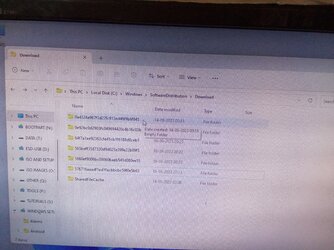
Please see the image attached herewith showing download folder in SoftwareDistribution directory of base folder Windows. All folders show id only , no msu files in download folder. As soon as Windows Update files are installed after having been downloaded, all folders become empty. So how to catch these files? Currently I am running Windows Update, in second image also Id files are being seen.
 

Attachments

  • IMG_20230917_234945.jpg
    IMG_20230917_234945.jpg
    1.5 MB · Views: 1
  • IMG_20230918_001150.jpg
    IMG_20230918_001150.jpg
    721.1 KB · Views: 1
Last edited:

My Computer

System One

  • OS
    Window 11 v24H2 Build 26100.2033
    Computer type
    PC/Desktop
    Manufacturer/Model
    ASSEMMBLED
    CPU
    Intel(R) Core(TM) i3-2100 CPU @ 3.10GHz 3.10 GHz
    Motherboard
    ZEBRONICS
    Memory
    4.00 GB (3.89 GB usable)
    Graphics Card(s)
    Onboard
    Sound Card
    Onboard
    Monitor(s) Displays
    LG
    Screen Resolution
    1366x768
    Hard Drives
    Toshiba HDD 1 TB
    Keyboard
    Mechanical
    Mouse
    Mechanical
    Internet Speed
    700 kb/s
    Browser
    Microsoft EDGE, CHROME
    Antivirus
    Microsoft Defender

My Computer

System One

  • OS
    Windows 11 Pro 25H2 (Build 26200.8524)
    Computer type
    PC/Desktop
    Manufacturer/Model
    Dell Pro Max Tower T2 FCT2250
    CPU
    Intel Core Ultra 9 285 5.6 GHz
    Motherboard
    64-bit operating system, x64-based processor
    Memory
    32.00 GB
    Graphics Card(s)
    Intel Integrated Graphics (128 MB)
    Sound Card
    Realtek Audio
    Monitor(s) Displays
    Dell P2714H Monitor
    Screen Resolution
    1920 x 1080
    Hard Drives
    1 x 512GB M.2 XG10d SED KIOXIA PCIe solid state drive (Internal)
    1 x 2TB Seagate ST2000DM008-2UB102 HDD (Internal)
    1 x 1TB Seagate STGX4000400 External HDD
    1 x 4TB Seagate STGX4000400 External HDD
    1 x 6TB WD Elements AE 2689 External HDD
    PSU
    500 Watts
    Cooling
    Air
    Keyboard
    Microsoft Wired Keyboard 600
    Mouse
    Microsoft USB Basic Optical Mouse v2.0
    Browser
    Firefox
    Antivirus
    Windows Defender + Malwarebytes Premium
    Other Info
    BaseBoard Manufacturer Dell Inc.
    BaseBoard Product 022RY57
    BaseBoard Version A01

My Computer

System One

  • OS
    Window 11 v24H2 Build 26100.2033
    Computer type
    PC/Desktop
    Manufacturer/Model
    ASSEMMBLED
    CPU
    Intel(R) Core(TM) i3-2100 CPU @ 3.10GHz 3.10 GHz
    Motherboard
    ZEBRONICS
    Memory
    4.00 GB (3.89 GB usable)
    Graphics Card(s)
    Onboard
    Sound Card
    Onboard
    Monitor(s) Displays
    LG
    Screen Resolution
    1366x768
    Hard Drives
    Toshiba HDD 1 TB
    Keyboard
    Mechanical
    Mouse
    Mechanical
    Internet Speed
    700 kb/s
    Browser
    Microsoft EDGE, CHROME
    Antivirus
    Microsoft Defender

Latest Support Threads

Back
Top Bottom