Solved How to permanently enable Numlock


Hey.
Here you can find a way that i use at my system , to permanently enable Numlock.
We can put the file/s at the path we want.

1) Firstly, we need one of these 2 files. One its at ps.1 and the other is the .ps1 file compiled to .exe.
2) Next we need to run one of these at a) system Logon (includes Restart) and b) system sleep and hibernation.
To do that we need to create 2 tasks at task scheduler. One for a) one for b)
3) Creating the task for Logon :


General :
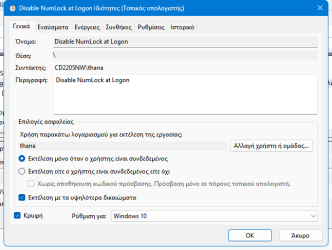
1711214630691.png


Trigger:
We set the trigger at "when logging in any user"
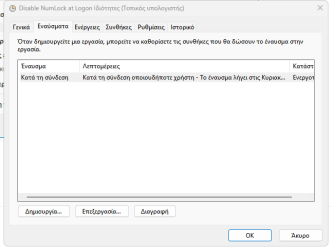
1711214766136.png


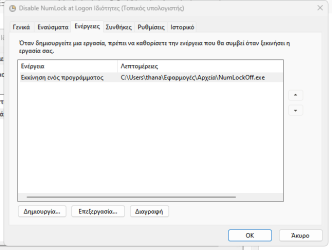
Action:

1711214899787.png


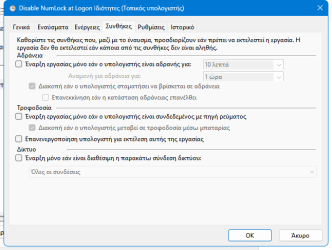
Conditions:

1711215214987.png


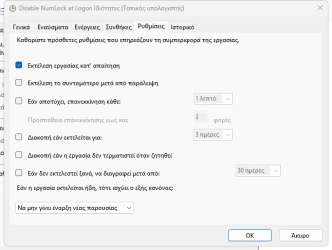
Settings:

1711215280980.png


Thats it for Logon and Restart.👈
For Sleep and Hibernation , here is the way.


Notes:
a)
1) To test if it works while you use the system :
-open notepad
-enable numlock by pressing its key and ensure that numlock is Enabled
-right click and choose Run at task at Task Scheduler
-go back to notepad and check that you can type numbers

2) To test if it works at Restart , Sleep , Hibernation :
-open notepad
-enable numlock by pressing its key and ensure that numlock is Enabled
-Restart or Sleep or Hibernate the system
-ensure that you can type numbers

b)
-.Ps1 file will produce a flash window when running
-.Exe file will be completely hidden , no windows of flashes. Thats better.

c) With the same procedure we could have always enabled the NumLock
The only changes are the file/s.

I had tested at my system and it works 100% OK.


Cheers.
 
Windows Build/Version
Windows 11 pro 23H2
Last edited:
No, his answers show that he wants to turn it on or off.


All the best,
Denis
I assumed he wanted the key killed so he doesn’t accidently turn it off. Regardless if he want’s it killed or not, I know what his objective is.
I don’t have a motherboard that does not enable num lock on boot. So If I was to kill the key, my num lock stays on.


Hang on though. If the number lock is enabled, the arrows don’t operate, the numbers do. Your comment is adverse to the request.
So you just want to kill that key altogether and hope that the settings remember that you want the number lock enabled at log-on?

You have right. English isnt my native language and i lost in translation. I will correct that.
So i want NumLock enabled by default after Restart , sleep or hibernation.
 

My Computers My Computers

  • At a glance

    Windows 11 Pro 25H2 Build 26200.9168Intel(R) Core(TM) i7-4770K CPU @ 3.50GHz32.0 GB of I forget and the box is in storage.Gigabyte nVidia GeForce GTX 1660 Super OC 6GB
    OS
    Windows 11 Pro 25H2 Build 26200.9168
    Computer type
    PC/Desktop
    Manufacturer/Model
    Sin-built 2013
    CPU
    Intel(R) Core(TM) i7-4770K CPU @ 3.50GHz
    Motherboard
    ASUS ROG Maximus VI Formula
    Memory
    32.0 GB of I forget and the box is in storage.
    Graphics Card(s)
    Gigabyte nVidia GeForce GTX 1660 Super OC 6GB
    Sound Card
    ROG SupremeFX Formula 8-Channel High Definition Audio
    Monitor(s) Displays
    5 x LG 25MS500-B - 1 x 24MK430H-B - 1 x Wacom Pro 22" Touch Screen Tablet
    Screen Resolution
    All over the place
    Hard Drives
    Too many to list. OS on Samsung 1TB 870 QVO SATA
    PSU
    Silverstone 1500
    Case
    NZXT Phantom 820 Full-Tower Case
    Cooling
    Noctua NH-D15 Elite Class Dual Tower CPU Cooler / 6 x EziDIY 120mm / 2 x Corsair 140mm somethings / 1 x 140mm Thermaltake something / 2 x 200mm Corsair.
    Keyboard
    Corsair K95 / Logitech diNovo Edge Wireless
    Mouse
    Logitech: G402 / G502 / Mx Masters / Mx Air Cordless
    Internet Speed
    2000/500Mbps
    Browser
    All sorts
    Antivirus
    Kaspersky Premium
    Other Info
    ㅤㅤㅤㅤㅤㅤㅤㅤㅤㅤㅤㅤㅤㅤㅤㅤㅤㅤㅤㅤㅤㅤㅤㅤㅤㅤㅤㅤㅤㅤㅤㅤㅤㅤㅤㅤㅤㅤㅤㅤ⠀⠀⠀⠀⠀⠀⠀⠀⠀⠀
    TP-Link BE9300 WiFi 7 Bluetooth 5.4 (Archer TBE550E)
    TP-Link TX201 V1 2.5GB Lan

    Grandstream HT812 - VoIP
    ASUS DSL-AX82U - Mesh
    ASUS RT-AC68U - Mesh
    ASUS RT-BE88U Router

    Brother MFC-L2880DW Printer

    I’m on a horse.
  • At a glance

    Windows 11 Pro 25H2 Build 26200.9168 (Wifes)13th Generation Intel® Core™ i5-1340P Process...16GB LPDDR5-52001x Intel® Iris® Xe Graphics
    Operating System
    Windows 11 Pro 25H2 Build 26200.9168 (Wifes)
    Computer type
    Laptop
    Manufacturer/Model
    LENOVO Yoga 7 14IRL8 - Type 82YL
    CPU
    13th Generation Intel® Core™ i5-1340P Processor(Core™ i5-1340P)
    Memory
    16GB LPDDR5-5200
    Graphics card(s)
    1x Intel® Iris® Xe Graphics
    Sound Card
    Optimized with Dolby Atmos®
    Screen Resolution
    QHD 2880 x 1800 OLED
    Hard Drives
    M.2 512 GB SSD PCIe
    Mouse
    Logiteck MX Master 3S
    Internet Speed
    2000/500
    Antivirus
    Defender / Malwarebytes
    Other Info
    …still on a horse.


    Wireless Network: Wi-Fi 6E 2x2 AX; Bluetooth® 5.1 or above
    Ports: 1x 1 Novo button; 2 in 1 Audio Combo jack; Micro SD Card Reader; HDMI 1.4b; 2 x USB Type-C (TBT4)
    USB 3.2 Gen 2 DP 1.4a
    PD 3.0); 1 x USB 3.2 Gen1 Type A
    Camera
    1x 1080P FHD IR/RGB Hybrid with Privacy Shutter and Dual Array Microphone
    Graphics
    1x Intel® Iris® Xe Graphics
    Monitor
    14" WUXGA
    Form Factor
    Convertible Notebook
  • Windows 11 Pro 25H2 Build 26200.9168 (Wifes)

    Yoga 7 2-in-1 14IML9 - Type 83DJ

    Processor: Intel® Core™ Ultra 7 155H Processor(Core™ Ultra 7 155H)

    Memory: 32GB LPD5X-7467

    Hard Drive: 1 TB SSD PCIe

    Wireless Network: 1x Wi-Fi 6E 2x2 AX; Bluetooth® 5.1 or above

    Ports: 1 x HDMI 2.1 TMDS; 1 x Novo Button; 1 x Combo Audio Jack
    2 x USB-C (USB 4.0)
    1 x USB-A 3.2 Gen 1

    Camera: 1080P FHD IR Hybrid with Dual Microphone

    Graphics: Intel® Arc™ Graphics

    Monitor: 14" 2.8K

    ...Where's my horse?
Hey.
Here you can find a way that i use at my system , to permanently enable Numlock.
We can put the file/s at the path we want.

1) Firstly, we need one of these 2 files. One its at ps.1 and the other is the .ps1 file compiled to .exe.
2) Next we need to run one of these at a) system Logon (includes Restart) and b) system sleep and hibernation.
To do that we need to create 2 tasks at task scheduler. One for a) one for b)
3) Creating the task for Logon :


General :

View attachment 91237


Trigger:
We set the trigger at "when logging in any user"

View attachment 91238


Action:

View attachment 91239


Conditions:

View attachment 91240


Settings:

View attachment 91241


Thats it for Logon and Restart.👈
For Sleep and Hibernation , here is the way.


Notes:
a)
1) To test if it works while you use the system :
-open notepad
-enable numlock by pressing its key and ensure that numlock is Enabled
-right click and choose Run at task at Task Scheduler
-go back to notepad and check that you can type numbers

2) To test if it works at Restart , Sleep , Hibernation :
-open notepad
-enable numlock by pressing its key and ensure that numlock is Enabled
-Restart or Sleep or Hibernate the system
-ensure that you can type numbers

b)
-.Ps1 file will produce a flash window when running
-.Exe file will be completely hidden , no windows of flashes. Thats better.

c) With the same procedure we could have always enabled the NumLock
The only changes are the file/s.

I had tested at my system and it works 100% OK.


Cheers.
Good Morning, i have the same issue , please, can you please share again the .exe file ? thank you !
 

My Computer My Computer

At a glance

Windows 11
OS
Windows 11
To get a member notified of a question directed to them use their name and precede it with the @ symbol, e.g. @Berton.
 

My Computers My Computers

  • At a glance

    Win11 Pro RTM Version 24H2 Build 26100.4202Intel Core i5 11th Gen. 2.40GHz12GB
    OS
    Win11 Pro RTM Version 24H2 Build 26100.4202
    Computer type
    Laptop
    Manufacturer/Model
    Dell Vostro 3400
    CPU
    Intel Core i5 11th Gen. 2.40GHz
    Memory
    12GB
    Hard Drives
    256GB SSD NVMe M.2
  • At a glance

    Win11 Pro RTM Version 24H2 Build 26100.4202Intel Core i5 10th Gen. 2.90GHz16GBOnboard, no VGA, using a DisplayPort-to-VGA a...
    Operating System
    Win11 Pro RTM Version 24H2 Build 26100.4202
    Computer type
    PC/Desktop
    Manufacturer/Model
    Dell Vostro 5890
    CPU
    Intel Core i5 10th Gen. 2.90GHz
    Memory
    16GB
    Graphics card(s)
    Onboard, no VGA, using a DisplayPort-to-VGA adapter
    Monitor(s) Displays
    24" Dell
    Hard Drives
    512GB SSD NVMe, 4TB Seagate HDD
    Browser
    Firefox, Edge
    Antivirus
    Windows Defender/Microsoft Security

My Computer My Computer

At a glance

Windows 11 ProIntel 113700H16GBNVIDIA RTX 3050 ti
OS
Windows 11 Pro
Computer type
Laptop
Manufacturer/Model
HP Pavilion 17 cd2205nw
CPU
Intel 113700H
Memory
16GB
Graphics Card(s)
NVIDIA RTX 3050 ti
Screen Resolution
1980x1020
Hard Drives
Micron 512GB
Mouse
Logitech
Internet Speed
100Mbs
Browser
Vivaldi , Edge
Antivirus
Windows defender
Because I was anxious to see what it would do, I clicked on that link.
This is what I got:

003271.webp

Translated:
We're sorry. You don't have access to this document because it doesn't meet our Terms of Service. You can find more information about this topic in the Google Drive Help Center.

I do have Google Drive myself, so that should not have been the reason for not having no access. I think it might be because it's an exe file (if that's the case, can't check it).
 

My Computer My Computer

At a glance

Windows 11 Pro 25H2AMD Ryzen 7 5700GKingston FURY Beast 2x16GB DIMM DDR4 2666 CL16MSI GeForce GT 730 2GB LP V1
OS
Windows 11 Pro 25H2
Computer type
PC/Desktop
Manufacturer/Model
Build by vendor to my specs
CPU
AMD Ryzen 7 5700G
Motherboard
MSI PRO B550M-P Gen3
Memory
Kingston FURY Beast 2x16GB DIMM DDR4 2666 CL16
Graphics Card(s)
MSI GeForce GT 730 2GB LP V1
Sound Card
Creative Sound Blaster Audigy FX
Monitor(s) Displays
Samsung S24E450F 24"
Screen Resolution
1920 x 1080
Hard Drives
1. SSD Crucial P5 Plus 500GB PCIe M.2
2. SSD-SATA Crucial MX500-2TB
PSU
Corsair CV650W
Case
Cooler Master Silencio S400
Cooling
Cooler Master Hyper H412R with Be Quiet Pure Wings 2 PWM BL038 fan
Keyboard
Cherry Stream (wired, scissor keys)
Mouse
Asus WT465 (wireless)
Internet Speed
70 Mbps down / 80 Mbps up
Browser
Firefox 130.0
Antivirus
F-Secure (Internetprovider version)
Other Info
Router: FRITZBox 7490
Oracle VirtualBox 7 for testing software on Win 10 or 11
Because I was anxious to see what it would do, I clicked on that link.
This is what I got:

View attachment 125749

Translated:
We're sorry. You don't have access to this document because it doesn't meet our Terms of Service. You can find more information about this topic in the Google Drive Help Center.

I do have Google Drive myself, so that should not have been the reason for not having no access. I think it might be because it's an exe file (if that's the case, can't check it).
Being curious and don't use Google, I looked and just got the same thing about the site.

1739895087836.webp
 

My Computers My Computers

  • At a glance

    Win11 Pro RTM Version 24H2 Build 26100.4202Intel Core i5 11th Gen. 2.40GHz12GB
    OS
    Win11 Pro RTM Version 24H2 Build 26100.4202
    Computer type
    Laptop
    Manufacturer/Model
    Dell Vostro 3400
    CPU
    Intel Core i5 11th Gen. 2.40GHz
    Memory
    12GB
    Hard Drives
    256GB SSD NVMe M.2
  • At a glance

    Win11 Pro RTM Version 24H2 Build 26100.4202Intel Core i5 10th Gen. 2.90GHz16GBOnboard, no VGA, using a DisplayPort-to-VGA a...
    Operating System
    Win11 Pro RTM Version 24H2 Build 26100.4202
    Computer type
    PC/Desktop
    Manufacturer/Model
    Dell Vostro 5890
    CPU
    Intel Core i5 10th Gen. 2.90GHz
    Memory
    16GB
    Graphics card(s)
    Onboard, no VGA, using a DisplayPort-to-VGA adapter
    Monitor(s) Displays
    24" Dell
    Hard Drives
    512GB SSD NVMe, 4TB Seagate HDD
    Browser
    Firefox, Edge
    Antivirus
    Windows Defender/Microsoft Security
Because I was anxious to see what it would do, I clicked on that link.
This is what I got:

View attachment 125749

Translated:
We're sorry. You don't have access to this document because it doesn't meet our Terms of Service. You can find more information about this topic in the Google Drive Help Center.

I do have Google Drive myself, so that should not have been the reason for not having no access. I think it might be because it's an exe file (if that's the case, can't check it).

1) Google marks unknown .exe as danger and block these
2) When i tried to download from a clean profile (Vivaldi's private browsing) ,
i take a message "This file has been blocked because it contains a dangerous virus. It is only visible to its owner." from Google.
Anyway , please check it again at One Drive. I checked with the same way and was OK.
 

My Computer My Computer

At a glance

Windows 11 ProIntel 113700H16GBNVIDIA RTX 3050 ti
OS
Windows 11 Pro
Computer type
Laptop
Manufacturer/Model
HP Pavilion 17 cd2205nw
CPU
Intel 113700H
Memory
16GB
Graphics Card(s)
NVIDIA RTX 3050 ti
Screen Resolution
1980x1020
Hard Drives
Micron 512GB
Mouse
Logitech
Internet Speed
100Mbs
Browser
Vivaldi , Edge
Antivirus
Windows defender
Anyway , please check it again at One Drive.
I just succesfully downloaded that file.
Have to test it later on, on my VirtualBox test system.
Never test any unknown app in my normal system directly.

I had that numlock problem as well, thought I solved it by a AutoHotkey string [SetNumLockState "On"] that always switches Numlock on at system start.
But often when returning from some VirtualBox snapshot into normal Windows, the numlock in that normal windows is off again and when I use the calculator after that, it does not function. Of course I activate numlock again, but would like to always have it on if possible.

So I'll see, thanks for the service!
 

My Computer My Computer

At a glance

Windows 11 Pro 25H2AMD Ryzen 7 5700GKingston FURY Beast 2x16GB DIMM DDR4 2666 CL16MSI GeForce GT 730 2GB LP V1
OS
Windows 11 Pro 25H2
Computer type
PC/Desktop
Manufacturer/Model
Build by vendor to my specs
CPU
AMD Ryzen 7 5700G
Motherboard
MSI PRO B550M-P Gen3
Memory
Kingston FURY Beast 2x16GB DIMM DDR4 2666 CL16
Graphics Card(s)
MSI GeForce GT 730 2GB LP V1
Sound Card
Creative Sound Blaster Audigy FX
Monitor(s) Displays
Samsung S24E450F 24"
Screen Resolution
1920 x 1080
Hard Drives
1. SSD Crucial P5 Plus 500GB PCIe M.2
2. SSD-SATA Crucial MX500-2TB
PSU
Corsair CV650W
Case
Cooler Master Silencio S400
Cooling
Cooler Master Hyper H412R with Be Quiet Pure Wings 2 PWM BL038 fan
Keyboard
Cherry Stream (wired, scissor keys)
Mouse
Asus WT465 (wireless)
Internet Speed
70 Mbps down / 80 Mbps up
Browser
Firefox 130.0
Antivirus
F-Secure (Internetprovider version)
Other Info
Router: FRITZBox 7490
Oracle VirtualBox 7 for testing software on Win 10 or 11
I just succesfully downloaded that file.
Have to test it later on, on my VirtualBox test system.
Never test any unknown app in my normal system directly.

I had that numlock problem as well, thought I solved it by a AutoHotkey string [SetNumLockState "On"] that always switches Numlock on at system start.
But often when returning from some VirtualBox snapshot into normal Windows, the numlock in that normal windows is off again and when I use the calculator after that, it does not function. Of course I activate numlock again, but would like to always have it on if possible.

So I'll see, thanks for the service!

I created a bat file for this job. Then i wanted to run it always without opening a window.
So i compiled with the Slimm Bat to exe converter.
So , its 100% safe. :-)
 

My Computer My Computer

At a glance

Windows 11 ProIntel 113700H16GBNVIDIA RTX 3050 ti
OS
Windows 11 Pro
Computer type
Laptop
Manufacturer/Model
HP Pavilion 17 cd2205nw
CPU
Intel 113700H
Memory
16GB
Graphics Card(s)
NVIDIA RTX 3050 ti
Screen Resolution
1980x1020
Hard Drives
Micron 512GB
Mouse
Logitech
Internet Speed
100Mbs
Browser
Vivaldi , Edge
Antivirus
Windows defender
So , its 100% safe.
Even them I will first test it on a separate (virtual) system, that I can just shut down to end anything that has happened to the system.
That's a habit I have since having some bad experiences with testing apps that took over my system or parts of it.

BTW. The file is called 'NumLockOff.exe' , so I suppose it does the opposite from what I would like to achieve.
Is that right? Or is it just a name?
 

My Computer My Computer

At a glance

Windows 11 Pro 25H2AMD Ryzen 7 5700GKingston FURY Beast 2x16GB DIMM DDR4 2666 CL16MSI GeForce GT 730 2GB LP V1
OS
Windows 11 Pro 25H2
Computer type
PC/Desktop
Manufacturer/Model
Build by vendor to my specs
CPU
AMD Ryzen 7 5700G
Motherboard
MSI PRO B550M-P Gen3
Memory
Kingston FURY Beast 2x16GB DIMM DDR4 2666 CL16
Graphics Card(s)
MSI GeForce GT 730 2GB LP V1
Sound Card
Creative Sound Blaster Audigy FX
Monitor(s) Displays
Samsung S24E450F 24"
Screen Resolution
1920 x 1080
Hard Drives
1. SSD Crucial P5 Plus 500GB PCIe M.2
2. SSD-SATA Crucial MX500-2TB
PSU
Corsair CV650W
Case
Cooler Master Silencio S400
Cooling
Cooler Master Hyper H412R with Be Quiet Pure Wings 2 PWM BL038 fan
Keyboard
Cherry Stream (wired, scissor keys)
Mouse
Asus WT465 (wireless)
Internet Speed
70 Mbps down / 80 Mbps up
Browser
Firefox 130.0
Antivirus
F-Secure (Internetprovider version)
Other Info
Router: FRITZBox 7490
Oracle VirtualBox 7 for testing software on Win 10 or 11
Even them I will first test it on a separate (virtual) system, that I can just shut down to end anything that has happened to the system.
That's a habit I have since having some bad experiences with testing apps that took over my system or parts of it.

BTW. The file is called 'NumLockOff.exe' , so I suppose it does the opposite from what I would like to achieve.
Is that right? Or is it just a name?

You could rename it , with your selection. :-)
 

My Computer My Computer

At a glance

Windows 11 ProIntel 113700H16GBNVIDIA RTX 3050 ti
OS
Windows 11 Pro
Computer type
Laptop
Manufacturer/Model
HP Pavilion 17 cd2205nw
CPU
Intel 113700H
Memory
16GB
Graphics Card(s)
NVIDIA RTX 3050 ti
Screen Resolution
1980x1020
Hard Drives
Micron 512GB
Mouse
Logitech
Internet Speed
100Mbs
Browser
Vivaldi , Edge
Antivirus
Windows defender

My Computer My Computer

At a glance

Windows 11 ProIntel 113700H16GBNVIDIA RTX 3050 ti
OS
Windows 11 Pro
Computer type
Laptop
Manufacturer/Model
HP Pavilion 17 cd2205nw
CPU
Intel 113700H
Memory
16GB
Graphics Card(s)
NVIDIA RTX 3050 ti
Screen Resolution
1980x1020
Hard Drives
Micron 512GB
Mouse
Logitech
Internet Speed
100Mbs
Browser
Vivaldi , Edge
Antivirus
Windows defender
I indeed tried it and it did switch Numlock on, so I renamed the exe file (for myself of course).
Because I did not yet put it in the Task Scheduler, it is showing a UAC screen every time I use the exe.
That would be cured if I would put it in the Task Scheduler (I suppose).

But unfortunately, at the moment for some reason I can't reproduce the problem with Numlock going to off while returning from Virtual Box to normal Windows. It stays on when in normal Windows while I purposely swithed it off off in Virtual Box. So it's no use for me trying any further now, my AutoHotkey script is doing the same: unlocking at system (re)start. And I did not have any problems with Numlock after a sleep 'session'.

If I ever would find out that the 'problem' is happening again, I will go on testing your little app, I saved it with my existing apps.

Thanks anyway! (y)
 

My Computer My Computer

At a glance

Windows 11 Pro 25H2AMD Ryzen 7 5700GKingston FURY Beast 2x16GB DIMM DDR4 2666 CL16MSI GeForce GT 730 2GB LP V1
OS
Windows 11 Pro 25H2
Computer type
PC/Desktop
Manufacturer/Model
Build by vendor to my specs
CPU
AMD Ryzen 7 5700G
Motherboard
MSI PRO B550M-P Gen3
Memory
Kingston FURY Beast 2x16GB DIMM DDR4 2666 CL16
Graphics Card(s)
MSI GeForce GT 730 2GB LP V1
Sound Card
Creative Sound Blaster Audigy FX
Monitor(s) Displays
Samsung S24E450F 24"
Screen Resolution
1920 x 1080
Hard Drives
1. SSD Crucial P5 Plus 500GB PCIe M.2
2. SSD-SATA Crucial MX500-2TB
PSU
Corsair CV650W
Case
Cooler Master Silencio S400
Cooling
Cooler Master Hyper H412R with Be Quiet Pure Wings 2 PWM BL038 fan
Keyboard
Cherry Stream (wired, scissor keys)
Mouse
Asus WT465 (wireless)
Internet Speed
70 Mbps down / 80 Mbps up
Browser
Firefox 130.0
Antivirus
F-Secure (Internetprovider version)
Other Info
Router: FRITZBox 7490
Oracle VirtualBox 7 for testing software on Win 10 or 11
'Most new-within-last-10-years hardware has an "Enable Numlock' in the BIOS.
For those that do not:

Code:
Windows Registry Editor Version 5.00

[HKEY_USERS\.DEFAULT\Control Panel\Keyboard]
"InitialKeyboardIndicators"="2147483650"
 

My Computer My Computer

At a glance

W11 Proi7-12700128GB DDR4NVIDIA GeForce GTX 1050Ti, 4GB discrete memory
OS
W11 Pro
Computer type
PC/Desktop
Manufacturer/Model
Gigabyte
CPU
i7-12700
Motherboard
B760M G P WIFI DDR4
Memory
128GB DDR4
Graphics Card(s)
NVIDIA GeForce GTX 1050Ti, 4GB discrete memory
Sound Card
Realtek HD switching output between each monitor, a soundbar, headphones, earphones
Monitor(s) Displays
2 Vizio 40" D-series LED Smart TV in Monitor-Mode
Screen Resolution
1080p 1920 x 1080
Hard Drives
Internal: Bootdrive WD_Black SN850X Gen4 NVMe 1TB SSD; secondary WD_Black SN770 NVMe SSD GAME DRIVE 2 TB PCI Gen 4 x4
External: 2 Seagate 6TB Backup Hubs, 2 Seagate 6TB Expansion Drives
NAS: WD EX2 Ultra 16TB Cloud Server, with WD 8TB HD attached
PSU
ATX - RM750e-Modular
Case
CORSAIR 4000D AIRFLOW Tempered Glass Mid-Tower ATX Case
Cooling
Laminar CPU Cooler plus two CORSAIR 120mm AirGuide fans, utilizing anti-vortex vanes
Keyboard
Logitech K740 Illuminated Keyboard
Mouse
LogiTech M720 Triathlon Multi-3-Device BT & Wireless
Internet Speed
1 Gbps
Code:
@echo off
POWERSHELL [CONSOLE]::NumberLock | FIND /I "FALSE">NUL&&POWERSHELL ($WSH = New-Object -ComObject WScript.Shell)-AND($WSH.SendKeys('{NUMLOCK}'))>NUL

save as a .bat file. use task scheduler to run it every however many minutes you want. if the state is "off" it will toggle it "on". if it is already on, it will leave it on.

credit.. i dont remember. some reddit post lol
 

My Computer My Computer

At a glance

Windows 11 Pro
OS
Windows 11 Pro
'Most new-within-last-10-years hardware has an "Enable Numlock' in the BIOS.
For those that do not:
The problem at hand isn't forcing Numlock when you boot Windows. It's the known fact that Windows resets it when resuming from sleep mode.
 

My Computer My Computer

At a glance

Windows 7
OS
Windows 7
Code:
@echo off
POWERSHELL [CONSOLE]::NumberLock | FIND /I "FALSE">NUL&&POWERSHELL ($WSH = New-Object -ComObject WScript.Shell)-AND($WSH.SendKeys('{NUMLOCK}'))>NUL

save as a .bat file. use task scheduler to run it every however many minutes you want. if the state is "off" it will toggle it "on". if it is already on, it will leave it on.

credit.. i dont remember. some reddit post lol
More the task scheduler should run on a "wake from sleep" event trigger.
 

My Computer My Computer

At a glance

Windows 7
OS
Windows 7
i had an issue after installing 24h2 initially where it would randomly shut off numlock (while i was using my pc). i set that task to run every 10 min and it worked for me. but after jan cumulative update for 24h2 i disabled the task and it has been back to normal since. why wake from sleep?
 

My Computer My Computer

At a glance

Windows 11 Pro
OS
Windows 11 Pro

My Computers My Computers

  • At a glance

    Windows 11 HomeRyzen 7 5825u64GB DDR4 3200Ryzen 7 5825u
    OS
    Windows 11 Home
    Computer type
    PC/Desktop
    Manufacturer/Model
    HP 24" AiO
    CPU
    Ryzen 7 5825u
    Motherboard
    HP
    Memory
    64GB DDR4 3200
    Graphics Card(s)
    Ryzen 7 5825u
    Sound Card
    RealTek
    Monitor(s) Displays
    24" HP AiO
    Screen Resolution
    1920 x 1080 @60 Hz
    Hard Drives
    1TB WD Blue SN580 M2 SSD Partitioned.
    2x 1TB USB HDD External Backup/Storage.
    PSU
    90W external power brick
    Case
    24" All in One
    Cooling
    Default Air Cooling
    Keyboard
    HP WiFi UK extended
    Mouse
    HP WiFi 3 Button
    Internet Speed
    1GB full fibre
    Browser
    Edge & Firefox
    Antivirus
    AVG Internet Security/Windows Defender
    Other Info
    Mainly Open Source Software
  • At a glance

    Ubuntu 22.04.5 LTSi5 7200u16GB DDR4Intel
    Operating System
    Ubuntu 22.04.5 LTS
    Computer type
    Laptop
    Manufacturer/Model
    Dell 13" Latitude 2017
    CPU
    i5 7200u
    Motherboard
    Dell
    Memory
    16GB DDR4
    Graphics card(s)
    Intel
    Sound Card
    Intel
    Monitor(s) Displays
    13" Dell Laptop
    Hard Drives
    250GB Crucial 2.5" SSD
    Mouse
    Generic WiFi 3 button
    Internet Speed
    WiFi only
    Browser
    Firefox
    Antivirus
    ClamAV TK
    Other Info
    Mainly Open Source Software
I don't have this problem because I don't allow my PC to sleep.

Back in post #14, I submitted a scheduled task to run an invisible VB script, which runs a PS command. I know that sounds lame, but evidently VB can't read the current Numlock state but PS can 🤷‍♂️. You want VBS so the screen doesn't flash.
 

My Computer My Computer

At a glance

Windows 7
OS
Windows 7

Latest Support Threads

Back
Top Bottom