JavaScript is disabled. For a better experience, please enable JavaScript in your browser before proceeding.
You are using an out of date browser. It may not display this or other websites correctly.
You should upgrade or use an
alternative browser .
How to prevent Windows from enumerating audio devices
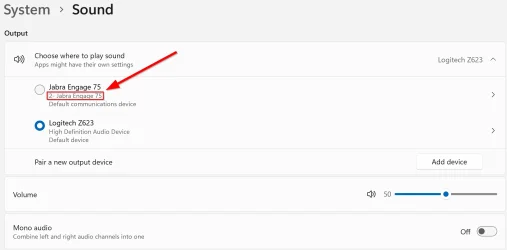
This has been a problem in Windows for as long as I can remember, where Windows will add numbers to your audio devices if you plug them into different USB ports. Luckily, it doesn't affect functionality but it looks quite stupid having numbers added like this to the names of the audio devices. And seen in every app which uses your audio device.
Haven't suffered from this for a long time but yesterday, I did a reset of my Jabra Engage 75 headset to sort a problem with some settings. After doing this, Windows apparently sees it as a new device or connected to another USB port and have for that reason added '
2- ' as seen below. Even when it's neither of these - still the same headset and still connected to the same USB port.
As I recall it, I found a way to fix this many, many years ago but now, I can't remember how to do it and force Windows to "start from fresh" when identifying this audio device. Things I've already tried to no avail after searching for a solution online include:
In Windows Device Manager and after choosing to also see hidden devices, getting rid of all audio devices under Sound, video and game controllers and Audio inputs and outputs
In the Windows Registry, manually getting rid of everything under HKEY_LOCAL_MACHINE\SOFTWARE\Microsoft\Windows\CurrentVersion\MMDevices\Audio\Render
Using an app called DeviceCleanup to do the same I already tried manually in step 1
Using an app called USBDeview , deleted all devices which were not recently connected
Any help from you pros in here how to get rid of this stupid enumeration greatly appreciated!
This is what I'm referring to
Windows Build/Version
Windows 11 Pro 25H2 Build 26200.7840
OS
Windows 11
Computer type
PC/Desktop
Manufacturer/Model
Custom
CPU
AMD Ryzen 9 9950X3D
Motherboard
MSI MAG X670E TOMAHAWK WIFI
Memory
Kingston Fury Beast RGB 64GB (2x32GB) / 6000MHz / DDR5 / CL30 /
Graphics Card(s)
MSI GeForce RTX 5090 32GB Suprim SOC
Sound Card
Integrated
Monitor(s) Displays
Samsung UE50TU7175UXXC
Screen Resolution
3840x2160
Hard Drives
1 x WD Black SN8100 4TB, 1 x WD Black SN7100 2TB, 1 x WD Red 4TB, 1 x Seagate IronWolf 10TB
PSU
Phanteks AMP GH 1200W Platinum ATX 3.1
Case
Corsair Obsidian 500D RGB SE
Cooling
EK-Nucleus AIO CR360 Lux D-RGB (Mounted in the front as intake) 1 x Phanteks M25-120 G2 (rear exhaust), 2 x Phanteks M25-140 G2 (top exhaust)
Keyboard
Corsair K100 RGB Wireless
Mouse
Corsair M65 Ultra Wireless
Internet Speed
700-1000 Mbit
Browser
Google Chrome
Antivirus
Windows Defender
Well-known member
Thread Starter
As an update, I somehow managed to fix the issue by repeating step 1 and 2 in my list above. Not sure why it worked this time and not last time I tried it but I'm just happy I was able to fix it
Still have the same issue for another device though and this one seems absolutely impossible to fix. It's the built-in speakers in my Samsung TV which are identified by Windows when I connect the TV to my Nvidia graphics card.
I suppose what makes it so hard to fix this one is because I can't unplug the audio device which in this case is my TV before doing the steps above. Since I wouldn't be able to see what I'm doing if I did that
Making sure the device you want to delete and have Windows forget about is unplugged before deleting it in Device Manager seems to be a requirement for this to work.
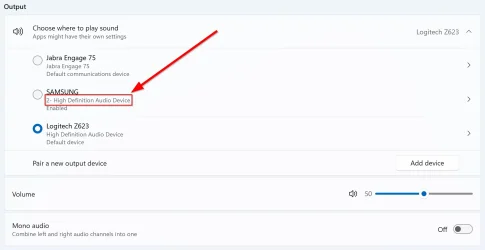
I even tried connecting to my PC from another PC over a remote connection using Quick Connect. Figuring I could then unplug the TV but still see the screen on the other PC over the remote connection. And I could...but sadly I was not able to interact with anything on the screen, I just had the screen. A bit odd but apparently, you need to have the screen connected to the PC you're controlling remotely in order to interact with it.
This is what it looks like now
OS
Windows 11
Computer type
PC/Desktop
Manufacturer/Model
Custom
CPU
AMD Ryzen 9 9950X3D
Motherboard
MSI MAG X670E TOMAHAWK WIFI
Memory
Kingston Fury Beast RGB 64GB (2x32GB) / 6000MHz / DDR5 / CL30 /
Graphics Card(s)
MSI GeForce RTX 5090 32GB Suprim SOC
Sound Card
Integrated
Monitor(s) Displays
Samsung UE50TU7175UXXC
Screen Resolution
3840x2160
Hard Drives
1 x WD Black SN8100 4TB, 1 x WD Black SN7100 2TB, 1 x WD Red 4TB, 1 x Seagate IronWolf 10TB
PSU
Phanteks AMP GH 1200W Platinum ATX 3.1
Case
Corsair Obsidian 500D RGB SE
Cooling
EK-Nucleus AIO CR360 Lux D-RGB (Mounted in the front as intake) 1 x Phanteks M25-120 G2 (rear exhaust), 2 x Phanteks M25-140 G2 (top exhaust)
Keyboard
Corsair K100 RGB Wireless
Mouse
Corsair M65 Ultra Wireless
Internet Speed
700-1000 Mbit
Browser
Google Chrome
Antivirus
Windows Defender
Jack of all trades
Power User
VIP
I have three like your second pic including that Samsung (monitor) but no numbers on any mine.
Last edited: Feb 20, 2026
OS
Windows 11 (up to date)
Computer type
PC/Desktop
Manufacturer/Model
Custom
CPU
Intel i5 12400
Motherboard
Gigabyte Z690 UA
Memory
Corsair Vengeance LPX 16GB
Graphics Card(s)
On Board the Z690
Sound Card
On Board
Monitor(s) Displays
43" Samsung tu7000
Screen Resolution
2560 x 1440
Hard Drives
SAMSUNG SSD 1TB NVMe M.2
PSU
Thermaltake smart 500w 80+
Case
LIAN LANCOOL_205M
Cooling
Bunch of fans . . . :o) (lights dont work)
Keyboard
Unicomp: Ultra Classic White Buckling Spring USB
Mouse
M510
Internet Speed
50mbps on Ethernet
Browser
Fire Fox
Antivirus
Windows
Other Info
Love this computer but I still prefer Win-7 like I love my old Lazy Boy Recliner . . . it just feels better.
Operating System
WIN-7-64BIT and Win-11 pro for testing on unsupported hardware
Computer type
PC/Desktop
Manufacturer/Model
Home built
CPU
i5-3570K CPU @ 3.40GHz, 3801 Mhz, 4 Core(s), 4 Logical Processor(s)
Motherboard
GA-Z77-HD3
Memory
16 GB - Crucial Ballistick 4GB PC3-14900 DDR3-1333 MHz
Graphics card(s)
NVIDIA GeForce GTX 1050
Sound Card
On Board
Monitor(s) Displays
ASUS VP278
Screen Resolution
1920 x 1080
Hard Drives
4 - internal Samsung 2.5" SSD, 1 WD HDD 7200 and some external drives
PSU
EVGA 550w
Case
Old Gygabyte Tower
Cooling
Yes
Keyboard
Unicomp - UNIOP4A USB (like the old IBM Model H that I started with)
Mouse
M510
Internet Speed
50mbps
Browser
Firefox
Antivirus
Windows
Other Info
The only thing it lack is USB-3.2 on the front face but it has 3.0 on the back
Well-known member
Thread Starter
I have three like your second pic as including that Samsung (monitor) but no numbers on any mine.
Good for you
OS
Windows 11
Computer type
PC/Desktop
Manufacturer/Model
Custom
CPU
AMD Ryzen 9 9950X3D
Motherboard
MSI MAG X670E TOMAHAWK WIFI
Memory
Kingston Fury Beast RGB 64GB (2x32GB) / 6000MHz / DDR5 / CL30 /
Graphics Card(s)
MSI GeForce RTX 5090 32GB Suprim SOC
Sound Card
Integrated
Monitor(s) Displays
Samsung UE50TU7175UXXC
Screen Resolution
3840x2160
Hard Drives
1 x WD Black SN8100 4TB, 1 x WD Black SN7100 2TB, 1 x WD Red 4TB, 1 x Seagate IronWolf 10TB
PSU
Phanteks AMP GH 1200W Platinum ATX 3.1
Case
Corsair Obsidian 500D RGB SE
Cooling
EK-Nucleus AIO CR360 Lux D-RGB (Mounted in the front as intake) 1 x Phanteks M25-120 G2 (rear exhaust), 2 x Phanteks M25-140 G2 (top exhaust)
Keyboard
Corsair K100 RGB Wireless
Mouse
Corsair M65 Ultra Wireless
Internet Speed
700-1000 Mbit
Browser
Google Chrome
Antivirus
Windows Defender
Jack of all trades
Power User
VIP
Are you saying that you cannot delete that Samsung device and let Windows rediscover it?
OS
Windows 11 (up to date)
Computer type
PC/Desktop
Manufacturer/Model
Custom
CPU
Intel i5 12400
Motherboard
Gigabyte Z690 UA
Memory
Corsair Vengeance LPX 16GB
Graphics Card(s)
On Board the Z690
Sound Card
On Board
Monitor(s) Displays
43" Samsung tu7000
Screen Resolution
2560 x 1440
Hard Drives
SAMSUNG SSD 1TB NVMe M.2
PSU
Thermaltake smart 500w 80+
Case
LIAN LANCOOL_205M
Cooling
Bunch of fans . . . :o) (lights dont work)
Keyboard
Unicomp: Ultra Classic White Buckling Spring USB
Mouse
M510
Internet Speed
50mbps on Ethernet
Browser
Fire Fox
Antivirus
Windows
Other Info
Love this computer but I still prefer Win-7 like I love my old Lazy Boy Recliner . . . it just feels better.
Operating System
WIN-7-64BIT and Win-11 pro for testing on unsupported hardware
Computer type
PC/Desktop
Manufacturer/Model
Home built
CPU
i5-3570K CPU @ 3.40GHz, 3801 Mhz, 4 Core(s), 4 Logical Processor(s)
Motherboard
GA-Z77-HD3
Memory
16 GB - Crucial Ballistick 4GB PC3-14900 DDR3-1333 MHz
Graphics card(s)
NVIDIA GeForce GTX 1050
Sound Card
On Board
Monitor(s) Displays
ASUS VP278
Screen Resolution
1920 x 1080
Hard Drives
4 - internal Samsung 2.5" SSD, 1 WD HDD 7200 and some external drives
PSU
EVGA 550w
Case
Old Gygabyte Tower
Cooling
Yes
Keyboard
Unicomp - UNIOP4A USB (like the old IBM Model H that I started with)
Mouse
M510
Internet Speed
50mbps
Browser
Firefox
Antivirus
Windows
Other Info
The only thing it lack is USB-3.2 on the front face but it has 3.0 on the back
Well-known member
Thread Starter
Are you saying that you cannot delete that Samsung device and let Windows rediscover it?
Correct, it keeps showing up with a number.
OS
Windows 11
Computer type
PC/Desktop
Manufacturer/Model
Custom
CPU
AMD Ryzen 9 9950X3D
Motherboard
MSI MAG X670E TOMAHAWK WIFI
Memory
Kingston Fury Beast RGB 64GB (2x32GB) / 6000MHz / DDR5 / CL30 /
Graphics Card(s)
MSI GeForce RTX 5090 32GB Suprim SOC
Sound Card
Integrated
Monitor(s) Displays
Samsung UE50TU7175UXXC
Screen Resolution
3840x2160
Hard Drives
1 x WD Black SN8100 4TB, 1 x WD Black SN7100 2TB, 1 x WD Red 4TB, 1 x Seagate IronWolf 10TB
PSU
Phanteks AMP GH 1200W Platinum ATX 3.1
Case
Corsair Obsidian 500D RGB SE
Cooling
EK-Nucleus AIO CR360 Lux D-RGB (Mounted in the front as intake) 1 x Phanteks M25-120 G2 (rear exhaust), 2 x Phanteks M25-140 G2 (top exhaust)
Keyboard
Corsair K100 RGB Wireless
Mouse
Corsair M65 Ultra Wireless
Internet Speed
700-1000 Mbit
Browser
Google Chrome
Antivirus
Windows Defender
Jack of all trades
Power User
VIP
Correct, it keeps showing up with a number.
It's been a long time since I've done this but it use to be that if I looked at device manager in safe mode more older devices would show up. From what I read it was my understanding that it was the old one that got the number not the new one from it being re-detected
Last edited: Feb 20, 2026
OS
Windows 11 (up to date)
Computer type
PC/Desktop
Manufacturer/Model
Custom
CPU
Intel i5 12400
Motherboard
Gigabyte Z690 UA
Memory
Corsair Vengeance LPX 16GB
Graphics Card(s)
On Board the Z690
Sound Card
On Board
Monitor(s) Displays
43" Samsung tu7000
Screen Resolution
2560 x 1440
Hard Drives
SAMSUNG SSD 1TB NVMe M.2
PSU
Thermaltake smart 500w 80+
Case
LIAN LANCOOL_205M
Cooling
Bunch of fans . . . :o) (lights dont work)
Keyboard
Unicomp: Ultra Classic White Buckling Spring USB
Mouse
M510
Internet Speed
50mbps on Ethernet
Browser
Fire Fox
Antivirus
Windows
Other Info
Love this computer but I still prefer Win-7 like I love my old Lazy Boy Recliner . . . it just feels better.
Operating System
WIN-7-64BIT and Win-11 pro for testing on unsupported hardware
Computer type
PC/Desktop
Manufacturer/Model
Home built
CPU
i5-3570K CPU @ 3.40GHz, 3801 Mhz, 4 Core(s), 4 Logical Processor(s)
Motherboard
GA-Z77-HD3
Memory
16 GB - Crucial Ballistick 4GB PC3-14900 DDR3-1333 MHz
Graphics card(s)
NVIDIA GeForce GTX 1050
Sound Card
On Board
Monitor(s) Displays
ASUS VP278
Screen Resolution
1920 x 1080
Hard Drives
4 - internal Samsung 2.5" SSD, 1 WD HDD 7200 and some external drives
PSU
EVGA 550w
Case
Old Gygabyte Tower
Cooling
Yes
Keyboard
Unicomp - UNIOP4A USB (like the old IBM Model H that I started with)
Mouse
M510
Internet Speed
50mbps
Browser
Firefox
Antivirus
Windows
Other Info
The only thing it lack is USB-3.2 on the front face but it has 3.0 on the back
Well-known member
Thread Starter
It's been a long time since I've done this but it use to be that if I looked at device manager in safe mode more older devices would show up. From what I read it was my understanding that it was the old one that got the number not the new one from it being re-detected
What you need to do is enable hidden devices to be shown. Then get rid of any old devices with the same name.
Already tried that to no avail.
OS
Windows 11
Computer type
PC/Desktop
Manufacturer/Model
Custom
CPU
AMD Ryzen 9 9950X3D
Motherboard
MSI MAG X670E TOMAHAWK WIFI
Memory
Kingston Fury Beast RGB 64GB (2x32GB) / 6000MHz / DDR5 / CL30 /
Graphics Card(s)
MSI GeForce RTX 5090 32GB Suprim SOC
Sound Card
Integrated
Monitor(s) Displays
Samsung UE50TU7175UXXC
Screen Resolution
3840x2160
Hard Drives
1 x WD Black SN8100 4TB, 1 x WD Black SN7100 2TB, 1 x WD Red 4TB, 1 x Seagate IronWolf 10TB
PSU
Phanteks AMP GH 1200W Platinum ATX 3.1
Case
Corsair Obsidian 500D RGB SE
Cooling
EK-Nucleus AIO CR360 Lux D-RGB (Mounted in the front as intake) 1 x Phanteks M25-120 G2 (rear exhaust), 2 x Phanteks M25-140 G2 (top exhaust)
Keyboard
Corsair K100 RGB Wireless
Mouse
Corsair M65 Ultra Wireless
Internet Speed
700-1000 Mbit
Browser
Google Chrome
Antivirus
Windows Defender
Jack of all trades
Power User
VIP
Do you know anyone you can borrow a monitor from?
OS
Windows 11 (up to date)
Computer type
PC/Desktop
Manufacturer/Model
Custom
CPU
Intel i5 12400
Motherboard
Gigabyte Z690 UA
Memory
Corsair Vengeance LPX 16GB
Graphics Card(s)
On Board the Z690
Sound Card
On Board
Monitor(s) Displays
43" Samsung tu7000
Screen Resolution
2560 x 1440
Hard Drives
SAMSUNG SSD 1TB NVMe M.2
PSU
Thermaltake smart 500w 80+
Case
LIAN LANCOOL_205M
Cooling
Bunch of fans . . . :o) (lights dont work)
Keyboard
Unicomp: Ultra Classic White Buckling Spring USB
Mouse
M510
Internet Speed
50mbps on Ethernet
Browser
Fire Fox
Antivirus
Windows
Other Info
Love this computer but I still prefer Win-7 like I love my old Lazy Boy Recliner . . . it just feels better.
Operating System
WIN-7-64BIT and Win-11 pro for testing on unsupported hardware
Computer type
PC/Desktop
Manufacturer/Model
Home built
CPU
i5-3570K CPU @ 3.40GHz, 3801 Mhz, 4 Core(s), 4 Logical Processor(s)
Motherboard
GA-Z77-HD3
Memory
16 GB - Crucial Ballistick 4GB PC3-14900 DDR3-1333 MHz
Graphics card(s)
NVIDIA GeForce GTX 1050
Sound Card
On Board
Monitor(s) Displays
ASUS VP278
Screen Resolution
1920 x 1080
Hard Drives
4 - internal Samsung 2.5" SSD, 1 WD HDD 7200 and some external drives
PSU
EVGA 550w
Case
Old Gygabyte Tower
Cooling
Yes
Keyboard
Unicomp - UNIOP4A USB (like the old IBM Model H that I started with)
Mouse
M510
Internet Speed
50mbps
Browser
Firefox
Antivirus
Windows
Other Info
The only thing it lack is USB-3.2 on the front face but it has 3.0 on the back
Well-known member
Thread Starter
Do you know anyone you can borrow a monitor from?
Nope, unfortunately not and even if I did, I'm not sure if I would find it worth the hassle.
This isn't really a big issue since it doesn't affect the functionality. More an esthetic annoyance where I was hoping there was an easy way to fix it.
OS
Windows 11
Computer type
PC/Desktop
Manufacturer/Model
Custom
CPU
AMD Ryzen 9 9950X3D
Motherboard
MSI MAG X670E TOMAHAWK WIFI
Memory
Kingston Fury Beast RGB 64GB (2x32GB) / 6000MHz / DDR5 / CL30 /
Graphics Card(s)
MSI GeForce RTX 5090 32GB Suprim SOC
Sound Card
Integrated
Monitor(s) Displays
Samsung UE50TU7175UXXC
Screen Resolution
3840x2160
Hard Drives
1 x WD Black SN8100 4TB, 1 x WD Black SN7100 2TB, 1 x WD Red 4TB, 1 x Seagate IronWolf 10TB
PSU
Phanteks AMP GH 1200W Platinum ATX 3.1
Case
Corsair Obsidian 500D RGB SE
Cooling
EK-Nucleus AIO CR360 Lux D-RGB (Mounted in the front as intake) 1 x Phanteks M25-120 G2 (rear exhaust), 2 x Phanteks M25-140 G2 (top exhaust)
Keyboard
Corsair K100 RGB Wireless
Mouse
Corsair M65 Ultra Wireless
Internet Speed
700-1000 Mbit
Browser
Google Chrome
Antivirus
Windows Defender