
How to reduce size of Microsoft Office apps?


TheMystic

Well-known member
Power User
VIP
Local time
11:19 AM
Posts
752
OS
Windows 11
Hello community!

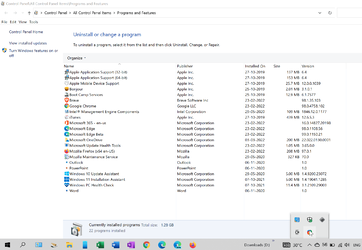
I see that Microsoft Office apps have huge download size, but more importantly they keep growing in size. This is not just on Windows, but also on macOS and Android. They are just too large in size. Also, Microsoft is hiding their Office apps' sizes in Storage Sense. Check this out:
2022-03-03_12-24-38.png

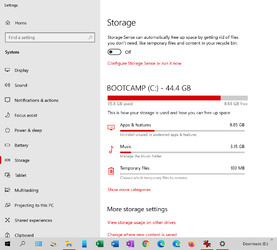
Control panel\ Programs and Features is saying that the total size of currently installed apps is 1.28 GB. That's wrong because the Microsoft Office apps are not showing their sizes. When I open Storage Sense, I see the actual size of all programs installed, which is currently 9.85 GB:
2022-03-03_12-27-10.png

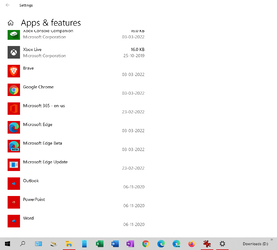
Even here, Microsoft is hiding the sizes of its Office apps:
2022-03-03_12-28-42.png

It is Microsoft Office apps that are taking up the maximum space from the difference between 9.85 GB and 1.28 GB, i.e. 8.57 GB.

1. Is there a setting that can be changed to reduce the size of these apps?
2. Why are the app icons for Microsoft Office apps so small in Control Panel\ Programs & Features as well as in Storage Sense?

Thanks.
 

My Computer My Computer

At a glance

Windows 11Intel Core i7 3630QM16 GBIntel HD Graphics 4000 & Nvidia GeForce GT 635M
OS
Windows 11
Computer type
Laptop
Manufacturer/Model
HP Envy dv7
CPU
Intel Core i7 3630QM
Motherboard
HP
Memory
16 GB
Graphics Card(s)
Intel HD Graphics 4000 & Nvidia GeForce GT 635M
Sound Card
IDT High Definition
Screen Resolution
1080p
Hard Drives
1 TB Crucial MX500 on bay 1.
1 TB Seagate HDD on bay 2.
Antivirus
Windows Defender
@TheMystic, this is unrelated to your thread, but how did you get Windows to update on a Mac in bootcamp? My Macbook Pro for work is 10 years old, so maybe it's too old to update. You can PM me if you like to keep it out of your thread.

As for number 1, I've never seen a setting where you could reduce the size of an Office app. I just noticed the apps are smaller for Office apps. My Microsoft Office 365 icon is the correct size. However, there is an Office app that's small. Strange.
 

My Computers My Computers

  • At a glance

    Windows 11 Pro 25H2 RP channelRyzen 9 5900XCorsair Vengeance RGB PRO 64GB (2x32GB) DDR4 ...ASUS GeForce RTX 4070 Super OC 12GB DDR6 / ZO...
    OS
    Windows 11 Pro 25H2 RP channel
    Computer type
    PC/Desktop
    Manufacturer/Model
    Home built
    CPU
    Ryzen 9 5900X
    Motherboard
    MSI MPG X570S Edge Max WiFi
    Memory
    Corsair Vengeance RGB PRO 64GB (2x32GB) DDR4 3600 (PC4-28800) C18
    Graphics Card(s)
    ASUS GeForce RTX 4070 Super OC 12GB DDR6 / ZOTAC RTX 3060 Twin Edge OC 12GB GDDR6
    Sound Card
    Proprietary on MB / FiiO K5Pro DAC
    Monitor(s) Displays
    ViewSonic XG2530 25"/Benq XL2411P 24"/ ASUS VA24DQSB) 23.8"
    Screen Resolution
    1920x1080 240Hz/144Hz/60Hz (based on monitor setup above)
    Hard Drives
    SK hynix Gold P31 1TB PCIe NVMe Gen3 M.2 2280 Internal SSD
    ADATA XPG SX8200 Pro 1TB
    Samsung SSD 860 EVO 1TB 2.5 Inch SATA III Internal SSD
    PSU
    Corsair RM1000e
    Case
    Phanteks Enthoo Pro Full Tower Chassis with Window
    Cooling
    Corsair iCUE H60i RGB PRO XT Liquid CPU Cooler
    Keyboard
    Corsair K70
    Mouse
    Logitech MX Master 3
    Internet Speed
    ~950Mb/s download / ~700Mb/s upload
    Browser
    Edge (Chromium)
    Antivirus
    Norton 360
  • At a glance

    Windows 11 ProRyzen 7 3700X32MB DDR4I forget, but it's old. I can't see the need ...
    Operating System
    Windows 11 Pro
    Computer type
    PC/Desktop
    Manufacturer/Model
    Home Built
    CPU
    Ryzen 7 3700X
    Motherboard
    MSI B550 Gaming GEN3 Gaming Motherboard
    Memory
    32MB DDR4
    Graphics card(s)
    I forget, but it's old. I can't see the need to upgrade it.
    Sound Card
    Propietary
    Monitor(s) Displays
    ACER LED 24" (dual monitor setup)
    Screen Resolution
    1920X1080
    Hard Drives
    1TB Samsung SSD 3.5"
    Case
    Corsair
    Cooling
    Stock
    Keyboard
    Logitech
    Mouse
    Logitech
    Internet Speed
    ~750Mb/s download / ~750Mb/s upload
    Browser
    Edge
    Antivirus
    Defender and Malware Bytes
  • ASUS Vivobook 16X, 16" WUXGA(1920x1200) Business Laptop Computer, AMD Ryzen 7, 16GB DDR4 RAM, 1TB SSD, Windows 11 Pro, Wi-Fi 6, USB-C, Full-Sized Keyboard, Webcam, HDMI
@TheMystic, this is unrelated to your thread, but how did you get Windows to update on a Mac in bootcamp? My Macbook Pro for work is 10 years old, so maybe it's too old to update. You can PM me if you like to keep it out of your thread.

As for number 1, I've never seen a setting where you could reduce the size of an Office app. I just noticed the apps are smaller for Office apps. My Microsoft Office 365 icon is the correct size. However, there is an Office app that's small. Strange.
Mine is a 2019 MacBook Pro and I have not had problems updating Windows so far. I also have a 2013 HP Envy and never had problems updating Windows on that either.

What error do you get when trying to update? I don't think the age of your laptop is a factor.

I could assign only about 45 GB space for Windows out of the 256 GB that I have. Earlier the idea was just to have Windows as an alternative. I had well over 15 GB free space all the time. But after installing MS Office, that free space has gone down significantly. So was wondering if something could be done to reduce the space that Office apps take up.
 

My Computer My Computer

At a glance

Windows 11Intel Core i7 3630QM16 GBIntel HD Graphics 4000 & Nvidia GeForce GT 635M
OS
Windows 11
Computer type
Laptop
Manufacturer/Model
HP Envy dv7
CPU
Intel Core i7 3630QM
Motherboard
HP
Memory
16 GB
Graphics Card(s)
Intel HD Graphics 4000 & Nvidia GeForce GT 635M
Sound Card
IDT High Definition
Screen Resolution
1080p
Hard Drives
1 TB Crucial MX500 on bay 1.
1 TB Seagate HDD on bay 2.
Antivirus
Windows Defender
Mine is a 2019 MacBook Pro and I have not had problems updating Windows so far. I also have a 2013 HP Envy and never had problems updating Windows on that either.

What error do you get when trying to update? I don't think the age of your laptop is a factor.

I could assign only about 45 GB space for Windows out of the 256 GB that I have. Earlier the idea was just to have Windows as an alternative. I had well over 15 GB free space all the time. But after installing MS Office, that free space has gone down significantly. So was wondering if something could be done to reduce the space that Office apps take up.
My MacBook Pro is a 2010 model. I just checked to see if it was eligible and it wasn't. I read you can't install Windows 11 on a MacBook Pro, but that's clearly not the case. When I have time, I'll break it out and fiddle with it. Thanks for the response!
 

My Computers My Computers

  • At a glance

    Windows 11 Pro 25H2 RP channelRyzen 9 5900XCorsair Vengeance RGB PRO 64GB (2x32GB) DDR4 ...ASUS GeForce RTX 4070 Super OC 12GB DDR6 / ZO...
    OS
    Windows 11 Pro 25H2 RP channel
    Computer type
    PC/Desktop
    Manufacturer/Model
    Home built
    CPU
    Ryzen 9 5900X
    Motherboard
    MSI MPG X570S Edge Max WiFi
    Memory
    Corsair Vengeance RGB PRO 64GB (2x32GB) DDR4 3600 (PC4-28800) C18
    Graphics Card(s)
    ASUS GeForce RTX 4070 Super OC 12GB DDR6 / ZOTAC RTX 3060 Twin Edge OC 12GB GDDR6
    Sound Card
    Proprietary on MB / FiiO K5Pro DAC
    Monitor(s) Displays
    ViewSonic XG2530 25"/Benq XL2411P 24"/ ASUS VA24DQSB) 23.8"
    Screen Resolution
    1920x1080 240Hz/144Hz/60Hz (based on monitor setup above)
    Hard Drives
    SK hynix Gold P31 1TB PCIe NVMe Gen3 M.2 2280 Internal SSD
    ADATA XPG SX8200 Pro 1TB
    Samsung SSD 860 EVO 1TB 2.5 Inch SATA III Internal SSD
    PSU
    Corsair RM1000e
    Case
    Phanteks Enthoo Pro Full Tower Chassis with Window
    Cooling
    Corsair iCUE H60i RGB PRO XT Liquid CPU Cooler
    Keyboard
    Corsair K70
    Mouse
    Logitech MX Master 3
    Internet Speed
    ~950Mb/s download / ~700Mb/s upload
    Browser
    Edge (Chromium)
    Antivirus
    Norton 360
  • At a glance

    Windows 11 ProRyzen 7 3700X32MB DDR4I forget, but it's old. I can't see the need ...
    Operating System
    Windows 11 Pro
    Computer type
    PC/Desktop
    Manufacturer/Model
    Home Built
    CPU
    Ryzen 7 3700X
    Motherboard
    MSI B550 Gaming GEN3 Gaming Motherboard
    Memory
    32MB DDR4
    Graphics card(s)
    I forget, but it's old. I can't see the need to upgrade it.
    Sound Card
    Propietary
    Monitor(s) Displays
    ACER LED 24" (dual monitor setup)
    Screen Resolution
    1920X1080
    Hard Drives
    1TB Samsung SSD 3.5"
    Case
    Corsair
    Cooling
    Stock
    Keyboard
    Logitech
    Mouse
    Logitech
    Internet Speed
    ~750Mb/s download / ~750Mb/s upload
    Browser
    Edge
    Antivirus
    Defender and Malware Bytes
  • ASUS Vivobook 16X, 16" WUXGA(1920x1200) Business Laptop Computer, AMD Ryzen 7, 16GB DDR4 RAM, 1TB SSD, Windows 11 Pro, Wi-Fi 6, USB-C, Full-Sized Keyboard, Webcam, HDMI
My MacBook Pro is a 2010 model. I just checked to see if it was eligible and it wasn't. I read you can't install Windows 11 on a MacBook Pro, but that's clearly not the case. When I have time, I'll break it out and fiddle with it. Thanks for the response!
My Mac is on Windows 10 only. It hasn't received the Windows 11 update yet.

But the problem I mentioned is applicable on Windows 11 too.
 

My Computer My Computer

At a glance

Windows 11Intel Core i7 3630QM16 GBIntel HD Graphics 4000 & Nvidia GeForce GT 635M
OS
Windows 11
Computer type
Laptop
Manufacturer/Model
HP Envy dv7
CPU
Intel Core i7 3630QM
Motherboard
HP
Memory
16 GB
Graphics Card(s)
Intel HD Graphics 4000 & Nvidia GeForce GT 635M
Sound Card
IDT High Definition
Screen Resolution
1080p
Hard Drives
1 TB Crucial MX500 on bay 1.
1 TB Seagate HDD on bay 2.
Antivirus
Windows Defender
My Mac is on Windows 10 only. It hasn't received the Windows 11 update yet.

But the problem I mentioned is applicable on Windows 11 too.
Ah. That makes sense. I didn't think you can upgrade a Mac to Windows 11 easily if at all. I'll have to look into it more later.
 

My Computers My Computers

  • At a glance

    Windows 11 Pro 25H2 RP channelRyzen 9 5900XCorsair Vengeance RGB PRO 64GB (2x32GB) DDR4 ...ASUS GeForce RTX 4070 Super OC 12GB DDR6 / ZO...
    OS
    Windows 11 Pro 25H2 RP channel
    Computer type
    PC/Desktop
    Manufacturer/Model
    Home built
    CPU
    Ryzen 9 5900X
    Motherboard
    MSI MPG X570S Edge Max WiFi
    Memory
    Corsair Vengeance RGB PRO 64GB (2x32GB) DDR4 3600 (PC4-28800) C18
    Graphics Card(s)
    ASUS GeForce RTX 4070 Super OC 12GB DDR6 / ZOTAC RTX 3060 Twin Edge OC 12GB GDDR6
    Sound Card
    Proprietary on MB / FiiO K5Pro DAC
    Monitor(s) Displays
    ViewSonic XG2530 25"/Benq XL2411P 24"/ ASUS VA24DQSB) 23.8"
    Screen Resolution
    1920x1080 240Hz/144Hz/60Hz (based on monitor setup above)
    Hard Drives
    SK hynix Gold P31 1TB PCIe NVMe Gen3 M.2 2280 Internal SSD
    ADATA XPG SX8200 Pro 1TB
    Samsung SSD 860 EVO 1TB 2.5 Inch SATA III Internal SSD
    PSU
    Corsair RM1000e
    Case
    Phanteks Enthoo Pro Full Tower Chassis with Window
    Cooling
    Corsair iCUE H60i RGB PRO XT Liquid CPU Cooler
    Keyboard
    Corsair K70
    Mouse
    Logitech MX Master 3
    Internet Speed
    ~950Mb/s download / ~700Mb/s upload
    Browser
    Edge (Chromium)
    Antivirus
    Norton 360
  • At a glance

    Windows 11 ProRyzen 7 3700X32MB DDR4I forget, but it's old. I can't see the need ...
    Operating System
    Windows 11 Pro
    Computer type
    PC/Desktop
    Manufacturer/Model
    Home Built
    CPU
    Ryzen 7 3700X
    Motherboard
    MSI B550 Gaming GEN3 Gaming Motherboard
    Memory
    32MB DDR4
    Graphics card(s)
    I forget, but it's old. I can't see the need to upgrade it.
    Sound Card
    Propietary
    Monitor(s) Displays
    ACER LED 24" (dual monitor setup)
    Screen Resolution
    1920X1080
    Hard Drives
    1TB Samsung SSD 3.5"
    Case
    Corsair
    Cooling
    Stock
    Keyboard
    Logitech
    Mouse
    Logitech
    Internet Speed
    ~750Mb/s download / ~750Mb/s upload
    Browser
    Edge
    Antivirus
    Defender and Malware Bytes
  • ASUS Vivobook 16X, 16" WUXGA(1920x1200) Business Laptop Computer, AMD Ryzen 7, 16GB DDR4 RAM, 1TB SSD, Windows 11 Pro, Wi-Fi 6, USB-C, Full-Sized Keyboard, Webcam, HDMI
Hi,
Get a bigger ssd or ditch office.
 

My Computer My Computer

At a glance

Win-7-10-11Pro's10900k & 9940x & 5930kTrident-Z Royal 4000c16 2x16gb & Trident-Z 36...Titan Xp & 1080ti FTW3 & evga 980ti gaming
OS
Win-7-10-11Pro's
Computer type
PC/Desktop
Manufacturer/Model
Acer 17" Nitro 7840sn/ 2x16gb 5600c40/ 4060/ stock 1tb-os/ 4tb sn850x
CPU
10900k & 9940x & 5930k
Motherboard
z490-Apex & x299-Apex & x99-Sabertooth
Memory
Trident-Z Royal 4000c16 2x16gb & Trident-Z 3600c16 4x8gb & 3200c14 4x8gb
Graphics Card(s)
Titan Xp & 1080ti FTW3 & evga 980ti gaming
Sound Card
Onboard Realtek x3
Monitor(s) Displays
1-AOC G2460PG 24"G-Sync 144Hz/ 2nd 1-ASUS VG248QE 24"/ 3rd LG 43" series
Screen Resolution
1920-1080 not sure what the t.v is besides 43" class scales from 1920-1080 perfectly
Hard Drives
2-WD-sn850x 4tb/ 970evo+500gb/ 980 pro 2tb.
PSU
1000p2 & 1200p2 & 850p2
Case
D450 x2 & 1 Test bench in cherry Entertainment center
Cooling
Custom water loops x3 with 2x mora 360mm rads only 980ti gaming air cooled
Keyboard
G710+x3
Mouse
Redragon x3
Internet Speed
xfinity gigabyte
Browser
Firefox
Antivirus
mbam pro
  • Like
Reactions: RFS
Hi,
Get a bigger ssd or ditch office.
This is the MacBook, so no component upgrade possible.

I have an Office 365 subscription, so no point in ditching office either. Besides, I'm really comfortable with Microsoft Office suite of apps.
 

My Computer My Computer

At a glance

Windows 11Intel Core i7 3630QM16 GBIntel HD Graphics 4000 & Nvidia GeForce GT 635M
OS
Windows 11
Computer type
Laptop
Manufacturer/Model
HP Envy dv7
CPU
Intel Core i7 3630QM
Motherboard
HP
Memory
16 GB
Graphics Card(s)
Intel HD Graphics 4000 & Nvidia GeForce GT 635M
Sound Card
IDT High Definition
Screen Resolution
1080p
Hard Drives
1 TB Crucial MX500 on bay 1.
1 TB Seagate HDD on bay 2.
Antivirus
Windows Defender
Back
Top Bottom


