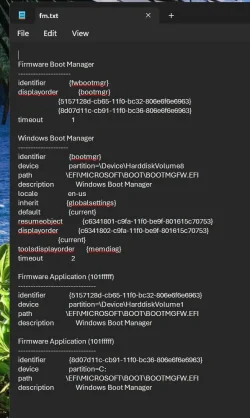
I have several bootable SSDs in my PC: My main System and a copy of it on another SSD. Plus two SSDs for boys to play their own games each. With the bcdboot command I have produced bootable EFI files on all of them. And because of automatic repairs in the past with Macrium Fix Boot Errors I have also EFI files on other SSDs.
Now I have a long list of eight UEFI bootable partions and Windows Boot Manager partitions. Some work some don't. So I wanted to get rid of the non working entries. I tried whatever gets recommended: EasyBCD, Hasleo Easy UEFI, Visual BCD Editor. But in each case their changes are gone once I reboot. What went wrong and how can I fix this?
Now I have a long list of eight UEFI bootable partions and Windows Boot Manager partitions. Some work some don't. So I wanted to get rid of the non working entries. I tried whatever gets recommended: EasyBCD, Hasleo Easy UEFI, Visual BCD Editor. But in each case their changes are gone once I reboot. What went wrong and how can I fix this?
My Computer
At a glance
Windows 11 Pro 25H2Intel i5-1150032 GB DDR4-3200 Fury Beast KingstonAMD Radeon RX 6700 XT
- OS
- Windows 11 Pro 25H2
- Computer type
- PC/Desktop
- Manufacturer/Model
- Gigabyte
- CPU
- Intel i5-11500
- Motherboard
- Z590 Aorus Elite AX
- Memory
- 32 GB DDR4-3200 Fury Beast Kingston
- Graphics Card(s)
- AMD Radeon RX 6700 XT
- Sound Card
- Topping DX3 Pro
- Monitor(s) Displays
- LG 4K monitor
- Screen Resolution
- 4K
- Hard Drives
- WD Black 850 2TB, WD 1TB, Crucial P3 1TB, Crucial BX500 1TB, Samsung 870 EVO 1TB, 860 EVO 1TB, 860 Pro 256GB.
- PSU
- Seasonic Prime fanless PX-450
- Case
- Midi Tower
- Cooling
- Big CPU cooler + 2 Fans
- Keyboard
- rapoo wireless multimedia
- Mouse
- Microsoft Wireless Mouse 2000
- Internet Speed
- mostly 900 Mbps
- Browser
- Brave, Firefox, Edge
- Antivirus
- Defender