

Recently updated to Win11PRO (with masses of help from Itsme1)
Not sure how to put this so here goes:
I have 4 WD Passport drives for storage plus a WD 2005 removable drive (I:\) which has my music collection on it. I now find that Media Player playing the tracks from
Music on my I:\ drive which seems to be synced to all the storage drives, now music player is listing the same tracks over and over again.
How the hell do you stop syncing between drives? All I can find is setting up syncing or removing computers from the sync.
Never had a problem with syncing like this in Win10, but this Win11 is a whole new ball game!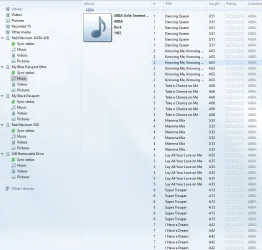
Not sure how to put this so here goes:
I have 4 WD Passport drives for storage plus a WD 2005 removable drive (I:\) which has my music collection on it. I now find that Media Player playing the tracks from
Music on my I:\ drive which seems to be synced to all the storage drives, now music player is listing the same tracks over and over again.
How the hell do you stop syncing between drives? All I can find is setting up syncing or removing computers from the sync.
Never had a problem with syncing like this in Win10, but this Win11 is a whole new ball game!
- Windows Build/Version
- 24H2
My Computer
At a glance
Win 11Pro 24H2AMD Ryzensets 5 7600X32GBGforce RTX 360
- OS
- Win 11Pro 24H2
- Computer type
- PC/Desktop
- Manufacturer/Model
- Self Build 2025
- CPU
- AMD Ryzensets 5 7600X
- Motherboard
- MSI Pro B850-P WIFI
- Memory
- 32GB
- Graphics Card(s)
- Gforce RTX 360
- Sound Card
- On Board
- Monitor(s) Displays
- AOC 2460 [Monitor] (24.0"vis, October 2019)
- Hard Drives
- 1 Internal 5 External
- PSU
- ENERMAX REvolution 850W
- Case
- Be quiet Pure Base 600
- Cooling
- Thermalright Assassin X 120R
- Keyboard
- Logi K540
- Mouse
- Logi M310
- Browser
- Firefox
- Antivirus
- Bitdefender






