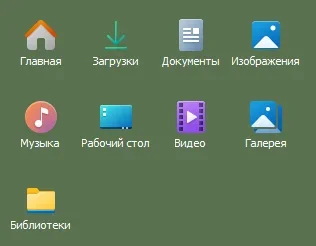
How to remove these icons?


Anixx

Well-known member
Member
VIP
Local time
11:56 AM
Posts
671
OS
Windows 11
How to remove these icons?

1749689807895.webp
 

My Computer My Computer

At a glance

Windows 11
OS
Windows 11
Option Two


My Computers My Computers

  • At a glance

    Win 11 Pro 26H2 26300.9550Intel® Core™ i7-14700KG.SKILL Ripjaws S5 Series 64GB (2 x 32GB) DDR5ASUS GeForce RTX 4070 Super 12GB
    OS
    Win 11 Pro 26H2 26300.9550
    Computer type
    PC/Desktop
    Manufacturer/Model
    Self Built
    CPU
    Intel® Core™ i7-14700K
    Motherboard
    ASUS TUF Z690-PLUS WIFI (BIOS 4505)
    Memory
    G.SKILL Ripjaws S5 Series 64GB (2 x 32GB) DDR5
    Graphics Card(s)
    ASUS GeForce RTX 4070 Super 12GB
    Sound Card
    Sound Blaster AE-5 Plus
    Monitor(s) Displays
    ASUS TUF Gaming 27" 2K HDR Gaming
    Screen Resolution
    2560 x 1440
    Hard Drives
    Samsung 990 Pro 1TB NVMe (Win 11 25H2)
    SK hynix P41 500GB NVMe
    SK hynix P41 2TB NVMe (x3)
    Crucial P3 Plus 4TB
    PSU
    Corsair RM850x Shift
    Case
    Antec Dark Phantom DP502 FLUX
    Cooling
    Corsair Nautilus 360 RS AIO
    Keyboard
    Logitech MK 320
    Mouse
    Razer Basilisk V3
    Internet Speed
    750Mbs
    Browser
    Firefox
    Antivirus
    Winows Security
    Other Info
    MR 8.1 Home
  • At a glance

    Win 11 Pro 25H2 26200.9550Intel Core i5-1140064 GB DDR4MSI GeForce RTX 3060 Ventus 2X 12GB
    Operating System
    Win 11 Pro 25H2 26200.9550
    Computer type
    PC/Desktop
    Manufacturer/Model
    Self Built
    CPU
    Intel Core i5-11400
    Motherboard
    Asus TUF Gaming Z590 Plus WiFi (BIOS 2803)
    Memory
    64 GB DDR4
    Graphics card(s)
    MSI GeForce RTX 3060 Ventus 2X 12GB
    Sound Card
    SoundBlaster Audigy Fx V2
    Monitor(s) Displays
    Samsung F27T350
    Screen Resolution
    1920x1080
    Hard Drives
    Samsung 980 Pro 1TB
    Samsung 970 EVO Plus 2TB
    Samsung 870 EVO 500GB SSD
    PSU
    Corsair HX750
    Case
    Cougar MX330-G Window
    Cooling
    Thermalright Frozen Edge 240 Black AIO
    Internet Speed
    350Mbps
    Browser
    Firefox
    Antivirus
    Windows Security
  • System Three
    Win 11 Pro 25H2 26200.9550
    ASUS PRIME Z370-P II BIOS 3004 7/12/21
    Intel Core i7-8700 CPU @ 3.20GHz
    32GB DDR4 RAM (4x8)
    Samsung 980 Pro 500 GB
    SK hynix P41 1 TB
    EVGA RTX 2060 (used)
    iGPU Intel UHD Graphics 630 (backup)
    Cooler Master Hyper 212
    Mid-Tower Desktop
Option Two

I am not asking about This PC. I have none of these in This PC I am asking about desktop.
 

My Computer My Computer

At a glance

Windows 11
OS
Windows 11
I am not asking about This PC. I have none of these in This PC I am asking about desktop.


If they're on the desktop... just delete them?


There's also this...

Image1.webp


Also... it would probably help if you explained how they got on your desktop in the first place. :-)
 
Last edited:

My Computers My Computers

  • At a glance

    Win 11 Home ♦♦♦26300.9550 ♦♦♦♦♦♦♦26H2AMD Ryzen 7 3700XG.Skill (F4-3200C14D-16GTZKW)EVGA RTX 2070 (08G-P4-2171-KR)
    OS
    Win 11 Home ♦♦♦26300.9550 ♦♦♦♦♦♦♦26H2
    Computer type
    PC/Desktop
    Manufacturer/Model
    Built by Ghot® [May 2020]
    CPU
    AMD Ryzen 7 3700X
    Motherboard
    Asus Pro WS X570-ACE (BIOS 5302)
    Memory
    G.Skill (F4-3200C14D-16GTZKW)
    Graphics Card(s)
    EVGA RTX 2070 (08G-P4-2171-KR)
    Sound Card
    Realtek ALC1220P / ALC S1220A
    Monitor(s) Displays
    Dell U3011 30"
    Screen Resolution
    2560 x 1600
    Hard Drives
    2x Samsung 860 EVO 500GB,
    WD 4TB Black FZBX - SATA III,
    WD 8TB Black FZBX - SATA III,
    DRW-24B1ST CD/DVD Burner
    PSU
    PC Power & Cooling 750W Quad EPS12V
    Case
    Cooler Master ATCS 840 Tower
    Cooling
    CM Hyper 212 EVO (push/pull)
    Keyboard
    Ducky DK9008 Shine II Blue LED
    Mouse
    Logitech Optical M-100
    Internet Speed
    300/300
    Browser
    Firefox (latest)
    Antivirus
    Bitdefender Total Security
    Other Info
    Speakers: Klipsch Pro Media 2.1
  • At a glance

    Windows XP Pro 32bit w/SP3AMD Athlon 64 X2 5000+ (OC'd @ 3.2Ghz)TWIN2X2048-6400C4DHX (2 x 1GB, DDR2 800)EVGA 256-P2-N758-TR GeForce 8600GT SSC
    Operating System
    Windows XP Pro 32bit w/SP3
    Computer type
    PC/Desktop
    Manufacturer/Model
    Built by Ghot® (not in use)
    CPU
    AMD Athlon 64 X2 5000+ (OC'd @ 3.2Ghz)
    Motherboard
    ASUS M2N32-SLI Deluxe Wireless Edition
    Memory
    TWIN2X2048-6400C4DHX (2 x 1GB, DDR2 800)
    Graphics card(s)
    EVGA 256-P2-N758-TR GeForce 8600GT SSC
    Sound Card
    Onboard
    Monitor(s) Displays
    ViewSonic G90FB Black 19" Professional (CRT)
    Screen Resolution
    up to 2048 x 1536
    Hard Drives
    WD 36GB 10,000rpm Raptor SATA
    Seagate 80GB 7200rpm SATA
    Lite-On LTR-52246S CD/RW
    Lite-On LH-18A1P CD/DVD Burner
    PSU
    PC Power & Cooling Silencer 750 Quad EPS12V
    Case
    Generic Beige case, 80mm fans
    Cooling
    ZALMAN 9500A 92mm CPU Cooler
    Keyboard
    Logitech Classic Keybooard 200
    Mouse
    Logitech Optical M-BT96a
    Internet Speed
    300/300
    Browser
    Firefox 3.x ??
    Antivirus
    Symantec (Norton)
    Other Info
    Still assembled, still runs. Haven't turned it on for 15 years?
If they're on the desktop... just delete them?
I tried to delete the desktop icon
1749782372024.webp
and all files from my desktop were moved to the recycle bin (but not these icons of the special folders). I had to undo the deletion.
 

My Computer My Computer

At a glance

Windows 11
OS
Windows 11
The OP has a legitimate Question.

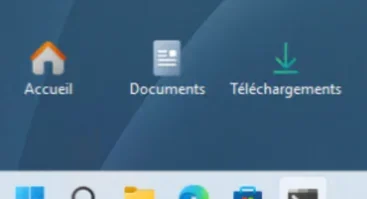
These icons are now being added to the desktop of a standard, non Microsoft Account, Windows 11 pro install.

1758897633810.webp

If you right click on them... there is no Delete. Selecting them and punching the Delete key does nothing. It's new garbage, that nobody asked for, that Microsoft is forcing on user... you know... the people who pay for the license but still get clobbered by tons of advertising from inside the OS... uhhh... the AS (the Advertising System called Windows 11).

Up to now, the only thing I found is a reg hack for the Home icon but it introduces an artifact; un unnamed blanc icon that also cannot be deleted:
[HKEY_LOCAL_MACHINE\SOFTWARE\Microsoft\Windows\CurrentVersion\Explorer\Desktop\NameSpace\{f874310e-b6b7-47dc-bc84-b9e6b38f5903}]
@="CLSID_MSGraphHomeFolder"
"HiddenByDefault"=dword:00000001
From here : Add or Remove Home in Navigation Pane of File Explorer in Windows 11

If Microsoft has locked those on our desktops... there's a reason. Now a days... it's gonna be for more advertising or more telemetry.

I'm not good enough to find where those are and I got a dozens PCs to upgrade from 10 to 11... ya know... Octobre 14.
 

My Computer My Computer

At a glance

Windoz 10
OS
Windoz 10
Computer type
PC/Desktop
Manufacturer/Model
Custom job
I'm still trying to figure out what you have? I have four machines that all have Windows 11 Pro with all updates. I don't see any of this stuff on any of the desktops.
 

My Computers My Computers

  • At a glance

    Win 11 Pro 25H2, Build 26200.9550.Intel Core i5 14500, 14th Generation64GB DDR4GeForce RTX 4060
    OS
    Win 11 Pro 25H2, Build 26200.9550.
    Computer type
    PC/Desktop
    Manufacturer/Model
    Home Brew
    CPU
    Intel Core i5 14500, 14th Generation
    Motherboard
    Gigabyte B760M G P WIFI
    Memory
    64GB DDR4
    Graphics Card(s)
    GeForce RTX 4060
    Sound Card
    Chipset Realtek
    Monitor(s) Displays
    LG 45" Ultragear & Acer 24" 1080p
    Screen Resolution
    5120x1440 & 1920x1080
    Hard Drives
    Crucial P310 2TB 2280 PCIe Gen4 3D NAND NVMe M.2 SSD (O/S)
    Silicon Power 2TB US75 NVMe PCIe Gen4 M.2 2280 SSD (backup)
    Crucial BX500 2TB 3D NAND (2nd backup)
    Seagate 4TB Ironwolf, rotating HDD secondary backup
    External off-line backup Drives: 2 NVMe 4TB drives in external enclosures
    PSU
    Thermaltake Toughpower GF3 750W
    Case
    LIAN LI LANCOOL 216 E-ATX PC Case
    Cooling
    Lots of fans!
    Keyboard
    Microsoft Comfort Curve 2000
    Mouse
    Logitech G305
    Internet Speed
    Verizon FiOS 1GB
    Browser
    Firefox
    Antivirus
    Malware Bytes & Windows Defender Security
  • At a glance

    Win 11 Pro 25H2, Build 26200.9550.Intel Core i5 1440032GB DDR5Intel 700 Embedded GPU
    Operating System
    Win 11 Pro 25H2, Build 26200.9550.
    Computer type
    PC/Desktop
    Manufacturer/Model
    Home Brew
    CPU
    Intel Core i5 14400
    Motherboard
    Gigabyte B760M DS3H AX
    Memory
    32GB DDR5
    Graphics card(s)
    Intel 700 Embedded GPU
    Sound Card
    Realtek Embedded
    Monitor(s) Displays
    27" HP 1080p
    Screen Resolution
    1920x1080
    Hard Drives
    Crucial P310 2TB NVMe Gen4 SSD
    Samsung EVO 990 2TB NVMe Gen4 SSD
    Samsung 2TB SATA SSD
    Seagate 4TB Ironwolf, rotating HDD secondary backup
    PSU
    Thermaltake Smart BM3 650W
    Case
    Okinos Micro ATX Case
    Cooling
    Fans
    Keyboard
    Microsoft Comfort Curve 2000
    Mouse
    Logitech G305
    Internet Speed
    Verizon FiOS 1GB
    Browser
    Firefox
    Antivirus
    Malware Bytes & Windows Defender Security
  • Nimo N171 17" Laptop, (Intel i3-1215U, 16GB RAM, 2TB NVMe, Win11 Pro)
    Acemagic Vista Mini PC V1 (Intel N150, 16GB RAM, 1TB NVMe, Win11 Pro)
    HP ENVY h8-1540t, (24GB RAM, 2TB SSD, 2TB HDD, Win11 Pro)
Hey! Thanks for being here.

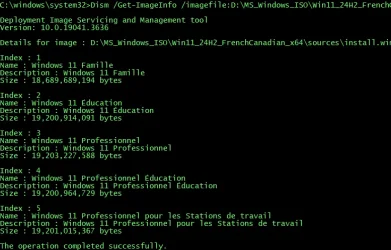
In an effort to supply all the data I can, I found this:
First : I work in a plant and we have no Intune, no SCCM... hand built images.
With the MS mediacreationtool created USB key with an unattended from

I found that I have no idea which of the following it installs:
1758905172181.webp

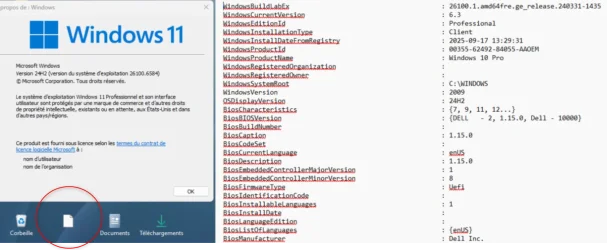
But then again I knew:
1758905604573.webp
(Red circle around the ghost icon)

I'm wasting so much time battling with Windows now a days... the ROI sucks!


Thank you for all help here.
 

My Computer My Computer

At a glance

Windoz 10
OS
Windoz 10
Computer type
PC/Desktop
Manufacturer/Model
Custom job

Latest Support Threads

Back
Top Bottom