- Local time
- 6:33 AM
- Posts
- 236
- OS
- Windows 11 Pro 22H2
Hi,
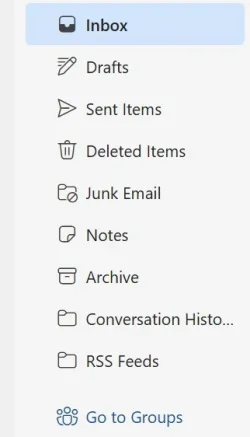
Is there a way to reset the Left Folder Pane menu folders back to their default order?
For example, I remember that I had the Junk Items folder right below the Inbox folder. Then right below the Junk Email folder, I had the Archive folder.
It is now mixed up because maybe I accidentally had done something to have these Folders not in the correct order in a way I like them to be.
If there is no option to Reset these back to the Default order, then I will just manually move them Up or Down.
Not a huge problem, but I was just wondering if there is an option to Reset these back to their default order.
Is there a way to reset the Left Folder Pane menu folders back to their default order?
For example, I remember that I had the Junk Items folder right below the Inbox folder. Then right below the Junk Email folder, I had the Archive folder.
It is now mixed up because maybe I accidentally had done something to have these Folders not in the correct order in a way I like them to be.
If there is no option to Reset these back to the Default order, then I will just manually move them Up or Down.
Not a huge problem, but I was just wondering if there is an option to Reset these back to their default order.
Attachments
My Computer
At a glance
Windows 11 Pro 22H2
- OS
- Windows 11 Pro 22H2