
How to revert to old Start Menu without using third party tools?


Looks like 2026-07 Preview Update (KB5101684) restores the option for the "Start menu size" in 25H2 (26200).
Anyone seeing this ?
 

My Computer My Computer

At a glance

Windows 11 ProIntel i5-9500TMicron MTA16ATF2G64HZ-2G6E1 2x16GB(32GB) 2666...
OS
Windows 11 Pro
Computer type
PC/Desktop
Manufacturer/Model
Dell OptiPlex 7070 Micro
CPU
Intel i5-9500T
Motherboard
DPN 6XMFM
Memory
Micron MTA16ATF2G64HZ-2G6E1 2x16GB(32GB) 2666mhz DDR4 SODIMM
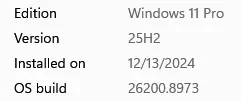
Looks like 2026-07 Preview Update (KB5101684) restores the option for the "Start menu size" in 25H2 (26200).

I have this build and it was not there yet.

Screenshot 2026-08-03 114159.webp

But the code for it is now in there as I used vivetool then restarted and I now have my small start menu back.

Code:
vivetool /enable /id:61754985,61225604,61596616,61596617,61596618,61596619

e.webp
 

My Computer My Computer

At a glance

Windows 11 Pro
OS
Windows 11 Pro
I have this build and it was not there yet.

View attachment 178440

But the code for it is now in there as I used vivetool then restarted and I now have my small start menu back.

Code:
vivetool /enable /id:61754985,61225604,61596616,61596617,61596618,61596619

View attachment 178443
I deleted my ViVeTool folder once I got the Windows Start menu size option. If you have the "Start menu size" option showing then you should be all good without ViVeTool.
 

My Computer My Computer

At a glance

Windows 11 ProIntel i5-9500TMicron MTA16ATF2G64HZ-2G6E1 2x16GB(32GB) 2666...
OS
Windows 11 Pro
Computer type
PC/Desktop
Manufacturer/Model
Dell OptiPlex 7070 Micro
CPU
Intel i5-9500T
Motherboard
DPN 6XMFM
Memory
Micron MTA16ATF2G64HZ-2G6E1 2x16GB(32GB) 2666mhz DDR4 SODIMM

Latest Support Threads

Back
Top Bottom




