Solved how to run a exe file that was supported in windows 4.1


Silencious

Well-known member
Local time
7:24 PM
Posts
22
OS
windows 11
Hi guys/gals, I was wondering if you could help in getting this EXE program to work for me in Windows 11 pro. Its a very small program mainly for correspondence chess and I have fond memories and games I wish to review. I know chess base have a reader, but I've always wanted this to work, and I've tried the windows compatibility route till I'm blue in the face with exasperation. So now I turn to you. Can you help
 
Windows Build/Version
window 24H2 (OS |Build 26100, 6584)

Attachments

My Computer

System One

  • OS
    windows 11

My Computer

System One

  • OS
    Windows 11 25H2 Home Single Language (26200.8037)
    Computer type
    Laptop
    Manufacturer/Model
    LENOVO IdeaPad 5 15ITL05
    CPU
    Intel Core i3-1115G4
    Motherboard
    There is no such a God, I only know mother-Earth
    Memory
    8GB
    Graphics Card(s)
    on-board
    Sound Card
    on-board
    Monitor(s) Displays
    (s) is too ambitious for me
    Screen Resolution
    1920*1080
    Hard Drives
    256GB (SSD)
    PSU
    I was very young when I last saw a PSU
    Case
    ...
    Cooling
    My coldness is enough to cool the computer
    Keyboard
    A broken and very clean keyboard
    Mouse
    Rat
    Internet Speed
    Slowest internet connection in Europe
    Browser
    ChromePortable / FirefoxPortable / TorBrowser
    Antivirus
    G-Virus
    Other Info
    I can simply say that I took the red pill and I am not happy with it.
Please tell me what to do here, I'm confused? Thank you for your help also
 

My Computer

System One

  • OS
    windows 11
Simply you can drag and drop your Win16 executable file to otvdm.exe or otvdmw.exe.

There is a how to install part at the github page.

You are welcome, I hope your app is working now.
 

My Computer

System One

  • OS
    Windows 11 25H2 Home Single Language (26200.8037)
    Computer type
    Laptop
    Manufacturer/Model
    LENOVO IdeaPad 5 15ITL05
    CPU
    Intel Core i3-1115G4
    Motherboard
    There is no such a God, I only know mother-Earth
    Memory
    8GB
    Graphics Card(s)
    on-board
    Sound Card
    on-board
    Monitor(s) Displays
    (s) is too ambitious for me
    Screen Resolution
    1920*1080
    Hard Drives
    256GB (SSD)
    PSU
    I was very young when I last saw a PSU
    Case
    ...
    Cooling
    My coldness is enough to cool the computer
    Keyboard
    A broken and very clean keyboard
    Mouse
    Rat
    Internet Speed
    Slowest internet connection in Europe
    Browser
    ChromePortable / FirefoxPortable / TorBrowser
    Antivirus
    G-Virus
    Other Info
    I can simply say that I took the red pill and I am not happy with it.

My Computers

System One System Two

  • OS
    W10
    Computer type
    PC/Desktop
    Manufacturer/Model
    Home brew
    CPU
    Ryzen3-2200G
    Motherboard
    GA-A320M-S2H
    Memory
    16 GB Kingston HyperX DDR4
    Graphics Card(s)
    Integrated
    Sound Card
    Integrated
    Monitor(s) Displays
    LG W2246
    Screen Resolution
    1920x1080
    Hard Drives
    Intel 760p 256GB NVMe M.2
    Seagate Barracuda 7200 1TB
    Gash Seagate ST31608
    PSU
    2006-vintage no-name
    Case
    Acer Aspire 2006
    Cooling
    Air (fan-assist)
    Keyboard
    HP SK-2885
    Mouse
    wireless
    Internet Speed
    32 mbps
    Browser
    FF latest
    Antivirus
    MS Defender
  • Operating System
    W10
    Computer type
    Laptop
    Manufacturer/Model
    HP 255 G8
    CPU
    Ryzen 5 3500U
    Memory
    8 GB
    Graphics card(s)
    on-board
    Monitor(s) Displays
    16"
    Screen Resolution
    1920x1080
    Hard Drives
    Samsung SSD 512GB Nvme
    Browser
    FF + Edge
    Antivirus
    MS Defender
It would be much better to recompile this program for Win32, then it will work in any Windows installation. Try to ask the authors if possible. But apparently it is written long ago using Borland C++ for Windows 3.1, so the authors might forget the code after so many years or may be no longer in touch. Then yes, you need either to install this DWM or, alternatively, run any 32-bit Windows on a virtual machine in your Windows 11.
 

My Computer

System One

  • OS
    Windows 11 Pro 25H2
    Computer type
    Laptop
    Manufacturer/Model
    Lenovo Legion 5-15ARH05
    CPU
    AMD Rysen 5 4600H
    Memory
    32 GB (2 x 16 GB Samsung SO-DIMM DDR4-3200)
    Graphics Card(s)
    GeForce GTX 1650 Ti, 4 GB GDDR6
    Screen Resolution
    1920x1080
    Hard Drives
    SSD M.2 512 GB SAMSUNG MZALQ512; SSD M.2 1 TB Seagate FireCuda 530
    Mouse
    Logitech M650L in Bluetooth mode
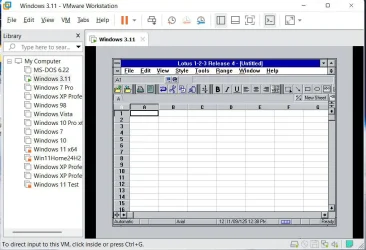
Do you mean Windows 3.1? After Windows 3.1/3.11 was Windows 95. Windows 11 does not support 16-bit programs. To run an old 16-bit program in Windows 11 you need to use a Virtual Machine.

For example, I is a Virtual Machine Manager called VMware Workstation. With it I created a DOS 6.22/Windows 3.11 virtual machine. In this virtual machine I installed the 16-bit program called Lotus 1-2-3.

Lotus123 in VM.webp
 

My Computers

System One System Two

  • OS
    Windows 11 Pro 25H2 (26200.6901)
    Computer type
    Laptop
    Manufacturer/Model
    ASUS TUF Gaming A15 (2022)
    CPU
    AMD Ryzen 7 6800H with Radeon 680M GPU (486MB RAM)
    Memory
    Crucial DDR5-4800 (2400MHz) 32GB (2 x 16GB)
    Graphics Card(s)
    NVIDIA RTX 3060 Laptop (6GB RAM)
    Sound Card
    n/a
    Monitor(s) Displays
    15.6-inch
    Screen Resolution
    1920x1080 300Hz
    Hard Drives
    2 x Samsung 990 Evo Plus (2TB M.2 NVME SSD)
    PSU
    n/a
    Mouse
    Wireless Mouse M510
    Internet Speed
    2100Mbps/300Mbps
    Browser
    Firefox
    Antivirus
    Malwarebytes
  • Operating System
    Windows 11 Pro 25H2 (26200.8246)
    Computer type
    PC/Desktop
    Manufacturer/Model
    Custom build
    CPU
    AMD Ryzen 7 5700X3D
    Motherboard
    ASUS ROG Strix B550-F Gaming WiFi II
    Memory
    G.SKILL Flare X 32GB (2x16GB) DDR4
    Graphics card(s)
    ASUS ROG-STRIX-RTX3060TI-08G-V2-GAMING (RTX 3060-Ti, 8GB RAM)
    Monitor(s) Displays
    Samsung G50D IPS 27"
    Screen Resolution
    1440p/180Hz
    Hard Drives
    SAMSUNG 990 EVO Plus (2TB] M.2 NVME SSD
    SAMSUNG 990 EVO Plus (4TB) M.2 NVME SSD
    PSU
    Corsair RM750x (750 watts)
    Case
    Cooler Master MasterCase 5
    Cooling
    Scythe Mugen 6
    Keyboard
    Logitech K520 (MK540 keyboard/mouse combo)
    Mouse
    Logitech M310 (MK540 keyboard/mouse combo)
    Internet Speed
    2100 Mbps down / 300 Mbps up
    Browser
    Firefox, Edge, Chrome
    Antivirus
    Malwarebytes (Premium)
    Other Info
    ASUS Blu-ray Burner BW-16D1HT (SATA) || Western Digital Easystore 20TB USB 3.0 external hard drive used with Acronis True Image 2025 backup software || HP OfficeJet Pro 6975 Printer/Scanner

Latest Support Threads

Back
Top Bottom