How to set the security to be “everyone” for entire hard drive


jamal numan

Active member
Local time
4:02 PM
Posts
47
OS
windows 11
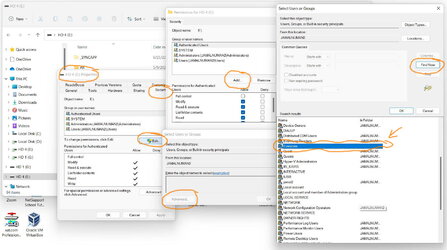
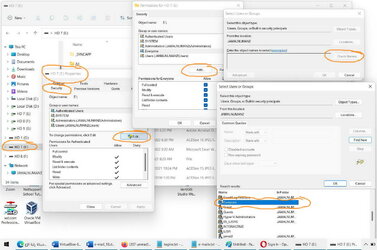
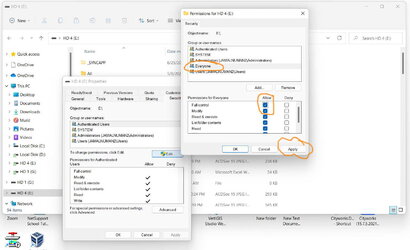
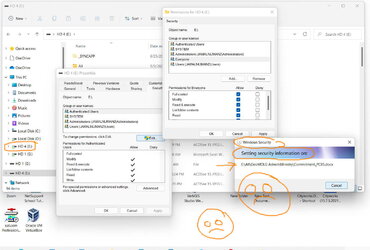
Windows 11: How to set the security to be “everyone” for a hard drive without the need to waste a lot of time to visit each single folder and subfolder?


I couldn’t figure out why settings the security to be “everyone” for a hard drive requires going through all the folders and subfolders which takes considerable time


How to grant the “everyone” security to all folders and subfolders in one go without having the Windows visiting all folders and subfolders?
Clip_842.jpg


Clip_844.jpg

Clip_845.jpg
 

Attachments

  • Clip_843.jpg
    Clip_843.jpg
    157.2 KB · Views: 2

My Computer My Computer

At a glance

windows 11
OS
windows 11
All file/directory objects contain ACLs, so if you're applying a recurve ACL all mentioned objects need to be modified. No way around that.
 

My Computer My Computer

At a glance

Linux Mint
OS
Linux Mint
Computer type
Laptop
Manufacturer/Model
System76 Lemur Pro
Windows 11: How to set the security to be “everyone” for a hard drive without the need to waste a lot of time to visit each single folder and subfolder?


I couldn’t figure out why settings the security to be “everyone” for a hard drive requires going through all the folders and subfolders which takes considerable time


How to grant the “everyone” security to all folders and subfolders in one go without having the Windows visiting all folders and subfolders?


View attachment 34075


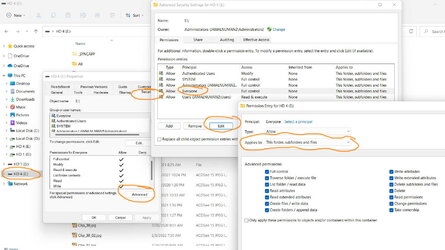
View attachment 34076

View attachment 34077

Use the security advanced options to do it. You can tell it to recurse your settings to sub-folders there.
 

My Computers My Computers

  • At a glance

    Windows 11 ProIntel Core i9 14900K 5800/4500 P/E96GB (2x48) G.skill Ripjaws 6800Asus ROG Strix 4070 Ti OC
    OS
    Windows 11 Pro
    Computer type
    PC/Desktop
    Manufacturer/Model
    DIY Photoshop/Audio/Game/tinker
    CPU
    Intel Core i9 14900K 5800/4500 P/E
    Motherboard
    Asus ROG Maximus Z790 Dark Hero
    Memory
    96GB (2x48) G.skill Ripjaws 6800
    Graphics Card(s)
    Asus ROG Strix 4070 Ti OC
    Sound Card
    B&W 606 S3 speakers; Audiolabs 7000a integrated amp; RSL 10S Mk2 sub
    Monitor(s) Displays
    Eizo CG2730 ColorEdge, ViewSonic VP2768
    Screen Resolution
    2560 x 1440 x 2
    Hard Drives
    nvme: WDC SN850X 4TB, SN850 1TB, SK-Hynix 2 TB P41
    Spinners: Sabrent USB-C DS-SC5B 5-bay docking station, 6TB WDC Black, 6TB Ironwolf Pro 2x 2TB WDC Black
    PSU
    850W Seasonic Vertex PX-850
    Case
    FD North XL Mesh, Black Walnut
    Cooling
    EK Nucleus black 360 AIO w/Phanteks T30 fans; 2 Noctua NF-A14 Chromax ; T30 for memory
    Keyboard
    Keychron Q3 Max TKL w/GMK Redsuns Red Samuri keycaps
    Mouse
    Logitech G305 wireless gaming
    Internet Speed
    575 Mb/s down | 25 Mb/s up
    Browser
    Firefox
    Antivirus
    Defender, Macrium Reflect X
    Other Info
    Phangkey Amaterasu V2 Desk Mat
  • At a glance

    Apple M1
    Computer type
    Laptop
    Manufacturer/Model
    💻 Apple 13" Macbook Pro 2020 (m1)

    CPU
    Apple M1
    Screen Resolution
    2560x1600
    Browser
    Firefox
Use the security advanced options to do it. You can tell it to recurse your settings to sub-folders there.

This the default option, nevertheless, Windows goes through all folders and files which wastes a lot of time


Clip_860.jpg
 

My Computer My Computer

At a glance

windows 11
OS
windows 11
All file/directory objects contain ACLs, so if you're applying a recurve ACL all mentioned objects need to be modified. No way around that.

Have you figure out the time I need to grant a security for my 4TB hard drive? It takes for ever. There should be a way to grant security for all in one go
 

My Computer My Computer

At a glance

windows 11
OS
windows 11
A better question, why would you want to set Everyone to have access to everything?
 

My Computer My Computer

At a glance

Windows 11, Windows 10, Linux Fedora Cinnamon
OS
Windows 11, Windows 10, Linux Fedora Cinnamon
A better question, why would you want to set Everyone to have access to everything?
Not sure why Everyone should have all access to an entire HDD unless a network shared one -- however seems the easy way is to create a top level folder called say shared_folder, grant everyone access in it and that should include all the sub folders.

How many users do you have on this windows machine -- if just a few say < 8 just grant each user the rights individually.

If a lot more than >8 and these are remote users just create an accessible lnternet ink via apache or IIS.

One of the problems with the domestic versions of Windows is that it's essentially a single user system so it's hard / if not impossible to grant people rights to access resources on the machine without also having a user account on the machine - even a limited one.. I think also you can't have more than 1 GUEST running concurrently --has to be set as GUEST1, GUEST2 etc.

The Internet solution IMO could be the best one for cases with a lot of users as this can be managed by browsers and each person just needs a simple account and password via a login box.


Cheers
jimbo
 
Last edited:

My Computer My Computer

At a glance

Windows XP,11 Linux Fedora Rawhide pre-releas...2 X Intel i7
OS
Windows XP,11 Linux Fedora Rawhide pre-release 46
Computer type
PC/Desktop
CPU
2 X Intel i7
Screen Resolution
4KUHD X 2

My Computers My Computers

  • At a glance

    Windows 11 ProIntel Core i9 14900K 5800/4500 P/E96GB (2x48) G.skill Ripjaws 6800Asus ROG Strix 4070 Ti OC
    OS
    Windows 11 Pro
    Computer type
    PC/Desktop
    Manufacturer/Model
    DIY Photoshop/Audio/Game/tinker
    CPU
    Intel Core i9 14900K 5800/4500 P/E
    Motherboard
    Asus ROG Maximus Z790 Dark Hero
    Memory
    96GB (2x48) G.skill Ripjaws 6800
    Graphics Card(s)
    Asus ROG Strix 4070 Ti OC
    Sound Card
    B&W 606 S3 speakers; Audiolabs 7000a integrated amp; RSL 10S Mk2 sub
    Monitor(s) Displays
    Eizo CG2730 ColorEdge, ViewSonic VP2768
    Screen Resolution
    2560 x 1440 x 2
    Hard Drives
    nvme: WDC SN850X 4TB, SN850 1TB, SK-Hynix 2 TB P41
    Spinners: Sabrent USB-C DS-SC5B 5-bay docking station, 6TB WDC Black, 6TB Ironwolf Pro 2x 2TB WDC Black
    PSU
    850W Seasonic Vertex PX-850
    Case
    FD North XL Mesh, Black Walnut
    Cooling
    EK Nucleus black 360 AIO w/Phanteks T30 fans; 2 Noctua NF-A14 Chromax ; T30 for memory
    Keyboard
    Keychron Q3 Max TKL w/GMK Redsuns Red Samuri keycaps
    Mouse
    Logitech G305 wireless gaming
    Internet Speed
    575 Mb/s down | 25 Mb/s up
    Browser
    Firefox
    Antivirus
    Defender, Macrium Reflect X
    Other Info
    Phangkey Amaterasu V2 Desk Mat
  • At a glance

    Apple M1
    Computer type
    Laptop
    Manufacturer/Model
    💻 Apple 13" Macbook Pro 2020 (m1)

    CPU
    Apple M1
    Screen Resolution
    2560x1600
    Browser
    Firefox
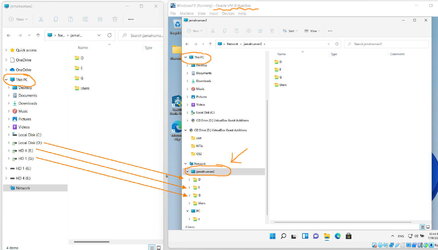
One simple case at which I need to secure the entire drive is when working with VM (screenshot is below). In this case, I need to be able to access all external hard drives connected to the physical machine while working from the VM. Unless they are shared with proper security, this won’t be possible


Other simple case is for home use! All machines that connected on the same network with wireless connection needs to be able to access particular external hard drive that’s physically connected to one of these machines


My issue here is that why securing the entire external hard drive for everyone should require all this complexity?


Clip_864.jpg
 

My Computer My Computer

At a glance

windows 11
OS
windows 11

Latest Support Threads

Back
Top Bottom