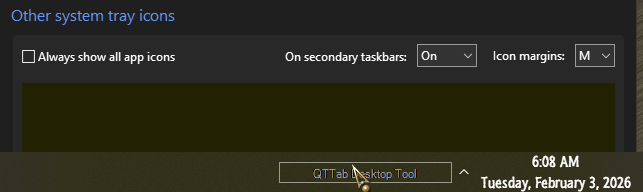
How to Show ALL System Tray icons without selecting them one by one? See Print Screen for more details


Code:
:: NotifyIconSettings [SHOW ALL]
for /f "tokens=*" %%A in (
  'REG QUERY "HKCU\Control Panel\NotifyIconSettings" ^| findstr /v "REG_" ^| findstr /v "NotifyIconSettings$"'
) do (
    REG ADD "%%A" /v "IsPromoted" /t REG_DWORD /d "1" /f >nul
)

:: SystemTrayChevronVisibility [ON]
REG ADD "HKCU\SOFTWARE\Classes\Local Settings\Software\Microsoft\Windows\CurrentVersion\TrayNotify" /v "SystemTrayChevronVisibility" /t REG_DWORD /d "1" /f

.BAT file i use to show all system tray icons
This forces you to rerun the script each time after another subkey gets added under the key
"HKCU\Control Panel\NotifyIconSettings".
Also, AFAIK the Windows 11 taskbar still has a (hard) limit on how many icons can be visible in its system tray, or "notification area" before it will add its chevron-sign (∧) button that lets you access its "taskbar corner overflow" menu that we're trying to avoid in order to prevent losing productivity.

I find that the "Always show all taskbar tray icons" Windhawk mod (see the link I posted in my previous reply to this thread) is the best solution right now. That is, for those who don't want to use ExplorerPatcher's "Windows 10 (ExplorerPatcher)" taskbar style option—and assuming that your boss doesn't force you to be less productive by telling you that tools like these are verboten whilst passing the blame for your being less productive on you. :what:
 

My Computers My Computers

  • At a glance

    11 Homei7 13650HX16GB DDR5GeForce RTX 4060 Mobile
    OS
    11 Home
    Computer type
    Laptop
    Manufacturer/Model
    Asus TUF Gaming F16 (2024)
    CPU
    i7 13650HX
    Memory
    16GB DDR5
    Graphics Card(s)
    GeForce RTX 4060 Mobile
    Sound Card
    Eastern Electric MiniMax DAC Supreme; Emotiva UMC-200; Astell & Kern AK240
    Monitor(s) Displays
    Sony Bravia XR-55X90J
    Screen Resolution
    3840×2160
    Hard Drives
    512GB SSD internal
    37TB external
    PSU
    Li-ion
    Cooling
    2× Arc Flow Fans, 4× exhaust vents, 5× heatpipes
    Keyboard
    Logitech K800
    Mouse
    Logitech G402
    Internet Speed
    30Mbit/s up, 500Mbit/s down
    Browser
    FF
    Antivirus
    What's an antivirus?
  • At a glance

    11 Homei5 1135G716GB DDR4Intel Iris Xe
    Operating System
    11 Home
    Computer type
    Laptop
    Manufacturer/Model
    Medion S15450
    CPU
    i5 1135G7
    Memory
    16GB DDR4
    Graphics card(s)
    Intel Iris Xe
    Sound Card
    Eastern Electric MiniMax DAC Supreme; Emotiva UMC-200; Astell & Kern AK240
    Monitor(s) Displays
    Sony Bravia XR-55X90J
    Screen Resolution
    3840×2160
    Hard Drives
    2TB SSD internal
    37TB external
    PSU
    Li-ion
    Keyboard
    Logitech K800
    Mouse
    Logitech G402
    Internet Speed
    30Mbit/s up, 500Mbit/s down
    Browser
    FF
StartAllBack will do it too.

12139.gif
 

My Computers My Computers

  • At a glance

    Windows 11 Pro
    OS
    Windows 11 Pro
    Computer type
    PC/Desktop
    Manufacturer/Model
    ASUS ROG Strix
  • At a glance

    Windows 11 Pro
    Operating System
    Windows 11 Pro
    Computer type
    Laptop
    Manufacturer/Model
    ASUS VivoBook
  • ASUS VivoBook 'Lite' ~ Windows 11 Home
Code:
:: NotifyIconSettings [SHOW ALL]
for /f "tokens=*" %%A in (
  'REG QUERY "HKCU\Control Panel\NotifyIconSettings" ^| findstr /v "REG_" ^| findstr /v "NotifyIconSettings$"'
) do (
    REG ADD "%%A" /v "IsPromoted" /t REG_DWORD /d "1" /f >nul
)

:: SystemTrayChevronVisibility [ON]
REG ADD "HKCU\SOFTWARE\Classes\Local Settings\Software\Microsoft\Windows\CurrentVersion\TrayNotify" /v "SystemTrayChevronVisibility" /t REG_DWORD /d "1" /f

.BAT file i use to show all system tray icons
Hi I saved and ran this batch file but I still get most icons "hidden" behind the ">" icon. Might it be so because I am using ExplorerPatcher?
 

My Computer My Computer

At a glance

Win11
OS
Win11
Computer type
Laptop
Manufacturer/Model
Microsoft
Hi I saved and ran this batch file but I still get most icons "hidden" behind the ">" icon. Might it be so because I am using ExplorerPatcher?
If you use ExplorerPatcher's "Windows 10 (ExplorerPatcher)" taskbar style option, then you don't need to run any script nor need to apply any registry tweaks nor need to do anything special. Instead, you can go to ExplorerPatcher settings > Taskbar > Customize notification area icons. Then, in the window that opens, check the checkbox at the bottom (see the screenshot from post #10).

(Step 2 from post #10 is just an alternative way to open this same window, by using explorer to open the window's shell link.)
 

My Computers My Computers

  • At a glance

    11 Homei7 13650HX16GB DDR5GeForce RTX 4060 Mobile
    OS
    11 Home
    Computer type
    Laptop
    Manufacturer/Model
    Asus TUF Gaming F16 (2024)
    CPU
    i7 13650HX
    Memory
    16GB DDR5
    Graphics Card(s)
    GeForce RTX 4060 Mobile
    Sound Card
    Eastern Electric MiniMax DAC Supreme; Emotiva UMC-200; Astell & Kern AK240
    Monitor(s) Displays
    Sony Bravia XR-55X90J
    Screen Resolution
    3840×2160
    Hard Drives
    512GB SSD internal
    37TB external
    PSU
    Li-ion
    Cooling
    2× Arc Flow Fans, 4× exhaust vents, 5× heatpipes
    Keyboard
    Logitech K800
    Mouse
    Logitech G402
    Internet Speed
    30Mbit/s up, 500Mbit/s down
    Browser
    FF
    Antivirus
    What's an antivirus?
  • At a glance

    11 Homei5 1135G716GB DDR4Intel Iris Xe
    Operating System
    11 Home
    Computer type
    Laptop
    Manufacturer/Model
    Medion S15450
    CPU
    i5 1135G7
    Memory
    16GB DDR4
    Graphics card(s)
    Intel Iris Xe
    Sound Card
    Eastern Electric MiniMax DAC Supreme; Emotiva UMC-200; Astell & Kern AK240
    Monitor(s) Displays
    Sony Bravia XR-55X90J
    Screen Resolution
    3840×2160
    Hard Drives
    2TB SSD internal
    37TB external
    PSU
    Li-ion
    Keyboard
    Logitech K800
    Mouse
    Logitech G402
    Internet Speed
    30Mbit/s up, 500Mbit/s down
    Browser
    FF
Hi I saved and ran this batch file but I still get most icons "hidden" behind the ">" icon. Might it be so because I am using ExplorerPatcher?
I do not use ExplorerPatcher, so i really do not know if it is about that app.

Try to run script in administrator mode, then restart your explorer.exe or restart your computer.
 

My Computer My Computer

At a glance

Windows 11 25H2 Home Single Language (26200.8...Intel Core i3-1115G48GBon-board
OS
Windows 11 25H2 Home Single Language (26200.8037)
Computer type
Laptop
Manufacturer/Model
LENOVO IdeaPad 5 15ITL05
CPU
Intel Core i3-1115G4
Motherboard
There is no such a God, I only know mother-Earth
Memory
8GB
Graphics Card(s)
on-board
Sound Card
on-board
Monitor(s) Displays
(s) is too ambitious for me
Screen Resolution
1920*1080
Hard Drives
256GB (SSD)
PSU
I was very young when I last saw a PSU
Case
...
Cooling
My coldness is enough to cool the computer
Keyboard
A broken and very clean keyboard
Mouse
Rat
Internet Speed
Slowest internet connection in Europe
Browser
ChromePortable / FirefoxPortable / TorBrowser
Antivirus
G-Virus
Other Info
I can simply say that I took the red pill and I am not happy with it.
Back
Top Bottom