how to uninstall new "Windows Backup" bloat app?


Sorry, haven't yet. Working on another previous project to auto-restore Classic Ribbon on a clean install. As you know, everything's in the details.
off topic... but as-in bake it into the image? or just have it implemented post-install via unattended?
 

My Computer

System One

  • OS
    Windows 11 Pro
off topic... but as-in bake it into the image? or just have it implemented post-install via unattended?
The normal guidance on applying HKCU changes on a clean install, is to update Default User's NTUSER.DAT with your HKCU edits. This way, every new user account inherits the same settings.

In reality, Windows appears to clobber (or ignore) some HKCU settings when the user account is provisioned at first logon.

The workaround as several IT admins have realized, is to apply the HKCU updates during the first logon session, through a created RunOnceEx task or ordered by FirstLogonCommand in the unattended file.

My command is actually a PS script, since corrective logic has be applied to check if you're on 21H2 vs 22H2-24H2 system.
 

My Computer

System One

  • OS
    Windows 7
The normal guidance on applying HKCU changes on a clean install, is to update Default User's NTUSER.DAT with your HKCU edits. This way, every new user account inherits the same settings.

In reality, Windows appears to clobber (or ignore) some HKCU settings when the user account is provisioned at first logon.

The workaround as several IT admins have realized, is to apply the HKCU updates during the first logon session, through a created RunOnceEx task or ordered by FirstLogonCommand in the unattended file.

My command is actually a PS script, since corrective logic has be applied to check if you're on 21H2 vs 22H2-24H2 system.
i only use the ribbon for specific tasks, hence the tool i made that i posted yesterday to launch a specific path only in the ribbon instance. i was just curious of your methodology. interested to see the final script when completed.
 

My Computer

System One

  • OS
    Windows 11 Pro
Quite rightly said by gunrunnerjohn
Use at your own risk. I did forget to say that.
I feel it does the job with safety nets.
But as always, have a look what the script does if you understand PowerShell. If not, it may be best not to run it.
I understand PS, and can confirm @JamieT's writes in that formal style of overcautious programming. :cautious:

If this was a "Fast & Furious" movie sequel, Dom & Letty would gut 75% of the script and it would still drive.
 

My Computer

System One

  • OS
    Windows 7
If they did a movie called "Slow & Cautious" I should star in it! 😂
.. and if they were trying to rip out all my nice safety stuff I'd tell them... "Well OK, as long as you know what you're doing?" 😂
 

My Computer

System One

  • OS
    Windows 11
Get a grip - the so called bloat impact is tiny.
Here's the thing - bloat is in the mind not of practical significance with modern high capacity hard drives. Just ignore it LOL.
 

My Computer

System One

  • OS
    Windows 11 Pro + Win11 Canary VM.
    Computer type
    Laptop
    Manufacturer/Model
    ASUS Zenbook 14
    CPU
    I9 13th gen i9-13900H 2.60 GHZ
    Motherboard
    Yep, Laptop has one.
    Memory
    16 GB soldered
    Graphics Card(s)
    Integrated Intel Iris XE
    Sound Card
    Realtek built in
    Monitor(s) Displays
    laptop OLED screen
    Screen Resolution
    2880x1800 touchscreen
    Hard Drives
    1 TB NVME SSD (only weakness is only one slot)
    PSU
    Internal + 65W thunderbolt USB4 charger
    Case
    Yep, got one
    Cooling
    Stella Artois (UK pint cans - 568 ml) - extra cost.
    Keyboard
    Built in UK keybd
    Mouse
    Bluetooth , wireless dongled, wired
    Internet Speed
    900 mbs (ethernet), wifi 6 typical 350-450 mb/s both up and down
    Browser
    Edge
    Antivirus
    Defender
    Other Info
    TPM 2.0, 2xUSB4 thunderbolt, 1xUsb3 (usb a), 1xUsb-c, hdmi out, 3.5 mm audio out/in combo, ASUS backlit trackpad (inc. switchable number pad)

    Macrium Reflect Home V8
    Office 365 Family (6 users each 1TB onedrive space)
    Hyper-V (a vm runs almost as fast as my older laptop)
There's no real bloat in terms of app size, but the larger issue is you can't hide it on Home or Pro. If you're using EDU or Enterprise in a domain, or live as a resident in the EEA, then MS provides you an opt out.
 

My Computer

System One

  • OS
    Windows 7
It's been repeated many times, removing Client.CBS will break your desktop. Some users don't care about the broken features.

AveYo's code snippet is hideously overkill and can be simplified when removing one Appx package:
Code:
$appx = get-appxpackage -allusers *Client.CBS*
$PackageFamilyName = $appx.PackageFamilyName
$PackageFullName = $appx.PackageFullName; $PackageFullName

ni "$store\Deprovisioned\$PackageFamilyName" -force >''
dism /online /set-nonremovableapppolicy /packagefamily:$PackageFamilyName /nonremovable:0 >''

$store = 'HKLM:\SOFTWARE\Microsoft\Windows\CurrentVersion\Appx\AppxAllUserStore'
$users = @('S-1-5-18')
$users += $((dir $store -ea 0 |where {$_ -like '*S-1-5-21*'}).PSChildName)

foreach ($sid in $users) { ni "$store\EndOfLife\$sid\$PackageFullName" -force >'' }
remove-appxpackage -package $PackageFullName -allusers >''
I registered account just to say thank you because after that code, backup app icon finally went away from start menu
 

My Computer

System One

  • OS
    Windows 11 23H2 22631.4112 Build
    Computer type
    Laptop
    Manufacturer/Model
    Lenovo
You mean Windows FINALLY AFTER DECADES removed that Windows7 setting from it's most modern O/S? I never did figure that one out. In fact on Windows 8.1 CUSTOM REFRESH was a LIFESAVER BACKUP in spite of anything else MS said about it. Those .WIM files was your backup and worked fast for recovery.
 

My Computer

You mean Windows FINALLY AFTER DECADES removed that Windows7 setting from it's most modern O/S? I never did figure that one out. In fact on Windows 8.1 CUSTOM REFRESH was a LIFESAVER BACKUP in spite of anything else MS said about it. Those .WIM files was your backup and worked fast for recovery.

Hello mate, :alien:

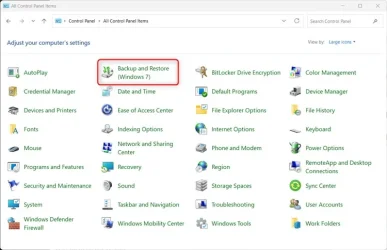
No worries, the W7 Backup and Restore feature is still in W11.


W7_backup.webp

The Windows Backup mentioned in this thread is different for below:


My Computers

System One System Two

  • OS
    Windows 11 Pro for Workstations
    Computer type
    PC/Desktop
    Manufacturer/Model
    Custom self build
    CPU
    Intel i7-8700K 5 GHz
    Motherboard
    ASUS ROG Maximus XI Formula Z390
    Memory
    64 GB (4x16GB) G.SKILL TridentZ RGB DDR4 3600 MHz (F4-3600C18D-32GTZR)
    Graphics Card(s)
    ASUS ROG-STRIX-GTX1080TI-O11G-GAMING (11GB GDDR5X)
    Sound Card
    Integrated Digital Audio (S/PDIF)
    Monitor(s) Displays
    2 x Samsung Odyssey G75 27"
    Screen Resolution
    2560x1440
    Hard Drives
    1TB Samsung 990 PRO M.2,
    4TB Samsung 990 PRO M.2,
    TerraMaster F8 SSD Plus NAS
    PSU
    Seasonic Prime Titanium 850W
    Case
    Thermaltake Core P3 wall mounted
    Cooling
    Corsair Hydro H115i
    Keyboard
    Amazon Basics Wired Full Keyboard MD005
    Mouse
    Logitech MX Master 4
    Internet Speed
    2 Gbps Download and 100 Mbps Upload
    Browser
    Chrome and Edge
    Antivirus
    Microsoft Defender
    Other Info
    Logitech Z625 speaker system,
    Logitech BRIO 4K Pro webcam,
    HP Color LaserJet Pro MFP M477fdn,
    CyberPower CP1500PFCLCD
    Galaxy S23 Plus phone
  • Operating System
    Windows 11 Pro
    Computer type
    Laptop
    Manufacturer/Model
    Surface Laptop 7 Copilot+ PC
    CPU
    Snapdragon X Elite (12 core) 3.42 GHz
    Memory
    16 GB LPDDR5x-7467 MHz
    Monitor(s) Displays
    15" HDR
    Screen Resolution
    2496 x 1664
    Hard Drives
    1 TB SSD
    Internet Speed
    Wi-Fi 7 and Bluetooth 5.4
    Browser
    Chrome and Edge
    Antivirus
    Microsoft Defender
Greetings @Brink - ALL of that grueling tireless effort and multiple years of your tweaks are still proving handy on my Windows 11. Some not, but many YES! As well as i still incorporate FANTASTIC Windows 98SE Filechangemonitor (Really shows you IN REAL-TIME) Windows is doing locally under the hood. RunMe, another old favorite still is a USEFUL LAUNCHER! In fact on my Windows 10 it would stick open. On Windows 11 it now retracts like was always intended.

So though. Windows 7 IS STILL EVEN ON Windows 11. Some things never change. Cheers! :-)
 

My Computer

Hi,

after running the script from
if you run the command sfc /scannow you will get error(s) and windows will not be able to fix them.

I found a way to fix that:


1 - before running the script, run sfc/scannow ( from an admin command prompt )

2 - no error? OK

3 - run powershell script

4 - run sfc/scannow, then there will be error(s) found and unable to repair...

4 - run DISM /Online /Cleanup-Image /RestoreHealth ( from an admin command prompt )

5 - run sfc/scannow, the error(s) will be repaired

6 - run sfc/scannow again to confirm that there is no error(s)

7 - fix is done.

end
 

My Computer

System One

  • OS
    WINDOWS 11 X64
    Computer type
    PC/Desktop
    Manufacturer/Model
    hp
Like Co-pilot, this one program Microsoft will not allow you to get rid off, Even if you are able to uninstall it, it keeps coming back in the next update.

I just ignore it and let it be.
 

My Computer

System One

  • OS
    Win 7,8.1,10,11, Mint, Kde Plasma, Debian
    Computer type
    Laptop
    Manufacturer/Model
    Dell
    CPU
    Intel(R) Core(TM) i7-6500U CPU @ 2.50GHz
    Memory
    16 GB
    Graphics Card(s)
    Intel(R) HD Graphics 520/Nvidia GeForce 930M
    Sound Card
    Intel(R) Display Audio/RealtekAudio
    Monitor(s) Displays
    Generic Pnp Monitor
    Screen Resolution
    1366 X 768
    Hard Drives
    ST2000LM024-1EJ164
    Keyboard
    Eng (US)
    Mouse
    Sanwa Supply
    Browser
    Firefox
    Antivirus
    Avast One
    Other Info
    Too many laptops with different system specifications.
I honestly wonder why are people are so afraid of a cloud system backup? :think:
During System Restore, people kept making as many restore points as possible.
There is NO SUCH THING as a "cloud" - it's really just an obfuscatory name for "Someone Else's computer." And when you put your files on Someone Else's computer, they aren't your files anymore, they become that Someone Else's files, and that Someone Else is totally free to do whatever he/she/it wants to do with them, including decrypting them, analyzing them, and even turning them over to yet another Someone Else for whatever purpose. The moment you give your files to Someone Else, you completely give up your 4th Amendment rights to protection against unwarranted search and seizure, or any other purpose. And do you really believe Microsoft doesn't know how to read the files you upload to their server? Knowing Microsoft$$, you can be sure they cracked the code before they ever released it to the public.

There is ABSOLUTELY NO WAY I will ever turn my files over to Macro$$$haft. My files are MY files and I intend to keep them that way, in MY possession, under MY control, where Macro$$$haft can't get them. They can take their "cloud-y" file-stealing server and "shove it". I don't need them to do who knows what with my files.

And when I need more storage I can buy as many more external USB drives as I want without having to pay any ongoing subscription fees.
 
Last edited:

My Computer

System One

  • OS
    Win 10 pro
    Computer type
    PC/Desktop
    Manufacturer/Model
    several (Dell, HP, custom build, Lenovo, ASUS, etc.)
    CPU
    several
    Motherboard
    several
    Browser
    Firefox
    Other Info
    I have many computers, mostly Dell and HP.
:lmao:LOL. Well, we never have to wonder where @SpacemanSam stands on the subject. He voiced his opinion well.
 

My Computers

System One System Two

  • OS
    Windows 11 Pro 25H2
    Computer type
    PC/Desktop
    Manufacturer/Model
    Dell Optiplex 7080
    CPU
    i9-10900 10 core 20 threads
    Motherboard
    DELL 0J37VM
    Memory
    32 gb
    Graphics Card(s)
    none-Intel UHD Graphics 630
    Sound Card
    Integrated Realtek
    Monitor(s) Displays
    Benq 27
    Screen Resolution
    2560x1440
    Hard Drives
    2x1tb Solidigm m.2 nvme /External drives 512gb Samsung m.2 sata+2tb Kingston m2.nvme
    PSU
    500w
    Case
    MT
    Cooling
    Dell Premium
    Keyboard
    Logitech wired
    Mouse
    Logitech wireless
    Internet Speed
    so slow I'm too embarrassed to tell
    Browser
    #1 Edge #2 Firefox
    Antivirus
    Defender+MWB Premium
  • Operating System
    Windows 11 Pro 24H2 26200.8457
    Computer type
    PC/Desktop
    Manufacturer/Model
    Beelink Mini PC SER5
    CPU
    AMD Ryzen 7 6800U
    Memory
    32 gb
    Graphics card(s)
    integrated
    Sound Card
    integrated
    Monitor(s) Displays
    Benq 27
    Screen Resolution
    2560x1440
    Hard Drives
    1TB Crucial nvme
    Keyboard
    Logitech wired
    Mouse
    Logitech wireless
    Internet Speed
    still too embarrassed to tell
    Browser
    Firefox
    Antivirus
    Defender
    Other Info
    System 3 is non compliant Dell 9020 i7-4770/24gb ram Win11 PRO 26200.8457
:lmao:LOL. Well, we never have to wonder where @SpacemanSam stands on the subject. He voiced his opinion well.

I can't say that he's wrong. I also have external USB drives that I only plug in to do backups, then there's the NAS that gets automated backups, and finally the separate SSD and a large HDD on my machine. The SSD and HDD backup drives get redundant backups as well.

To prevent forgetting them, everything but the external USB drive backups are automated with an email that alerts me to success or failure of a backup run.
 

My Computers

System One System Two

  • OS
    Win 11 Pro 25H2, Build 26200.8524
    Computer type
    PC/Desktop
    Manufacturer/Model
    Home Brew
    CPU
    Intel Core i5 14500
    Motherboard
    Gigabyte B760M G P WIFI
    Memory
    64GB DDR4
    Graphics Card(s)
    GeForce RTX 4060
    Sound Card
    Chipset Realtek
    Monitor(s) Displays
    LG 45" Ultragear, Acer 24" 1080p
    Screen Resolution
    5120x1440, 1920x1080
    Hard Drives
    Crucial P310 2TB 2280 PCIe Gen4 3D NAND NVMe M.2 SSD (O/S)
    Silicon Power 2TB US75 NVMe PCIe Gen4 M.2 2280 SSD (backup)
    Crucial BX500 2TB 3D NAND (2nd backup)
    Seagate 4TB Ironwolf, rotating HDD archive files
    External off-line backup Drives: 2 NVMe 4TB drives in external enclosures
    PSU
    Thermaltake Toughpower GF3 750W
    Case
    LIAN LI LANCOOL 216 E-ATX PC Case
    Cooling
    Lots of fans!
    Keyboard
    Microsoft Comfort Curve 2000
    Mouse
    Logitech G305
    Internet Speed
    Verizon FiOS 1GB
    Browser
    Firefox
    Antivirus
    Malware Bytes & Windows Defender Security
  • Operating System
    Win 11 Pro 25H2, Build 26200.8524
    Computer type
    PC/Desktop
    Manufacturer/Model
    Home Brew
    CPU
    Intel Core i5 14400
    Motherboard
    Gigabyte B760M DS3H AX
    Memory
    32GB DDR5
    Graphics card(s)
    Intel 700 Embedded GPU
    Sound Card
    Realtek Embedded
    Monitor(s) Displays
    27" HP 1080p
    Screen Resolution
    1920x1080
    Hard Drives
    Crucial P310 2TB 2280 PCIe Gen4 eD NAND PCIe SSD
    Samsung EVO 990 2TB NVMe Gen4 SSD
    Samsung 2TB SATA SSD
    PSU
    Thermaltake Smart BM3 650W
    Case
    Okinos Micro ATX Case
    Cooling
    Fans
    Keyboard
    Microsoft Comfort Curve 2000
    Mouse
    Logitech G305
    Internet Speed
    Verizon FiOS 1GB
    Browser
    Firefox
    Antivirus
    Malware Bytes & Windows Defender Security
This dumb app is backed up by a corporation worth $3556.62B.

There is no way Microsoft will let you uninstall it. Just disable and ignore it.

That goes for Edge, Bing, Copilot and OneDrive.
 

My Computer

System One

  • OS
    Win 7,8.1,10,11, Mint, Kde Plasma, Debian
    Computer type
    Laptop
    Manufacturer/Model
    Dell
    CPU
    Intel(R) Core(TM) i7-6500U CPU @ 2.50GHz
    Memory
    16 GB
    Graphics Card(s)
    Intel(R) HD Graphics 520/Nvidia GeForce 930M
    Sound Card
    Intel(R) Display Audio/RealtekAudio
    Monitor(s) Displays
    Generic Pnp Monitor
    Screen Resolution
    1366 X 768
    Hard Drives
    ST2000LM024-1EJ164
    Keyboard
    Eng (US)
    Mouse
    Sanwa Supply
    Browser
    Firefox
    Antivirus
    Avast One
    Other Info
    Too many laptops with different system specifications.

Latest Support Threads

Back
Top Bottom