HP i7 9700 Z2 G4 - need advice


dany

Well-known member
Local time
7:59 PM
Posts
9
OS
windows 10-11
Good afternoon

I have a computer and these are the specifications (HP i7 9700 Z2 Small Form Factor G4 Workstation (6TT78EA) ... for more information ... click on the link.


The only problem is that when i run Windows update or use the antivirus, the temperature rises from 35 to 85 and a loud noise occurs.

Will buying this (Noctua NH-U12S chromax.black) help solve the problem, or do you have other solutions?

I apologize for my poor language

regards
 

My Computer

System One

  • OS
    windows 10-11
    Computer type
    PC/Desktop
    Manufacturer/Model
    HP i7 9700 Z2 Small Form Factor G4 Workstation
    CPU
    Intel Core i7 9700 @ 3.00GHz 35 °C Coffee Lake 14nm Tec
    Motherboard
    HP 8456 (CPU0) - Coffee Lake
    Memory
    16 GB
    Graphics Card(s)
    Intel UHD Graphics 630
    Sound Card
    Synaptics HD Audio - Intel Display Audio
    Monitor(s) Displays
    HP 23xw IPS LED
    Screen Resolution
    1920X1080
    Hard Drives
    SAMSUNG MZVLB512HAJQ-000H2 (SSD)
    Internet Speed
    1 GB
    Browser
    firefox
    Antivirus
    ESET NOD32 Antivirus
Corrected link: HP Z2 Small Form Factor G4 Workstation (6TT78EA): beste prijs - Tweakers

You have the SFF model which is a lower profile chassis. That means that the Noctua cooler you linked won't fit. You'd need something shorter in height like the NH-L9x65. But I'm not entirely sure your motherboard uses standard mounting holes. HP is notorious for using proprietary everything.

You could always repaste with some new TIM.
 

My Computer

System One

  • OS
    Windows 11 Pro
    Computer type
    PC/Desktop
    Manufacturer/Model
    Custom
    CPU
    Intel Core Ultra 7 270K Plus
    Motherboard
    GIGABYTE Z890 AORUS MASTER AI TOP
    Memory
    OLOy Blade RGB 32GB (2 x 16GB) DDR5 6000 @ 7200
    Graphics Card(s)
    Dell RTX 4090
    Sound Card
    onboard, PHILIPS Fidelio X2HR
    Monitor(s) Displays
    MSI MAG 321UPX
    Screen Resolution
    3840x2160
    Hard Drives
    Sabrent 1TB Rocket 4 Plus, Fanxiang S790 2TB
    PSU
    SAMA XP1000W
    Case
    Lian Li V3000 Plus (White)
    Cooling
    Custom water
    Keyboard
    ZUOYA GMK104 Wireless (white with blue switches)
    Mouse
    AJAZZ AJ159 APEX (White)
    Internet Speed
    1.4Gbps down / 45 Mbps up
    Browser
    FireFox / Microsoft Edge
    Antivirus
    Windows Security
    Other Info
    Both CPU and GPU are under custom watercooling with an Alphacool NexXxoS Monsta 480mm radiator handling the nearly 600W+ while gaming.
As already remarked ("SimpleTech"), it's a small form factor PC, so using a third-party CPU cooler may be difficult or impossible. An NH-U12S certainly won't fit.

How old is it?

The current CPU cooler may be choked with dust, if it has never been cleaned. The thermal compound may be failing, and could be replaced. ("TIM" means thermal interface material. Which includes thermal paste, pads, etc.)
 

My Computers

System One System Two

  • OS
    Windows 11 26200.8116
    Computer type
    PC/Desktop
    Manufacturer/Model
    homebuilt
    CPU
    Amd Threadripper 7970X
    Motherboard
    Gigabyte TRX50 Aero D Rev. 1.0
    Memory
    128GB (4 X 32) G.Skill DDR5 6400 (RDIMM)
    Graphics Card(s)
    Gigabyte RTX 4090 OC
    Sound Card
    none (USB to speakers), Realtek
    Monitor(s) Displays
    Innocn 32" OLED
    Screen Resolution
    3840 X 2160 @ 60Hz
    Hard Drives
    Crucial T700 2TB M.2 NVME SSD
    WD 4TB Blue SATA SSD
    Seagate 18TB IronWolf Pro
    PSU
    BeQuiet! Straight Power 12 1500W
    Case
    Lian Li 011 Dynamic Evo XL
    Cooling
    SilverStone Technology XE360-TR5, with 3 Phanteks T30 fans
    Keyboard
    Cherry KC 500 MX LP (mechanical)
    Mouse
    Logitech M500s (wired)
    Internet Speed
    2000/250 Mbps (down/up)
    Other Info
    xFinity gateway
  • Operating System
    windows 11 26200.8116
    Computer type
    PC/Desktop
    Manufacturer/Model
    homebuilt
    CPU
    Intel I9-13900K
    Motherboard
    Asus RoG Strix Z690-E
    Memory
    64GB G.Skill DDR5-6000
    Graphics card(s)
    Gigabyte RTX 3090 ti
    Sound Card
    built in Realtek
    Monitor(s) Displays
    Philips 27E1N8900 27" OLED
    Screen Resolution
    3840 X 2160 @60Hz
    Hard Drives
    WDC SN850 1TB
    8TB Seagate Ironwolf
    4TB Seagate Ironwolf
    PSU
    eVGA SuperNOVA 1300 GT
    Case
    Lian Li 011 Dynamic Evo
    Cooling
    Corsair iCUE H150i ELITE CAPELLIX Liquid CPU Cooler
    Keyboard
    Cherry Streaming (wired)
    Mouse
    Logitech M500s (wired)
That is normal, when a SFF PC works hard the temperature goes up and the fan increases speed. 85°C does not exceed the max for CPUs which is probably ~100°C.

Windows Updates and AV scans would do that, certainly initially as bought. It will settle down later.

No harm in adding an extra fan (and noise) if that is possible.

Smaller fans in a SFF box means more noise/heat. There is nothing to suggest anything wrong with the thermals.
 

My Computer

System One

  • OS
    Windows 11
Ideally, your CPU temperature should be around 60 to 70 degrees Celsius (140 to 158 degrees Fahrenheit) when running essential apps and around 40 to 45 degrees Celsius (104 to 113 degrees Fahrenheit) when sitting idle. Moreover, the safe CPU temperature range for gaming is roughly 70 to 80 degrees Celcius. If your CPU is regularly shooting above these temperature ranges, you need to clean your PC, improve the cooling system, and re-apply thermal paste.
 

My Computer

System One

  • OS
    Windows 11
    Computer type
    PC/Desktop
    Manufacturer/Model
    HP Pavilion
    CPU
    AMD Ryzen 7 5700G
    Motherboard
    Erica6
    Memory
    Micron Technology DDR4-3200 16GB
    Graphics Card(s)
    NVIDIA GeForce RTX 3060
    Sound Card
    Realtek ALC671
    Monitor(s) Displays
    Samsung SyncMaster U28E590
    Screen Resolution
    3840 x 2160
    Hard Drives
    SAMSUNG MZVLQ1T0HALB-000H1
Really I appreciate all your valuable opinions. i bought the computer three years ago and haven't changed the thermal paste at all, but i clean it regularly; there is no dust. The high temperature during updates and using antivirus doesn't bother me as much as the noise does.
I read on some sites that noise and high temperatures are among the ninth-generation processor.
The eighth generation processor does not have these problems, to the extent that i started thinking about buying the 8700K processor to get rid of this issue.
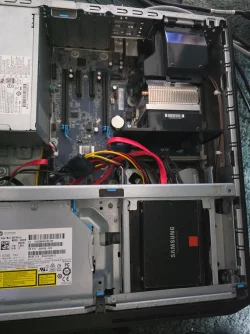
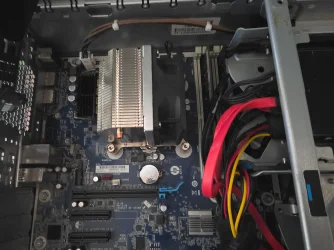
I have attached some pictures; does this NH-L9x65 fit my computer or help in solving it?
I will now order thermal paste and will test it as soon as I receive it
regards
 

Attachments

  • 8810.webp
    8810.webp
    655.4 KB · Views: 2
  • 8812.webp
    8812.webp
    470.7 KB · Views: 1

My Computer

System One

  • OS
    windows 10-11
    Computer type
    PC/Desktop
    Manufacturer/Model
    HP i7 9700 Z2 Small Form Factor G4 Workstation
    CPU
    Intel Core i7 9700 @ 3.00GHz 35 °C Coffee Lake 14nm Tec
    Motherboard
    HP 8456 (CPU0) - Coffee Lake
    Memory
    16 GB
    Graphics Card(s)
    Intel UHD Graphics 630
    Sound Card
    Synaptics HD Audio - Intel Display Audio
    Monitor(s) Displays
    HP 23xw IPS LED
    Screen Resolution
    1920X1080
    Hard Drives
    SAMSUNG MZVLB512HAJQ-000H2 (SSD)
    Internet Speed
    1 GB
    Browser
    firefox
    Antivirus
    ESET NOD32 Antivirus
I imagine what you are hearing is the fans increasing in speed to provide necessary cooling when the processor is under a heavier load. Nothing to be concerned about. I don't know the specifics on that computer, but on my desktop computer I can control the fan speeds/fan curve in the bios. It appears your cooling is working as is intended. It might be possible to limit the maximum fan speed to a lesser value and still maintain good cooling. My temps run from 36 to 85 degrees C, depending on what the processor load is.
 

My Computer

System One

  • Computer type
    PC/Desktop
    Manufacturer/Model
    MSI
    CPU
    Ryzen 5800X
    Motherboard
    MSI X570S Carbon Pro
    Memory
    64GB GSkill DDR4
    Graphics Card(s)
    MSI RX6750 XT OC
    Monitor(s) Displays
    Dell U2711
    Screen Resolution
    1920 x 1080
    Hard Drives
    Nexstorage NN4LE 2TB2C
    PSU
    850 watt
    Cooling
    Corsair H100i
That is very compact, cannot tell whether a new fan would fit, that is for you to measure. It also may have to fit the input fan cowling and have suitable characteristics for those type of fins in the heatsink.

It may be better without the input cowling if a bit restrictive to airflow, difficult to tell. I would also move those cables as much as you can out of the input airflow.

It might be possible to limit the maximum fan speed to a lesser value and still maintain good cooling.

I don't think so with that compact design, almost certain to make it worse if that is done.
 

My Computer

System One

  • OS
    Windows 11
yes .... the noice is when the fans increasing in speed
I orderd this paste ( ARCTIC - MX-7 ) with the certainty that it will not solve the problem because, as i mentioned earlier, the noise and high temperature only appear during windows update and when using antivirus. but does this problem actually occur for everyone using a ninth-generation processor and not appear with an eighth-generation processor?
The ventilation in the room is very good for the computer and there are no cables or anything restrictive to airflow.
What if i were playing games or programming and editing videos like others... maybe my computer would explode in my face.
How bad i was at choosing this computer
regards
 

My Computer

System One

  • OS
    windows 10-11
    Computer type
    PC/Desktop
    Manufacturer/Model
    HP i7 9700 Z2 Small Form Factor G4 Workstation
    CPU
    Intel Core i7 9700 @ 3.00GHz 35 °C Coffee Lake 14nm Tec
    Motherboard
    HP 8456 (CPU0) - Coffee Lake
    Memory
    16 GB
    Graphics Card(s)
    Intel UHD Graphics 630
    Sound Card
    Synaptics HD Audio - Intel Display Audio
    Monitor(s) Displays
    HP 23xw IPS LED
    Screen Resolution
    1920X1080
    Hard Drives
    SAMSUNG MZVLB512HAJQ-000H2 (SSD)
    Internet Speed
    1 GB
    Browser
    firefox
    Antivirus
    ESET NOD32 Antivirus
Really I appreciate all your valuable opinions. i bought the computer three years ago and haven't changed the thermal paste at all, but i clean it regularly; there is no dust. The high temperature during updates and using antivirus doesn't bother me as much as the noise does.
I read on some sites that noise and high temperatures are among the ninth-generation processor.
The eighth generation processor does not have these problems, to the extent that i started thinking about buying the 8700K processor to get rid of this issue.
I have attached some pictures; does this NH-L9x65 fit my computer or help in solving it?
I will now order thermal paste and will test it as soon as I receive it
regards
I'm not optimistic.

The NH-LX9X65 uses a backplate. Whether that'd be compatible with the HP's motherboard, I don't know. It's likely you'd need to remove the motherboard from the case to install it, if it'd fit at all.

Copilot also suggests the Thermalright AXP90 X47, But Copilot also states that you couldn't use a backplate, which the AXP90 requires. AI ain't intelligent, so far.

If you could replace the OEM fab with a quieter aftermarket fan (like from Noctua), that may help. But you'd want to match or exceed the flow specs of the OEM fan.
 

My Computers

System One System Two

  • OS
    Windows 11 26200.8116
    Computer type
    PC/Desktop
    Manufacturer/Model
    homebuilt
    CPU
    Amd Threadripper 7970X
    Motherboard
    Gigabyte TRX50 Aero D Rev. 1.0
    Memory
    128GB (4 X 32) G.Skill DDR5 6400 (RDIMM)
    Graphics Card(s)
    Gigabyte RTX 4090 OC
    Sound Card
    none (USB to speakers), Realtek
    Monitor(s) Displays
    Innocn 32" OLED
    Screen Resolution
    3840 X 2160 @ 60Hz
    Hard Drives
    Crucial T700 2TB M.2 NVME SSD
    WD 4TB Blue SATA SSD
    Seagate 18TB IronWolf Pro
    PSU
    BeQuiet! Straight Power 12 1500W
    Case
    Lian Li 011 Dynamic Evo XL
    Cooling
    SilverStone Technology XE360-TR5, with 3 Phanteks T30 fans
    Keyboard
    Cherry KC 500 MX LP (mechanical)
    Mouse
    Logitech M500s (wired)
    Internet Speed
    2000/250 Mbps (down/up)
    Other Info
    xFinity gateway
  • Operating System
    windows 11 26200.8116
    Computer type
    PC/Desktop
    Manufacturer/Model
    homebuilt
    CPU
    Intel I9-13900K
    Motherboard
    Asus RoG Strix Z690-E
    Memory
    64GB G.Skill DDR5-6000
    Graphics card(s)
    Gigabyte RTX 3090 ti
    Sound Card
    built in Realtek
    Monitor(s) Displays
    Philips 27E1N8900 27" OLED
    Screen Resolution
    3840 X 2160 @60Hz
    Hard Drives
    WDC SN850 1TB
    8TB Seagate Ironwolf
    4TB Seagate Ironwolf
    PSU
    eVGA SuperNOVA 1300 GT
    Case
    Lian Li 011 Dynamic Evo
    Cooling
    Corsair iCUE H150i ELITE CAPELLIX Liquid CPU Cooler
    Keyboard
    Cherry Streaming (wired)
    Mouse
    Logitech M500s (wired)
I am using i7-9700. Typically is 32-36 degrees. It is in a pc not a sff.

You might be able fit a better cooler or an extra fan


My Computers

System One System Two

  • OS
    Win7,Win11
    Computer type
    PC/Desktop
    CPU
    i7-9700
    Motherboard
    gigabyte b365m ds3h
    Memory
    2x16gb 3600mhz
    Monitor(s) Displays
    benq gw2480
    PSU
    bequiet pure power 11 400CM
    Cooling
    cryorig m9i
  • Operating System
    win7,win11
    Computer type
    PC/Desktop
    CPU
    i5-8400
    Motherboard
    gigabyte b365m ds3h
    Memory
    2x8gb 3200
    PSU
    xfx pro 450
Is the fan working noisy?

I have run many HP i5-8600/i7-9700 DM computers. it's unlikely an issue on CPU paste. possible issues as you have got it over three years.
  1. CPU fan.
  2. motherboard.
my HP i5-8600 was noisy when heavily loading (processing graphics, streaming, , ,) and getting hot. it's pretty old. hence I did replace its fan. after replacement, it runs cool and quiet as new.
1780551055214.webp

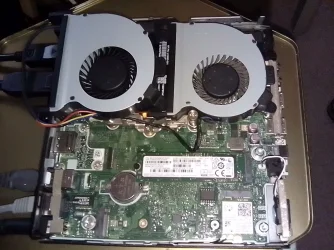
my HP i7-9700 DM has two fans. one over CPU. another over SSD. it works in room temperature. your 85 is abnormal high to me.

in my practice, I saw once an asus computer running hot and noisy. and I tried whatever I could (reseating CPU, reglue CPU, replace fan, , ,). the problem couldn't be fixed. it's identified the temp-control circuit on motherboard went bad. no easy solution than disposing.

I have a computer and these are the specifications (HP i7 9700 Z2 Small Form Factor G4 Workstation (6TT78EA) ... for more information ... click on the link.
 

My Computer

System One

  • OS
    Windows 7/11
    Computer type
    PC/Desktop
    Manufacturer/Model
    HP/Lenovo/Asus
    CPU
    Intel i7-11800H
    Motherboard
    Lenovo Legion 5i Pro Gen 6
    Memory
    32GB DDR4 3200MHz
    Graphics Card(s)
    NVIDIA GeForce RTX 3070
    Monitor(s) Displays
    LG 35WN65C-B
    Screen Resolution
    3440 x 1440
    Hard Drives
    1TB PCIe SSD
    Other Info
    Edition Windows 11 Pro
    Version 25H2
    Installed on ‎12/‎12/‎2025
    OS build 26200.7462
Thank you all for your valuable opinions.
I believe everyone agrees on one thing, which is to replace the fan.
bobkn ... The NH-LX9X65 is a good option, and there is another one that may be better (Noctua NH-L12S - 120mm)
. I will order it today and will test it after cleaning the processor from the old thermal paste and using the new paste.
I will keep you updated on the results.
regards
 

My Computer

System One

  • OS
    windows 10-11
    Computer type
    PC/Desktop
    Manufacturer/Model
    HP i7 9700 Z2 Small Form Factor G4 Workstation
    CPU
    Intel Core i7 9700 @ 3.00GHz 35 °C Coffee Lake 14nm Tec
    Motherboard
    HP 8456 (CPU0) - Coffee Lake
    Memory
    16 GB
    Graphics Card(s)
    Intel UHD Graphics 630
    Sound Card
    Synaptics HD Audio - Intel Display Audio
    Monitor(s) Displays
    HP 23xw IPS LED
    Screen Resolution
    1920X1080
    Hard Drives
    SAMSUNG MZVLB512HAJQ-000H2 (SSD)
    Internet Speed
    1 GB
    Browser
    firefox
    Antivirus
    ESET NOD32 Antivirus
They have thought about airflow in the original design, straight thru airflow.

The Noctuas NH-L9x65/Noctua NH-L12S - 120mm. Means there are 2 x 90 degree bends in the airflow in/out. The top input/output I suspect would be restricted somewhat by the box. That does not make for efficiency.
A lot depends on dimensions which you would have to measure to ensure fit and minimal restrictions to airflow.

"I believe everyone agrees on one thing, which is to replace the fan.

There are some detailed differences between the types of fans depending on where they are used in this case through radiator fins rather than say a case fan which is open both sides. I would read around the subject a bit.
 

My Computer

System One

  • OS
    Windows 11
Valuable notes
I have reserved it now from one of the specialized computer sites and informed them about the problem, telling them that i would test it for at least 3 days.
I also told them that i would return it if the problem was not resolved, and they agreed to that.
I will receive it tomorrow and will test it immediately.
 

My Computer

System One

  • OS
    windows 10-11
    Computer type
    PC/Desktop
    Manufacturer/Model
    HP i7 9700 Z2 Small Form Factor G4 Workstation
    CPU
    Intel Core i7 9700 @ 3.00GHz 35 °C Coffee Lake 14nm Tec
    Motherboard
    HP 8456 (CPU0) - Coffee Lake
    Memory
    16 GB
    Graphics Card(s)
    Intel UHD Graphics 630
    Sound Card
    Synaptics HD Audio - Intel Display Audio
    Monitor(s) Displays
    HP 23xw IPS LED
    Screen Resolution
    1920X1080
    Hard Drives
    SAMSUNG MZVLB512HAJQ-000H2 (SSD)
    Internet Speed
    1 GB
    Browser
    firefox
    Antivirus
    ESET NOD32 Antivirus
Unfortunately, they couldn't deliver the package today and informed me that it will be delivered tomorrow.
 

My Computer

System One

  • OS
    windows 10-11
    Computer type
    PC/Desktop
    Manufacturer/Model
    HP i7 9700 Z2 Small Form Factor G4 Workstation
    CPU
    Intel Core i7 9700 @ 3.00GHz 35 °C Coffee Lake 14nm Tec
    Motherboard
    HP 8456 (CPU0) - Coffee Lake
    Memory
    16 GB
    Graphics Card(s)
    Intel UHD Graphics 630
    Sound Card
    Synaptics HD Audio - Intel Display Audio
    Monitor(s) Displays
    HP 23xw IPS LED
    Screen Resolution
    1920X1080
    Hard Drives
    SAMSUNG MZVLB512HAJQ-000H2 (SSD)
    Internet Speed
    1 GB
    Browser
    firefox
    Antivirus
    ESET NOD32 Antivirus

Latest Support Threads

Back
Top Bottom