Solved HP Model 15t-cs200 Clone wont boot secure boot TPM


LASTBOOMER66

LAST BOOMER
Local time
6:04 AM
Posts
46
OS
Windows 11 pro
Machine has a 512GB m.2 SSD drive currently machine boots to this drive. I am using Macrium 8.07 I made a image to a file,
1st attempt : cloned to a image file verified boot resized partition down to fit on a 256 SSD m2 I UNCHECKED the box that says COPY MBR BOOT when I restored - This is NOT MBR. I am talking about the advanced options when restoring a image in macrium. That box cant be checked as far as I know we do not want to copy any MBR
wont boot, reset the keys for TPM turned secure boot off still wont boot.
2nd Attempt made a sector by sector copy of the drive, to a external 2T usb drive And restored that file to a restored to a 1T m2.ssd Restored this image to a 1T m2 SSD drive. I restored the image by booting up with a macrium boot made with PE11 not RE
I turned secure boot off, I reset the TPM keys It wont boot and this is what I get:

Stop Boot00089652.webp
So I booted with up with the macrium pe11 boot flash and repaired the boot C win 11 it finds the os and it repaired the EFI. But still same issue
I am wondering IF i need to clear the boot keys and load the factory defaults ? I did take the large battery out and held down the power button for 15 sec to clear things.
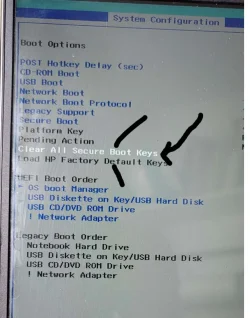
1000089659.webp
I have not tried this yet because I do not know if this HP laptop will still boot up with its original working windows 11 home that is on the 512Gig m2 ssd if I clear this. I do not know HP'S proprietary setup. Maybe they have it set up so only HP knows how to fix it. ALL THIS is installed
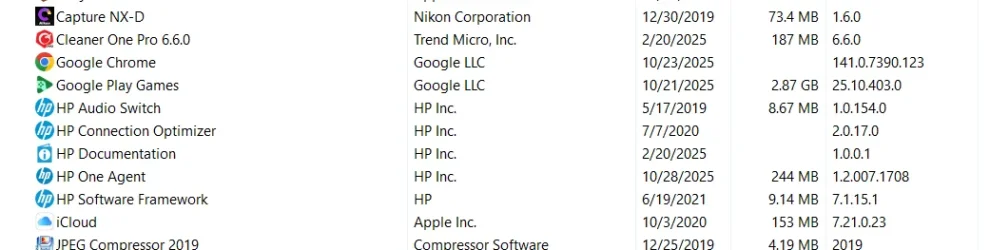
Screenshot 2025-11-06 065429.webp

I read that HP can at times edit a boot file if it seams different and I need to disable something ???

THINGS I I can still try -

USE MY ALIENWARE AND CLONE DISK TO DISK, as the Alienware laptop has 2 m2 ssd slots,
the other idea I had was to install Macrium newest version and try out the RE-DEPLOY to NEW HARDWARE - What else can I try ?? I have AIOME but I need to install it on a GPT machine and make a boot flash.

I am wondering if I clear the secure boot keys if that would allow it to boot up, ? But then I fear it might make it so the machine wont even boot to the working booting windows 11 m2 ssd drive. Then I would be trapped re-installing the OS. I doubt that but it cant hurt to ask first.


BELOW IS MORE MACHINE INFORMATION
MSINFO32:

OS Name Microsoft Windows 11 Home
Version 10.0.26100 Build 26100
Other OS Description Not Available
OS Manufacturer Microsoft Corporation
System Name LAPTOP-64RU0E5F
System Manufacturer HP
System Model HP Pavilion Laptop 15t-cs200
System Type x64-based PC
System SKU 5NL15AV
Processor Intel(R) Core(TM) i7-8565U CPU @ 1.80GHz, 1992 Mhz, 4 Core(s), 8 Logical Processor(s)
BIOS Version/Date Insyde F.23, 12/25/2020
SMBIOS Version 3.0
Embedded Controller Version 15.32
BIOS Mode UEFI
BaseBoard Manufacturer HP
BaseBoard Product 84C0
BaseBoard Version 15.32
Platform Role Mobile
Secure Boot State On
PCR7 Configuration Binding Possible
Windows Directory C:\WINDOWS
System Directory C:\WINDOWS\system32
Boot Device \Device\HarddiskVolume1
Locale United States
Hardware Abstraction Layer Version = "10.0.26100.1"
User Name local account and a Microsoft account
Time Zone Mountain Standard Time
Installed Physical Memory (RAM) 16.0 GB
Total Physical Memory 15.9 GB
Available Physical Memory 9.83 GB
Total Virtual Memory 16.9 GB
Available Virtual Memory 10.8 GB
Page File Space 1.00 GB
Page File C:\pagefile.sys
Kernel DMA Protection Off
Virtualization-based security Not enabled
App Control for Business policy Enforced
App Control for Business user mode policy Off
Automatic Device Encryption Support Meets prerequisites
Hyper-V - VM Monitor Mode Extensions Yes
Hyper-V - Second Level Address Translation Extensions Yes
Hyper-V - Virtualization Enabled in Firmware Yes
Hyper-V - Data Execution Protection Yes
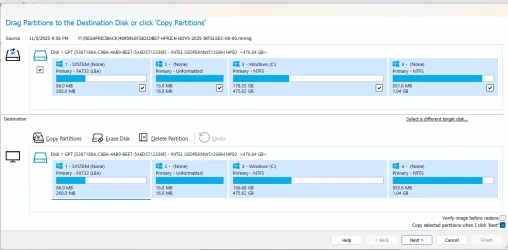
Screenshot 2025-11-06 065116.webp
And A screenshot of the current state showing the cloned image on top and the current working OS below
 
Windows Build/Version
OS Name Microsoft Windows 11 Home Version 10.0.26100 Build 26100

My Computers

System One System Two

  • OS
    Windows 11 pro
    Computer type
    Laptop
    Manufacturer/Model
    Precision 7780
    CPU
    Processor 13th Gen Intel(R) Core(TM) i9-13950HX, 2200 M
    Motherboard
    Dell calls it the “system board” in the service manual.
    Memory
    64GIG
    Graphics Card(s)
    NVIDIA RTX 5000 Ada Generation Laptop GPU
    Sound Card
    NVIDIA HIGH DEFINITION AUDIO
    Monitor(s) Displays
    Samsung and a HP Monitor
    Screen Resolution
    Resolution 3840 x 2160 x 60 hertz
    Hard Drives
    3 1T NVME and 1 223 Gb
    PSU
    External
    Case
    Laptop
    Cooling
    Dual fans
    Keyboard
    LOGI REMOTE KEYBOARD
    Mouse
    LOGI REMOTE MOUSE
    Internet Speed
    538 Mbps 163 Mbps upload
    Browser
    Duck, Chrome, Edge, Opra
    Antivirus
    Norton Antivirus
  • Operating System
    WIN 11 PRO
    Computer type
    Laptop
    Manufacturer/Model
    HP
    CPU
    RTX ADA 5000
    Memory
    32
    Monitor(s) Displays
    MY BIG SCREEN TV
    Screen Resolution
    3840 X 2016
    Hard Drives
    2 NVME
    Keyboard
    REMOTE USB
    Mouse
    REMOTE USB LOGI
    Internet Speed
    FIBER TO MY DOOR
    Browser
    DUCK FIREFOX CHROME OPRA
    Antivirus
    NORTON
I cant find edit, This post is a bit hard to follow. sorry
 

My Computers

System One System Two

  • OS
    Windows 11 pro
    Computer type
    Laptop
    Manufacturer/Model
    Precision 7780
    CPU
    Processor 13th Gen Intel(R) Core(TM) i9-13950HX, 2200 M
    Motherboard
    Dell calls it the “system board” in the service manual.
    Memory
    64GIG
    Graphics Card(s)
    NVIDIA RTX 5000 Ada Generation Laptop GPU
    Sound Card
    NVIDIA HIGH DEFINITION AUDIO
    Monitor(s) Displays
    Samsung and a HP Monitor
    Screen Resolution
    Resolution 3840 x 2160 x 60 hertz
    Hard Drives
    3 1T NVME and 1 223 Gb
    PSU
    External
    Case
    Laptop
    Cooling
    Dual fans
    Keyboard
    LOGI REMOTE KEYBOARD
    Mouse
    LOGI REMOTE MOUSE
    Internet Speed
    538 Mbps 163 Mbps upload
    Browser
    Duck, Chrome, Edge, Opra
    Antivirus
    Norton Antivirus
  • Operating System
    WIN 11 PRO
    Computer type
    Laptop
    Manufacturer/Model
    HP
    CPU
    RTX ADA 5000
    Memory
    32
    Monitor(s) Displays
    MY BIG SCREEN TV
    Screen Resolution
    3840 X 2016
    Hard Drives
    2 NVME
    Keyboard
    REMOTE USB
    Mouse
    REMOTE USB LOGI
    Internet Speed
    FIBER TO MY DOOR
    Browser
    DUCK FIREFOX CHROME OPRA
    Antivirus
    NORTON
I am using Macrium 8.07 I made a image to a file,
1st attempt : cloned to a image file
Clarify ... did you create an image and restore, or clone drive-to-drive?
 

My Computers

System One System Two

  • OS
    Windows 11 2xH2 (latest update ... forever anal)
    Computer type
    PC/Desktop
    Manufacturer/Model
    HP Slim S01
    CPU
    Intel i5-12400
    Memory
    8GB
    Graphics Card(s)
    NVIDIA GeForce GT730
    Sound Card
    OOBE
    Monitor(s) Displays
    Acer 32"
    Screen Resolution
    1920x1080
    Hard Drives
    512GB KIOXIA NVMe
    1TB SATA SSD
    PSU
    OOBE
    Case
    OOBE
    Cooling
    OOBE
    Keyboard
    BT
    Mouse
    BT
    Browser
    Brave FFox Chrome Opera
    Antivirus
    KIS
  • Operating System
    Windows 11 Pro 2xH2 (latest update ... 4ever anal)
    Computer type
    Laptop
    Manufacturer/Model
    HP Pavillion 15
    CPU
    i7-1165G7 @ 2.80GHz
    Graphics card(s)
    Intel Iris Xe Graphics
    Hard Drives
    Samsung NVMe 512GB
    + numerous/multiple SSD Type C USB enclosures
    Internet Speed
    NBN FTTN 50
    Browser
    Brave
    Antivirus
    KIS
THe first try: With macrium 8.07 I created an image of the internal m2 ssd 512G W11 home to a 2T external USB drive, THen I pulled the 512Gm2 ssd out of the laptop and put in a m2ssd 256 Gig Macrium resized the image smaller so it would fit on the 256gig

The second Try: With macrium 8.07 I created a sector by sector image clone of the m2 SSD 512G on to a image file on a external usb drive. And then I restore that image file it without doing any resizing to a 1000Gb m2 ssd. I am getting the same result with both of these clone restores.
STOP CODE: INACCESSIBLE_BOOT_DEVICE (Ox7B)
 
Last edited:

My Computers

System One System Two

  • OS
    Windows 11 pro
    Computer type
    Laptop
    Manufacturer/Model
    Precision 7780
    CPU
    Processor 13th Gen Intel(R) Core(TM) i9-13950HX, 2200 M
    Motherboard
    Dell calls it the “system board” in the service manual.
    Memory
    64GIG
    Graphics Card(s)
    NVIDIA RTX 5000 Ada Generation Laptop GPU
    Sound Card
    NVIDIA HIGH DEFINITION AUDIO
    Monitor(s) Displays
    Samsung and a HP Monitor
    Screen Resolution
    Resolution 3840 x 2160 x 60 hertz
    Hard Drives
    3 1T NVME and 1 223 Gb
    PSU
    External
    Case
    Laptop
    Cooling
    Dual fans
    Keyboard
    LOGI REMOTE KEYBOARD
    Mouse
    LOGI REMOTE MOUSE
    Internet Speed
    538 Mbps 163 Mbps upload
    Browser
    Duck, Chrome, Edge, Opra
    Antivirus
    Norton Antivirus
  • Operating System
    WIN 11 PRO
    Computer type
    Laptop
    Manufacturer/Model
    HP
    CPU
    RTX ADA 5000
    Memory
    32
    Monitor(s) Displays
    MY BIG SCREEN TV
    Screen Resolution
    3840 X 2016
    Hard Drives
    2 NVME
    Keyboard
    REMOTE USB
    Mouse
    REMOTE USB LOGI
    Internet Speed
    FIBER TO MY DOOR
    Browser
    DUCK FIREFOX CHROME OPRA
    Antivirus
    NORTON
Has anyone witnessed HP recovery tools being helpful ? or does anyone think uninstalling these HP tools would help this situation? my next try is this:
  1. Boot into Safe Mode: If Startup Repair fails, you can try booting into Safe Mode from the recovery environment (Troubleshoot > Advanced options > Startup Settings > Restart, then select a Safe Mode option). If Windows loads in Safe Mode, a third-party driver or software is likely the cause. A normal restart after Safe Mode can sometimes resolve the issue.
 

My Computers

System One System Two

  • OS
    Windows 11 pro
    Computer type
    Laptop
    Manufacturer/Model
    Precision 7780
    CPU
    Processor 13th Gen Intel(R) Core(TM) i9-13950HX, 2200 M
    Motherboard
    Dell calls it the “system board” in the service manual.
    Memory
    64GIG
    Graphics Card(s)
    NVIDIA RTX 5000 Ada Generation Laptop GPU
    Sound Card
    NVIDIA HIGH DEFINITION AUDIO
    Monitor(s) Displays
    Samsung and a HP Monitor
    Screen Resolution
    Resolution 3840 x 2160 x 60 hertz
    Hard Drives
    3 1T NVME and 1 223 Gb
    PSU
    External
    Case
    Laptop
    Cooling
    Dual fans
    Keyboard
    LOGI REMOTE KEYBOARD
    Mouse
    LOGI REMOTE MOUSE
    Internet Speed
    538 Mbps 163 Mbps upload
    Browser
    Duck, Chrome, Edge, Opra
    Antivirus
    Norton Antivirus
  • Operating System
    WIN 11 PRO
    Computer type
    Laptop
    Manufacturer/Model
    HP
    CPU
    RTX ADA 5000
    Memory
    32
    Monitor(s) Displays
    MY BIG SCREEN TV
    Screen Resolution
    3840 X 2016
    Hard Drives
    2 NVME
    Keyboard
    REMOTE USB
    Mouse
    REMOTE USB LOGI
    Internet Speed
    FIBER TO MY DOOR
    Browser
    DUCK FIREFOX CHROME OPRA
    Antivirus
    NORTON
Consider making a new backup image.

Clean install Windows.

Modify partitions to your preference.

Confirm the dual boot as needed.


Restore only C: into the new clean installation.
 

My Computer

System One

  • OS
    Windows 10
    Computer type
    Laptop
    Manufacturer/Model
    HP
    CPU
    Intel(R) Core(TM) i7-4800MQ CPU @ 2.70GHz
    Motherboard
    Product : 190A Version : KBC Version 94.56
    Memory
    16 GB Total: Manufacturer : Samsung MemoryType : DDR3 FormFactor : SODIMM Capacity : 8GB Speed : 1600
    Graphics Card(s)
    NVIDIA Quadro K3100M; Intel(R) HD Graphics 4600
    Sound Card
    IDT High Definition Audio CODEC; PNP Device ID HDAUDIO\FUNC_01&VEN_111D&DEV_76E0
    Hard Drives
    Model Hitachi HTS727575A9E364
    Antivirus
    Microsoft Defender
    Other Info
    Mobile Workstation
I suspect missing SSD drivers not included in the image. Was that option (to include drivers) selected when the image, and the recovery boot USB, were created.

In any case, I'm going with @zbook for the clean install option. As much as curiosity about why things went pear-shaped, you could have been up and running by now with a clean install onto the new blank 1TB drive.
 

My Computers

System One System Two

  • OS
    Windows 11 2xH2 (latest update ... forever anal)
    Computer type
    PC/Desktop
    Manufacturer/Model
    HP Slim S01
    CPU
    Intel i5-12400
    Memory
    8GB
    Graphics Card(s)
    NVIDIA GeForce GT730
    Sound Card
    OOBE
    Monitor(s) Displays
    Acer 32"
    Screen Resolution
    1920x1080
    Hard Drives
    512GB KIOXIA NVMe
    1TB SATA SSD
    PSU
    OOBE
    Case
    OOBE
    Cooling
    OOBE
    Keyboard
    BT
    Mouse
    BT
    Browser
    Brave FFox Chrome Opera
    Antivirus
    KIS
  • Operating System
    Windows 11 Pro 2xH2 (latest update ... 4ever anal)
    Computer type
    Laptop
    Manufacturer/Model
    HP Pavillion 15
    CPU
    i7-1165G7 @ 2.80GHz
    Graphics card(s)
    Intel Iris Xe Graphics
    Hard Drives
    Samsung NVMe 512GB
    + numerous/multiple SSD Type C USB enclosures
    Internet Speed
    NBN FTTN 50
    Browser
    Brave
    Antivirus
    KIS
STOP CODE: INACCESSIBLE_BOOT_DEVICE (Ox7B) I would like to know more, when this happens are there logs we can look at ? when a machine does not boot can we install any type of utility that will tell us more about what is happening ? Does anyone know where to find out more information about how specific bios work, like how does secure boot work with TPM what is TPM looking for and if I do not use bitlocker does it even care? So in my case the f8 worked. BUT WHY ? apparently something was in the way but not anymore after going into SAFE MODE That was the Solution for this machine. Windows knew how to fix itself but It was not going to do so for some reason. Apparently some 3rd PARTY software WAS in the way and it might get in the way again ? next time it boots The past tells me that once f8 fixes things, things are going continue to work. But since I do not know for sure WHY this STOP CODE: INACCESSIBLE_BOOT_DEVICE (Ox7B was triggered I can not answer that.
 

My Computers

System One System Two

  • OS
    Windows 11 pro
    Computer type
    Laptop
    Manufacturer/Model
    Precision 7780
    CPU
    Processor 13th Gen Intel(R) Core(TM) i9-13950HX, 2200 M
    Motherboard
    Dell calls it the “system board” in the service manual.
    Memory
    64GIG
    Graphics Card(s)
    NVIDIA RTX 5000 Ada Generation Laptop GPU
    Sound Card
    NVIDIA HIGH DEFINITION AUDIO
    Monitor(s) Displays
    Samsung and a HP Monitor
    Screen Resolution
    Resolution 3840 x 2160 x 60 hertz
    Hard Drives
    3 1T NVME and 1 223 Gb
    PSU
    External
    Case
    Laptop
    Cooling
    Dual fans
    Keyboard
    LOGI REMOTE KEYBOARD
    Mouse
    LOGI REMOTE MOUSE
    Internet Speed
    538 Mbps 163 Mbps upload
    Browser
    Duck, Chrome, Edge, Opra
    Antivirus
    Norton Antivirus
  • Operating System
    WIN 11 PRO
    Computer type
    Laptop
    Manufacturer/Model
    HP
    CPU
    RTX ADA 5000
    Memory
    32
    Monitor(s) Displays
    MY BIG SCREEN TV
    Screen Resolution
    3840 X 2016
    Hard Drives
    2 NVME
    Keyboard
    REMOTE USB
    Mouse
    REMOTE USB LOGI
    Internet Speed
    FIBER TO MY DOOR
    Browser
    DUCK FIREFOX CHROME OPRA
    Antivirus
    NORTON

My Computer

System One

  • OS
    Windows 10
    Computer type
    Laptop
    Manufacturer/Model
    HP
    CPU
    Intel(R) Core(TM) i7-4800MQ CPU @ 2.70GHz
    Motherboard
    Product : 190A Version : KBC Version 94.56
    Memory
    16 GB Total: Manufacturer : Samsung MemoryType : DDR3 FormFactor : SODIMM Capacity : 8GB Speed : 1600
    Graphics Card(s)
    NVIDIA Quadro K3100M; Intel(R) HD Graphics 4600
    Sound Card
    IDT High Definition Audio CODEC; PNP Device ID HDAUDIO\FUNC_01&VEN_111D&DEV_76E0
    Hard Drives
    Model Hitachi HTS727575A9E364
    Antivirus
    Microsoft Defender
    Other Info
    Mobile Workstation
I suspect missing SSD drivers not included in the image. Was that option (to include drivers) selected when the image, and the recovery boot USB, were created.

In any case, I'm going with @zbook for the clean install option. As much as curiosity about why things went pear-shaped, you could have been up and running by now with a clean install onto the new blank 1TB drive.
if I do a clean install the right drivers will be in place, then I make a recovery disk with Macrium on that install so it grabs the right drivers for the new m2.ssd rather than trying to insert them in to the image and registry and that might never work ! so this idea of z book makes sense Thanks I watched one video of a guy going from the disk to a USB m2 ssd converter. disk to disk must account for drivers, and if I do a sector by sector it wont be able to insert drivers ?
 

My Computers

System One System Two

  • OS
    Windows 11 pro
    Computer type
    Laptop
    Manufacturer/Model
    Precision 7780
    CPU
    Processor 13th Gen Intel(R) Core(TM) i9-13950HX, 2200 M
    Motherboard
    Dell calls it the “system board” in the service manual.
    Memory
    64GIG
    Graphics Card(s)
    NVIDIA RTX 5000 Ada Generation Laptop GPU
    Sound Card
    NVIDIA HIGH DEFINITION AUDIO
    Monitor(s) Displays
    Samsung and a HP Monitor
    Screen Resolution
    Resolution 3840 x 2160 x 60 hertz
    Hard Drives
    3 1T NVME and 1 223 Gb
    PSU
    External
    Case
    Laptop
    Cooling
    Dual fans
    Keyboard
    LOGI REMOTE KEYBOARD
    Mouse
    LOGI REMOTE MOUSE
    Internet Speed
    538 Mbps 163 Mbps upload
    Browser
    Duck, Chrome, Edge, Opra
    Antivirus
    Norton Antivirus
  • Operating System
    WIN 11 PRO
    Computer type
    Laptop
    Manufacturer/Model
    HP
    CPU
    RTX ADA 5000
    Memory
    32
    Monitor(s) Displays
    MY BIG SCREEN TV
    Screen Resolution
    3840 X 2016
    Hard Drives
    2 NVME
    Keyboard
    REMOTE USB
    Mouse
    REMOTE USB LOGI
    Internet Speed
    FIBER TO MY DOOR
    Browser
    DUCK FIREFOX CHROME OPRA
    Antivirus
    NORTON
In the future you can backup drivers:


My Computer

System One

  • OS
    Windows 10
    Computer type
    Laptop
    Manufacturer/Model
    HP
    CPU
    Intel(R) Core(TM) i7-4800MQ CPU @ 2.70GHz
    Motherboard
    Product : 190A Version : KBC Version 94.56
    Memory
    16 GB Total: Manufacturer : Samsung MemoryType : DDR3 FormFactor : SODIMM Capacity : 8GB Speed : 1600
    Graphics Card(s)
    NVIDIA Quadro K3100M; Intel(R) HD Graphics 4600
    Sound Card
    IDT High Definition Audio CODEC; PNP Device ID HDAUDIO\FUNC_01&VEN_111D&DEV_76E0
    Hard Drives
    Model Hitachi HTS727575A9E364
    Antivirus
    Microsoft Defender
    Other Info
    Mobile Workstation

idgat zbook Thank you for sharing your ideas with me. I have a better understanding than I did before​


My Computers

System One System Two

  • OS
    Windows 11 pro
    Computer type
    Laptop
    Manufacturer/Model
    Precision 7780
    CPU
    Processor 13th Gen Intel(R) Core(TM) i9-13950HX, 2200 M
    Motherboard
    Dell calls it the “system board” in the service manual.
    Memory
    64GIG
    Graphics Card(s)
    NVIDIA RTX 5000 Ada Generation Laptop GPU
    Sound Card
    NVIDIA HIGH DEFINITION AUDIO
    Monitor(s) Displays
    Samsung and a HP Monitor
    Screen Resolution
    Resolution 3840 x 2160 x 60 hertz
    Hard Drives
    3 1T NVME and 1 223 Gb
    PSU
    External
    Case
    Laptop
    Cooling
    Dual fans
    Keyboard
    LOGI REMOTE KEYBOARD
    Mouse
    LOGI REMOTE MOUSE
    Internet Speed
    538 Mbps 163 Mbps upload
    Browser
    Duck, Chrome, Edge, Opra
    Antivirus
    Norton Antivirus
  • Operating System
    WIN 11 PRO
    Computer type
    Laptop
    Manufacturer/Model
    HP
    CPU
    RTX ADA 5000
    Memory
    32
    Monitor(s) Displays
    MY BIG SCREEN TV
    Screen Resolution
    3840 X 2016
    Hard Drives
    2 NVME
    Keyboard
    REMOTE USB
    Mouse
    REMOTE USB LOGI
    Internet Speed
    FIBER TO MY DOOR
    Browser
    DUCK FIREFOX CHROME OPRA
    Antivirus
    NORTON
You're welcome.
 

My Computer

System One

  • OS
    Windows 10
    Computer type
    Laptop
    Manufacturer/Model
    HP
    CPU
    Intel(R) Core(TM) i7-4800MQ CPU @ 2.70GHz
    Motherboard
    Product : 190A Version : KBC Version 94.56
    Memory
    16 GB Total: Manufacturer : Samsung MemoryType : DDR3 FormFactor : SODIMM Capacity : 8GB Speed : 1600
    Graphics Card(s)
    NVIDIA Quadro K3100M; Intel(R) HD Graphics 4600
    Sound Card
    IDT High Definition Audio CODEC; PNP Device ID HDAUDIO\FUNC_01&VEN_111D&DEV_76E0
    Hard Drives
    Model Hitachi HTS727575A9E364
    Antivirus
    Microsoft Defender
    Other Info
    Mobile Workstation
Something like that happened to my HP EliteBook a couple of days ago.
I suggest a clean install of Windows.

If you can’t do a fresh install with your MCT because of a blue screen indicating errors on your system, let me know. I will tell you how.
 

My Computer

System One

  • OS
    Win 7,8.1,10,11, Mint, Kde Plasma, Debian
    Computer type
    Laptop
    Manufacturer/Model
    Dell
    CPU
    Intel(R) Core(TM) i7-6500U CPU @ 2.50GHz
    Memory
    16 GB
    Graphics Card(s)
    Intel(R) HD Graphics 520/Nvidia GeForce 930M
    Sound Card
    Intel(R) Display Audio/RealtekAudio
    Monitor(s) Displays
    Generic Pnp Monitor
    Screen Resolution
    1366 X 768
    Hard Drives
    ST2000LM024-1EJ164
    Keyboard
    Eng (US)
    Mouse
    Sanwa Supply
    Browser
    Firefox
    Antivirus
    Avast One
    Other Info
    Too many laptops with different system specifications.
in your BIOS please check the boot manager and see how many boot devices are listed
if there are two devices please change the boot order so that the second on the boot list is first.

best of luck Steve ..
 

My Computers

System One System Two

  • OS
    Windows 11 Home
    Computer type
    PC/Desktop
    Manufacturer/Model
    HP 24" AiO
    CPU
    Ryzen 7 5825u
    Motherboard
    HP
    Memory
    64GB DDR4 3200
    Graphics Card(s)
    Ryzen 7 5825u
    Sound Card
    RealTek
    Monitor(s) Displays
    24" HP AiO
    Screen Resolution
    1920 x 1080 @60 Hz
    Hard Drives
    1TB WD Blue SN580 M2 SSD Partitioned.
    2x 1TB USB HDD External Backup/Storage.
    PSU
    90W external power brick
    Case
    24" All in One
    Cooling
    Default Air Cooling
    Keyboard
    HP WiFi UK extended
    Mouse
    HP WiFi 3 Button
    Internet Speed
    1GB full fibre
    Browser
    Edge & Firefox
    Antivirus
    AVG Internet Security/Windows Defender
    Other Info
    Mainly Open Source Software
  • Operating System
    Ubuntu 22.04.5 LTS
    Computer type
    Laptop
    Manufacturer/Model
    Dell 13" Latitude 2017
    CPU
    i5 7200u
    Motherboard
    Dell
    Memory
    16GB DDR4
    Graphics card(s)
    Intel
    Sound Card
    Intel
    Monitor(s) Displays
    13" Dell Laptop
    Hard Drives
    250GB Crucial 2.5" SSD
    Mouse
    Generic WiFi 3 button
    Internet Speed
    WiFi only
    Browser
    Firefox
    Antivirus
    ClamAV TK
    Other Info
    Mainly Open Source Software
Back
Top Bottom