HP printer doesn't scan


Davidovsky

Well-known member
Local time
8:29 AM
Posts
16
OS
Windows 11
Hello guys. I have problem with my HP mulitifuncional device. It doesn't want to scan. Device is upsanding. One month ago scaning was working fine but when I installed WIndows 11 again and after I installed printer software it doesn't work.
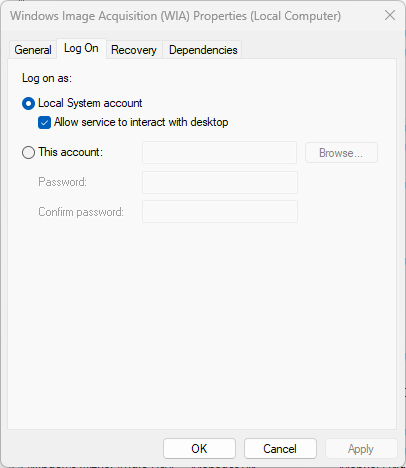
I applied solution which I appliped 3 years ago in this post.

Right now Windows 11 OS recognize HP device and print but doesn't want to scan.
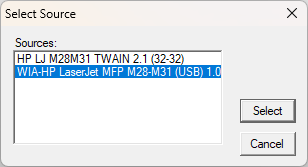
8q2eoSd.png

uGpIqLF.png

RR6LPdH.png


What should I do that HP can scan again?
 

My Computer My Computer

At a glance

Windows 11AMD Athlon 3000G16GB DDR4AMD Readon Vega 3 Graphic
OS
Windows 11
Computer type
PC/Desktop
Manufacturer/Model
MSI
CPU
AMD Athlon 3000G
Motherboard
A320 M
Memory
16GB DDR4
Graphics Card(s)
AMD Readon Vega 3 Graphic
Screen Resolution
1920X1080
Hard Drives
Kingston SSD 250GB
Western Digital 1TB
Mouse
Logitech
Internet Speed
20MB
Browser
Google Chrome
Antivirus
Windows
My HP printer has a special scanning utility that is part of the driver package. I assume that you have installed something like that when you put the drivers in? I know it is a separate driver or program because the damn thing is always going offline and won't scan when I want it to.

Also, try the Twain setting above. Twain is part of the scanner software.
 

My Computer My Computer

At a glance

Win 11 Pro 25H2Intel i7 13700KF32 GB Team Group DDR5 - 6000 CL 30ASUS TUF GAMING RTX 3070 Ti
OS
Win 11 Pro 25H2
Computer type
PC/Desktop
Manufacturer/Model
Self build
CPU
Intel i7 13700KF
Motherboard
Gigabyte Z790 UD AC
Memory
32 GB Team Group DDR5 - 6000 CL 30
Graphics Card(s)
ASUS TUF GAMING RTX 3070 Ti
Sound Card
On board Realtek
Monitor(s) Displays
ACER 34 inch
Screen Resolution
Not 4K like I thought. 35" wide though.
Hard Drives
1 TB Samsung 980 Pro Nvme, 1 TB Samsung 970 EVO Nvme, 2 x Samsung 970 2TB SSD SATA
PSU
EVGA 1000Q
Case
Rosewill something or other
Cooling
Noctua NH-D15. A whole schwak of Noctua case fans. $$$
Keyboard
Logitech G815
Mouse
Logitech G502 Hero
Internet Speed
700 up, 600 down
Browser
Firefox
Antivirus
MalwareBytes
Maybe this will help you. I have the HP Officejet Pro 8600. Every time I have done a clean install of Windows 11 24H2, I have run into same problem. But I discovered a very simple solution. If your printer software is installed, remove it with RevoUninstaller Free. Make sure after the uninstall, you scan for and remove all left over files. After a reboot, reinstall the software. After the software is installed, reboot again. Now try to scan something. This process has worked for me countless times and hope it helps you as well. Good Luck
 

My Computer My Computer

At a glance

Windows 11 Pro 64 Bit 25H2 26200 9168Intel Core I5-8250U 1.80 GHZ16 GBIntel UHD Graphics 620
OS
Windows 11 Pro 64 Bit 25H2 26200 9168
Computer type
Laptop
Manufacturer/Model
Asus X510UAR
CPU
Intel Core I5-8250U 1.80 GHZ
Memory
16 GB
Graphics Card(s)
Intel UHD Graphics 620
Sound Card
Conexant
Monitor(s) Displays
Dell 24" ST2420
Screen Resolution
1920x1080
Hard Drives
ADATA SU635 DDS
Keyboard
Logitech
Mouse
Logitech
Internet Speed
465
Browser
Google Chrome, MS Edge
Antivirus
Norton 360
Other Info
Windows Feature Experience Pack 1000.26100.297
Try the HP Smart app in Microsoft Store.
 

My Computers My Computers

  • At a glance

    Win 11 ProAMD Ryzen™ 7 7730U24GB Dual-Channel DDR4 @ 1596MHz (22-22-22-52)512MB ATI AMD Radeon Graphics (ASUStek Comput...
    OS
    Win 11 Pro
    Computer type
    Laptop
    Manufacturer/Model
    ASUS Vivobook
    CPU
    AMD Ryzen™ 7 7730U
    Motherboard
    M1605YA
    Memory
    24GB Dual-Channel DDR4 @ 1596MHz (22-22-22-52)
    Graphics Card(s)
    512MB ATI AMD Radeon Graphics (ASUStek Computer Inc)
    Monitor(s) Displays
    Generic PnP Monitor (1920x1200@60Hz) - P1 PLUS (1920x1080@59Hz)
    Screen Resolution
    1920 X 1200
    Hard Drives
    953GB Western Digital WD
    PSU
    45 Watts
    Mouse
    Lenovo Bluetooth.
    Internet Speed
    500 Mbps
    Browser
    Edge
    Antivirus
    Defender
  • At a glance

    Windows 11AMD Ryzen 7 5800H / 3.2 GHz32 GB DDR4 SDRAM 3200 MHzNVIDIA GeForce RTX 3060 6 GB GDDR6 SDRAM
    Operating System
    Windows 11
    Computer type
    Laptop
    Manufacturer/Model
    ACER NITRO
    CPU
    AMD Ryzen 7 5800H / 3.2 GHz
    Motherboard
    CZ Scala_CAS (FP6)
    Memory
    32 GB DDR4 SDRAM 3200 MHz
    Graphics card(s)
    NVIDIA GeForce RTX 3060 6 GB GDDR6 SDRAM
    Sound Card
    Realtek Audio. NVIDIA High Definition Audio
    Monitor(s) Displays
    15.6" LED backlight 1920 x 1080 (Full HD) 144 Hz
    Screen Resolution
    1920 x 1080 (Full HD)
    Hard Drives
    Samsung 970 Evo Plus 2TB NVMe M.2
    PSU
    180 Watt, 19.5 V
    Mouse
    Lenovo Bluetooth
    Internet Speed
    500 Mbps
    Browser
    Edge
    Antivirus
    Defender

Latest Support Threads

Back
Top Bottom