Hyper-V disk issue: Corrupt VHDX with multiple AVHDX files


merrittr

New member
Local time
3:49 PM
Posts
3
OS
Windows 2008 Hyper-V core R2
I have a VHDX file that says it is corrupt when I try to assign it to disk1. I also have multiple AVHDX files associated with it.

Can I run:
Code:
Repair-VHDX -Path "C:\path\to\your\file.vhdx"
and then still merge the latest AVHDX? Or do I need to merge the AVHDX files one at a time?
 
Windows Build/Version
hyper-v core 2012 R2

My Computer My Computer

At a glance

Windows 2008 Hyper-V core R2
OS
Windows 2008 Hyper-V core R2
Computer type
PC/Desktop
Manufacturer/Model
hp
I have a VHDX file that says it is corrupt when I try to assign it to disk1. I also have multiple AVHDX files associated with it.

Can I run:
Code:
Repair-VHDX -Path "C:\path\to\your\file.vhdx"
and then still merge the latest AVHDX? Or do I need to merge the AVHDX files one at a time?
You can try but as it is the base vhdx file that is corrupt I doubt it will work.

Perhaps a more worrying issue is that as I have never seen a corrupted vhdx file (I use them a lot), you may be experiencing a hardware disk failure.

I recommend you use s suitable disk checking tool to check drive. Start simple with CHKDSK before moving on to more sophisticated tools.
 

My Computer My Computer

At a glance

Windows 11 Pro + Win11 Canary VM.I9 13th gen i9-13900H 2.60 GHZ16 GB solderedIntegrated Intel Iris XE
OS
Windows 11 Pro + Win11 Canary VM.
Computer type
Laptop
Manufacturer/Model
ASUS Zenbook 14
CPU
I9 13th gen i9-13900H 2.60 GHZ
Motherboard
Yep, Laptop has one.
Memory
16 GB soldered
Graphics Card(s)
Integrated Intel Iris XE
Sound Card
Realtek built in
Monitor(s) Displays
laptop OLED screen
Screen Resolution
2880x1800 touchscreen
Hard Drives
1 TB NVME SSD (only weakness is only one slot)
PSU
Internal + 65W thunderbolt USB4 charger
Case
Yep, got one
Cooling
Stella Artois (UK pint cans - 568 ml) - extra cost.
Keyboard
Built in UK keybd
Mouse
Bluetooth , wireless dongled, wired
Internet Speed
900 mbs (ethernet), wifi 6 typical 350-450 mb/s both up and down
Browser
Edge
Antivirus
Defender
Other Info
TPM 2.0, 2xUSB4 thunderbolt, 1xUsb3 (usb a), 1xUsb-c, hdmi out, 3.5 mm audio out/in combo, ASUS backlit trackpad (inc. switchable number pad)

Macrium Reflect Home V8
Office 365 Family (6 users each 1TB onedrive space)
Hyper-V (a vm runs almost as fast as my older laptop)
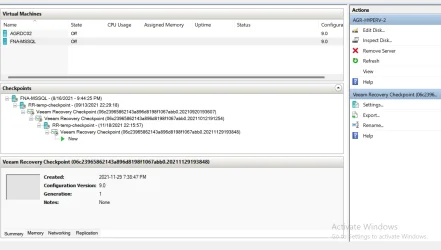
here is a follow up to what I am dealing with a png showing the checkpoints and all the avhdx vhdx files and I ran get-vhd for each of them just wondering if I can use some of these and preserve as much data as possible
 

Attachments

My Computer My Computer

At a glance

Windows 2008 Hyper-V core R2
OS
Windows 2008 Hyper-V core R2
Computer type
PC/Desktop
Manufacturer/Model
hp
also I ran sfc /scanow and chkdsk and it said it did repairs

PS M:\VM\FNA-MSSQL> diskpart

Microsoft DiskPart version 10.0.17763.1911

Copyright (C) Microsoft Corporation.
On computer: AGR-HYPERV-2

DISKPART> select vdisk file="M:\VM\FNA-MSSQL\disk1.vhdx"

DiskPart has encountered an error: The file or directory is corrupted and unreadable.
See the System Event Log for more information.

There is no virtual disk selected.

DISKPART>
 
Last edited:

My Computer My Computer

At a glance

Windows 2008 Hyper-V core R2
OS
Windows 2008 Hyper-V core R2
Computer type
PC/Desktop
Manufacturer/Model
hp

Latest Support Threads

Back
Top Bottom