
Hyper-V on W11 Pro - Unable to Start VM (or invoke from 3rd party app) Corruption? Settings?


Flipmode

Active member
Member
Local time
5:26 AM
Posts
74
OS
w11
Hi, just wanting to get Hyper-V running and overcome the uphill battle of VMware Workstation on Windows 11 Pro x64 24H2.
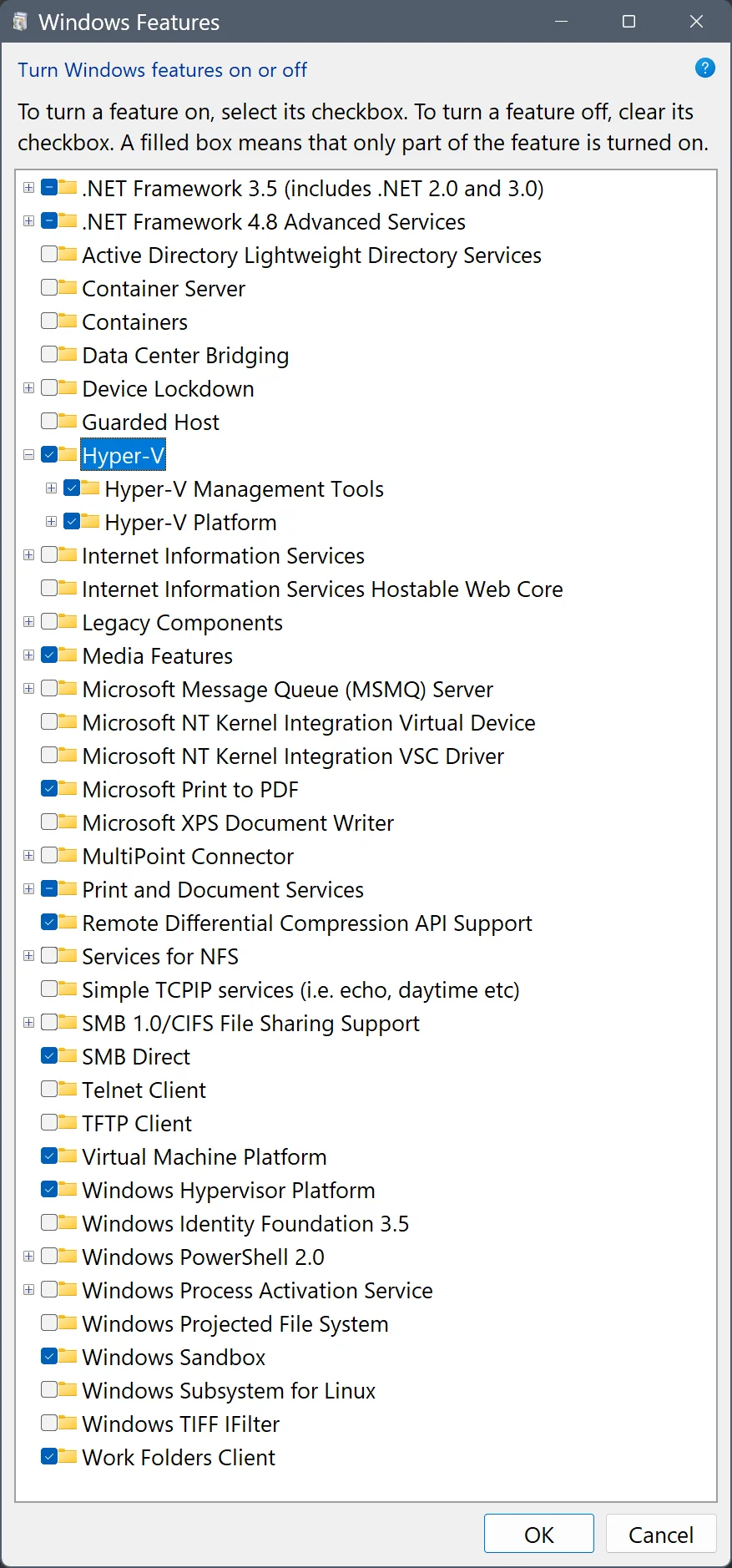
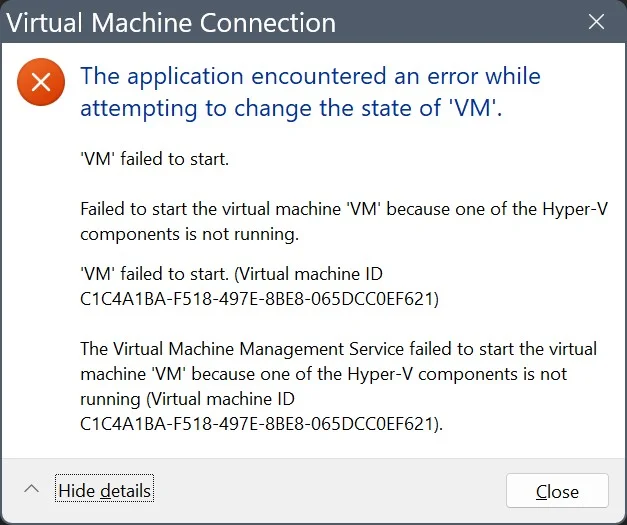
I have unisntalled VMware 17, rebooted. However after installing Windows Features: VM, Sandbxo, WSL2, Hyper-V (Mgmt & Tools) - see screenshot, creating a VM and trying to start it, I am getting an error. Will not boot or launch the VM.
See diagnostics and ouput I have performed below. Would appreciate input of a guru, expert or magician.
I will update to 25H2 after resolving issues.
Thanks for your time, Cheers!
1781982438679.webp1781982671157.webp

SystemInfo output:
Code:
OS Version:                    10.0.26100 N/A Build 26100
...
Virtualization-based security: Status: Running
                               Required Security Properties:
                               Available Security Properties:
                                     Base Virtualization Support
                                     DMA Protection
                                     Secure Memory Overwrite
                                     UEFI Code Readonly
                                     Mode Based Execution Control
                                     APIC Virtualization
                               Services Configured:
                               Services Running:
                               App Control for Business policy: Enforced
                               App Control for Business user mode policy: Off
                               Security Features Enabled:
Hyper-V Requirements:          A hypervisor has been detected. Features required for Hyper-V will not be displayed.

Query VMMS service:
Code:
PS C:\> Get-Service vmms

Status   Name               DisplayName
------   ----               -----------
Running  vmms               Hyper-V Virtual Machine Management

Query Hypervisor launch type (auto/off):
Code:
PS C:\> bcdedit | findstr -i hypervisor
hypervisorlaunchtype    Auto

Query Hypervisor launch type (again):
Code:
PS C:\> bcdedit /enum

Windows Boot Loader
-------------------
identifier              {current}
device                  partition=C:
path                    \WINDOWS\system32\winload.efi
description             Windows 11
locale                  en-us
inherit                 {bootloadersettings}
isolatedcontext         Yes
allowedinmemorysettings 0x15000075
osdevice                partition=C:
systemroot              \WINDOWS
resumeobject            {a156ff76-68e3-11f1-b28f-c8b27cd193b0}
nx                      OptIn
bootmenupolicy          Standard
hypervisorlaunchtype    Auto
When I run "bcdedit | findstr -i vsmlaunch" = blank. Perhaps is the issue? I don't know enough about Hyper-V...

Query VM I created but cannot run:
Code:
PS C:\> get-vm

Name State CPUUsage(%) MemoryAssigned(M) Uptime   Status             Version
---- ----- ----------- ----------------- ------   ------             -------
VM   Off   0           0                 00:00:00 Operating normally 12.0

Confirm Windows Features / See Screenshot:
Code:
PS C:\> Get-WindowsOptionalFeature -Online | Where-Object FeatureName -like "*Hyper*" | Select-Object FeatureName, State

FeatureName                                State
-----------                                -----
HypervisorPlatform                       Enabled
Microsoft-Hyper-V-All                    Enabled
Microsoft-Hyper-V                        Enabled
Microsoft-Hyper-V-Tools-All              Enabled
Microsoft-Hyper-V-Management-PowerShell  Enabled
Microsoft-Hyper-V-Hypervisor             Enabled
Microsoft-Hyper-V-Services               Enabled
Microsoft-Hyper-V-Management-Clients     Enabled
HyperV-KernelInt-VirtualDevice          Disabled
HyperV-Guest-KernelInt                  Disabled

Confirm Hyper V services:
Code:
PS C:\> Get-Service vmms,hvhost,vmcompute | Select Name, Status, StartType

Name       Status StartType
----       ------ ---------
hvhost    Running    Manual
vmcompute Running    Manual
vmms      Running Automatic

Windows Event Log:
Code:
PS C:\> Get-WinEvent -LogName "Microsoft-Windows-Hyper-V-VMMS-Admin" -MaxEvents 20 |>> Select-Object TimeCreated, Id, LevelDisplayName, Message |>> Format-List
TimeCreated  : 21/06/2026 11:11:25 AMId     : 10130LevelDisplayName : InformationMessage    : Hyper-V VSS is not supported on client operating systems.

TimeCreated  : 20/06/2026 11:01:27 PMId     : 15130LevelDisplayName : ErrorMessage          : 'VM' failed to start. (Virtual machine ID C1C4A1BA-F518-497E-8BE8-ABCDEFABCDEF)

TimeCreated  : 20/06/2026 11:01:27 PMId     : 20144LevelDisplayName : ErrorMessage          : The Virtual Machine Management Service failed to start the virtual machine 'VM' because one of the Hyper-V                   components is not running (Virtual machine ID C1C4A1BA-F518-497E-8BE8-ABCDEFABCDEF)

TimeCreated  : 20/06/2026 11:01:15 PMId     : 13002LevelDisplayName : InformationMessage    : A new virtual machine 'VM' was created. (Virtual machine ID C1C4A1BA-F518-497E-8BE8-ABCDEFABCDEF)

TimeCreated  : 20/06/2026 11:01:15 PMId     : 36000LevelDisplayName : InformationMessage    : 'VM' The runtime repository has logged performance summary (Virtual machine ID                   {C1C4A1BA-F518-497E-8BE8-ABCDEFABCDEF}) [Completed                   WmiMsvmVirtualSystemManagementService::DefineVirtualSystemInternal]:

TimeCreated  : 20/06/2026 11:01:15 PMId     : 18304LevelDisplayName : InformationMessage    : The virtual machine 'VM' was realized. (VMID C1C4A1BA-F518-497E-8BE8-ABCDEFABCDEF).
Strange error about not supported on client operating systems??

Nothing since adding roles, VM, etc:
Code:
PS C:\> Get-WinEvent -LogName "Microsoft-Windows-Hyper-V-Hypervisor-Admin" -MaxEvents 20 |
>> Select-Object TimeCreated, Id, LevelDisplayName, Message |
>> Format-List

TimeCreated      : 20/06/2026 8:51:00 PM
Id               : 155
LevelDisplayName : Information
Message          : Host processor features mask:

                   Host xsave features mask: 0x4058381F

                   Host cache line flush size: 64 bytes

TimeCreated      : 20/06/2026 8:50:58 PM
Id               : 156
LevelDisplayName : Information
Message          : Hypervisor initial page allocation NUMA policy: Proportional NUMA distribution

TimeCreated      : 20/06/2026 8:50:58 PM
Id               : 39
LevelDisplayName : Information
Message          : Hypervisor Load Options -  IGNOREMEMPART=1 ..


Would greatly appreciate any insight, troubleshooting and guidance.
Cheers!
 

My Computers My Computers

  • At a glance

    w11i7-12700H64GB DDR4Something big I will never take advantage of!
    OS
    w11
    Computer type
    Laptop
    Manufacturer/Model
    Gigabyte Aero 17
    CPU
    i7-12700H
    Memory
    64GB DDR4
    Graphics Card(s)
    Something big I will never take advantage of!
    Monitor(s) Displays
    17.3" 4K UHD
    Browser
    Yandex Browser (10x better than Chrome!) or Brave
    Antivirus
    MBAM + ESET + WFC + KTS
  • At a glance

    W7
    Operating System
    W7
Hi,
What OS did you choose to run as a VM please?

When it came out, I used to have MS Hypervisor running Ubuntu but getting sound can be problematic, so I switched to
VMware many moons ago. I find VMware Workstation more than adequate with Linux distros but I also run multiple Windows VMs.
 

My Computers My Computers

  • At a glance

    All Branches but ReleaseAMD Ryzen 7 7735HS 3200-4500 Mhz 8 cores x 232 GB DDR5Radeon Graphic / NVIDIA GeForce RTX 4060 8 GB...
    OS
    All Branches but Release
    Computer type
    Laptop
    Manufacturer/Model
    Acer Nitro ANV15-51
    CPU
    AMD Ryzen 7 7735HS 3200-4500 Mhz 8 cores x 2
    Motherboard
    Sportage_RBH
    Memory
    32 GB DDR5
    Graphics Card(s)
    Radeon Graphic / NVIDIA GeForce RTX 4060 8 GB GDDR6
    Sound Card
    AMD/Realtek(R) Audio
    Monitor(s) Displays
    Integrated Monitor (15.3"vis)
    Screen Resolution
    FHD 1920X1080 16:9 144Hz
    Hard Drives
    KINGSTON OM8SEP4512Q-AA 1TB
    Western Digital 256GB
    PSU
    19V DC 6.32 A 120 W
    Cooling
    Dual Fans
    Mouse
    MS Bluetooth
    Internet Speed
    Fiber 1GB Cox -us & 1GB Orange-fr
    Browser
    Edge Canary- Firefox Nightly-Chrome Dev-Chrome Dev
    Antivirus
    Windows Defender
  • At a glance

    Windows 11 BetaAMD A9-94208 GB of DDR4AMD Radeon R5
    Operating System
    Windows 11 Beta
    Computer type
    Laptop
    Manufacturer/Model
    Asus X751BP
    CPU
    AMD A9-9420
    Memory
    8 GB of DDR4
    Graphics card(s)
    AMD Radeon R5
    Screen Resolution
    1600x900
    Hard Drives
    Seagate 1 TB
@OAT Thanks. I just gave it a random ISO on the disk. Just to get it to boot. I think it was an Acronis NFR ISO.
Yes, I am a vmware fan - love vSphere too. But I don't want to have to disable various services like credential guard, VBS, memory integrity, etc just to run occasional VMs. Big drop in security.
It says in the screenshot that "Virtual Machine ID

I wonder what the hypervisor option IGNOREMEMPART=1 means? Or where it came from??
Did some deeper digging. I get some strange errors enabling services.
sc start vid -> Error 127 (error code 39 in device manager)
sc start vmbus -> Error 31 (ok in device manager)
sc start vmms -> Running
sc start hvhost -> Running
sc start vmcompute -> Running


SC QC queries:
Ruby:
C:\>sc qc vmbus
[SC] QueryServiceConfig SUCCESS
SERVICE_NAME: vmbus
        TYPE               : 1  KERNEL_DRIVER
        START_TYPE         : 3   DEMAND_START
        ERROR_CONTROL      : 1   NORMAL
        BINARY_PATH_NAME   : \SystemRoot\System32\drivers\vmbus.sys
        LOAD_ORDER_GROUP   : System Bus Extender
        TAG                : 12
        DISPLAY_NAME       : Virtual Machine Bus
        DEPENDENCIES       :
        SERVICE_START_NAME :

C:\>sc qc vid
[SC] QueryServiceConfig SUCCESS
SERVICE_NAME: vid
        TYPE               : 1  KERNEL_DRIVER
        START_TYPE         : 1   SYSTEM_START
        ERROR_CONTROL      : 1   NORMAL
        BINARY_PATH_NAME   : \SystemRoot\System32\drivers\Vid.sys
        LOAD_ORDER_GROUP   : Extended Base
        TAG                : 43
        DISPLAY_NAME       : Vid
        DEPENDENCIES       :
        SERVICE_START_NAME :

SC QUERY queries:
Ruby:
C:\>sc query vid
SERVICE_NAME: vid
        TYPE               : 1  KERNEL_DRIVER
        STATE              : 1  STOPPED
        WIN32_EXIT_CODE    : 31  (0x1f)
        SERVICE_EXIT_CODE  : 0  (0x0)
        CHECKPOINT         : 0x0
        WAIT_HINT          : 0x0

C:\>sc query vmbus
SERVICE_NAME: vmbus
        TYPE               : 1  KERNEL_DRIVER
        STATE              : 1  STOPPED
        WIN32_EXIT_CODE    : 1077  (0x435)
        SERVICE_EXIT_CODE  : 0  (0x0)
        CHECKPOINT         : 0x0
        WAIT_HINT          : 0x0

Checking registry:
Code:
PS C:\> reg query HKLM\SYSTEM\CurrentControlSet\Services\Vid

HKEY_LOCAL_MACHINE\SYSTEM\CurrentControlSet\Services\Vid
    ImagePath    REG_EXPAND_SZ    \SystemRoot\System32\drivers\Vid.sys
    Type    REG_DWORD    0x1
    Start    REG_DWORD    0x1
    ErrorControl    REG_DWORD    0x1
    Group    REG_SZ    Extended Base
    Tag    REG_DWORD    0x2b
    Owners    REG_MULTI_SZ    wvid.inf

HKEY_LOCAL_MACHINE\SYSTEM\CurrentControlSet\Services\Vid\Parameters
HKEY_LOCAL_MACHINE\SYSTEM\CurrentControlSet\Services\Vid\State
HKEY_LOCAL_MACHINE\SYSTEM\CurrentControlSet\Services\Vid\Enum

PS C:\> reg query HKLM\SYSTEM\CurrentControlSet\Services\vmbus
HKEY_LOCAL_MACHINE\SYSTEM\CurrentControlSet\Services\vmbus
    ImagePath    REG_EXPAND_SZ    System32\drivers\vmbus.sys
    Type    REG_DWORD    0x1
    Start    REG_DWORD    0x0
    ErrorControl    REG_DWORD    0x1
    Group    REG_SZ    System Bus Extender
    Tag    REG_DWORD    0xc
    DisplayName    REG_SZ    @wvmbus.inf,%vmbus.SVCDESC%;Virtual Machine Bus
    Owners    REG_MULTI_SZ    wvmbus.inf

HKEY_LOCAL_MACHINE\SYSTEM\CurrentControlSet\Services\vmbus\Parameters
HKEY_LOCAL_MACHINE\SYSTEM\CurrentControlSet\Services\vmbus\StartOverride

Event Log
Code:
Get-CimInstance Win32_SystemDriver

"Microsoft Hyper-V Virtualization Infrastructure Driver" (I assume is 'vid') @ 21/06/2006 v10.0.26100.4202) states under device status:
Code:
Windows cannot load the device driver for this hardware. The driver may be corrupted or missing. (Code 39)
{Driver Entry Point Not Found}
The %hs device driver could not locate the entry point %hs in driver %hs.

Code:
 

My Computers My Computers

  • At a glance

    w11i7-12700H64GB DDR4Something big I will never take advantage of!
    OS
    w11
    Computer type
    Laptop
    Manufacturer/Model
    Gigabyte Aero 17
    CPU
    i7-12700H
    Memory
    64GB DDR4
    Graphics Card(s)
    Something big I will never take advantage of!
    Monitor(s) Displays
    17.3" 4K UHD
    Browser
    Yandex Browser (10x better than Chrome!) or Brave
    Antivirus
    MBAM + ESET + WFC + KTS
  • At a glance

    W7
    Operating System
    W7
Interesting....

Ruby:
sfc /scanfile=C:\Windows\System32\drivers\vid.sys

Windows Resource Protection found corrupt files but was unable to fix some of them.
 

My Computers My Computers

  • At a glance

    w11i7-12700H64GB DDR4Something big I will never take advantage of!
    OS
    w11
    Computer type
    Laptop
    Manufacturer/Model
    Gigabyte Aero 17
    CPU
    i7-12700H
    Memory
    64GB DDR4
    Graphics Card(s)
    Something big I will never take advantage of!
    Monitor(s) Displays
    17.3" 4K UHD
    Browser
    Yandex Browser (10x better than Chrome!) or Brave
    Antivirus
    MBAM + ESET + WFC + KTS
  • At a glance

    W7
    Operating System
    W7
@OAT Thanks. I just gave it a random ISO on the disk. Just to get it to boot. I think it was an Acronis NFR ISO.
Yes, I am a vmware fan - love vSphere too. But I don't want to have to disable various services like credential guard, VBS, memory integrity, etc just to run occasional VMs. Big drop in security.
I am unfamiliar with vSphere as I use VMPlayer and VMWorkstation without disabling anything you listed.
 

My Computers My Computers

  • At a glance

    All Branches but ReleaseAMD Ryzen 7 7735HS 3200-4500 Mhz 8 cores x 232 GB DDR5Radeon Graphic / NVIDIA GeForce RTX 4060 8 GB...
    OS
    All Branches but Release
    Computer type
    Laptop
    Manufacturer/Model
    Acer Nitro ANV15-51
    CPU
    AMD Ryzen 7 7735HS 3200-4500 Mhz 8 cores x 2
    Motherboard
    Sportage_RBH
    Memory
    32 GB DDR5
    Graphics Card(s)
    Radeon Graphic / NVIDIA GeForce RTX 4060 8 GB GDDR6
    Sound Card
    AMD/Realtek(R) Audio
    Monitor(s) Displays
    Integrated Monitor (15.3"vis)
    Screen Resolution
    FHD 1920X1080 16:9 144Hz
    Hard Drives
    KINGSTON OM8SEP4512Q-AA 1TB
    Western Digital 256GB
    PSU
    19V DC 6.32 A 120 W
    Cooling
    Dual Fans
    Mouse
    MS Bluetooth
    Internet Speed
    Fiber 1GB Cox -us & 1GB Orange-fr
    Browser
    Edge Canary- Firefox Nightly-Chrome Dev-Chrome Dev
    Antivirus
    Windows Defender
  • At a glance

    Windows 11 BetaAMD A9-94208 GB of DDR4AMD Radeon R5
    Operating System
    Windows 11 Beta
    Computer type
    Laptop
    Manufacturer/Model
    Asus X751BP
    CPU
    AMD A9-9420
    Memory
    8 GB of DDR4
    Graphics card(s)
    AMD Radeon R5
    Screen Resolution
    1600x900
    Hard Drives
    Seagate 1 TB
Hi folks
Not sure what the problem is here -- you need though AT LEAST W11 PRO (no home edition(s) to get it to work.

I've managed to get it to work on W11 Pro for workstations (itself a VM running on Linux KVM). Enabled "Nested Virtualisation and set in the Real Hardware's BIOS things like VT-X / IOMMU etc for Intel or whatever AMD needs.

No probs - but don't expect the 2nd level VM to give hugely stellar performance. But as a POC (Proof of concept) it certainly works.

For most Linux Hosts running VM's (including Windows VM's ) this works !! Ignore the text - "Making sure you are not a bot" -- the link still works !!!.


cheers
jimbo
 

My Computer My Computer

At a glance

Windows XP,11 Linux Fedora Rawhide pre-releas...2 X Intel i7
OS
Windows XP,11 Linux Fedora Rawhide pre-release 45
Computer type
PC/Desktop
CPU
2 X Intel i7
Screen Resolution
4KUHD X 2
Vegans, runners, and Linux users…

Anyway, @Flipmode, if you have corrupted system files, you should do a DISM health restore and an “sfc /scannow”
 

My Computer My Computer

At a glance

Windows 11 Pro 25H212th Gen Core i7-1260P64 GB Micron PC4-25600Intel Iris Xe Graphics
OS
Windows 11 Pro 25H2
Computer type
PC/Desktop
Manufacturer/Model
Intel NUC12WSHi7
CPU
12th Gen Core i7-1260P
Motherboard
NUC12WSBi7
Memory
64 GB Micron PC4-25600
Graphics Card(s)
Intel Iris Xe Graphics
Sound Card
on-board Realtek HD Audio
Monitor(s) Displays
Dell U3219Q
Screen Resolution
3840 x 2160
Hard Drives
Samsung SSD 990 PRO 1TB
Crucial MX500 2 TB
Antivirus
Microsoft Defender
  • Haha
Reactions: OAT

Latest Support Threads

Back
Top Bottom




