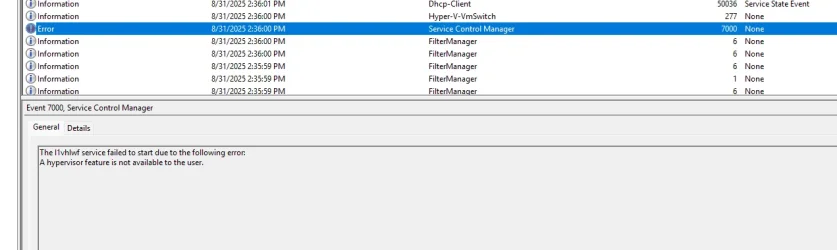
Hypervisor error and bsod constantly freezing and restarting my PC


Stewsy

Well-known member
Local time
6:41 PM
Posts
21
OS
Windows 11
1000006184.webp


What are some recommended fixes? Do I need to reinstall Windows?
 

My Computer My Computer

At a glance

Windows 11
OS
Windows 11
Computer type
PC/Desktop
Manufacturer/Model
Asus
Please see posting instructions:

Before posting a BSOD thread, please read the instructions here: Blue/Black Screen of Death (BSOD) Posting Instructions
If you need to add new information, please make a new post in your initial BSOD thread. Please do not make an extra new thread.

Please do not post anything other than Windows 11 Blue/Black Screen Of Death problems in this section.
 

My Computer My Computer

At a glance

Windows 10Intel(R) Core(TM) i7-4800MQ CPU @ 2.70GHz16 GB Total: Manufacturer : Samsung MemoryTyp...NVIDIA Quadro K3100M; Intel(R) HD Graphics 4600
OS
Windows 10
Computer type
Laptop
Manufacturer/Model
HP
CPU
Intel(R) Core(TM) i7-4800MQ CPU @ 2.70GHz
Motherboard
Product : 190A Version : KBC Version 94.56
Memory
16 GB Total: Manufacturer : Samsung MemoryType : DDR3 FormFactor : SODIMM Capacity : 8GB Speed : 1600
Graphics Card(s)
NVIDIA Quadro K3100M; Intel(R) HD Graphics 4600
Sound Card
IDT High Definition Audio CODEC; PNP Device ID HDAUDIO\FUNC_01&VEN_111D&DEV_76E0
Hard Drives
Model Hitachi HTS727575A9E364
Antivirus
Microsoft Defender
Other Info
Mobile Workstation
Sorry about that! The zip is attached
 

Attachments

My Computer My Computer

At a glance

Windows 11
OS
Windows 11
Computer type
PC/Desktop
Manufacturer/Model
Asus
The computer has an approximate 10 day Windows 11 installation with BSODs.


The most up to date available BIOS is from 2015 and is installed.


Asus has tested drivers for Windows 7 - 10.


Please perform the following steps:


1) Open administrative command prompt and copy and paste:

DISM /Online /Add-Capability /CapabilityName:WMIC~~~~

Post a share link.


2) Run Tuneup plus > post a share link


3) Reinstall:

a) netwtw14 ___ Intel(R) Wireless Adapter Driver for Windows 10 - 64 Bit c:\windows\system32\driverstore\filerepository\netwtw6e.inf_amd64_c3785d6f1e6d5b0e\netwtw14.sys

b) nvlddmkm nvlddmkm c:\windows\system32\driverstore\filerepository\nv_dispig.inf_amd64_0afec3f2050014a0\nvlddmkm.sys


Install a version older than 32.0.15.6094


4) Create a new restore point:


5) For new BSOD post a new V2 share link into the newest post


Code:
Name    NVIDIA GeForce GTX 1060 3GB
PNP Device ID    PCI\VEN_10DE&DEV_1C02&SUBSYS_85ED1043&REV_A1\4&14E8F4CB&0&0010
Adapter Type    NVIDIA GeForce GTX 1060 3GB, NVIDIA compatible
Adapter Description    NVIDIA GeForce GTX 1060 3GB
Adapter RAM    (1,073,741,824) bytes
Installed Drivers    C:\WINDOWS\System32\DriverStore\FileRepository\nv_dispig.inf_amd64_0afec3f2050014a0\nvldumdx.dll,C:\WINDOWS\System32\DriverStore\FileRepository\nv_dispig.inf_amd64_0afec3f2050014a0\nvldumdx.dll,C:\WINDOWS\System32\DriverStore\FileRepository\nv_dispig.inf_amd64_0afec3f2050014a0\nvldumdx.dll,C:\WINDOWS\System32\DriverStore\FileRepository\nv_dispig.inf_amd64_0afec3f2050014a0\nvldumdx.dll
Driver Version    32.0.15.6094
INF File    oem8.inf (Section024 section)
Driver    C:\WINDOWS\SYSTEM32\DRIVERSTORE\FILEREPOSITORY\NV_DISPIG.INF_AMD64_0AFEC3F2050014A0\NVLDDMKM.SYS (32.0.15.6094, 68.52 MB (71,847,544 bytes), 10/14/2024 10:43 AM)


Code:
Name    [00000000] Intel(R) Wi-Fi 6E AX210 160MHz
Adapter Type    Ethernet 802.3
Product Type    Intel(R) Wi-Fi 6E AX210 160MHz
Installed    Yes
PNP Device ID    PCI\VEN_8086&DEV_2725&SUBSYS_00248086&REV_1A\4&28CDDF4&0&00A8
Last Reset    9/1/2025 6:33 PM
Index    0
Service Name    Netwtw14.
Driver    C:\WINDOWS\SYSTEM32\DRIVERSTORE\FILEREPOSITORY\NETWTW6E.INF_AMD64_C3785D6F1E6D5B0E\NETWTW14.SYS (23.50.11.2, 5.31 MB (5,564,832 bytes), 8/20/2025 12:31 AM)


Code:
Netwtw14.sys Sat Jun  7 14:13:13 2025 (68448F49)

Code:
nvlddmkm.sys Wed Aug 14 00:14:57 2024 (66BC3D51)
 

My Computer My Computer

At a glance

Windows 10Intel(R) Core(TM) i7-4800MQ CPU @ 2.70GHz16 GB Total: Manufacturer : Samsung MemoryTyp...NVIDIA Quadro K3100M; Intel(R) HD Graphics 4600
OS
Windows 10
Computer type
Laptop
Manufacturer/Model
HP
CPU
Intel(R) Core(TM) i7-4800MQ CPU @ 2.70GHz
Motherboard
Product : 190A Version : KBC Version 94.56
Memory
16 GB Total: Manufacturer : Samsung MemoryType : DDR3 FormFactor : SODIMM Capacity : 8GB Speed : 1600
Graphics Card(s)
NVIDIA Quadro K3100M; Intel(R) HD Graphics 4600
Sound Card
IDT High Definition Audio CODEC; PNP Device ID HDAUDIO\FUNC_01&VEN_111D&DEV_76E0
Hard Drives
Model Hitachi HTS727575A9E364
Antivirus
Microsoft Defender
Other Info
Mobile Workstation

Latest Support Threads

Back
Top Bottom