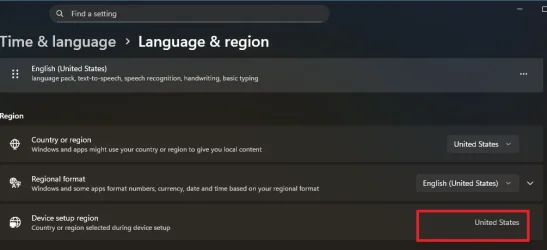
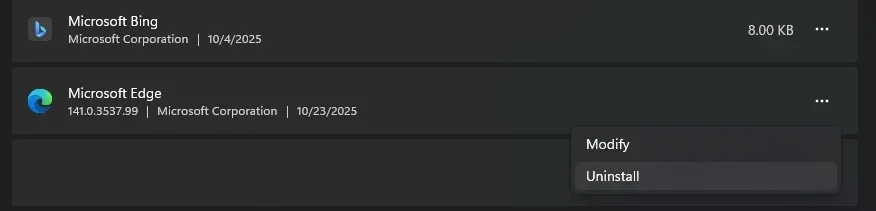
I am in the EU but unable to uninstall Edge?


According to your Wikipedia link, I think you're part of the EEA, currency doesn't change anything.

Did you download the Microsoft Media Creation Tool or the ISO from the Microsoft page for your language? That's what I did for the Microsoft Media Creation Tool, and when creating the USB, I choose my country/language. And when I download an ISO from the Microsoft page, I choose my country/language.
That's all I did. And I also believe that during the clean install, I had the internet connection enabled.
 

My Computer

System One

  • OS
    windows 11
According to your Wikipedia link, I think you're part of the EEA, currency doesn't change anything.

Did you download the Microsoft Media Creation Tool or the ISO from the Microsoft page for your language? That's what I did for the Microsoft Media Creation Tool, and when creating the USB, I choose my country/language. And when I download an ISO from the Microsoft page, I choose my country/language.
That's all I did. And I also believe that during the clean install, I had the internet connection enabled.
If as you are suggesting you get a different version depending on language selection, then what about the Irish who are part of EU but there is no Irish English version (only US and International (GB) versions).

What about Spanish versions, Portuguese and French versions? Many countries round the world speak these.

I wonder if it is more related to which MS servers serve EU countries, with them having different versions to the rest of the world?

If it was like that, could you fool them using a vpn, could I fool the servers into think I am in an EU country (specifically Ireland for me)?

Well, if I setup vpn so it thinks I am in Dublin, i cannot access the download servers.
 
Last edited:

My Computer

System One

  • OS
    Windows 11 Pro + Win11 Canary VM.
    Computer type
    Laptop
    Manufacturer/Model
    ASUS Zenbook 14
    CPU
    I9 13th gen i9-13900H 2.60 GHZ
    Motherboard
    Yep, Laptop has one.
    Memory
    16 GB soldered
    Graphics Card(s)
    Integrated Intel Iris XE
    Sound Card
    Realtek built in
    Monitor(s) Displays
    laptop OLED screen
    Screen Resolution
    2880x1800 touchscreen
    Hard Drives
    1 TB NVME SSD (only weakness is only one slot)
    PSU
    Internal + 65W thunderbolt USB4 charger
    Case
    Yep, got one
    Cooling
    Stella Artois (UK pint cans - 568 ml) - extra cost.
    Keyboard
    Built in UK keybd
    Mouse
    Bluetooth , wireless dongled, wired
    Internet Speed
    900 mbs (ethernet), wifi 6 typical 350-450 mb/s both up and down
    Browser
    Edge
    Antivirus
    Defender
    Other Info
    TPM 2.0, 2xUSB4 thunderbolt, 1xUsb3 (usb a), 1xUsb-c, hdmi out, 3.5 mm audio out/in combo, ASUS backlit trackpad (inc. switchable number pad)

    Macrium Reflect Home V8
    Office 365 Family (6 users each 1TB onedrive space)
    Hyper-V (a vm runs almost as fast as my older laptop)
I really think it's either deliberate crap from Microsoft OR their stuff is horribly broken, considering the option to uninstall Edge on my Windows 10 PC suddenly unlocked one day in the past few months (this PC was installed in 2022 btw and I never changed regional settings on it). I'd given up trying to figure it out long before that. I eventually figured maybe they didn't give a rubbish about Windows 10 anymore, didn't care about the european court order (or whatever it was), and simply only made that accessible on Windows 11. But then I installed Windows 11 and it didn't work either - while it does on my Windows 10 machine now.

My brain is full of foodle.webp
 

My Computer

System One

  • OS
    Windows 11
I really think it's either deliberate crap from Microsoft OR their stuff is horribly broken, considering the option to uninstall Edge on my Windows 10 PC suddenly unlocked one day in the past few months (this PC was installed in 2022 btw and I never changed regional settings on it). I'd given up trying to figure it out long before that. I eventually figured maybe they didn't give a rubbish about Windows 10 anymore, didn't care about the european court order (or whatever it was), and simply only made that accessible on Windows 11. But then I installed Windows 11 and it didn't work either - while it does on my Windows 10 machine now.

View attachment 150537
99% of your issue relates to a pointless need to remove Defender.
Answer is simple - ignore it and do not use it.
 

My Computer

System One

  • OS
    Windows 11 Pro + Win11 Canary VM.
    Computer type
    Laptop
    Manufacturer/Model
    ASUS Zenbook 14
    CPU
    I9 13th gen i9-13900H 2.60 GHZ
    Motherboard
    Yep, Laptop has one.
    Memory
    16 GB soldered
    Graphics Card(s)
    Integrated Intel Iris XE
    Sound Card
    Realtek built in
    Monitor(s) Displays
    laptop OLED screen
    Screen Resolution
    2880x1800 touchscreen
    Hard Drives
    1 TB NVME SSD (only weakness is only one slot)
    PSU
    Internal + 65W thunderbolt USB4 charger
    Case
    Yep, got one
    Cooling
    Stella Artois (UK pint cans - 568 ml) - extra cost.
    Keyboard
    Built in UK keybd
    Mouse
    Bluetooth , wireless dongled, wired
    Internet Speed
    900 mbs (ethernet), wifi 6 typical 350-450 mb/s both up and down
    Browser
    Edge
    Antivirus
    Defender
    Other Info
    TPM 2.0, 2xUSB4 thunderbolt, 1xUsb3 (usb a), 1xUsb-c, hdmi out, 3.5 mm audio out/in combo, ASUS backlit trackpad (inc. switchable number pad)

    Macrium Reflect Home V8
    Office 365 Family (6 users each 1TB onedrive space)
    Hyper-V (a vm runs almost as fast as my older laptop)
99% of your issue relates to a pointless need to remove Defender.
Answer is simple - ignore it and do not use it.
Shush, how will I pay my bills if people start following common sense talk like that!!!

I'd have to get a real job :scream:
 

My Computers

System One System Two

  • OS
    Windows 11 Workstation
    Computer type
    PC/Desktop
    Manufacturer/Model
    doofenshmirtz evil incorporated
    CPU
    Ryzen 9 5950X
    Motherboard
    Asus ROG Crosshair VIII Formula
    Memory
    Corsair Vengeance RGB PRO Black 64GB (4x16GB) 3600MHz AMD Ryzen Tuned DDR4
    Graphics Card(s)
    ASUS AMD Radeon RX 6900 XT 16GB ROG Strix LC OC
    Sound Card
    Sound BlasterX Katana
    Monitor(s) Displays
    3 x27" Dell U2724D & 1 x 34" Dell U3415W
    Hard Drives
    Samsung 980 Pro 1TB M.2 2280 PCI-e 4.0 x4 NVMe Solid State
    Drive
    PSU
    ASUS ROG THOR 850W 80 Plus Platinum
    Case
    ASUS ROG Strix Helios Midi-Tower ARGB Gaming Case
    Cooling
    ASUS ROG Strix LC Performance RGB AIO CPU Liquid Cooler - 360mm
    Keyboard
    Logi Ergo
    Mouse
    Logitech MX Vertical
    Internet Speed
    900/100 Mbps
    Browser
    Chrome
    Antivirus
    Windows Defender, Malwarebytes Pro
    Other Info
    HP M281 Printer
    Logitech Brio Stream webcam
    Yeti X mic
  • Operating System
    Windows 10
    Computer type
    Laptop
    Manufacturer/Model
    Surface Laptop
    CPU
    i7
If as you are suggesting you get a different version depending on language selection, then what about the Irish who are part of EU but there is no Irish English version (only US and International (GB) versions).

What about Spanish versions, Portuguese and French versions? Many countries round the world speak these.

I wonder if it is more related to which MS servers serve EU countries, with them having different versions to the rest of the world?

If it was like that, could you fool them using a vpn, could I fool the servers into think I am in an EU country (specifically Ireland for me)?

Well, if I setup vpn so it thinks I am in Dublin, i cannot access the download servers.
There are separate ISOs for some of the same languages: Portuguese (Brazil), Canadian French, and Spanish (Mexico).

Microsoft may use three methods to, among others, enable Edge uninstallation: in a separate ISO, with a non-separate ISO during a clean install or update when an EU region is selected and the internet connection is enabled to install the KB(s), a non-separate ISO when an EU region is selected and the internet connection is disabled during a clean install or update, the KB(s) are installed via Windows Update.

The servers in each region must also influence the result.
I really think it's either deliberate crap from Microsoft OR their stuff is horribly broken, considering the option to uninstall Edge on my Windows 10 PC suddenly unlocked one day in the past few months (this PC was installed in 2022 btw and I never changed regional settings on it). I'd given up trying to figure it out long before that. I eventually figured maybe they didn't give a rubbish about Windows 10 anymore, didn't care about the european court order (or whatever it was), and simply only made that accessible on Windows 11. But then I installed Windows 11 and it didn't work either - while it does on my Windows 10 machine now.

View attachment 150537
If this is not the case, enable the "Get latest updates as soon as they're available" option. It's on the Windows Update page, below "Check for updates." You'll have to wait up to a few months. It may be a dynamic KB that installs in the background and will not be visible during a Windows Update search and will not appear in the update history.
 

My Computer

System One

  • OS
    windows 11
  • Sad
Reactions: OAT
Microsoft may use three methods to, among others, enable Edge uninstallation: in a separate ISO, with a non-separate ISO during a clean install or update when an EU region is selected and the internet connection is enabled to install the KB(s), a non-separate ISO when an EU region is selected and the internet connection is disabled during a clean install or update, the KB(s) are installed via Windows Update.

The servers in each region must also influence the result.
I am sorry but I find it difficult to decipher anything remotely truthful in your statements and you are right to use 'may' & 'must be'.
But assumptions are not really what technical knowledge is all about.

At this time, the ISO has nothing to do with your ability to uninstall Edge.
Currently it is simply done thru the IntegratedServicesRegionPolicySet.json file.
The latest builds in the Canary branch no longer use that method.

The location of your update distribution servers are solely governed by the values in the keys listed below,
where CountryCode is located with a subkey RegisteredWithAU with a Reg_Word value of 1.
This allows world travelers to obtain a quicker connection to the local MS update servers.

Code:
HKEY_LOCAL_MACHINE\SOFTWARE\Microsoft\Windows\CurrentVersion\WindowsUpdate\Services

The DeviceRegion can be found in the following key as well:
This gets set either at installation time or via a selection in settings.

Code:
HKEY_LOCAL_MACHINE\SOFTWARE\Microsoft\Windows\CurrentVersion\Control Panel\DeviceRegion

Again, nothing to do with Edge and your ability to uninstall it.
 

My Computers

System One System Two

  • OS
    All Branches but Release
    Computer type
    Laptop
    Manufacturer/Model
    Acer Nitro ANV15-51
    CPU
    AMD Ryzen 7 7735HS 3200-4500 Mhz 8 cores x 2
    Motherboard
    Sportage_RBH
    Memory
    32 GB DDR5
    Graphics Card(s)
    Radeon Graphic / NVIDIA GeForce RTX 4060 8 GB GDDR6
    Sound Card
    AMD/Realtek(R) Audio
    Monitor(s) Displays
    Integrated Monitor (15.3"vis)
    Screen Resolution
    FHD 1920X1080 16:9 144Hz
    Hard Drives
    KINGSTON OM8SEP4512Q-AA 1TB
    Western Digital 256GB
    PSU
    19V DC 6.32 A 120 W
    Cooling
    Dual Fans
    Mouse
    MS Bluetooth
    Internet Speed
    Fiber 1GB Cox -us & 1GB Orange-fr
    Browser
    Edge Canary- Firefox Nightly-Chrome Dev-Chrome Dev
    Antivirus
    Windows Defender
  • Operating System
    Windows 11 Beta
    Computer type
    Laptop
    Manufacturer/Model
    Asus X751BP
    CPU
    AMD A9-9420
    Memory
    8 GB of DDR4
    Graphics card(s)
    AMD Radeon R5
    Screen Resolution
    1600x900
    Hard Drives
    Seagate 1 TB
I really think it's either deliberate crap from Microsoft OR their stuff is horribly broken, considering the option to uninstall Edge on my Windows 10 PC suddenly unlocked one day in the past few months (this PC was installed in 2022 btw and I never changed regional settings on it). I'd given up trying to figure it out long before that. I eventually figured maybe they didn't give a rubbish about Windows 10 anymore, didn't care about the european court order (or whatever it was), and simply only made that accessible on Windows 11. But then I installed Windows 11 and it didn't work either - while it does on my Windows 10 machine now.

View attachment 150537
99% of your issue relates to a pointless need to remove Defender.
Answer is simple - ignore it and do not use it.
uninstalling edge is one eea feature that you can enable for any region with a simple registry edit, region aside.
 

My Computer

System One

  • OS
    Windows 11 Pro
I am sorry but I find it difficult to decipher anything remotely truthful in your statements and you are right to use 'may' & 'must be'.
But assumptions are not really what technical knowledge is all about.

At this time, the ISO has nothing to do with your ability to uninstall Edge.
Currently it is simply done thru the IntegratedServicesRegionPolicySet.json file.
The latest builds in the Canary branch no longer use that method.

The location of your update distribution servers are solely governed by the values in the keys listed below,
where CountryCode is located with a subkey RegisteredWithAU with a Reg_Word value of 1.
This allows world travelers to obtain a quicker connection to the local MS update servers.

Code:
HKEY_LOCAL_MACHINE\SOFTWARE\Microsoft\Windows\CurrentVersion\WindowsUpdate\Services

The DeviceRegion can be found in the following key as well:
This gets set either at installation time or via a selection in settings.

Code:
HKEY_LOCAL_MACHINE\SOFTWARE\Microsoft\Windows\CurrentVersion\Control Panel\DeviceRegion

Again, nothing to do with Edge and your ability to uninstall it.
Yup, those are assumptions. Since the op does not have the possibility to uninstall edge and I have this possibility and I do not know how microsoft proceeds, I indicate in my comment 41 what I did. The suggestions were in response to Cereberus.

"It is simply done through the IntegratedServicesRegionPolicySet.json file."
So technically, how do EU citizens have the DMA ACT features enabled without touching this json file? I haven't touched the json file. And the op hasn't touched this json file for his Windows 10, where the ability to uninstall Edge appeared well after installing Windows 10.
 

My Computer

System One

  • OS
    windows 11
uninstalling edge is one eea feature that you can enable for any region with a simple registry edit, region aside.
The two safest methods for using the EEA loophole:

1. Temporarily edit the defaults in IntegratedServicesRegionPolicySet.json so everyone is eligible. This works, but the edited file may be overwritten when SFC runs. Not a big deal, if you've already removed Edge.

2. Temporarily change DeviceRegion, uninstall Edge and restore your old DeviceRegion. Don't leave it permanently changed, because the wrong region will make Windows act incorrectly for other features.

For an example of a script that safely removes Edge (using the EEA loophole):
EdgeRemover/RemoveEdge.ps1 at main · he3als/EdgeRemover
 

My Computer

System One

  • OS
    Windows 7
  • Like
Reactions: OAT
Yup, those are assumptions. Since the op does not have the possibility to uninstall edge and I have this possibility and I do not know how microsoft proceeds, I indicate in my comment 41 what I did. The suggestions were in response to Cereberus.

"It is simply done through the IntegratedServicesRegionPolicySet.json file."
So technically, how do EU citizens have the DMA ACT features enabled without touching this json file?
That file is delivered pre-configured based on the device country code. (key listed above)
This can be done at any time during any CU, build or others .
The owner of that file is TrustedInstaller to prevent the user from modifying it and the 2 letter country/regions are as follows.

Code:
 "region": {
          "enabled": ["AT", "BE", "BG", "CH", "CY", "CZ", "DE", "DK", "EE", "ES", "FI", "FR", "GF", "GP", "GR", "HR", "HU", "IE", "IS", "IT", "LI", "LT", "LU", "LV", "MT", "MQ", "NL", "NO", "PL", "PT", "RE", "RO", "SE", "SI", "SK", "YT"]

Please note that if the command SFC /scannow is run, it will replace the modified file back to its correct region code.
 

My Computers

System One System Two

  • OS
    All Branches but Release
    Computer type
    Laptop
    Manufacturer/Model
    Acer Nitro ANV15-51
    CPU
    AMD Ryzen 7 7735HS 3200-4500 Mhz 8 cores x 2
    Motherboard
    Sportage_RBH
    Memory
    32 GB DDR5
    Graphics Card(s)
    Radeon Graphic / NVIDIA GeForce RTX 4060 8 GB GDDR6
    Sound Card
    AMD/Realtek(R) Audio
    Monitor(s) Displays
    Integrated Monitor (15.3"vis)
    Screen Resolution
    FHD 1920X1080 16:9 144Hz
    Hard Drives
    KINGSTON OM8SEP4512Q-AA 1TB
    Western Digital 256GB
    PSU
    19V DC 6.32 A 120 W
    Cooling
    Dual Fans
    Mouse
    MS Bluetooth
    Internet Speed
    Fiber 1GB Cox -us & 1GB Orange-fr
    Browser
    Edge Canary- Firefox Nightly-Chrome Dev-Chrome Dev
    Antivirus
    Windows Defender
  • Operating System
    Windows 11 Beta
    Computer type
    Laptop
    Manufacturer/Model
    Asus X751BP
    CPU
    AMD A9-9420
    Memory
    8 GB of DDR4
    Graphics card(s)
    AMD Radeon R5
    Screen Resolution
    1600x900
    Hard Drives
    Seagate 1 TB
The two safest methods for using the EEA loophole:

1. Temporarily edit the defaults in IntegratedServicesRegionPolicySet.json so everyone is eligible. This works, but the edited file may be overwritten when SFC runs. Not a big deal, if you've already removed Edge.

2. Temporarily change DeviceRegion, uninstall Edge and restore your old DeviceRegion. Don't leave it permanently changed, because the wrong region will make Windows act incorrectly for other features.

For an example of a script that safely removes Edge (using the EEA loophole):
EdgeRemover/RemoveEdge.ps1 at main · he3als/EdgeRemover
changing the "Country or Region" didnt work for me on any of the 3 PCs i tested on (all 25H2). i had to actually change the "Device Setup Region" which can be done via:

run
%WINDIR%\system32\sysprep\sysprep.exe
when it reboots:
Choose Germany, or Ireland or another EU
Set English & US Layout (or whatever is needed)
Click Next until Search for Updates > then disable internet
Shift + F10
start ms-cxh:localonly
create a new local account (will be deleted later)
reboot
Log out of new Local Account
Log into your account
delete account you created during oobe

*Pinned Taskbar, Run Commands, Pinned Start Menu - WILL BE UNDONE from your original account, but no data lost*
1761579594714.webp
 

My Computer

System One

  • OS
    Windows 11 Pro
Did not have to do any of that, but then again I am in the US.... And a reboot is a must once the file has been modified.

edge.webpregion.webp

Code:
 {
  "$schema": "schemas/IntegratedServicesRegionPolicySet.Schema.1.1.0.json",
  "version": "1.0",
  "policies": [
    {
      "$comment": "Edge is uninstallable.",
      "guid": "{1bca278a-5d11-4acf-ad2f-f9ab6d7f93a6}",
      "defaultState": "enabled",
      "conditions": {
        "region": {
          "enabled": ["AT", "BE", "BG", "CH", "CY", "CZ", "DE", "DK", "EE", "ES", "FI", "FR", "GF", "GP", "GR", "HR", "HU", "IE", "IS", "IT", "LI", "LT", "LU", "LV", "MT", "MQ", "NL", "NO", "PL", "PT", "RE", "RO", "SE", "SI", "SK", "US", "YT"]
        }
      }
    },


My Computers

System One System Two

  • OS
    All Branches but Release
    Computer type
    Laptop
    Manufacturer/Model
    Acer Nitro ANV15-51
    CPU
    AMD Ryzen 7 7735HS 3200-4500 Mhz 8 cores x 2
    Motherboard
    Sportage_RBH
    Memory
    32 GB DDR5
    Graphics Card(s)
    Radeon Graphic / NVIDIA GeForce RTX 4060 8 GB GDDR6
    Sound Card
    AMD/Realtek(R) Audio
    Monitor(s) Displays
    Integrated Monitor (15.3"vis)
    Screen Resolution
    FHD 1920X1080 16:9 144Hz
    Hard Drives
    KINGSTON OM8SEP4512Q-AA 1TB
    Western Digital 256GB
    PSU
    19V DC 6.32 A 120 W
    Cooling
    Dual Fans
    Mouse
    MS Bluetooth
    Internet Speed
    Fiber 1GB Cox -us & 1GB Orange-fr
    Browser
    Edge Canary- Firefox Nightly-Chrome Dev-Chrome Dev
    Antivirus
    Windows Defender
  • Operating System
    Windows 11 Beta
    Computer type
    Laptop
    Manufacturer/Model
    Asus X751BP
    CPU
    AMD A9-9420
    Memory
    8 GB of DDR4
    Graphics card(s)
    AMD Radeon R5
    Screen Resolution
    1600x900
    Hard Drives
    Seagate 1 TB
Did not have to do any of that, but then again I am in the US.

View attachment 150554View attachment 150555

Code:
 {
  "$schema": "schemas/IntegratedServicesRegionPolicySet.Schema.1.1.0.json",
  "version": "1.0",
  "policies": [
    {
      "$comment": "Edge is uninstallable.",
      "guid": "{1bca278a-5d11-4acf-ad2f-f9ab6d7f93a6}",
      "defaultState": "enabled",
      "conditions": {
        "region": {
          "enabled": ["AT", "BE", "BG", "CH", "CY", "CZ", "DE", "DK", "EE", "ES", "FI", "FR", "GF", "GP", "GR", "HR", "HU", "IE", "IS", "IT", "LI", "LT", "LU", "LV", "MT", "MQ", "NL", "NO", "PL", "PT", "RE", "RO", "SE", "SI", "SK", "US", "YT"]
        }
      }
    },
so am i. but on a test machine i setup with ireland at oobe, i could not change it to germany. had to re-enter oobe. not sure why. but as i stated, uninstalling edge is easy no matter where in the world you are....

Code:
Windows Registry Editor Version 5.00

[HKEY_LOCAL_MACHINE\SOFTWARE\WOW6432Node\Microsoft\Windows\CurrentVersion\Uninstall\Microsoft Edge]
"NoRemove"=dword:00000000

and reboot
 

My Computer

System One

  • OS
    Windows 11 Pro
  • Like
Reactions: OAT

Latest Support Threads

Back
Top Bottom