
Navigation
Install the app
How to install the app on iOS
Follow along with the video below to see how to install our site as a web app on your home screen.
Note: This feature may not be available in some browsers.
More options
Style variation
System
Light
Dark
You are using an out of date browser. It may not display this or other websites correctly.
You should upgrade or use an alternative browser.
You should upgrade or use an alternative browser.
i can't find an .inf driver file for the MSI B550M VC WIFI motherboard (motherboard drivers)
- Thread starter dookzzz
- Start date
i can't believe it takes all of this JUST to get windows working
My Computer
At a glance
Windows 11
- OS
- Windows 11
- Computer type
- PC/Desktop

That's why I use SATS SSDs. 
This is what Google AI has to say about this...
This is what Google AI has to say about this...
The Windows 11 installer asks for a media or storage driver during setup on an MSI AMD motherboard because the generic installer lacks the specific AMD RAID/SATA or chipset controller drivers to detect your M.2 NVMe SSD. [1, 2]
How to Fix the Missing Driver Prompt
- Download AMD RAID/SOTA Drivers: Go to the official MSI Support Page for your specific motherboard model, download the latest AMD RAID Driver or AMD Chipset Driver package, and extract the files onto a separate USB flash drive. [1, 2]
- Load Driver During Setup: On the Windows 11 installation screen where it fails to detect a drive and asks for a driver, click Load Driver, browse to the folder containing the extracted AMD storage/RAID files on your USB stick, and select the compatible controller to let Windows recognize your NVMe SSD. [1, 2]
- Check BIOS Storage Mode: Restart your PC, enter the BIOS, and verify your storage configuration. If it is set to RAID mode while you only have a single NVMe drive, switch the SATA/Storage mode to AHCI, save changes (F10), and restart the installer. [1, 2, 3]
- Recreate Installation Media: If the error persists, use a different USB stick and recreate your bootable installer using the latest Microsoft Windows 11 Media Creation Tool to ensure the installer isn't corrupted or missing baseline files.
My Computers
-
At a glance
Win 11 Home ♦♦♦26300.9550 ♦♦♦♦♦♦♦26H2AMD Ryzen 7 3700XG.Skill (F4-3200C14D-16GTZKW)EVGA RTX 2070 (08G-P4-2171-KR)- OS
- Win 11 Home ♦♦♦26300.9550 ♦♦♦♦♦♦♦26H2
- Computer type
- PC/Desktop
- Manufacturer/Model
- Built by Ghot® [May 2020]
- CPU
- AMD Ryzen 7 3700X
- Motherboard
- Asus Pro WS X570-ACE (BIOS 5302)
- Memory
- G.Skill (F4-3200C14D-16GTZKW)
- Graphics Card(s)
- EVGA RTX 2070 (08G-P4-2171-KR)
- Sound Card
- Realtek ALC1220P / ALC S1220A
- Monitor(s) Displays
- Dell U3011 30"
- Screen Resolution
- 2560 x 1600
- Hard Drives
- 2x Samsung 860 EVO 500GB,
WD 4TB Black FZBX - SATA III,
WD 8TB Black FZBX - SATA III,
DRW-24B1ST CD/DVD Burner
- PSU
- PC Power & Cooling 750W Quad EPS12V
- Case
- Cooler Master ATCS 840 Tower
- Cooling
- CM Hyper 212 EVO (push/pull)
- Keyboard
- Ducky DK9008 Shine II Blue LED
- Mouse
- Logitech Optical M-100
- Internet Speed
- 300/300
- Browser
- Firefox (latest)
- Antivirus
- Bitdefender Total Security
- Other Info
- Speakers: Klipsch Pro Media 2.1
-
At a glance
Windows XP Pro 32bit w/SP3AMD Athlon 64 X2 5000+ (OC'd @ 3.2Ghz)TWIN2X2048-6400C4DHX (2 x 1GB, DDR2 800)EVGA 256-P2-N758-TR GeForce 8600GT SSC- Operating System
- Windows XP Pro 32bit w/SP3
- Computer type
- PC/Desktop
- Manufacturer/Model
- Built by Ghot® (not in use)
- CPU
- AMD Athlon 64 X2 5000+ (OC'd @ 3.2Ghz)
- Motherboard
- ASUS M2N32-SLI Deluxe Wireless Edition
- Memory
- TWIN2X2048-6400C4DHX (2 x 1GB, DDR2 800)
- Graphics card(s)
- EVGA 256-P2-N758-TR GeForce 8600GT SSC
- Sound Card
- Onboard
- Monitor(s) Displays
- ViewSonic G90FB Black 19" Professional (CRT)
- Screen Resolution
- up to 2048 x 1536
- Hard Drives
- WD 36GB 10,000rpm Raptor SATA
Seagate 80GB 7200rpm SATA
Lite-On LTR-52246S CD/RW
Lite-On LH-18A1P CD/DVD Burner
- PSU
- PC Power & Cooling Silencer 750 Quad EPS12V
- Case
- Generic Beige case, 80mm fans
- Cooling
- ZALMAN 9500A 92mm CPU Cooler
- Keyboard
- Logitech Classic Keybooard 200
- Mouse
- Logitech Optical M-BT96a
- Internet Speed
- 300/300
- Browser
- Firefox 3.x ??
- Antivirus
- Symantec (Norton)
- Other Info
- Still assembled, still runs. Haven't turned it on for 15 years?
then i must reflash the usb cuz idk that's my only optionThat's why I use SATS SSDs.
This is what Google AI has to say about this...
My Computer
At a glance
Windows 11
- OS
- Windows 11
- Computer type
- PC/Desktop
Probably... check this. He got the exact same error message.
Go here and download the Win 11 ISO... don't use the Media Creation Tool.
Then go here and get RUFUS... and use RUFUS to recreate your Win 11 install media.
Go here and download the Win 11 ISO... don't use the Media Creation Tool.
Then go here and get RUFUS... and use RUFUS to recreate your Win 11 install media.
Rufus - Create bootable USB drives the easy way
Rufus: Create bootable USB drives the easy way
rufus.ie
My Computers
-
At a glance
Win 11 Home ♦♦♦26300.9550 ♦♦♦♦♦♦♦26H2AMD Ryzen 7 3700XG.Skill (F4-3200C14D-16GTZKW)EVGA RTX 2070 (08G-P4-2171-KR)- OS
- Win 11 Home ♦♦♦26300.9550 ♦♦♦♦♦♦♦26H2
- Computer type
- PC/Desktop
- Manufacturer/Model
- Built by Ghot® [May 2020]
- CPU
- AMD Ryzen 7 3700X
- Motherboard
- Asus Pro WS X570-ACE (BIOS 5302)
- Memory
- G.Skill (F4-3200C14D-16GTZKW)
- Graphics Card(s)
- EVGA RTX 2070 (08G-P4-2171-KR)
- Sound Card
- Realtek ALC1220P / ALC S1220A
- Monitor(s) Displays
- Dell U3011 30"
- Screen Resolution
- 2560 x 1600
- Hard Drives
- 2x Samsung 860 EVO 500GB,
WD 4TB Black FZBX - SATA III,
WD 8TB Black FZBX - SATA III,
DRW-24B1ST CD/DVD Burner
- PSU
- PC Power & Cooling 750W Quad EPS12V
- Case
- Cooler Master ATCS 840 Tower
- Cooling
- CM Hyper 212 EVO (push/pull)
- Keyboard
- Ducky DK9008 Shine II Blue LED
- Mouse
- Logitech Optical M-100
- Internet Speed
- 300/300
- Browser
- Firefox (latest)
- Antivirus
- Bitdefender Total Security
- Other Info
- Speakers: Klipsch Pro Media 2.1
-
At a glance
Windows XP Pro 32bit w/SP3AMD Athlon 64 X2 5000+ (OC'd @ 3.2Ghz)TWIN2X2048-6400C4DHX (2 x 1GB, DDR2 800)EVGA 256-P2-N758-TR GeForce 8600GT SSC- Operating System
- Windows XP Pro 32bit w/SP3
- Computer type
- PC/Desktop
- Manufacturer/Model
- Built by Ghot® (not in use)
- CPU
- AMD Athlon 64 X2 5000+ (OC'd @ 3.2Ghz)
- Motherboard
- ASUS M2N32-SLI Deluxe Wireless Edition
- Memory
- TWIN2X2048-6400C4DHX (2 x 1GB, DDR2 800)
- Graphics card(s)
- EVGA 256-P2-N758-TR GeForce 8600GT SSC
- Sound Card
- Onboard
- Monitor(s) Displays
- ViewSonic G90FB Black 19" Professional (CRT)
- Screen Resolution
- up to 2048 x 1536
- Hard Drives
- WD 36GB 10,000rpm Raptor SATA
Seagate 80GB 7200rpm SATA
Lite-On LTR-52246S CD/RW
Lite-On LH-18A1P CD/DVD Burner
- PSU
- PC Power & Cooling Silencer 750 Quad EPS12V
- Case
- Generic Beige case, 80mm fans
- Cooling
- ZALMAN 9500A 92mm CPU Cooler
- Keyboard
- Logitech Classic Keybooard 200
- Mouse
- Logitech Optical M-BT96a
- Internet Speed
- 300/300
- Browser
- Firefox 3.x ??
- Antivirus
- Symantec (Norton)
- Other Info
- Still assembled, still runs. Haven't turned it on for 15 years?
i'm gonna use balana etcherProbably... check this...
Go here and download the Win 11 ISO... don't use the Media Creation Tool.
Then go here and get RUFUS... and use RUFUS to recreate your Win 11 install media.
Rufus - Create bootable USB drives the easy way
Rufus: Create bootable USB drives the easy wayrufus.ie
My Computer
At a glance
Windows 11
- OS
- Windows 11
- Computer type
- PC/Desktop
i'm gonna use balana etcher
The guy in that post used RUFUS.... but it's your choice.
My Computers
-
At a glance
Win 11 Home ♦♦♦26300.9550 ♦♦♦♦♦♦♦26H2AMD Ryzen 7 3700XG.Skill (F4-3200C14D-16GTZKW)EVGA RTX 2070 (08G-P4-2171-KR)- OS
- Win 11 Home ♦♦♦26300.9550 ♦♦♦♦♦♦♦26H2
- Computer type
- PC/Desktop
- Manufacturer/Model
- Built by Ghot® [May 2020]
- CPU
- AMD Ryzen 7 3700X
- Motherboard
- Asus Pro WS X570-ACE (BIOS 5302)
- Memory
- G.Skill (F4-3200C14D-16GTZKW)
- Graphics Card(s)
- EVGA RTX 2070 (08G-P4-2171-KR)
- Sound Card
- Realtek ALC1220P / ALC S1220A
- Monitor(s) Displays
- Dell U3011 30"
- Screen Resolution
- 2560 x 1600
- Hard Drives
- 2x Samsung 860 EVO 500GB,
WD 4TB Black FZBX - SATA III,
WD 8TB Black FZBX - SATA III,
DRW-24B1ST CD/DVD Burner
- PSU
- PC Power & Cooling 750W Quad EPS12V
- Case
- Cooler Master ATCS 840 Tower
- Cooling
- CM Hyper 212 EVO (push/pull)
- Keyboard
- Ducky DK9008 Shine II Blue LED
- Mouse
- Logitech Optical M-100
- Internet Speed
- 300/300
- Browser
- Firefox (latest)
- Antivirus
- Bitdefender Total Security
- Other Info
- Speakers: Klipsch Pro Media 2.1
-
At a glance
Windows XP Pro 32bit w/SP3AMD Athlon 64 X2 5000+ (OC'd @ 3.2Ghz)TWIN2X2048-6400C4DHX (2 x 1GB, DDR2 800)EVGA 256-P2-N758-TR GeForce 8600GT SSC- Operating System
- Windows XP Pro 32bit w/SP3
- Computer type
- PC/Desktop
- Manufacturer/Model
- Built by Ghot® (not in use)
- CPU
- AMD Athlon 64 X2 5000+ (OC'd @ 3.2Ghz)
- Motherboard
- ASUS M2N32-SLI Deluxe Wireless Edition
- Memory
- TWIN2X2048-6400C4DHX (2 x 1GB, DDR2 800)
- Graphics card(s)
- EVGA 256-P2-N758-TR GeForce 8600GT SSC
- Sound Card
- Onboard
- Monitor(s) Displays
- ViewSonic G90FB Black 19" Professional (CRT)
- Screen Resolution
- up to 2048 x 1536
- Hard Drives
- WD 36GB 10,000rpm Raptor SATA
Seagate 80GB 7200rpm SATA
Lite-On LTR-52246S CD/RW
Lite-On LH-18A1P CD/DVD Burner
- PSU
- PC Power & Cooling Silencer 750 Quad EPS12V
- Case
- Generic Beige case, 80mm fans
- Cooling
- ZALMAN 9500A 92mm CPU Cooler
- Keyboard
- Logitech Classic Keybooard 200
- Mouse
- Logitech Optical M-BT96a
- Internet Speed
- 300/300
- Browser
- Firefox 3.x ??
- Antivirus
- Symantec (Norton)
- Other Info
- Still assembled, still runs. Haven't turned it on for 15 years?
i can't use rufus because the laptop i'm on is running on linux mintThe guy in that post used RUFUS.... but it's your choice.
My Computer
At a glance
Windows 11
- OS
- Windows 11
- Computer type
- PC/Desktop
i can't use rufus because the laptop i'm on is running on linux mint
Got it. LOL
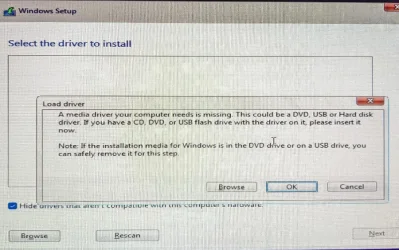
The guy in that post I linked, had the exact same error message...
My Computers
-
At a glance
Win 11 Home ♦♦♦26300.9550 ♦♦♦♦♦♦♦26H2AMD Ryzen 7 3700XG.Skill (F4-3200C14D-16GTZKW)EVGA RTX 2070 (08G-P4-2171-KR)- OS
- Win 11 Home ♦♦♦26300.9550 ♦♦♦♦♦♦♦26H2
- Computer type
- PC/Desktop
- Manufacturer/Model
- Built by Ghot® [May 2020]
- CPU
- AMD Ryzen 7 3700X
- Motherboard
- Asus Pro WS X570-ACE (BIOS 5302)
- Memory
- G.Skill (F4-3200C14D-16GTZKW)
- Graphics Card(s)
- EVGA RTX 2070 (08G-P4-2171-KR)
- Sound Card
- Realtek ALC1220P / ALC S1220A
- Monitor(s) Displays
- Dell U3011 30"
- Screen Resolution
- 2560 x 1600
- Hard Drives
- 2x Samsung 860 EVO 500GB,
WD 4TB Black FZBX - SATA III,
WD 8TB Black FZBX - SATA III,
DRW-24B1ST CD/DVD Burner
- PSU
- PC Power & Cooling 750W Quad EPS12V
- Case
- Cooler Master ATCS 840 Tower
- Cooling
- CM Hyper 212 EVO (push/pull)
- Keyboard
- Ducky DK9008 Shine II Blue LED
- Mouse
- Logitech Optical M-100
- Internet Speed
- 300/300
- Browser
- Firefox (latest)
- Antivirus
- Bitdefender Total Security
- Other Info
- Speakers: Klipsch Pro Media 2.1
-
At a glance
Windows XP Pro 32bit w/SP3AMD Athlon 64 X2 5000+ (OC'd @ 3.2Ghz)TWIN2X2048-6400C4DHX (2 x 1GB, DDR2 800)EVGA 256-P2-N758-TR GeForce 8600GT SSC- Operating System
- Windows XP Pro 32bit w/SP3
- Computer type
- PC/Desktop
- Manufacturer/Model
- Built by Ghot® (not in use)
- CPU
- AMD Athlon 64 X2 5000+ (OC'd @ 3.2Ghz)
- Motherboard
- ASUS M2N32-SLI Deluxe Wireless Edition
- Memory
- TWIN2X2048-6400C4DHX (2 x 1GB, DDR2 800)
- Graphics card(s)
- EVGA 256-P2-N758-TR GeForce 8600GT SSC
- Sound Card
- Onboard
- Monitor(s) Displays
- ViewSonic G90FB Black 19" Professional (CRT)
- Screen Resolution
- up to 2048 x 1536
- Hard Drives
- WD 36GB 10,000rpm Raptor SATA
Seagate 80GB 7200rpm SATA
Lite-On LTR-52246S CD/RW
Lite-On LH-18A1P CD/DVD Burner
- PSU
- PC Power & Cooling Silencer 750 Quad EPS12V
- Case
- Generic Beige case, 80mm fans
- Cooling
- ZALMAN 9500A 92mm CPU Cooler
- Keyboard
- Logitech Classic Keybooard 200
- Mouse
- Logitech Optical M-BT96a
- Internet Speed
- 300/300
- Browser
- Firefox 3.x ??
- Antivirus
- Symantec (Norton)
- Other Info
- Still assembled, still runs. Haven't turned it on for 15 years?

It looks like the MSI B550M VC WIFI dates from 5 years ago. Hardly new. I'd expect a Windows 11 installer to have the drivers needed to complete the installation. You might run into issue with LAN or WiFi drivers.
(My most recent build was a Threadripper/TRX50 one, not quite 3 years ago. I didn't have to hunt down drivers for the initial install.)
I'm unclear on the history of the installer you're attempting to use. At a guess. It's messed up. If you don't have access to a Windows PC, I have no idea how you'd produce a normal installation USB drive. Maybe someone can assist you with that.
(My most recent build was a Threadripper/TRX50 one, not quite 3 years ago. I didn't have to hunt down drivers for the initial install.)
I'm unclear on the history of the installer you're attempting to use. At a guess. It's messed up. If you don't have access to a Windows PC, I have no idea how you'd produce a normal installation USB drive. Maybe someone can assist you with that.
My Computers
-
At a glance
Windows 11 26300.9278Amd Threadripper 7970X128GB (4 X 32) G.Skill DDR5 6400 (RDIMM)Gigabyte RTX 4090 OC- OS
- Windows 11 26300.9278
- Computer type
- PC/Desktop
- Manufacturer/Model
- homebuilt
- CPU
- Amd Threadripper 7970X
- Motherboard
- Gigabyte TRX50 Aero D Rev. 1.0
- Memory
- 128GB (4 X 32) G.Skill DDR5 6400 (RDIMM)
- Graphics Card(s)
- Gigabyte RTX 4090 OC
- Sound Card
- none (USB to speakers), Realtek
- Monitor(s) Displays
- Innocn 32" OLED
- Screen Resolution
- 3840 X 2160 @ 60Hz
- Hard Drives
- Crucial T700 2TB M.2 NVME SSD
WD 4TB Blue SATA SSD
Seagate 18TB IronWolf Pro
- PSU
- BeQuiet! Straight Power 12 1500W
- Case
- Lian Li 011 Dynamic Evo XL
- Cooling
- SilverStone Technology XE360-TR5, with 3 Phanteks T30 fans
- Keyboard
- Cherry KC 500 MX LP (mechanical)
- Mouse
- Logitech M500s (wired)
- Internet Speed
- 2000/250 Mbps (down/up)
- Other Info
- xFinity gateway
-
At a glance
windows 11 26300.9278Intel I9-13900K64GB G.Skill DDR5-6000Gigabyte RTX 3090 ti- Operating System
- windows 11 26300.9278
- Computer type
- PC/Desktop
- Manufacturer/Model
- homebuilt
- CPU
- Intel I9-13900K
- Motherboard
- Asus RoG Strix Z690-E
- Memory
- 64GB G.Skill DDR5-6000
- Graphics card(s)
- Gigabyte RTX 3090 ti
- Sound Card
- built in Realtek
- Monitor(s) Displays
- Philips 27E1N8900 27" OLED
- Screen Resolution
- 3840 X 2160 @60Hz
- Hard Drives
- WDC SN850 1TB
8TB Seagate Ironwolf
4TB Seagate Ironwolf
- PSU
- eVGA SuperNOVA 1300 GT
- Case
- Lian Li 011 Dynamic Evo
- Cooling
- Corsair iCUE H150i ELITE CAPELLIX Liquid CPU Cooler
- Keyboard
- Cherry Streaming (wired)
- Mouse
- Logitech M500s (wired)
It looks like the MSI B550M VC WIFI dates from 5 years ago. Hardly new. I'd expect a Windows 11 installer to have the drivers needed to complete the installation. You might run into issue with LAN or WiFi drivers.
(My most recent build was a Threadripper/TRX50 one, not quite 3 years ago. I didn't have to hunt down drivers for the initial install.)
I'm unclear on the history of the installer you're attempting to use. At a guess. It's messed up. If you don't have access to a Windows PC, I have no idea how you'd produce a normal installation USB drive. Maybe someone can assist you with that.i
i used fedora media writer to write itIt looks like the MSI B550M VC WIFI dates from 5 years ago. Hardly new. I'd expect a Windows 11 installer to have the drivers needed to complete the installation. You might run into issue with LAN or WiFi drivers.
(My most recent build was a Threadripper/TRX50 one, not quite 3 years ago. I didn't have to hunt down drivers for the initial install.)
I'm unclear on the history of the installer you're attempting to use. At a guess. It's messed up. If you don't have access to a Windows PC, I have no idea how you'd produce a normal installation USB drive. Maybe someone can assist you with that.
My Computer
At a glance
Windows 11
- OS
- Windows 11
- Computer type
- PC/Desktop
i have nothing left to do, i've lost all hope.nope. it's not my installation media
My Computer
At a glance
Windows 11
- OS
- Windows 11
- Computer type
- PC/Desktop
i guess for now, i'm using bazzite, windows refuses to work on my system.i have nothing left to do, i've lost all hope.
My Computer
At a glance
Windows 11
- OS
- Windows 11
- Computer type
- PC/Desktop
i have nothing left to do, i've lost all hope.
Post #14 still has the phone numbers for MSI.
You could also Google this...
MSI B550M VC motherboard with NVMe SSD asking for driver during Windows 11 install?
Or just wait till tomorrow. Someone will know how to do this.
My Computers
-
At a glance
Win 11 Home ♦♦♦26300.9550 ♦♦♦♦♦♦♦26H2AMD Ryzen 7 3700XG.Skill (F4-3200C14D-16GTZKW)EVGA RTX 2070 (08G-P4-2171-KR)- OS
- Win 11 Home ♦♦♦26300.9550 ♦♦♦♦♦♦♦26H2
- Computer type
- PC/Desktop
- Manufacturer/Model
- Built by Ghot® [May 2020]
- CPU
- AMD Ryzen 7 3700X
- Motherboard
- Asus Pro WS X570-ACE (BIOS 5302)
- Memory
- G.Skill (F4-3200C14D-16GTZKW)
- Graphics Card(s)
- EVGA RTX 2070 (08G-P4-2171-KR)
- Sound Card
- Realtek ALC1220P / ALC S1220A
- Monitor(s) Displays
- Dell U3011 30"
- Screen Resolution
- 2560 x 1600
- Hard Drives
- 2x Samsung 860 EVO 500GB,
WD 4TB Black FZBX - SATA III,
WD 8TB Black FZBX - SATA III,
DRW-24B1ST CD/DVD Burner
- PSU
- PC Power & Cooling 750W Quad EPS12V
- Case
- Cooler Master ATCS 840 Tower
- Cooling
- CM Hyper 212 EVO (push/pull)
- Keyboard
- Ducky DK9008 Shine II Blue LED
- Mouse
- Logitech Optical M-100
- Internet Speed
- 300/300
- Browser
- Firefox (latest)
- Antivirus
- Bitdefender Total Security
- Other Info
- Speakers: Klipsch Pro Media 2.1
-
At a glance
Windows XP Pro 32bit w/SP3AMD Athlon 64 X2 5000+ (OC'd @ 3.2Ghz)TWIN2X2048-6400C4DHX (2 x 1GB, DDR2 800)EVGA 256-P2-N758-TR GeForce 8600GT SSC- Operating System
- Windows XP Pro 32bit w/SP3
- Computer type
- PC/Desktop
- Manufacturer/Model
- Built by Ghot® (not in use)
- CPU
- AMD Athlon 64 X2 5000+ (OC'd @ 3.2Ghz)
- Motherboard
- ASUS M2N32-SLI Deluxe Wireless Edition
- Memory
- TWIN2X2048-6400C4DHX (2 x 1GB, DDR2 800)
- Graphics card(s)
- EVGA 256-P2-N758-TR GeForce 8600GT SSC
- Sound Card
- Onboard
- Monitor(s) Displays
- ViewSonic G90FB Black 19" Professional (CRT)
- Screen Resolution
- up to 2048 x 1536
- Hard Drives
- WD 36GB 10,000rpm Raptor SATA
Seagate 80GB 7200rpm SATA
Lite-On LTR-52246S CD/RW
Lite-On LH-18A1P CD/DVD Burner
- PSU
- PC Power & Cooling Silencer 750 Quad EPS12V
- Case
- Generic Beige case, 80mm fans
- Cooling
- ZALMAN 9500A 92mm CPU Cooler
- Keyboard
- Logitech Classic Keybooard 200
- Mouse
- Logitech Optical M-BT96a
- Internet Speed
- 300/300
- Browser
- Firefox 3.x ??
- Antivirus
- Symantec (Norton)
- Other Info
- Still assembled, still runs. Haven't turned it on for 15 years?
"The Windows 11 installer may not recognize your NVMe SSD due to missing drivers. You can resolve this by downloading the appropriate AMD RAID/NVMe drivers from the MSI website and loading them during the installation process when prompted."Post #14 still has the phone numbers for MSI.
You could also Google this...
MSI B550M VC motherboard with NVMe SSD asking for driver during Windows 11 install?
Or just wait till tomorrow. Someone will know how to do this.
My Computer
At a glance
Windows 11
- OS
- Windows 11
- Computer type
- PC/Desktop
"Driver Integration: Consider integrating the AMD drivers into the installation media using tools like DISM or similar.""The Windows 11 installer may not recognize your NVMe SSD due to missing drivers. You can resolve this by downloading the appropriate AMD RAID/NVMe drivers from the MSI website and loading them during the installation process when prompted.
My Computer
At a glance
Windows 11
- OS
- Windows 11
- Computer type
- PC/Desktop
gonna use bazzite for now until these issues get fixed"Driver Integration: Consider integrating the AMD drivers into the installation media using tools like DISM or similar."
My Computer
At a glance
Windows 11
- OS
- Windows 11
- Computer type
- PC/Desktop
I would just check back tomorrow. I've seen lots of threads about this before.
Someone will know the answer.
Someone will know the answer.
My Computers
-
At a glance
Win 11 Home ♦♦♦26300.9550 ♦♦♦♦♦♦♦26H2AMD Ryzen 7 3700XG.Skill (F4-3200C14D-16GTZKW)EVGA RTX 2070 (08G-P4-2171-KR)- OS
- Win 11 Home ♦♦♦26300.9550 ♦♦♦♦♦♦♦26H2
- Computer type
- PC/Desktop
- Manufacturer/Model
- Built by Ghot® [May 2020]
- CPU
- AMD Ryzen 7 3700X
- Motherboard
- Asus Pro WS X570-ACE (BIOS 5302)
- Memory
- G.Skill (F4-3200C14D-16GTZKW)
- Graphics Card(s)
- EVGA RTX 2070 (08G-P4-2171-KR)
- Sound Card
- Realtek ALC1220P / ALC S1220A
- Monitor(s) Displays
- Dell U3011 30"
- Screen Resolution
- 2560 x 1600
- Hard Drives
- 2x Samsung 860 EVO 500GB,
WD 4TB Black FZBX - SATA III,
WD 8TB Black FZBX - SATA III,
DRW-24B1ST CD/DVD Burner
- PSU
- PC Power & Cooling 750W Quad EPS12V
- Case
- Cooler Master ATCS 840 Tower
- Cooling
- CM Hyper 212 EVO (push/pull)
- Keyboard
- Ducky DK9008 Shine II Blue LED
- Mouse
- Logitech Optical M-100
- Internet Speed
- 300/300
- Browser
- Firefox (latest)
- Antivirus
- Bitdefender Total Security
- Other Info
- Speakers: Klipsch Pro Media 2.1
-
At a glance
Windows XP Pro 32bit w/SP3AMD Athlon 64 X2 5000+ (OC'd @ 3.2Ghz)TWIN2X2048-6400C4DHX (2 x 1GB, DDR2 800)EVGA 256-P2-N758-TR GeForce 8600GT SSC- Operating System
- Windows XP Pro 32bit w/SP3
- Computer type
- PC/Desktop
- Manufacturer/Model
- Built by Ghot® (not in use)
- CPU
- AMD Athlon 64 X2 5000+ (OC'd @ 3.2Ghz)
- Motherboard
- ASUS M2N32-SLI Deluxe Wireless Edition
- Memory
- TWIN2X2048-6400C4DHX (2 x 1GB, DDR2 800)
- Graphics card(s)
- EVGA 256-P2-N758-TR GeForce 8600GT SSC
- Sound Card
- Onboard
- Monitor(s) Displays
- ViewSonic G90FB Black 19" Professional (CRT)
- Screen Resolution
- up to 2048 x 1536
- Hard Drives
- WD 36GB 10,000rpm Raptor SATA
Seagate 80GB 7200rpm SATA
Lite-On LTR-52246S CD/RW
Lite-On LH-18A1P CD/DVD Burner
- PSU
- PC Power & Cooling Silencer 750 Quad EPS12V
- Case
- Generic Beige case, 80mm fans
- Cooling
- ZALMAN 9500A 92mm CPU Cooler
- Keyboard
- Logitech Classic Keybooard 200
- Mouse
- Logitech Optical M-BT96a
- Internet Speed
- 300/300
- Browser
- Firefox 3.x ??
- Antivirus
- Symantec (Norton)
- Other Info
- Still assembled, still runs. Haven't turned it on for 15 years?
ok i will :)I would just check back tomorrow. I've seen lots of threads about this before.
Someone will know the answer.
My Computer
At a glance
Windows 11
- OS
- Windows 11
- Computer type
- PC/Desktop
Similar threads

Latest Support Threads
-
i can't find an .inf driver file for the MSI B550M VC WIFI motherboard (motherboard drivers)
- Started by dookzzz
- Replies: 65
-

-
-
-
Latest Tutorials
-
 Personalization Add or Remove Extract Context Menu for CAB files in Windows 11
- Started by Brink
- Replies: 0
-

-

-
 Accessibility Change Mouse Indicator Activation Method in Windows 11
- Started by Brink
- Replies: 0
-
 Accessibility Enable or Disable Include Screen Reader Audio in Live Captions on Windows 11
- Started by Brink
- Replies: 0