I can't preview messages in Gmail anymore


kanenas

Well-known member
Member
Local time
6:38 PM
Posts
104
OS
Windows 11 Pro for Workstations 25H2 26200.9445
I used to be able to get a panel next to the selected message but it seems that something has changed in Edge,
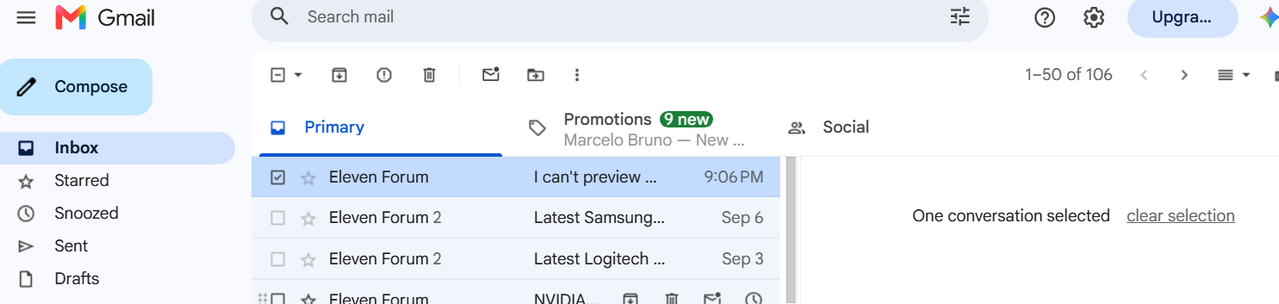
When I try it, I see the panel that says one message is selected. But no data is shown.

Out of curiosity, I just tried it with Chromium, I got the same panel but it asks me to make an account and login to cloudHQ before the message preview is enabled.
Is that a new fruit(cake) or what? And why Edge doesn't show the data but never refers to cloudHQ?

Thanks in advance for any clarification.
 

My Computer My Computer

At a glance

Windows 11 Pro for Workstations 25H2 26200.94456C+4c Intel 13th Gen Intel(R) Core(TM) i5-134...64 GBNVIDIA GeForce RTX 4060, Intel UHD Graphics 730
OS
Windows 11 Pro for Workstations 25H2 26200.9445
Computer type
PC/Desktop
Manufacturer/Model
ASRock
CPU
6C+4c Intel 13th Gen Intel(R) Core(TM) i5-13400, 4100 M
Motherboard
ASRock B660M-HDV
Memory
64 GB
Graphics Card(s)
NVIDIA GeForce RTX 4060, Intel UHD Graphics 730
Sound Card
Realtek
Monitor(s) Displays
AOC 24V2W1G5
Screen Resolution
1920x1080
Hard Drives
Samsung SSD 990 Pro with Heatsink
Keyboard
Logitech
Mouse
Logitech
Internet Speed
1GB
Antivirus
Windows Defender
I'm not sure, but it sounds like "preview messages" is something to do with the cloudHQ browser extension. Is that what you're trying to fix, or do you want Gmail's standard functionality with its reading pane next to the messages? If it's the latter then go into your browser's extensions section and disable anything called "cloudHQ" or any other extension that refers to Gmail. Press F5 to refresh the Gmail page and see if that's fixed it for you.
 

My Computer My Computer

At a glance

Windows 11
OS
Windows 11
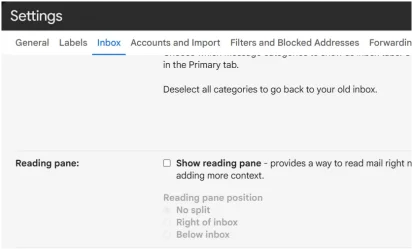
Hello! Take a look here also: In Chrome, go to the gear, & check to see if your Inbox, Reading Pane, Show Reading Pain is checked?
 

Attachments

  • Screenshot 2026-09-09 110507.webp
    Screenshot 2026-09-09 110507.webp
    21.3 KB · Views: 1

My Computer My Computer

At a glance

Windows 11 25H2 (OS Build 26200.9445)Processor: 11th Gen Intel(R) Core(TM) i5-1135...12GBIntel R Iris R XE Graphics family
OS
Windows 11 25H2 (OS Build 26200.9445)
Computer type
Laptop
Manufacturer/Model
Dell
CPU
Processor: 11th Gen Intel(R) Core(TM) i5-1135G7 @ 2.40G
Motherboard
64-bit operating system Dell 0XMF7W
Memory
12GB
Graphics Card(s)
Intel R Iris R XE Graphics family
Sound Card
Cirrus Speakers High Definition Audio
Monitor(s) Displays
Generic PnP monitor
Screen Resolution
1920 x 1080
Hard Drives
NVMe 670p SSDPEKNU512GZ NVMe I NTEL 512GB
Case
cheap
Mouse
Logitech wireless mouse
Internet Speed
16 Mps download
Browser
Google Chrome
Antivirus
Security: Microsoft Defender & Malwarebytes Premium (with browser guard)
Other Info
Dell model: Inspiron 15 3511
This works for me (on a test) I'm using a Chrome browser.
 

My Computer My Computer

At a glance

Windows 11 25H2 (OS Build 26200.9445)Processor: 11th Gen Intel(R) Core(TM) i5-1135...12GBIntel R Iris R XE Graphics family
OS
Windows 11 25H2 (OS Build 26200.9445)
Computer type
Laptop
Manufacturer/Model
Dell
CPU
Processor: 11th Gen Intel(R) Core(TM) i5-1135G7 @ 2.40G
Motherboard
64-bit operating system Dell 0XMF7W
Memory
12GB
Graphics Card(s)
Intel R Iris R XE Graphics family
Sound Card
Cirrus Speakers High Definition Audio
Monitor(s) Displays
Generic PnP monitor
Screen Resolution
1920 x 1080
Hard Drives
NVMe 670p SSDPEKNU512GZ NVMe I NTEL 512GB
Case
cheap
Mouse
Logitech wireless mouse
Internet Speed
16 Mps download
Browser
Google Chrome
Antivirus
Security: Microsoft Defender & Malwarebytes Premium (with browser guard)
Other Info
Dell model: Inspiron 15 3511
Thank you much for the information.

To start off, I just wanted the built-in Gmail functionality to show the message preview like I had before.
I had never seen this cloudHQ before so I personally never added any extensions that mention it.

As it stands now, both Edge and Chromium don't handle the preview and I also added to the mix Firefox. No dice with it either.
The preview is enabled in all 3 browsers, changed the preview panel positions and restarted the browsers, I followed the video that remover posted above (which shows what I was doing already) but no luck.

In Edge and Firefox I didn't see any new extensions other than my regular blockers and such.
In Chromium though, a cloudHQ had been installed to handle the previews. I hadn't used Chromium for sometime and I guess something is getting cooked and mixed between Edge and Chromium. (I saw a reference to Edge Chromium, yesterday I think).
I disabled that cloudHQ extension but it made no difference.

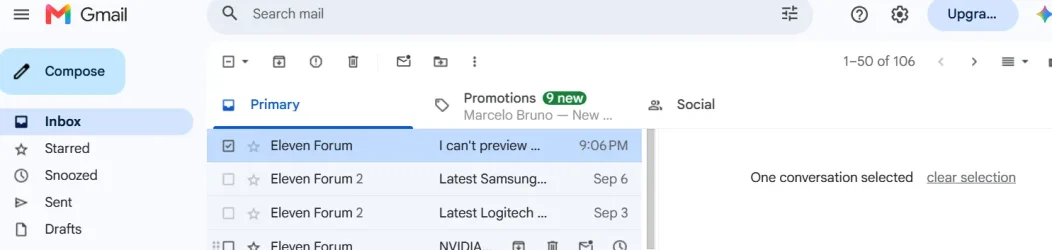
For any message I choose, I get the panel in the image:

message-preview.png


Strange stuff with Gmail...

Much appreciated for the guidance.
 

My Computer My Computer

At a glance

Windows 11 Pro for Workstations 25H2 26200.94456C+4c Intel 13th Gen Intel(R) Core(TM) i5-134...64 GBNVIDIA GeForce RTX 4060, Intel UHD Graphics 730
OS
Windows 11 Pro for Workstations 25H2 26200.9445
Computer type
PC/Desktop
Manufacturer/Model
ASRock
CPU
6C+4c Intel 13th Gen Intel(R) Core(TM) i5-13400, 4100 M
Motherboard
ASRock B660M-HDV
Memory
64 GB
Graphics Card(s)
NVIDIA GeForce RTX 4060, Intel UHD Graphics 730
Sound Card
Realtek
Monitor(s) Displays
AOC 24V2W1G5
Screen Resolution
1920x1080
Hard Drives
Samsung SSD 990 Pro with Heatsink
Keyboard
Logitech
Mouse
Logitech
Internet Speed
1GB
Antivirus
Windows Defender
Oops. It doesn't like images by URL from Postimage.org?
I'll try and drop the .png here...

message preview.webp
 

My Computer My Computer

At a glance

Windows 11 Pro for Workstations 25H2 26200.94456C+4c Intel 13th Gen Intel(R) Core(TM) i5-134...64 GBNVIDIA GeForce RTX 4060, Intel UHD Graphics 730
OS
Windows 11 Pro for Workstations 25H2 26200.9445
Computer type
PC/Desktop
Manufacturer/Model
ASRock
CPU
6C+4c Intel 13th Gen Intel(R) Core(TM) i5-13400, 4100 M
Motherboard
ASRock B660M-HDV
Memory
64 GB
Graphics Card(s)
NVIDIA GeForce RTX 4060, Intel UHD Graphics 730
Sound Card
Realtek
Monitor(s) Displays
AOC 24V2W1G5
Screen Resolution
1920x1080
Hard Drives
Samsung SSD 990 Pro with Heatsink
Keyboard
Logitech
Mouse
Logitech
Internet Speed
1GB
Antivirus
Windows Defender
.............. I just wanted the built-in Gmail functionality to show the message preview like I had before.
Thanks for the helpful screenshot. It shows native Gmail functionality.

What's happening is that you've ticked the selection box that is used when you want to delete an email, move it, or another action.. If you want the email to appear in the reading pane then you need to click directly on the text/subject of the email rather than ticking its box. The message content should appear in the reading pane immediately.
 

My Computer My Computer

At a glance

Windows 11
OS
Windows 11
Thanks for the helpful screenshot. It shows native Gmail functionality.

What's happening is that you've ticked the selection box that is used when you want to delete an email, move it, or another action.. If you want the email to appear in the reading pane then you need to click directly on the text/subject of the email rather than ticking its box. The message content should appear in the reading pane immediately.

Thank you. It worked and the original message is still flagged as unread.

I had tried hovering over the message title, selecting it when it would show on the new panel that nothing was selected, etc.
Oof! One down.

Many thanks to all who helped in resolving this.
Cheers.
 

My Computer My Computer

At a glance

Windows 11 Pro for Workstations 25H2 26200.94456C+4c Intel 13th Gen Intel(R) Core(TM) i5-134...64 GBNVIDIA GeForce RTX 4060, Intel UHD Graphics 730
OS
Windows 11 Pro for Workstations 25H2 26200.9445
Computer type
PC/Desktop
Manufacturer/Model
ASRock
CPU
6C+4c Intel 13th Gen Intel(R) Core(TM) i5-13400, 4100 M
Motherboard
ASRock B660M-HDV
Memory
64 GB
Graphics Card(s)
NVIDIA GeForce RTX 4060, Intel UHD Graphics 730
Sound Card
Realtek
Monitor(s) Displays
AOC 24V2W1G5
Screen Resolution
1920x1080
Hard Drives
Samsung SSD 990 Pro with Heatsink
Keyboard
Logitech
Mouse
Logitech
Internet Speed
1GB
Antivirus
Windows Defender
Back
Top Bottom