@Brink
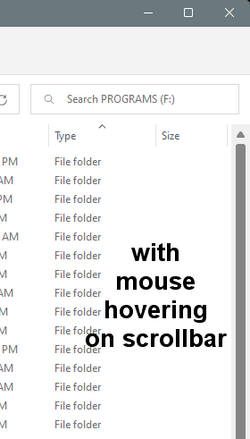
Well, I spoke too soon. This black bar problem is even stranger than I thought.
I made a text file I could test with, and saved it on the desktop.
No matter how many times I drag it from the desktop to a storage drive... no black bars.
BUT... if I put a
.reg file on my desktop and drag it to the storage drive... I get the black bars.
And... now the text file has the black bars too.
I assume a reboot will once again remove the black bars till I once again drag a
.reg file from the desktop to the storage drive.
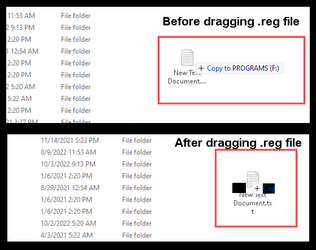
Cursor is holding the text files in both cases. Once I let go of the files... they're fine again.
Rebooted and problem gone.
Made a text file and changed the extension to .reg, and dragged to storage drive... still no black bars.
Downloaded a .reg file from a tutorial, dragged to storage drive... still no black bars.
Grabbed the Disable System Restore .reg file from storage drive, dragged to desktop, then dragged back to storage drive.
Bam! Black bars again. Brb reboot
Ok... don't need to always reboot... just signing out works.
Ok... the problem ONLY occurs when I drag something from my F:\ drive to the desktop... then back again to the F:\ drive.
And, it happens with ALL files dragged from F: to desktop and back again.
Further, when dragging from F: to desktop, it looks like this...
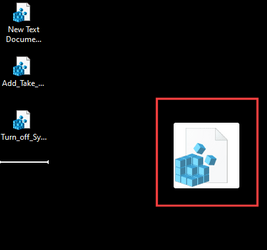
I also changed F: 's drive letter and problem still occurs.
And this happens on all storage drives and partitions, and all file types.
So dragging something from any storage drive to desktop... does something to the file.
File still functions normally, but when dragged back to the storage drive... black bars again.