
I get a pop up for something called "RAV endpoint protection" asking me to install it.


IvanDrago

Well-known member
Local time
3:27 AM
Posts
28
OS
Windows 11 Pro
The pop up seems to indicate that it's a Microsoft product. My laptop is about 2 months old with Windows 11.

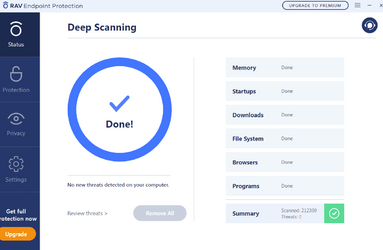
I clicked the icon on the system tray and clicked open. To see what I get, see the attached picture. I don't recall accepting any of this so this concerns me.

1. Do I need this even though I already have McAfee?
2. What is this RAV Endpoint thing?
3. Why does this keep popping up?
4. How do I get rid of this?
 

Attachments
  • RAV Endpoint Scan.png
    RAV Endpoint Scan.png
    23.3 KB · Views: 4

My Computer My Computer

At a glance

Windows 11 Pro12th Gen Intel(R) Core(TM) i7-12700H 2.30 GHz32.0 GB (31.7 GB usable)NVIDIA GeForce RTX 3050 Laptop GPU
OS
Windows 11 Pro
Computer type
Laptop
Manufacturer/Model
Dell XPS 15 9520
CPU
12th Gen Intel(R) Core(TM) i7-12700H 2.30 GHz
Motherboard
0MWGD4 A00
Memory
32.0 GB (31.7 GB usable)
Graphics Card(s)
NVIDIA GeForce RTX 3050 Laptop GPU
Monitor(s) Displays
Dell XPS 15 LGD06B3 Display
Hard Drives
NVMe PC SN810 NVMe WDC 512GB
Keyboard
Dell Premier Multi-Device Wireless Keyboard and Mouse – KM7321W
Mouse
Dell Premier Multi-Device Wireless Keyboard and Mouse – KM7321W
Antivirus
McAfee

My Computers My Computers

  • At a glance

    Windows 11 26200.8973Amd Threadripper 7970X128GB (4 X 32) G.Skill DDR5 6400 (RDIMM)Gigabyte RTX 4090 OC
    OS
    Windows 11 26200.8973
    Computer type
    PC/Desktop
    Manufacturer/Model
    homebuilt
    CPU
    Amd Threadripper 7970X
    Motherboard
    Gigabyte TRX50 Aero D Rev. 1.0
    Memory
    128GB (4 X 32) G.Skill DDR5 6400 (RDIMM)
    Graphics Card(s)
    Gigabyte RTX 4090 OC
    Sound Card
    none (USB to speakers), Realtek
    Monitor(s) Displays
    Innocn 32" OLED
    Screen Resolution
    3840 X 2160 @ 60Hz
    Hard Drives
    Crucial T700 2TB M.2 NVME SSD
    WD 4TB Blue SATA SSD
    Seagate 18TB IronWolf Pro
    PSU
    BeQuiet! Straight Power 12 1500W
    Case
    Lian Li 011 Dynamic Evo XL
    Cooling
    SilverStone Technology XE360-TR5, with 3 Phanteks T30 fans
    Keyboard
    Cherry KC 500 MX LP (mechanical)
    Mouse
    Logitech M500s (wired)
    Internet Speed
    2000/250 Mbps (down/up)
    Other Info
    xFinity gateway
  • At a glance

    windows 11 26200.8973Intel I9-13900K64GB G.Skill DDR5-6000Gigabyte RTX 3090 ti
    Operating System
    windows 11 26200.8973
    Computer type
    PC/Desktop
    Manufacturer/Model
    homebuilt
    CPU
    Intel I9-13900K
    Motherboard
    Asus RoG Strix Z690-E
    Memory
    64GB G.Skill DDR5-6000
    Graphics card(s)
    Gigabyte RTX 3090 ti
    Sound Card
    built in Realtek
    Monitor(s) Displays
    Philips 27E1N8900 27" OLED
    Screen Resolution
    3840 X 2160 @60Hz
    Hard Drives
    WDC SN850 1TB
    8TB Seagate Ironwolf
    4TB Seagate Ironwolf
    PSU
    eVGA SuperNOVA 1300 GT
    Case
    Lian Li 011 Dynamic Evo
    Cooling
    Corsair iCUE H150i ELITE CAPELLIX Liquid CPU Cooler
    Keyboard
    Cherry Streaming (wired)
    Mouse
    Logitech M500s (wired)
I had RAV endpoint protection installed on my PC, apparently I got it with other software.
Looks legit though, from a company ReasonLabs, also found it on Microsoft website as certified anti virus software.
Anyway, I uninstalled it easily like any other software - they have a short video explaining how
.
 

My Computer My Computer

At a glance

cQ^4G!%TDQi6jF
OS
cQ^4G!%TDQi6jF
@IvanDrago may i suggest you run these two programs to make sure it is all gone !

Malwarebytes AdwCleaner >>> Download AdwCleaner

Please download AdwCleaner and save it to your Desktop
  • Close all open programs and browsers
  • Right click on the icon and select Run as administrator
  • Click Scan now
  • Allow the program to Quarantine what it finds except for Pre-installed applications if you would like to keep those or other entries you would like to keep
  • When completed click View Scan Log File
  • Copy and paste the contents in your reply
  • Click Skip Basic Repair if it appears then close the program

==============

Full System Scan with Malwarebytes Antimalware >>> Free Antivirus 2023 | 100% Free & Easy Install | Malware Removal
  • If not existing, please download Malwarebytes' Anti-Malware to your desktop.
  • Double-click mbam-setup.exe and follow the prompts to install the program.
  • At the end, be sure a checkmark is placed next to Update Malwarebytes' Anti-Malware and Launch Malwarebytes' Anti-Malware, then click Finish.

  • If the program is already installed:
  • Run Malwarebytes Antimalware
  • If an update is found, it will download and install the latest version.
  • Once the program has loaded, select Perform fullscan, place a checkmark on all hard drives, then click Scan.
  • When the scan is complete, click OK, then Show Results to view the results.
  • Be sure that everything is checked, and click Remove Selected.
  • When completed, a log will open in Notepad. Please save it to a convenient location.
  • The log can also be found here:
C:\Documents and Settings\Username\Application Data\Malwarebytes\Malwarebytes' Anti-Malware\Logs\log-date.txt
* Or at C:\Program Files\Malwarebytes' Anti-Malware\Logs\log-date.txt
*** Post that log back here or just tell me what it found ?
If it is to long then you will have to zip it or find a site to download it to & let me know where !
 

My Computer My Computer

At a glance

Windows11 23H2 (OS Build 22631.2428)2.90 gigahertz Intel Core i7-1070016214 Megabytes Usable Installed Memor
OS
Windows11 23H2 (OS Build 22631.2428)
Computer type
PC/Desktop
Manufacturer/Model
HP HP ENVY TE01
CPU
2.90 gigahertz Intel Core i7-10700
Motherboard
Board: HP 8767 A (SMVB)
Memory
16214 Megabytes Usable Installed Memor
Hard Drives
1511.52 Gigabytes Usable Hard Drive Capacity
1418.15 Gigabytes Hard Drive Free Space
Keyboard
Logitech wireless
Mouse
M 185 wireless
Internet Speed
12 ms Jitter 8 ms Download 10.5 Mbps Upload 1.7
Browser
Edge & FF
Antivirus
Windows Defender

Latest Support Threads

Back
Top Bottom




