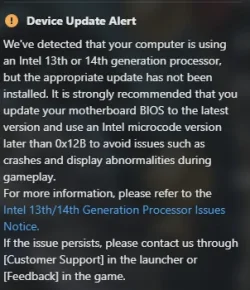
I get a warning about bios update


vsub

Active member
Member
VIP
Local time
2:42 AM
Posts
207
OS
Windows 11
1766928188856.webp
My bios micro code version is 0x120 but when I check for bios updates in the MSI support page,the one for download if the one I already have installed
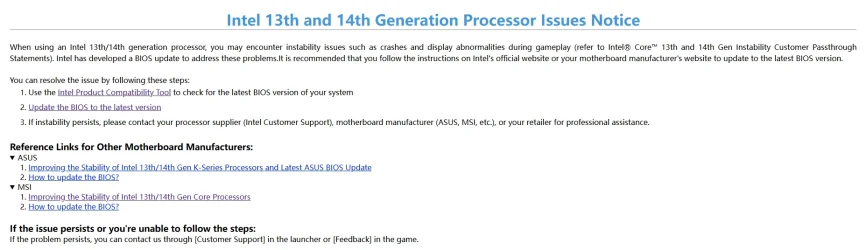
The link leads me to this page and clicking on the MSI leads me to a page they are talking only about the desktop version of those cpus

1766928529477.webp
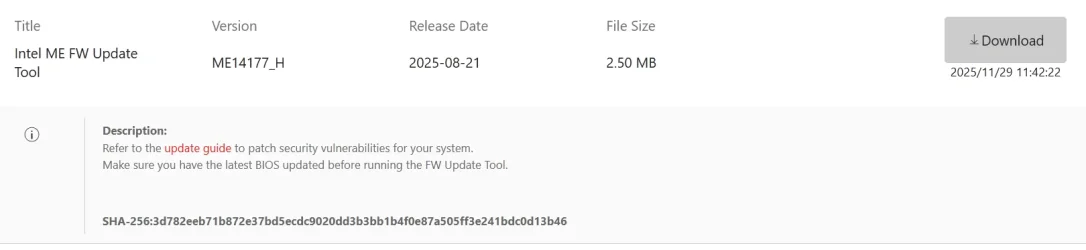
I installed Intel ME FW Update and it said that my cpu is vulnerable so I installed the update it offered
After restarting that updater said that am I ok but the program at top is still saying the same thing and I am still on 0x120
 

My Computer

System One

  • OS
    Windows 11
    Computer type
    Laptop
    Manufacturer/Model
    MSI Sword 17 HX
    CPU
    14700HX
    Memory
    64GB
    Graphics Card(s)
    RTX 4070
If you want to install BIOS firmware then motherboard manufacturer website will have the newest version, i don't know which program giving you that update message so let us know.
 

My Computer

System One

  • OS
    Windows 11
    Computer type
    PC/Desktop
    Manufacturer/Model
    HP Pavilion
    CPU
    AMD Ryzen 7 5700G
    Motherboard
    Erica6
    Memory
    Micron Technology DDR4-3200 16GB
    Graphics Card(s)
    NVIDIA GeForce RTX 3060
    Sound Card
    Realtek ALC671
    Monitor(s) Displays
    Samsung SyncMaster U28E590
    Screen Resolution
    3840 x 2160
    Hard Drives
    SAMSUNG MZVLQ1T0HALB-000H1
My MSI laptop has an update posted which I applied about a month ago. All went fine.


Screenshot 2025-12-28 114928.webp
 

My Computer

System One

  • OS
    11 Pro 25H2
    Computer type
    Laptop
    Manufacturer/Model
    MSI
    CPU
    i7-10750H
    Motherboard
    MSI MS-17F5
    Memory
    16GB Samsung DDR4 3200
    Graphics Card(s)
    Intel + Nvidia RTX3060 Laptop
    Sound Card
    Realtek
    Monitor(s) Displays
    Samsung 24" Curved (HDMI)
    Screen Resolution
    1920x1080
    Hard Drives
    Sabrent Rocket Gen3 1Tb Smasung EVO 870 1TB
    Antivirus
    Bitdefender
If you want to install BIOS firmware then motherboard manufacturer website will have the newest version, i don't know which program giving you that update message so let us know.
The MiHoYo game launcher(HoYoPlay
 

My Computer

System One

  • OS
    Windows 11
    Computer type
    Laptop
    Manufacturer/Model
    MSI Sword 17 HX
    CPU
    14700HX
    Memory
    64GB
    Graphics Card(s)
    RTX 4070
The MiHoYo game launcher(HoYoPlay
Its game telling you update your BIOS, why i don't know never happen to me.
 

My Computer

System One

  • OS
    Windows 11
    Computer type
    PC/Desktop
    Manufacturer/Model
    HP Pavilion
    CPU
    AMD Ryzen 7 5700G
    Motherboard
    Erica6
    Memory
    Micron Technology DDR4-3200 16GB
    Graphics Card(s)
    NVIDIA GeForce RTX 3060
    Sound Card
    Realtek ALC671
    Monitor(s) Displays
    Samsung SyncMaster U28E590
    Screen Resolution
    3840 x 2160
    Hard Drives
    SAMSUNG MZVLQ1T0HALB-000H1
Its game telling you update your BIOS, why i don't know never happen to me.

Yea, not sure why a game launcher would pop that warning especially if you have the latest BIOS.
 

My Computer

System One

  • OS
    11 Pro 25H2
    Computer type
    Laptop
    Manufacturer/Model
    MSI
    CPU
    i7-10750H
    Motherboard
    MSI MS-17F5
    Memory
    16GB Samsung DDR4 3200
    Graphics Card(s)
    Intel + Nvidia RTX3060 Laptop
    Sound Card
    Realtek
    Monitor(s) Displays
    Samsung 24" Curved (HDMI)
    Screen Resolution
    1920x1080
    Hard Drives
    Sabrent Rocket Gen3 1Tb Smasung EVO 870 1TB
    Antivirus
    Bitdefender
@vsub

Have you run a full virus scan on you computer to remove the possibility of malware/viruses?
 

My Computers

System One System Two

  • OS
    Windows 11 Pro 25H2
    Computer type
    PC/Desktop
    Manufacturer/Model
    Homebuilt
    CPU
    Intel Core i9 13900K
    Motherboard
    Asus ProArt Z790 Creator WiFi - Bios 3107
    Memory
    Corsair Dominator Platinum 64gb 5600MT/s DDR5 Dual Channel
    Graphics Card(s)
    Sapphire NITRO+ AMD Radeon RX 7900 XTX Vapor-X 24GB
    Sound Card
    External DAC: Cambridge Audio DACMagic200M - Headphone Amp: Topping L50
    Monitor(s) Displays
    Panasonic MX950 Mini LED 55" TV 120hz
    Screen Resolution
    3840 x 2160 120hz
    Hard Drives
    Samsung 980 Pro 2TB (OS)
    Samsung 980 Pro 1TB (Files)
    Lexar NZ790 4TB
    LaCie d2 Professional 6TB external - USB 3.1
    Seagate Expansion 16TB external - USB 3.2
    Seagate One Touch 18TB external HD - USB 3.0
    PSU
    Corsair RM1200x Shift
    Case
    Corsair RGB Smart Case 5000x (white)
    Cooling
    Corsair iCue H150i Elite Capellix XT
    Keyboard
    Incase Ergonomic USB (Microsoft clone)
    Mouse
    Logitech MX Master 3S
    Internet Speed
    Fibre 900/500 Mbps
    Browser
    Microsoft Edge Chromium
    Antivirus
    Bitdefender Total Security
    Other Info
    AMD Radeon Software & Drivers 26.1.1
    Hasleo Backup Suite
    Dashlane password manager
    Kensington Verimark fingerprint reader
    Logitech Brio 4K webcam
    Orico 10-port powered USB 3.0 hub
  • Operating System
    Windows 11 Pro 25H2
    Computer type
    Laptop
    Manufacturer/Model
    Asus Vivobook X1605VA
    CPU
    Intel® Core™ i9-13900H
    Motherboard
    Asus X1605VA bios 309
    Memory
    32GB DDR4-3200 Dual channel
    Graphics card(s)
    *Intel Iris Xᵉ Graphics G7
    Sound Card
    Realtek | Intel SST Bluetooth & USB
    Monitor(s) Displays
    16.0-inch, WUXGA 16:10 aspect ratio, IPS-level Panel
    Screen Resolution
    1920 x 1200 60hz
    Hard Drives
    512GB M.2 NVMe™ PCIe® 3.0 SSD
    Mouse
    Logitech MX Ergo Trackball
    Antivirus
    Bitdefender Total Security
    Other Info
    720p Webcam
    WiFi & USB to ethernet
@vsub

Have you run a full virus scan on you computer to remove the possibility of malware/viruses?
No but that's not a message from some fake launcher
Yea, not sure why a game launcher would pop that warning especially if you have the latest BIOS.
maybe it just shows that message because I am on that 14 gen cpu,and not because it actually affects me(in my case on a laptop with 14700HX)

Anyone on a 13/14 gen cpu playing hoyo games with micro code bellow 0x12B?
 

My Computer

System One

  • OS
    Windows 11
    Computer type
    Laptop
    Manufacturer/Model
    MSI Sword 17 HX
    CPU
    14700HX
    Memory
    64GB
    Graphics Card(s)
    RTX 4070
Its game telling you update your BIOS, why i don't know never happen to me.
Same here, I've never had this happen to me in over 30 years of using Windows based computers either with AMD or Intel CPU's for ANY game or app to tell me to upgrade the bios when loading.

If it were me I'd get in touch with MSI support and see if they can shed any light on this.
 

My Computers

System One System Two

  • OS
    Windows 11 Pro 25H2
    Computer type
    PC/Desktop
    Manufacturer/Model
    Homebuilt
    CPU
    Intel Core i9 13900K
    Motherboard
    Asus ProArt Z790 Creator WiFi - Bios 3107
    Memory
    Corsair Dominator Platinum 64gb 5600MT/s DDR5 Dual Channel
    Graphics Card(s)
    Sapphire NITRO+ AMD Radeon RX 7900 XTX Vapor-X 24GB
    Sound Card
    External DAC: Cambridge Audio DACMagic200M - Headphone Amp: Topping L50
    Monitor(s) Displays
    Panasonic MX950 Mini LED 55" TV 120hz
    Screen Resolution
    3840 x 2160 120hz
    Hard Drives
    Samsung 980 Pro 2TB (OS)
    Samsung 980 Pro 1TB (Files)
    Lexar NZ790 4TB
    LaCie d2 Professional 6TB external - USB 3.1
    Seagate Expansion 16TB external - USB 3.2
    Seagate One Touch 18TB external HD - USB 3.0
    PSU
    Corsair RM1200x Shift
    Case
    Corsair RGB Smart Case 5000x (white)
    Cooling
    Corsair iCue H150i Elite Capellix XT
    Keyboard
    Incase Ergonomic USB (Microsoft clone)
    Mouse
    Logitech MX Master 3S
    Internet Speed
    Fibre 900/500 Mbps
    Browser
    Microsoft Edge Chromium
    Antivirus
    Bitdefender Total Security
    Other Info
    AMD Radeon Software & Drivers 26.1.1
    Hasleo Backup Suite
    Dashlane password manager
    Kensington Verimark fingerprint reader
    Logitech Brio 4K webcam
    Orico 10-port powered USB 3.0 hub
  • Operating System
    Windows 11 Pro 25H2
    Computer type
    Laptop
    Manufacturer/Model
    Asus Vivobook X1605VA
    CPU
    Intel® Core™ i9-13900H
    Motherboard
    Asus X1605VA bios 309
    Memory
    32GB DDR4-3200 Dual channel
    Graphics card(s)
    *Intel Iris Xᵉ Graphics G7
    Sound Card
    Realtek | Intel SST Bluetooth & USB
    Monitor(s) Displays
    16.0-inch, WUXGA 16:10 aspect ratio, IPS-level Panel
    Screen Resolution
    1920 x 1200 60hz
    Hard Drives
    512GB M.2 NVMe™ PCIe® 3.0 SSD
    Mouse
    Logitech MX Ergo Trackball
    Antivirus
    Bitdefender Total Security
    Other Info
    720p Webcam
    WiFi & USB to ethernet
Same here, I've never had this happen to me in over 30 years of using Windows based computers either with AMD or Intel CPU's for ANY game or app to tell me to upgrade the bios when loading.

If it were me I'd get in touch with MSI support and see if they can shed any light on this.
Yes very strange.
 

My Computer

System One

  • OS
    Windows 11
    Computer type
    PC/Desktop
    Manufacturer/Model
    HP Pavilion
    CPU
    AMD Ryzen 7 5700G
    Motherboard
    Erica6
    Memory
    Micron Technology DDR4-3200 16GB
    Graphics Card(s)
    NVIDIA GeForce RTX 3060
    Sound Card
    Realtek ALC671
    Monitor(s) Displays
    Samsung SyncMaster U28E590
    Screen Resolution
    3840 x 2160
    Hard Drives
    SAMSUNG MZVLQ1T0HALB-000H1
This warning message is quite common for those with a 13th or 14th Intel CPU who play current games. Even World of Warcraft has displayed it, so it is neither a virus nor malware.

Given the instability of these CPUs, videogame companies are taking preventive action and recommending updating the CPU microcode (via a BIOS update). The latest version of this microcode is 0x12F.

Be careful, I see that you are confusing the CPU microcode with the Intel ME Firmware. They are two different things. Although it is advisable to keep both the CPU microcode (via BIOS update) and the Intel ME Firmware (which can be updated together with the BIOS or independently) up to date, the most important of these is the CPU microcode. The latest version of CPU microcode 0x12F resolves all CPU instabilities.
 

My Computer

System One

  • OS
    Win 11 Pro 23H2
    Computer type
    PC/Desktop
    CPU
    13700K
    Motherboard
    MAG Z790 TOMAHAWK WIFI (7D91vHH - 0x12F)
    Memory
    32GB DDR5 Kingston Fury Renegade @6400
    Graphics Card(s)
    MSI GeForce RTX 4070 Ti Gaming X Slim White 12G
    Sound Card
    Creative Sound Blaster Z SE
    Monitor(s) Displays
    ASUS VA24DQ
    Hard Drives
    WD Black SN850X 2TB (main)
    SAMSUNG SSD 990 Pro 2TB
    WD Blue 1TB 7200rpm
    PSU
    Corsair RM1000x SHIFT
    Case
    DeepCool CH560 WH
    Cooling
    Noctua NH-D15S
    Keyboard
    Ducky One 3 Pro Nazca Line
    Mouse
    Logitech G403 HERO
Please run the V2 log collector > post a share link


My Computer

System One

  • OS
    Windows 10
    Computer type
    Laptop
    Manufacturer/Model
    HP
    CPU
    Intel(R) Core(TM) i7-4800MQ CPU @ 2.70GHz
    Motherboard
    Product : 190A Version : KBC Version 94.56
    Memory
    16 GB Total: Manufacturer : Samsung MemoryType : DDR3 FormFactor : SODIMM Capacity : 8GB Speed : 1600
    Graphics Card(s)
    NVIDIA Quadro K3100M; Intel(R) HD Graphics 4600
    Sound Card
    IDT High Definition Audio CODEC; PNP Device ID HDAUDIO\FUNC_01&VEN_111D&DEV_76E0
    Hard Drives
    Model Hitachi HTS727575A9E364
    Antivirus
    Microsoft Defender
    Other Info
    Mobile Workstation
This warning message is quite common for those with a 13th or 14th Intel CPU who play current games. Even World of Warcraft has displayed it, so it is neither a virus nor malware.

Given the instability of these CPUs, videogame companies are taking preventive action and recommending updating the CPU microcode (via a BIOS update). The latest version of this microcode is 0x12F.

Be careful, I see that you are confusing the CPU microcode with the Intel ME Firmware. They are two different things. Although it is advisable to keep both the CPU microcode (via BIOS update) and the Intel ME Firmware (which can be updated together with the BIOS or independently) up to date, the most important of these is the CPU microcode. The latest version of CPU microcode 0x12F resolves all CPU instabilities.
And how do I update it if the official msi support page does not offer any update for my cpu
 

My Computer

System One

  • OS
    Windows 11
    Computer type
    Laptop
    Manufacturer/Model
    MSI Sword 17 HX
    CPU
    14700HX
    Memory
    64GB
    Graphics Card(s)
    RTX 4070
And how do I update it if the official msi support page does not offer any update for my cpu

This is a pretty serious problem in many companies. Although it is a critical update for a laptop that is not very old, many manufacturers have not yet released the corresponding update for all affected models.

According to the link you posted in your first post, I understand that your laptop is the Sword 17 HX B14VGKG, whose latest BIOS is E17T2IMS.110. But seeing that its date is January 2025, I don't think it includes microcode 0x12F, which is later. I have tried searching for your model in the official web of other regions of the world, but none of them seem to have a more recent BIOS.

There are unofficial methods for injecting microcode 0x12F into the BIOS, but they are very risky and I do not recommend them. The only alternative I suggest is to write directly to MSI to see what they say, or wait for the release of a BIOS update.
 

My Computer

System One

  • OS
    Win 11 Pro 23H2
    Computer type
    PC/Desktop
    CPU
    13700K
    Motherboard
    MAG Z790 TOMAHAWK WIFI (7D91vHH - 0x12F)
    Memory
    32GB DDR5 Kingston Fury Renegade @6400
    Graphics Card(s)
    MSI GeForce RTX 4070 Ti Gaming X Slim White 12G
    Sound Card
    Creative Sound Blaster Z SE
    Monitor(s) Displays
    ASUS VA24DQ
    Hard Drives
    WD Black SN850X 2TB (main)
    SAMSUNG SSD 990 Pro 2TB
    WD Blue 1TB 7200rpm
    PSU
    Corsair RM1000x SHIFT
    Case
    DeepCool CH560 WH
    Cooling
    Noctua NH-D15S
    Keyboard
    Ducky One 3 Pro Nazca Line
    Mouse
    Logitech G403 HERO

Latest Support Threads

Back
Top Bottom