I get error message for all office apps


provalogo

Active member
Local time
6:08 AM
Posts
15
OS
windows 11 pro 64bit
Whenever I open any office apps I get this error message:

"we're sorry but (word or any office apps) has run into an error that is preventing it from working correctly.
word will need to be closed as a result. Would you like to repair now?"

When I click "repair now" the error message goes away and closes the word app. This applies to all
office apps including outlook.

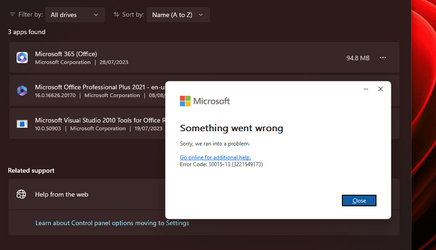
When I try to repair it, neither quick repair or online repair work. After atempting to repair it, it takes quite a while to complete but then comes back with another error message. (see attachment)
Windows version: 22H2

Office version: 2021
 

Attachments
  • error.png
    error.png
    34.4 KB · Views: 1

My Computer My Computer

At a glance

windows 11 pro 64bitAMD Ryzen 5 5600XCorsair Vengeance LPX 16 GB (4 x 4 GB)Radeon RX550 4GB
OS
windows 11 pro 64bit
Computer type
PC/Desktop
Manufacturer/Model
Self Build
CPU
AMD Ryzen 5 5600X
Motherboard
ASUS ROG STRIX B550-F GAMING
Memory
Corsair Vengeance LPX 16 GB (4 x 4 GB)
Graphics Card(s)
Radeon RX550 4GB
Monitor(s) Displays
Dell UltraSharp U2414H 23.8 inch Monitor (1920 x 1080)
Screen Resolution
1920x1080
Hard Drives
Samsung 250GB 850 EVO M.2 SATA SSD
PSU
Corsair Semi-Modular Power Supply Unit, 600 W
Case
NZXT H5 atx
Cooling
Noctua NH-L9a-AM4 chromax.black

Even though the online repair of the Office installation doesn't work have a look at the links within this link which suggest that OS repairs might work: -
 

My Computers My Computers

  • At a glance

    Windows 11 ProAMD Ryzen 9 8945HS32GB DDR5 SO-DIMMIntegrated AMD Radeon 780M (4.00 GHz)
    OS
    Windows 11 Pro
    Computer type
    PC/Desktop
    Manufacturer/Model
    GMKtec K11
    CPU
    AMD Ryzen 9 8945HS
    Memory
    32GB DDR5 SO-DIMM
    Graphics Card(s)
    Integrated AMD Radeon 780M (4.00 GHz)
    Monitor(s) Displays
    Benq 2250HM
    Screen Resolution
    1920 x 1080
    Hard Drives
    1 TB PCIe 4.0 NVMe M.2 SSD
  • At a glance

    Windows 11 HomeIntel® Core™ Ultra 7 - 255H processor16 GB LPDDR5 SDRAMIntel Arc 140T onboard graphics
    Operating System
    Windows 11 Home
    Computer type
    Laptop
    Manufacturer/Model
    ASUS Zenbook 14 OLED 14" Laptop - UX3405CA-QL192W
    CPU
    Intel® Core™ Ultra 7 - 255H processor
    Memory
    16 GB LPDDR5 SDRAM
    Graphics card(s)
    Intel Arc 140T onboard graphics
    Screen Resolution
    1920 x 1200 (16:10 WUXGA resolution) OLED Touchscreen
    Hard Drives
    1TB SSD
thank you i repaired it by deleting the word folder in the registry,
I followed this video in youtube to reset it,and it worked for 2021 version

youtube video
 

My Computer My Computer

At a glance

windows 11 pro 64bitAMD Ryzen 5 5600XCorsair Vengeance LPX 16 GB (4 x 4 GB)Radeon RX550 4GB
OS
windows 11 pro 64bit
Computer type
PC/Desktop
Manufacturer/Model
Self Build
CPU
AMD Ryzen 5 5600X
Motherboard
ASUS ROG STRIX B550-F GAMING
Memory
Corsair Vengeance LPX 16 GB (4 x 4 GB)
Graphics Card(s)
Radeon RX550 4GB
Monitor(s) Displays
Dell UltraSharp U2414H 23.8 inch Monitor (1920 x 1080)
Screen Resolution
1920x1080
Hard Drives
Samsung 250GB 850 EVO M.2 SATA SSD
PSU
Corsair Semi-Modular Power Supply Unit, 600 W
Case
NZXT H5 atx
Cooling
Noctua NH-L9a-AM4 chromax.black
Glad you are sorted. :-)
 

My Computers My Computers

  • At a glance

    Windows 11 ProAMD Ryzen 9 8945HS32GB DDR5 SO-DIMMIntegrated AMD Radeon 780M (4.00 GHz)
    OS
    Windows 11 Pro
    Computer type
    PC/Desktop
    Manufacturer/Model
    GMKtec K11
    CPU
    AMD Ryzen 9 8945HS
    Memory
    32GB DDR5 SO-DIMM
    Graphics Card(s)
    Integrated AMD Radeon 780M (4.00 GHz)
    Monitor(s) Displays
    Benq 2250HM
    Screen Resolution
    1920 x 1080
    Hard Drives
    1 TB PCIe 4.0 NVMe M.2 SSD
  • At a glance

    Windows 11 HomeIntel® Core™ Ultra 7 - 255H processor16 GB LPDDR5 SDRAMIntel Arc 140T onboard graphics
    Operating System
    Windows 11 Home
    Computer type
    Laptop
    Manufacturer/Model
    ASUS Zenbook 14 OLED 14" Laptop - UX3405CA-QL192W
    CPU
    Intel® Core™ Ultra 7 - 255H processor
    Memory
    16 GB LPDDR5 SDRAM
    Graphics card(s)
    Intel Arc 140T onboard graphics
    Screen Resolution
    1920 x 1200 (16:10 WUXGA resolution) OLED Touchscreen
    Hard Drives
    1TB SSD

Latest Support Threads

Back
Top Bottom