Solved I Hate MS Updates!!


Lance1

Well-known member
Power User
VIP
Local time
11:09 PM
Posts
1,037
OS
Windows 11 Pro 25H2
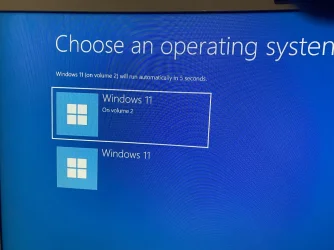
Here's the story. I was using my system as usual and finished what I was doing and walked away for a few hours. Coming back I was on my desktop with horrible artifacting. I was able to get around a bit and found that MS updated me automatically. Then my system restarted and would no longer go into Windows. It just sat on recovery and I could not do anything. Lucky for me I did a system back 2 days prior. So I restore that image and am back in Windows BUT!! On bootup I get this screen. I have no other volumes. What is going on??

1.webp


IMG_1397.webp
 

My Computers My Computers

  • At a glance

    Windows 11 Pro 25H2Intel 12th Gen Intel Core i5-12600KF, 3686 MHzCORSAIR Vengeance 32GB (2 x 16GB) 288-Pin PC ...GIGABYTE GeForce RTX 4060, 3x Fans, 8GB GDDR6 OC
    OS
    Windows 11 Pro 25H2
    Computer type
    PC/Desktop
    Manufacturer/Model
    Custom Build By Lance1
    CPU
    Intel 12th Gen Intel Core i5-12600KF, 3686 MHz
    Motherboard
    GIGABYTE Z790 AORUS ELITE AX LGA 1700 Intel Z790 ATX
    Memory
    CORSAIR Vengeance 32GB (2 x 16GB) 288-Pin PC RAM DDR5 6400 (PC5 51200) Dual-Channel
    Graphics Card(s)
    GIGABYTE GeForce RTX 4060, 3x Fans, 8GB GDDR6 OC
    Sound Card
    AMD High Definition
    Monitor(s) Displays
    Samsung 32" 60Hz 4ms Curved PLS LED
    Screen Resolution
    1920 X 1080
    Hard Drives
    WD Blue NVME M.2 1T Boot Drive
    WD Blue SSD 1T
    WD Blue NVME M.2 2T
    PSU
    EVGA SuperNOVA 850 GT, 80 Plus Gold 850W, Fully Modular,
    Case
    Fractal Design Pop XL Air RGB Black TG ATX High-Airflow Clear Tempered Glass Window Full Tower
    Cooling
    Noctua NH-D15 chromax black, Dual Tower CPU Cooler with Dual NF-A15 PWM 140mm Fans (Black)
    Keyboard
    Devistator 3
    Mouse
    Inphic PM6 Pro
    Internet Speed
    Telus Fiber Optic: Download 332.7 Mbps / Upload 331.5 Mbps
    Browser
    Vivaldi (64bit)
    Antivirus
    Windows Defender
  • At a glance

    Window 11 ProIntel(R) Core(TM) i3-2310M CPU @ 2.10GHz4 GB DDR3Intel(R) HD Graphics 3000
    Operating System
    Window 11 Pro
    Computer type
    Laptop
    Manufacturer/Model
    DELL Inspiron N7110
    CPU
    Intel(R) Core(TM) i3-2310M CPU @ 2.10GHz
    Motherboard
    Dell Inc. 0YH79Y
    Memory
    4 GB DDR3
    Graphics card(s)
    Intel(R) HD Graphics 3000
    Sound Card
    High Definition Audio
    Monitor(s) Displays
    17.3 Inch Display
    Screen Resolution
    1600 X 900
    Hard Drives
    Samsung SSD 860 EVO 500GB
    Internet Speed
    Fiber Optic: Download 332.7 Mbps / Upload 331.5 Mbps
    Browser
    Vivaldi 64 bit
    Antivirus
    Windows Defender
    Other Info
    YA! This the old backup. In case things go south. It'll give me access to everything I need.
The Boot tab in the Microsoft System Configuration (msconfig) utility controls how your computer starts up and manages advanced troubleshooting parameters.

If there are multiple boot partitions on the computer, they are each listed here.

The System Configuration tool also offers a graphical way of choosing which of the operating systems installed on your PC loads first. In the System Configuration tool, switch to the Boot tab, and you can view all the operating systems installed on your computer and select the default one if you have a multi-boot setup. To select a new default operating system, click or tap on it and then on “Set as default.”

You can delete duplicated bootable Windows entries. Delete the Windows 11 that you don't boot from and is listed at Choose operating system screen.
 

My Computer My Computer

At a glance

Windows 11AMD Ryzen 7 5700GMicron Technology DDR4-3200 16GBNVIDIA GeForce RTX 3060
OS
Windows 11
Computer type
PC/Desktop
Manufacturer/Model
HP Pavilion
CPU
AMD Ryzen 7 5700G
Motherboard
Erica6
Memory
Micron Technology DDR4-3200 16GB
Graphics Card(s)
NVIDIA GeForce RTX 3060
Sound Card
Realtek ALC671
Monitor(s) Displays
Samsung SyncMaster U28E590
Screen Resolution
3840 x 2160
Hard Drives
SAMSUNG MZVLQ1T0HALB-000H1
The Boot tab in the Microsoft System Configuration (msconfig) utility controls how your computer starts up and manages advanced troubleshooting parameters.

If there are multiple boot partitions on the computer, they are each listed here.

The System Configuration tool also offers a graphical way of choosing which of the operating systems installed on your PC loads first. In the System Configuration tool, switch to the Boot tab, and you can view all the operating systems installed on your computer and select the default one if you have a multi-boot setup. To select a new default operating system, click or tap on it and then on “Set as default.”

You can delete duplicated bootable Windows entries. Delete the Windows 11 that you don't boot from and is listed at Choose operating system screen.
Alright I am officially OLD. I should have known that. Thanks Freebooter.
 

My Computers My Computers

  • At a glance

    Windows 11 Pro 25H2Intel 12th Gen Intel Core i5-12600KF, 3686 MHzCORSAIR Vengeance 32GB (2 x 16GB) 288-Pin PC ...GIGABYTE GeForce RTX 4060, 3x Fans, 8GB GDDR6 OC
    OS
    Windows 11 Pro 25H2
    Computer type
    PC/Desktop
    Manufacturer/Model
    Custom Build By Lance1
    CPU
    Intel 12th Gen Intel Core i5-12600KF, 3686 MHz
    Motherboard
    GIGABYTE Z790 AORUS ELITE AX LGA 1700 Intel Z790 ATX
    Memory
    CORSAIR Vengeance 32GB (2 x 16GB) 288-Pin PC RAM DDR5 6400 (PC5 51200) Dual-Channel
    Graphics Card(s)
    GIGABYTE GeForce RTX 4060, 3x Fans, 8GB GDDR6 OC
    Sound Card
    AMD High Definition
    Monitor(s) Displays
    Samsung 32" 60Hz 4ms Curved PLS LED
    Screen Resolution
    1920 X 1080
    Hard Drives
    WD Blue NVME M.2 1T Boot Drive
    WD Blue SSD 1T
    WD Blue NVME M.2 2T
    PSU
    EVGA SuperNOVA 850 GT, 80 Plus Gold 850W, Fully Modular,
    Case
    Fractal Design Pop XL Air RGB Black TG ATX High-Airflow Clear Tempered Glass Window Full Tower
    Cooling
    Noctua NH-D15 chromax black, Dual Tower CPU Cooler with Dual NF-A15 PWM 140mm Fans (Black)
    Keyboard
    Devistator 3
    Mouse
    Inphic PM6 Pro
    Internet Speed
    Telus Fiber Optic: Download 332.7 Mbps / Upload 331.5 Mbps
    Browser
    Vivaldi (64bit)
    Antivirus
    Windows Defender
  • At a glance

    Window 11 ProIntel(R) Core(TM) i3-2310M CPU @ 2.10GHz4 GB DDR3Intel(R) HD Graphics 3000
    Operating System
    Window 11 Pro
    Computer type
    Laptop
    Manufacturer/Model
    DELL Inspiron N7110
    CPU
    Intel(R) Core(TM) i3-2310M CPU @ 2.10GHz
    Motherboard
    Dell Inc. 0YH79Y
    Memory
    4 GB DDR3
    Graphics card(s)
    Intel(R) HD Graphics 3000
    Sound Card
    High Definition Audio
    Monitor(s) Displays
    17.3 Inch Display
    Screen Resolution
    1600 X 900
    Hard Drives
    Samsung SSD 860 EVO 500GB
    Internet Speed
    Fiber Optic: Download 332.7 Mbps / Upload 331.5 Mbps
    Browser
    Vivaldi 64 bit
    Antivirus
    Windows Defender
    Other Info
    YA! This the old backup. In case things go south. It'll give me access to everything I need.
You are very welcome!
 

My Computer My Computer

At a glance

Windows 11AMD Ryzen 7 5700GMicron Technology DDR4-3200 16GBNVIDIA GeForce RTX 3060
OS
Windows 11
Computer type
PC/Desktop
Manufacturer/Model
HP Pavilion
CPU
AMD Ryzen 7 5700G
Motherboard
Erica6
Memory
Micron Technology DDR4-3200 16GB
Graphics Card(s)
NVIDIA GeForce RTX 3060
Sound Card
Realtek ALC671
Monitor(s) Displays
Samsung SyncMaster U28E590
Screen Resolution
3840 x 2160
Hard Drives
SAMSUNG MZVLQ1T0HALB-000H1
1788386509868.webp
 

My Computer My Computer

At a glance

Windows 11 25H212th Gen i9 -12900K64GBIntel UHD Graphics
OS
Windows 11 25H2
Computer type
PC/Desktop
Manufacturer/Model
Dell
CPU
12th Gen i9 -12900K
Memory
64GB
Graphics Card(s)
Intel UHD Graphics
Monitor(s) Displays
Dual Dell U2717D
Screen Resolution
2560x1440
Hard Drives
2TB Lexar SSD, 2TB Crucial SSD, 2TB Kingston SSD
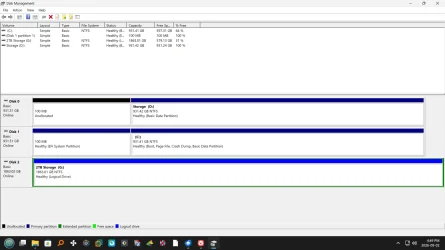
Just a mention, while using the boot tab will control what partition Windows will boot from, it does not alter the fact that Windows is seeing multiple boot partitions. I am assuming that you are not dual booting. Correct? That be true you will have to manually deal with the extra boot partition. I have a feeling that it is related to when you recovered your image. Please post a screenshot of disk management. Make sure the columns are extended so we can see everything.
 

My Computers My Computers

  • At a glance

    Windows 11 Pro 25H2 26200.9168i9-10900 10 core 20 threads32 gbnone-Intel UHD Graphics 630
    OS
    Windows 11 Pro 25H2 26200.9168
    Computer type
    PC/Desktop
    Manufacturer/Model
    Dell Optiplex 7080
    CPU
    i9-10900 10 core 20 threads
    Motherboard
    DELL 0J37VM
    Memory
    32 gb
    Graphics Card(s)
    none-Intel UHD Graphics 630
    Sound Card
    Integrated Realtek
    Monitor(s) Displays
    Benq 27
    Screen Resolution
    2560x1440
    Hard Drives
    2x1tb Solidigm m.2 nvme /External drives 512gb Samsung m.2 sata+2tb Kingston m2.nvme
    PSU
    500w
    Case
    MT
    Cooling
    Dell Premium
    Keyboard
    Logitech wired
    Mouse
    Logitech wireless
    Internet Speed
    so slow I'm too embarrassed to tell
    Browser
    #1 Edge #2 Firefox
    Antivirus
    Defender+MWB Premium
  • At a glance

    Windows 11 Pro 24H2 26200.9168AMD Ryzen 7 6800U32 gbintegrated
    Operating System
    Windows 11 Pro 24H2 26200.9168
    Computer type
    PC/Desktop
    Manufacturer/Model
    Beelink Mini PC SER5
    CPU
    AMD Ryzen 7 6800U
    Memory
    32 gb
    Graphics card(s)
    integrated
    Sound Card
    integrated
    Monitor(s) Displays
    Benq 27
    Screen Resolution
    2560x1440
    Hard Drives
    1TB Crucial nvme
    Keyboard
    Logitech wired
    Mouse
    Logitech wireless
    Internet Speed
    still too embarrassed to tell
    Browser
    Firefox
    Antivirus
    Defender
  • System 3 is non compliant Dell 9020 i7-4770/24gb ram Win11 PRO 26200.9168
Just a mention, while using the boot tab will control what partition Windows will boot from, it does not alter the fact that Windows is seeing multiple boot partitions. I am assuming that you are not dual booting. Correct? That be true you will have to manually deal with the extra boot partition. I have a feeling that it is related to when you recovered your image. Please post a screenshot of disk management. Make sure the columns are extended so we can see everything.
Here you go.

Screenshot (10).webp
 
Last edited:

My Computers My Computers

  • At a glance

    Windows 11 Pro 25H2Intel 12th Gen Intel Core i5-12600KF, 3686 MHzCORSAIR Vengeance 32GB (2 x 16GB) 288-Pin PC ...GIGABYTE GeForce RTX 4060, 3x Fans, 8GB GDDR6 OC
    OS
    Windows 11 Pro 25H2
    Computer type
    PC/Desktop
    Manufacturer/Model
    Custom Build By Lance1
    CPU
    Intel 12th Gen Intel Core i5-12600KF, 3686 MHz
    Motherboard
    GIGABYTE Z790 AORUS ELITE AX LGA 1700 Intel Z790 ATX
    Memory
    CORSAIR Vengeance 32GB (2 x 16GB) 288-Pin PC RAM DDR5 6400 (PC5 51200) Dual-Channel
    Graphics Card(s)
    GIGABYTE GeForce RTX 4060, 3x Fans, 8GB GDDR6 OC
    Sound Card
    AMD High Definition
    Monitor(s) Displays
    Samsung 32" 60Hz 4ms Curved PLS LED
    Screen Resolution
    1920 X 1080
    Hard Drives
    WD Blue NVME M.2 1T Boot Drive
    WD Blue SSD 1T
    WD Blue NVME M.2 2T
    PSU
    EVGA SuperNOVA 850 GT, 80 Plus Gold 850W, Fully Modular,
    Case
    Fractal Design Pop XL Air RGB Black TG ATX High-Airflow Clear Tempered Glass Window Full Tower
    Cooling
    Noctua NH-D15 chromax black, Dual Tower CPU Cooler with Dual NF-A15 PWM 140mm Fans (Black)
    Keyboard
    Devistator 3
    Mouse
    Inphic PM6 Pro
    Internet Speed
    Telus Fiber Optic: Download 332.7 Mbps / Upload 331.5 Mbps
    Browser
    Vivaldi (64bit)
    Antivirus
    Windows Defender
  • At a glance

    Window 11 ProIntel(R) Core(TM) i3-2310M CPU @ 2.10GHz4 GB DDR3Intel(R) HD Graphics 3000
    Operating System
    Window 11 Pro
    Computer type
    Laptop
    Manufacturer/Model
    DELL Inspiron N7110
    CPU
    Intel(R) Core(TM) i3-2310M CPU @ 2.10GHz
    Motherboard
    Dell Inc. 0YH79Y
    Memory
    4 GB DDR3
    Graphics card(s)
    Intel(R) HD Graphics 3000
    Sound Card
    High Definition Audio
    Monitor(s) Displays
    17.3 Inch Display
    Screen Resolution
    1600 X 900
    Hard Drives
    Samsung SSD 860 EVO 500GB
    Internet Speed
    Fiber Optic: Download 332.7 Mbps / Upload 331.5 Mbps
    Browser
    Vivaldi 64 bit
    Antivirus
    Windows Defender
    Other Info
    YA! This the old backup. In case things go south. It'll give me access to everything I need.

I like the thread title. 🤓(y)
My first thought even before i open the thread was....... does anyone actually likes MS updates. :think:
 
Last edited:

My Computers My Computers

  • At a glance

    Linux: Debian, Kali-linux, Alma, Win:7,10IoT,...i3, i5 and i7 From 2gen to 9th gen... Server ...
    OS
    Linux: Debian, Kali-linux, Alma, Win:7,10IoT,2012R
    Manufacturer/Model
    HP Elitebook 840, AsusX53, Aspire E1-572. AsusUX32A, HP Pro3130mt+3010mt, HP Proliant ML150, 3xCustom-PC, i3, i5, i7
    CPU
    i3, i5 and i7 From 2gen to 9th gen... Server dual Xenon
    Hard Drives
    Sata, M.2, SAS
  • At a glance

    Retro: 2003server.XPpro, Win2000, Win98SE, Wi...Oldest intel 8088 up to P4 dual core
    Operating System
    Retro: 2003server.XPpro, Win2000, Win98SE, Win95, Win3.11, MS-DOS, IBM-DOS
    Manufacturer/Model
    Commodore, AST, Fujitsu, Compaq, etc etc. etc Around 15 desktops and 20 laptops in the collection
    CPU
    Oldest intel 8088 up to P4 dual core
    Hard Drives
    MFM, IDE, SCSI

My Computers My Computers

  • At a glance

    Windows 11 Pro 25H2Intel 12th Gen Intel Core i5-12600KF, 3686 MHzCORSAIR Vengeance 32GB (2 x 16GB) 288-Pin PC ...GIGABYTE GeForce RTX 4060, 3x Fans, 8GB GDDR6 OC
    OS
    Windows 11 Pro 25H2
    Computer type
    PC/Desktop
    Manufacturer/Model
    Custom Build By Lance1
    CPU
    Intel 12th Gen Intel Core i5-12600KF, 3686 MHz
    Motherboard
    GIGABYTE Z790 AORUS ELITE AX LGA 1700 Intel Z790 ATX
    Memory
    CORSAIR Vengeance 32GB (2 x 16GB) 288-Pin PC RAM DDR5 6400 (PC5 51200) Dual-Channel
    Graphics Card(s)
    GIGABYTE GeForce RTX 4060, 3x Fans, 8GB GDDR6 OC
    Sound Card
    AMD High Definition
    Monitor(s) Displays
    Samsung 32" 60Hz 4ms Curved PLS LED
    Screen Resolution
    1920 X 1080
    Hard Drives
    WD Blue NVME M.2 1T Boot Drive
    WD Blue SSD 1T
    WD Blue NVME M.2 2T
    PSU
    EVGA SuperNOVA 850 GT, 80 Plus Gold 850W, Fully Modular,
    Case
    Fractal Design Pop XL Air RGB Black TG ATX High-Airflow Clear Tempered Glass Window Full Tower
    Cooling
    Noctua NH-D15 chromax black, Dual Tower CPU Cooler with Dual NF-A15 PWM 140mm Fans (Black)
    Keyboard
    Devistator 3
    Mouse
    Inphic PM6 Pro
    Internet Speed
    Telus Fiber Optic: Download 332.7 Mbps / Upload 331.5 Mbps
    Browser
    Vivaldi (64bit)
    Antivirus
    Windows Defender
  • At a glance

    Window 11 ProIntel(R) Core(TM) i3-2310M CPU @ 2.10GHz4 GB DDR3Intel(R) HD Graphics 3000
    Operating System
    Window 11 Pro
    Computer type
    Laptop
    Manufacturer/Model
    DELL Inspiron N7110
    CPU
    Intel(R) Core(TM) i3-2310M CPU @ 2.10GHz
    Motherboard
    Dell Inc. 0YH79Y
    Memory
    4 GB DDR3
    Graphics card(s)
    Intel(R) HD Graphics 3000
    Sound Card
    High Definition Audio
    Monitor(s) Displays
    17.3 Inch Display
    Screen Resolution
    1600 X 900
    Hard Drives
    Samsung SSD 860 EVO 500GB
    Internet Speed
    Fiber Optic: Download 332.7 Mbps / Upload 331.5 Mbps
    Browser
    Vivaldi 64 bit
    Antivirus
    Windows Defender
    Other Info
    YA! This the old backup. In case things go south. It'll give me access to everything I need.

My Computer My Computer

At a glance

Windows 11 Pro 24H2i7 Ultra16GBIntel
OS
Windows 11 Pro 24H2
Computer type
Laptop
Manufacturer/Model
LG
CPU
i7 Ultra
Memory
16GB
Graphics Card(s)
Intel
Sound Card
Intel Realtek
Monitor(s) Displays
Laptop 17" & TB4 Dell 27" QHD Ultrasharp w/integral TB4 hub
Screen Resolution
2560x1600
Hard Drives
1TB SSD, 5 external WDs
Mouse
Logitech Master MX 3S
Browser
Vivaldi
Antivirus
Kaspersky Premium Suite
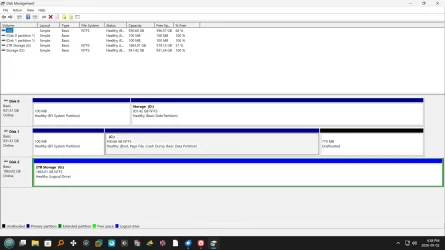
What???? I'm either going crazy or you switched screenshots on me as I was writing my answer. I'm positive the original screenshot was different. You had not expanded the columns so I could see it all but it appeared to me that Windows was seeing your boot partition correctly on Disk 1.
But From what I could see (which is now gone) on disk 0 partition marked "storage" it also said that was flagged as a boot partition? I saw where at some time or the other, on disk 0 you had an EFI 100 mb partition that was marked unallocated. Did you delete that unallocated partition and take another screenshot???

PS: Lance please tell me I am not nuts and that you switched screenshots.
 

My Computers My Computers

  • At a glance

    Windows 11 Pro 25H2 26200.9168i9-10900 10 core 20 threads32 gbnone-Intel UHD Graphics 630
    OS
    Windows 11 Pro 25H2 26200.9168
    Computer type
    PC/Desktop
    Manufacturer/Model
    Dell Optiplex 7080
    CPU
    i9-10900 10 core 20 threads
    Motherboard
    DELL 0J37VM
    Memory
    32 gb
    Graphics Card(s)
    none-Intel UHD Graphics 630
    Sound Card
    Integrated Realtek
    Monitor(s) Displays
    Benq 27
    Screen Resolution
    2560x1440
    Hard Drives
    2x1tb Solidigm m.2 nvme /External drives 512gb Samsung m.2 sata+2tb Kingston m2.nvme
    PSU
    500w
    Case
    MT
    Cooling
    Dell Premium
    Keyboard
    Logitech wired
    Mouse
    Logitech wireless
    Internet Speed
    so slow I'm too embarrassed to tell
    Browser
    #1 Edge #2 Firefox
    Antivirus
    Defender+MWB Premium
  • At a glance

    Windows 11 Pro 24H2 26200.9168AMD Ryzen 7 6800U32 gbintegrated
    Operating System
    Windows 11 Pro 24H2 26200.9168
    Computer type
    PC/Desktop
    Manufacturer/Model
    Beelink Mini PC SER5
    CPU
    AMD Ryzen 7 6800U
    Memory
    32 gb
    Graphics card(s)
    integrated
    Sound Card
    integrated
    Monitor(s) Displays
    Benq 27
    Screen Resolution
    2560x1440
    Hard Drives
    1TB Crucial nvme
    Keyboard
    Logitech wired
    Mouse
    Logitech wireless
    Internet Speed
    still too embarrassed to tell
    Browser
    Firefox
    Antivirus
    Defender
  • System 3 is non compliant Dell 9020 i7-4770/24gb ram Win11 PRO 26200.9168
What???? I'm either going crazy or you switched screenshots on me as I was writing my answer. I'm positive the original screenshot was different. You had not expanded the columns so I could see it all but it appeared to me that Windows was seeing your boot partition correctly on Disk 1.
But From what I could see (which is now gone) on disk 0 partition marked "storage" it also said that was flagged as a boot partition? I saw where at some time or the other, on disk 0 you had an EFI 100 mb partition that was marked unallocated. Did you delete that unallocated partition and take another screenshot???

PS: Lance please tell me I am not nuts and that you switched screenshots.
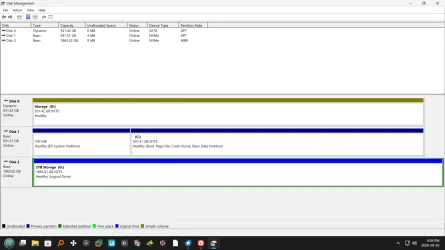
I must admit. Sorry here they are.

Screenshot (9).webp

Screenshot (8).webp
 

My Computers My Computers

  • At a glance

    Windows 11 Pro 25H2Intel 12th Gen Intel Core i5-12600KF, 3686 MHzCORSAIR Vengeance 32GB (2 x 16GB) 288-Pin PC ...GIGABYTE GeForce RTX 4060, 3x Fans, 8GB GDDR6 OC
    OS
    Windows 11 Pro 25H2
    Computer type
    PC/Desktop
    Manufacturer/Model
    Custom Build By Lance1
    CPU
    Intel 12th Gen Intel Core i5-12600KF, 3686 MHz
    Motherboard
    GIGABYTE Z790 AORUS ELITE AX LGA 1700 Intel Z790 ATX
    Memory
    CORSAIR Vengeance 32GB (2 x 16GB) 288-Pin PC RAM DDR5 6400 (PC5 51200) Dual-Channel
    Graphics Card(s)
    GIGABYTE GeForce RTX 4060, 3x Fans, 8GB GDDR6 OC
    Sound Card
    AMD High Definition
    Monitor(s) Displays
    Samsung 32" 60Hz 4ms Curved PLS LED
    Screen Resolution
    1920 X 1080
    Hard Drives
    WD Blue NVME M.2 1T Boot Drive
    WD Blue SSD 1T
    WD Blue NVME M.2 2T
    PSU
    EVGA SuperNOVA 850 GT, 80 Plus Gold 850W, Fully Modular,
    Case
    Fractal Design Pop XL Air RGB Black TG ATX High-Airflow Clear Tempered Glass Window Full Tower
    Cooling
    Noctua NH-D15 chromax black, Dual Tower CPU Cooler with Dual NF-A15 PWM 140mm Fans (Black)
    Keyboard
    Devistator 3
    Mouse
    Inphic PM6 Pro
    Internet Speed
    Telus Fiber Optic: Download 332.7 Mbps / Upload 331.5 Mbps
    Browser
    Vivaldi (64bit)
    Antivirus
    Windows Defender
  • At a glance

    Window 11 ProIntel(R) Core(TM) i3-2310M CPU @ 2.10GHz4 GB DDR3Intel(R) HD Graphics 3000
    Operating System
    Window 11 Pro
    Computer type
    Laptop
    Manufacturer/Model
    DELL Inspiron N7110
    CPU
    Intel(R) Core(TM) i3-2310M CPU @ 2.10GHz
    Motherboard
    Dell Inc. 0YH79Y
    Memory
    4 GB DDR3
    Graphics card(s)
    Intel(R) HD Graphics 3000
    Sound Card
    High Definition Audio
    Monitor(s) Displays
    17.3 Inch Display
    Screen Resolution
    1600 X 900
    Hard Drives
    Samsung SSD 860 EVO 500GB
    Internet Speed
    Fiber Optic: Download 332.7 Mbps / Upload 331.5 Mbps
    Browser
    Vivaldi 64 bit
    Antivirus
    Windows Defender
    Other Info
    YA! This the old backup. In case things go south. It'll give me access to everything I need.
Latest Support Threads

Back
Top Bottom