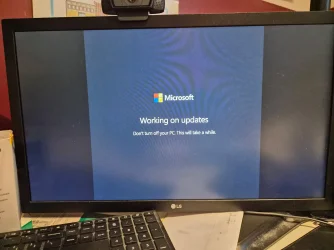
Is this a valid MS Updates screen??


Bardiferously

Well-known member
Member
Local time
4:52 AM
Posts
37
OS
Windows 11
JL 2nd Day start screen.webp

This doesn't look like valid for Windows 11. Has anyone seen this version and is it OK?
 

My Computers My Computers

  • At a glance

    Windows 1111th Gen Intel Core i5-1135G7 @ 2.40GHz8GB (not upgradeable)Intel Iris Xe Graphics
    OS
    Windows 11
    Computer type
    Laptop
    Manufacturer/Model
    Lenovo
    CPU
    11th Gen Intel Core i5-1135G7 @ 2.40GHz
    Motherboard
    LNVNB161216 (U3E1)
    Memory
    8GB (not upgradeable)
    Graphics Card(s)
    Intel Iris Xe Graphics
    Screen Resolution
    HD 1920 x 1080
    Hard Drives
    VMe SAMSUNG MZALQ256HBJD-00BL2 256GB
    Mouse
    Logitech MX2
    Internet Speed
    Very good, in most of my regular places
    Browser
    Chrome, Firefox, Edge (in that order)
    Antivirus
    Norton 360
  • At a glance

    Windows 10AMD Ryzen 5 4500 6-Core ProcessorCorsair DDR4-2132 (1066 MHz) CMK16GX4M2B3200C...NVIDIA GeForce RTX 2080 Ti
    Operating System
    Windows 10
    Computer type
    PC/Desktop
    Manufacturer/Model
    Homebuilt in an old Dell case
    CPU
    AMD Ryzen 5 4500 6-Core Processor
    Motherboard
    ASUS PRIME B550M-A (AM4)
    Memory
    Corsair DDR4-2132 (1066 MHz) CMK16GX4M2B3200C16 (2x8GB)
    Graphics card(s)
    NVIDIA GeForce RTX 2080 Ti
    Monitor(s) Displays
    Samsung 27"
    Screen Resolution
    1920x1080
    Hard Drives
    500GB m.2 Samsung 980
    1TB WDC WD10EADX-00TDHB0
    1TB WDC WD1002FAEX-00Y9A0
    Case
    Old Dell Dimension Vista PC
Can you ctrl+alt+del or alt+f4 out of it? It isn't one I've ever seen.
 

My Computer My Computer

At a glance

Linux Mint
OS
Linux Mint
Computer type
Laptop
Manufacturer/Model
System76 Lemur Pro
Agreed. I've never seen them put "Microsoft" on that screen.
 

My Computer My Computer

At a glance

Windows 11 Pro 25H212th Gen Core i7-1260P64 GB Micron PC4-25600Intel Iris Xe Graphics
OS
Windows 11 Pro 25H2
Computer type
PC/Desktop
Manufacturer/Model
Intel NUC12WSHi7
CPU
12th Gen Core i7-1260P
Motherboard
NUC12WSBi7
Memory
64 GB Micron PC4-25600
Graphics Card(s)
Intel Iris Xe Graphics
Sound Card
on-board Realtek HD Audio
Monitor(s) Displays
Dell U3219Q
Screen Resolution
3840 x 2160
Hard Drives
Samsung SSD 990 PRO 1TB
Crucial MX500 2 TB
Antivirus
Microsoft Defender
Thats a fake message, might be clickfix. Notice the bars on the side? Microsoft logo is also not proper colors.

Also, google lens could not find this exact image online which is another red flag.

I would nuke and start over. Probably a Rat backdoor and they are using this to hide their actions.


A lot of the fake update screens have gotten much better.

I actually came across an AI video that was made to mimic the exact windows official screen.

Standard security practice is now to test with ctrl alt delete to see if it is real.
 

My Computers My Computers

  • At a glance

    Windows 11 ProRyzen 7 5700 X3D64 GB DDR4 3600mhz Gskill Ripjaws VRTX 4070 Super , 12GB VRAM Asus EVO Overclock
    OS
    Windows 11 Pro
    Computer type
    PC/Desktop
    Manufacturer/Model
    Custom Built
    CPU
    Ryzen 7 5700 X3D
    Motherboard
    MSI MPG B550 GAMING PLUS
    Memory
    64 GB DDR4 3600mhz Gskill Ripjaws V
    Graphics Card(s)
    RTX 4070 Super , 12GB VRAM Asus EVO Overclock
    Monitor(s) Displays
    Gigabyte M27Q (rev. 2.0) 2560 x 1440 @ 170hz HDR
    Hard Drives
    2TB Samsung nvme ssd
    4TB Western Digital nvme ssd
    PSU
    CORSAIR RMx SHIFT Series™ RM750x 80 PLUS Gold Fully Modular ATX Power Supply
    Case
    CORSAIR 3500X ARGB Mid-Tower ATX PC Case – Black
    Cooling
    ID-COOLING FROSTFLOW X 240 CPU Water Cooler
    Keyboard
    Logitech G213
    Mouse
    Logitech G203
    Internet Speed
    1.2gbps Fiber 😎
  • At a glance

    Chrome OSIntel Pentium Quad Core4GB LPDDR4
    Operating System
    Chrome OS
    Computer type
    Laptop
    Manufacturer/Model
    HP Chromebook
    CPU
    Intel Pentium Quad Core
    Memory
    4GB LPDDR4
    Monitor(s) Displays
    14 Inch HD SVA anti glare micro edge display
    Hard Drives
    64 GB emmc
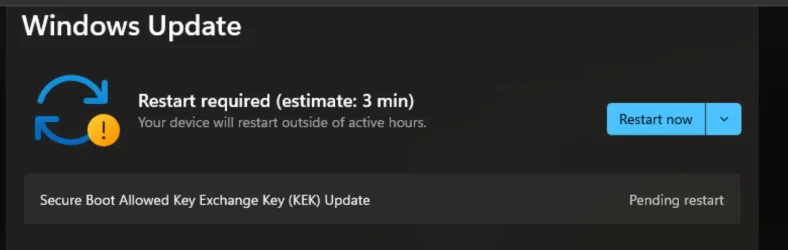
Windows Update is waiting to Restart Now --- with two updates:
  • Secure Boot Allowed Key Exchange Key (KEK) Update
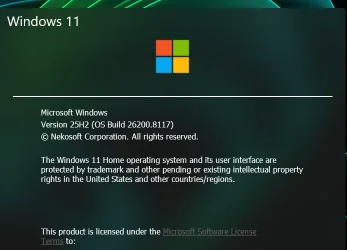
  • 2026-03 Update (KB5086672) (26200.8117)
I am very suspicious about the 1st one and not really sure about the 2nd one, either. Is there any way to get out of these two updates besides doing a factory reset (which I might be doing, anyhow), as I'm crunched for time right now and don't want to let these two get fully installed.

***** APPRECIATE your replies so far! ********
 

My Computers My Computers

  • At a glance

    Windows 1111th Gen Intel Core i5-1135G7 @ 2.40GHz8GB (not upgradeable)Intel Iris Xe Graphics
    OS
    Windows 11
    Computer type
    Laptop
    Manufacturer/Model
    Lenovo
    CPU
    11th Gen Intel Core i5-1135G7 @ 2.40GHz
    Motherboard
    LNVNB161216 (U3E1)
    Memory
    8GB (not upgradeable)
    Graphics Card(s)
    Intel Iris Xe Graphics
    Screen Resolution
    HD 1920 x 1080
    Hard Drives
    VMe SAMSUNG MZALQ256HBJD-00BL2 256GB
    Mouse
    Logitech MX2
    Internet Speed
    Very good, in most of my regular places
    Browser
    Chrome, Firefox, Edge (in that order)
    Antivirus
    Norton 360
  • At a glance

    Windows 10AMD Ryzen 5 4500 6-Core ProcessorCorsair DDR4-2132 (1066 MHz) CMK16GX4M2B3200C...NVIDIA GeForce RTX 2080 Ti
    Operating System
    Windows 10
    Computer type
    PC/Desktop
    Manufacturer/Model
    Homebuilt in an old Dell case
    CPU
    AMD Ryzen 5 4500 6-Core Processor
    Motherboard
    ASUS PRIME B550M-A (AM4)
    Memory
    Corsair DDR4-2132 (1066 MHz) CMK16GX4M2B3200C16 (2x8GB)
    Graphics card(s)
    NVIDIA GeForce RTX 2080 Ti
    Monitor(s) Displays
    Samsung 27"
    Screen Resolution
    1920x1080
    Hard Drives
    500GB m.2 Samsung 980
    1TB WDC WD10EADX-00TDHB0
    1TB WDC WD1002FAEX-00Y9A0
    Case
    Old Dell Dimension Vista PC
Interestingly Google AI gives a reasonable response starting with

This is a known ClickFix malware scam designed to steal data or install viruses. Scammers use realistic, full-screen browser pages to mimic Windows updates, prompting you to run commands or call fake support numbers. Do not follow the on-screen instructions to press keys or call a number.
- I searched for
Fake Microsoft Working on updates Don't turn off your PC This will take a while.

Proceed with the utmost caution as above.


The first update description could relate to a real update:


The second is this (from the News section where you can find a thread per update):
 

My Computer My Computer

At a glance

Windows 11 Proi7-8650U16GBIntel UHD 620
OS
Windows 11 Pro
Computer type
Laptop
Manufacturer/Model
Lenovo t480s
CPU
i7-8650U
Memory
16GB
Graphics Card(s)
Intel UHD 620
Screen Resolution
1920x1080
Hard Drives
C SN810 SDCPNRY-512G-1006
Browser
Edge, Firefox
Antivirus
Defender
Windows Update is waiting to Restart Now --- with two updates:
  • Secure Boot Allowed Key Exchange Key (KEK) Update
  • 2026-03 Update (KB5086672) (26200.8117)
I am very suspicious about the 1st one and not really sure about the 2nd one, either. Is there any way to get out of these two updates besides doing a factory reset (which I might be doing, anyhow), as I'm crunched for time right now and don't want to let these two get fully installed.

***** APPRECIATE your replies so far! ********
On that screen in your screenshot above, hit ctl alt delete. If it brings up the screen to select task manager its fake. Shutdown the computer
 

My Computers My Computers

  • At a glance

    Windows 11 ProRyzen 7 5700 X3D64 GB DDR4 3600mhz Gskill Ripjaws VRTX 4070 Super , 12GB VRAM Asus EVO Overclock
    OS
    Windows 11 Pro
    Computer type
    PC/Desktop
    Manufacturer/Model
    Custom Built
    CPU
    Ryzen 7 5700 X3D
    Motherboard
    MSI MPG B550 GAMING PLUS
    Memory
    64 GB DDR4 3600mhz Gskill Ripjaws V
    Graphics Card(s)
    RTX 4070 Super , 12GB VRAM Asus EVO Overclock
    Monitor(s) Displays
    Gigabyte M27Q (rev. 2.0) 2560 x 1440 @ 170hz HDR
    Hard Drives
    2TB Samsung nvme ssd
    4TB Western Digital nvme ssd
    PSU
    CORSAIR RMx SHIFT Series™ RM750x 80 PLUS Gold Fully Modular ATX Power Supply
    Case
    CORSAIR 3500X ARGB Mid-Tower ATX PC Case – Black
    Cooling
    ID-COOLING FROSTFLOW X 240 CPU Water Cooler
    Keyboard
    Logitech G213
    Mouse
    Logitech G203
    Internet Speed
    1.2gbps Fiber 😎
  • At a glance

    Chrome OSIntel Pentium Quad Core4GB LPDDR4
    Operating System
    Chrome OS
    Computer type
    Laptop
    Manufacturer/Model
    HP Chromebook
    CPU
    Intel Pentium Quad Core
    Memory
    4GB LPDDR4
    Monitor(s) Displays
    14 Inch HD SVA anti glare micro edge display
    Hard Drives
    64 GB emmc
Windows Update is waiting to Restart Now --- with two updates:
  • Secure Boot Allowed Key Exchange Key (KEK) Update
  • 2026-03 Update (KB5086672) (26200.8117)
I am very suspicious about the 1st one and not really sure about the 2nd one, either. Is there any way to get out of these two updates besides doing a factory reset (which I might be doing, anyhow), as I'm crunched for time right now and don't want to let these two get fully installed.
First update is normal and good news for you. Your PC is fully supported for the upcoming Secure Boot migration to CA 2023 certs. Every PC needs a specific KEK certificate provided by their OEM (using Windows Update), or have the KEK already in the BIOS.

Other PC's are gradually receiving similar KEK updates. A reboot is required for the change to take place, but you won't see this screen appear for a KEK install.
 

My Computer My Computer

At a glance

Windows 7
OS
Windows 7

My Computers My Computers

  • At a glance

    Windows 11 ProAMD Ryzen 9 9950X3DKingston FURY Beast 64GB (2x32GB) DDR5 6000MT/sASUS TUF Gaming Radeon RX 9070 OC Edition 16G...
    OS
    Windows 11 Pro
    Computer type
    PC/Desktop
    CPU
    AMD Ryzen 9 9950X3D
    Motherboard
    ASRock B650E Taichi Lite
    Memory
    Kingston FURY Beast 64GB (2x32GB) DDR5 6000MT/s
    Graphics Card(s)
    ASUS TUF Gaming Radeon RX 9070 OC Edition 16GB GDDR6
    Hard Drives
    Solidigm P44 Pro 2TB M.2 NVMe SSD
  • At a glance

    Windows 11 HomeIntel Core Ultra 9 275HX64GB (2x 32GB) DDR5-6400NVIDIA GeForce RTX 5080 16GB GDDR7 Laptop GPU
    Operating System
    Windows 11 Home
    Computer type
    Laptop
    Manufacturer/Model
    Lenovo Legion Pro 7i Gen 10 16"
    CPU
    Intel Core Ultra 9 275HX
    Memory
    64GB (2x 32GB) DDR5-6400
    Graphics card(s)
    NVIDIA GeForce RTX 5080 16GB GDDR7 Laptop GPU
    Hard Drives
    2x 1TB M.2 NVMe SSD (SK Hynix)
It is advised to ctrl+alt+del , disconnect from internet, and run security scans offline. You definitely do not want to click anywhere on that screen.
However, personally, I would immediately restore an old image or clean install windows...but that's just me. I don't take chances.

The thing about malware is, hackers are very, very smart and can set triggers inside their malware. One does not always see any indication of infection as soon as one is infected, but when a user action triggers it. You could have gotten the malware today...or 6 months ago. One never knows.

You get such infections from fake tech support pages,malicious browser extensions, allowing someone remote access, bundled with shady downloads, clicking on malicious ads (Social media ads are notorious for containing malware)., cracked software(ie: sites like PirateBay) and malicious browser extensions.

Have you given anyone remote access to your system? If so all the more reason to clean install.
 

My Computers My Computers

  • At a glance

    Windows 11 Pro 25H2 26200.8655i9-10900 10 core 20 threads32 gbnone-Intel UHD Graphics 630
    OS
    Windows 11 Pro 25H2 26200.8655
    Computer type
    PC/Desktop
    Manufacturer/Model
    Dell Optiplex 7080
    CPU
    i9-10900 10 core 20 threads
    Motherboard
    DELL 0J37VM
    Memory
    32 gb
    Graphics Card(s)
    none-Intel UHD Graphics 630
    Sound Card
    Integrated Realtek
    Monitor(s) Displays
    Benq 27
    Screen Resolution
    2560x1440
    Hard Drives
    2x1tb Solidigm m.2 nvme /External drives 512gb Samsung m.2 sata+2tb Kingston m2.nvme
    PSU
    500w
    Case
    MT
    Cooling
    Dell Premium
    Keyboard
    Logitech wired
    Mouse
    Logitech wireless
    Internet Speed
    so slow I'm too embarrassed to tell
    Browser
    #1 Edge #2 Firefox
    Antivirus
    Defender+MWB Premium
  • At a glance

    Windows 11 Pro 24H2 26200.8457AMD Ryzen 7 6800U32 gbintegrated
    Operating System
    Windows 11 Pro 24H2 26200.8457
    Computer type
    PC/Desktop
    Manufacturer/Model
    Beelink Mini PC SER5
    CPU
    AMD Ryzen 7 6800U
    Memory
    32 gb
    Graphics card(s)
    integrated
    Sound Card
    integrated
    Monitor(s) Displays
    Benq 27
    Screen Resolution
    2560x1440
    Hard Drives
    1TB Crucial nvme
    Keyboard
    Logitech wired
    Mouse
    Logitech wireless
    Internet Speed
    still too embarrassed to tell
    Browser
    Firefox
    Antivirus
    Defender
    Other Info
    System 3 is non compliant Dell 9020 i7-4770/24gb ram Win11 PRO 26200.8457
The “Secure Boot Allowed Key Exchange Key (KEK) Update” is a critical Windows security update that refreshes the Secure Boot certificates stored in your system’s UEFI firmware. You do need to install it, because older KEK certificates issued back in 2011 are expiring in 2026, and without this update your system may eventually fail to validate Secure Boot policies or block legitimate software from loading.

Secure Boot works by ensuring that only trusted, signed code can run during the boot process. To do this, your firmware maintains a set of certificates: the Platform Key (PK), Key Exchange Keys (KEKs), and signature databases (DB/DBX). The KEK is essentially the “master authority” that allows Microsoft to update the Secure Boot signature databases. If the KEK expires or is invalid, your machine cannot accept new Secure Boot updates, which undermines the integrity of the boot process.

Microsoft is rolling out new KEKs through Windows Update so that systems can continue to validate and apply Secure Boot updates beyond the expiration of the original 2011 certificates. This update does not change your operating system features or user experience, but it ensures that your device remains compliant with Secure Boot requirements and protected against firmware-level attacks. The update is marked “Pending restart” because the new KEK must be written into UEFI, which only happens during a reboot.

If you ignore the update, your system will continue to run for now, but once the old KEK expires, Secure Boot updates (such as revocation lists for compromised bootloaders) will no longer apply. That could leave your machine vulnerable to boot-level malware or prevent certain trusted software from loading. Installing the update guarantees that your device remains able to process future Secure Boot certificate changes.


My Computers My Computers

  • At a glance

    Windows 11 ProAMD Ryzen 9 9950X3DKingston FURY Beast 64GB (2x32GB) DDR5 6000MT/sASUS TUF Gaming Radeon RX 9070 OC Edition 16G...
    OS
    Windows 11 Pro
    Computer type
    PC/Desktop
    CPU
    AMD Ryzen 9 9950X3D
    Motherboard
    ASRock B650E Taichi Lite
    Memory
    Kingston FURY Beast 64GB (2x32GB) DDR5 6000MT/s
    Graphics Card(s)
    ASUS TUF Gaming Radeon RX 9070 OC Edition 16GB GDDR6
    Hard Drives
    Solidigm P44 Pro 2TB M.2 NVMe SSD
  • At a glance

    Windows 11 HomeIntel Core Ultra 9 275HX64GB (2x 32GB) DDR5-6400NVIDIA GeForce RTX 5080 16GB GDDR7 Laptop GPU
    Operating System
    Windows 11 Home
    Computer type
    Laptop
    Manufacturer/Model
    Lenovo Legion Pro 7i Gen 10 16"
    CPU
    Intel Core Ultra 9 275HX
    Memory
    64GB (2x 32GB) DDR5-6400
    Graphics card(s)
    NVIDIA GeForce RTX 5080 16GB GDDR7 Laptop GPU
    Hard Drives
    2x 1TB M.2 NVMe SSD (SK Hynix)
IMO this user is in a catch 22 situation. He has a clickfix infection as well as a valid pending windows update waiting to be applied. Guess it depends on how gutsy he is to restart and apply the valid windows update without knowing what the result would be from the malware, especially if he acquired that malware from remote access.
 

My Computers My Computers

  • At a glance

    Windows 11 Pro 25H2 26200.8655i9-10900 10 core 20 threads32 gbnone-Intel UHD Graphics 630
    OS
    Windows 11 Pro 25H2 26200.8655
    Computer type
    PC/Desktop
    Manufacturer/Model
    Dell Optiplex 7080
    CPU
    i9-10900 10 core 20 threads
    Motherboard
    DELL 0J37VM
    Memory
    32 gb
    Graphics Card(s)
    none-Intel UHD Graphics 630
    Sound Card
    Integrated Realtek
    Monitor(s) Displays
    Benq 27
    Screen Resolution
    2560x1440
    Hard Drives
    2x1tb Solidigm m.2 nvme /External drives 512gb Samsung m.2 sata+2tb Kingston m2.nvme
    PSU
    500w
    Case
    MT
    Cooling
    Dell Premium
    Keyboard
    Logitech wired
    Mouse
    Logitech wireless
    Internet Speed
    so slow I'm too embarrassed to tell
    Browser
    #1 Edge #2 Firefox
    Antivirus
    Defender+MWB Premium
  • At a glance

    Windows 11 Pro 24H2 26200.8457AMD Ryzen 7 6800U32 gbintegrated
    Operating System
    Windows 11 Pro 24H2 26200.8457
    Computer type
    PC/Desktop
    Manufacturer/Model
    Beelink Mini PC SER5
    CPU
    AMD Ryzen 7 6800U
    Memory
    32 gb
    Graphics card(s)
    integrated
    Sound Card
    integrated
    Monitor(s) Displays
    Benq 27
    Screen Resolution
    2560x1440
    Hard Drives
    1TB Crucial nvme
    Keyboard
    Logitech wired
    Mouse
    Logitech wireless
    Internet Speed
    still too embarrassed to tell
    Browser
    Firefox
    Antivirus
    Defender
    Other Info
    System 3 is non compliant Dell 9020 i7-4770/24gb ram Win11 PRO 26200.8457
Do a hard shutdown (press the power button till it shuts down. This way it doesn't install anything other than it already did).
If you do have your data backed up, do a clean install (deleting all partitions on the drive).
If you don't have your data backed up, boot from a WinPE or Linux live and copy all your data to an external drive and then do a do a clean install (deleting all partitions on the drive).
 

My Computers My Computers

  • At a glance

    Windows 11 Pro - Windows 7 HP 64 - Lubuntui5 6600K - 800MHz to 4400MHz4+4G GSkill DDR4 3000IG - Intel 530
    OS
    Windows 11 Pro - Windows 7 HP 64 - Lubuntu
    Computer type
    PC/Desktop
    Manufacturer/Model
    custom build
    CPU
    i5 6600K - 800MHz to 4400MHz
    Motherboard
    GA-Z170-HD3P
    Memory
    4+4G GSkill DDR4 3000
    Graphics Card(s)
    IG - Intel 530
    Monitor(s) Displays
    Samsung 226BW
    Screen Resolution
    1680x1050
    Hard Drives
    (1) -1 SM951 – 128GB M.2 AHCI PCIe SSD drive for Win 11
    (2) -1 WD SATA 3 - 1T for Data
    (3) -1 WD SATA 3 - 1T for backup
    (4) -1 BX500 SSD - 256G for Windows 7 and Lubuntu
    PSU
    Thermaltake 450W TR2 gold
    Keyboard
    Old and good Chicony mechanical keyboard
    Mouse
    Logitech mX performance - 9 buttons (had to disable some)
    Internet Speed
    500 Mb/s
    Browser
    Firefox 64
  • At a glance

    Windows 11 Proi7-4500U 800- 3000MHz(4+4)G DDR3 1600IG intel 4400 + NVIDIA GeForce GT 745M
    Operating System
    Windows 11 Pro
    Computer type
    Laptop
    Manufacturer/Model
    Asus Q550LF
    CPU
    i7-4500U 800- 3000MHz
    Motherboard
    Asus Q550LF
    Memory
    (4+4)G DDR3 1600
    Graphics card(s)
    IG intel 4400 + NVIDIA GeForce GT 745M
    Sound Card
    Realtek
    Monitor(s) Displays
    LG Display LP156WF4-SPH1
    Screen Resolution
    1920 x 1080
    Hard Drives
    BX500 120G SSD for Windows and programs
    & 1T HDD for data
    Internet Speed
    500 Mb/s
    Browser
    Firefox 64
  • Secure Boot Allowed Key Exchange Key (KEK) Update
  • 2026-03 Update (KB5086672) (26200.8117)
Those two updates themselves are totally legit. 26200.8117 is my latest WU build and the "Secure Boot Allowed Key Exchange Key (KEK) Update" is a mandatory security update to replace expiring 2011 UEFI CA certs. As for the update screen itself I remember seeing Working on Update screens but I honestly didn't pay much attention to their appearance except for a quick glance. Might be some unnecessary paranoia and panic over that screen you posted going on though.


Screenshot 2026-04-08 130921.webp
 
Last edited:

My Computers My Computers

  • At a glance

    Windows 11 25H2Intel Core Ultra 9 275HX (24-Core)64GB DDR5 6400MT/sNVIDIA GeForce RTX 5080 and Intel UHD Graphics
    OS
    Windows 11 25H2
    Computer type
    Laptop
    Manufacturer/Model
    Alienware 18 Area-51
    CPU
    Intel Core Ultra 9 275HX (24-Core)
    Motherboard
    Alienware
    Memory
    64GB DDR5 6400MT/s
    Graphics Card(s)
    NVIDIA GeForce RTX 5080 and Intel UHD Graphics
    Sound Card
    Onboard, Realtek high-performance Audio chips (ALC3329 & ALC1708))
    Monitor(s) Displays
    300HZ 18-inch QHD 500 nit Comfort View+
    Screen Resolution
    2560 x 1600
    Hard Drives
    2TB NVMe M.2 PCIe Gen 5 SSD
    Case
    Magnesium Alloy
    Cooling
    Advanced Cryo-Tech Quad-Fan Cooling system & large vapor chamber
    Keyboard
    Cherry MX ultra low profile mechanical keyboard with per key AlienFX RGB lighting
    Mouse
    Logitech MX Master 4
    Browser
    Vivaldi (main), Firefox, Chrome, Edge
    Antivirus
    MS Defender and Malwarebytes Free
  • At a glance

    Windows 11 25H2Qualcomm Snapdragon X Elite (12 Core) ARM bas...16GB LPDDR5Qualcomm Adreno X1-85
    Operating System
    Windows 11 25H2
    Computer type
    Laptop
    Manufacturer/Model
    Microsoft Surface Laptop 7
    CPU
    Qualcomm Snapdragon X Elite (12 Core) ARM based CPU
    Motherboard
    Microsoft Corp.
    Memory
    16GB LPDDR5
    Graphics card(s)
    Qualcomm Adreno X1-85
    Sound Card
    Omnisonic speakers with Dolby Atmos spatial sound
    Monitor(s) Displays
    120 Hz 13.8-inch 600 nit PixelSense Flow touchscreen
    Screen Resolution
    2304x1536
    Hard Drives
    1TB NVMe Gen 4 SSD
    Case
    Anodized Aluminum
    Cooling
    Traditional active cooling fan system
    Keyboard
    Mechanical QWERTY, backlit when in use
    Mouse
    Logitech MX Master 4 and Surface Arc Mouse
    Browser
    Vivaldi (main), Firefox, Chrome, Edge
    Antivirus
    MS Defender and Malwarebytes Free

My Computers My Computers

  • At a glance

    Windows 11 2xH2 (latest update ... forever anal)Intel i5-124008GBNVIDIA GeForce GT730
    OS
    Windows 11 2xH2 (latest update ... forever anal)
    Computer type
    PC/Desktop
    Manufacturer/Model
    HP Slim S01
    CPU
    Intel i5-12400
    Memory
    8GB
    Graphics Card(s)
    NVIDIA GeForce GT730
    Sound Card
    OOBE
    Monitor(s) Displays
    Acer 32"
    Screen Resolution
    1920x1080
    Hard Drives
    512GB KIOXIA NVMe
    1TB SATA SSD
    PSU
    OOBE
    Case
    OOBE
    Cooling
    OOBE
    Keyboard
    BT
    Mouse
    BT
    Browser
    Brave FFox Chrome Opera
    Antivirus
    KIS
  • At a glance

    Windows 11 Pro 2xH2 (latest update ... 4ever ...i7-1165G7 @ 2.80GHzIntel Iris Xe Graphics
    Operating System
    Windows 11 Pro 2xH2 (latest update ... 4ever anal)
    Computer type
    Laptop
    Manufacturer/Model
    HP Pavillion 15
    CPU
    i7-1165G7 @ 2.80GHz
    Graphics card(s)
    Intel Iris Xe Graphics
    Hard Drives
    Samsung NVMe 512GB
    + numerous/multiple SSD Type C USB enclosures
    Internet Speed
    NBN FTTN 50
    Browser
    Brave
    Antivirus
    KIS
Might be some unnecessary paranoia and panic over this screen going on though.
updates are legit, the screen being shown is not
 

My Computers My Computers

  • At a glance

    Windows 11 ProRyzen 7 5700 X3D64 GB DDR4 3600mhz Gskill Ripjaws VRTX 4070 Super , 12GB VRAM Asus EVO Overclock
    OS
    Windows 11 Pro
    Computer type
    PC/Desktop
    Manufacturer/Model
    Custom Built
    CPU
    Ryzen 7 5700 X3D
    Motherboard
    MSI MPG B550 GAMING PLUS
    Memory
    64 GB DDR4 3600mhz Gskill Ripjaws V
    Graphics Card(s)
    RTX 4070 Super , 12GB VRAM Asus EVO Overclock
    Monitor(s) Displays
    Gigabyte M27Q (rev. 2.0) 2560 x 1440 @ 170hz HDR
    Hard Drives
    2TB Samsung nvme ssd
    4TB Western Digital nvme ssd
    PSU
    CORSAIR RMx SHIFT Series™ RM750x 80 PLUS Gold Fully Modular ATX Power Supply
    Case
    CORSAIR 3500X ARGB Mid-Tower ATX PC Case – Black
    Cooling
    ID-COOLING FROSTFLOW X 240 CPU Water Cooler
    Keyboard
    Logitech G213
    Mouse
    Logitech G203
    Internet Speed
    1.2gbps Fiber 😎
  • At a glance

    Chrome OSIntel Pentium Quad Core4GB LPDDR4
    Operating System
    Chrome OS
    Computer type
    Laptop
    Manufacturer/Model
    HP Chromebook
    CPU
    Intel Pentium Quad Core
    Memory
    4GB LPDDR4
    Monitor(s) Displays
    14 Inch HD SVA anti glare micro edge display
    Hard Drives
    64 GB emmc
The screen Working on updates you only see on shutting down or booting up, never during a working Windows.
Another strange thing is the vertical format, as the message was made for a cell phone.
 

My Computers My Computers

  • At a glance

    Windows 11 Pro - Windows 7 HP 64 - Lubuntui5 6600K - 800MHz to 4400MHz4+4G GSkill DDR4 3000IG - Intel 530
    OS
    Windows 11 Pro - Windows 7 HP 64 - Lubuntu
    Computer type
    PC/Desktop
    Manufacturer/Model
    custom build
    CPU
    i5 6600K - 800MHz to 4400MHz
    Motherboard
    GA-Z170-HD3P
    Memory
    4+4G GSkill DDR4 3000
    Graphics Card(s)
    IG - Intel 530
    Monitor(s) Displays
    Samsung 226BW
    Screen Resolution
    1680x1050
    Hard Drives
    (1) -1 SM951 – 128GB M.2 AHCI PCIe SSD drive for Win 11
    (2) -1 WD SATA 3 - 1T for Data
    (3) -1 WD SATA 3 - 1T for backup
    (4) -1 BX500 SSD - 256G for Windows 7 and Lubuntu
    PSU
    Thermaltake 450W TR2 gold
    Keyboard
    Old and good Chicony mechanical keyboard
    Mouse
    Logitech mX performance - 9 buttons (had to disable some)
    Internet Speed
    500 Mb/s
    Browser
    Firefox 64
  • At a glance

    Windows 11 Proi7-4500U 800- 3000MHz(4+4)G DDR3 1600IG intel 4400 + NVIDIA GeForce GT 745M
    Operating System
    Windows 11 Pro
    Computer type
    Laptop
    Manufacturer/Model
    Asus Q550LF
    CPU
    i7-4500U 800- 3000MHz
    Motherboard
    Asus Q550LF
    Memory
    (4+4)G DDR3 1600
    Graphics card(s)
    IG intel 4400 + NVIDIA GeForce GT 745M
    Sound Card
    Realtek
    Monitor(s) Displays
    LG Display LP156WF4-SPH1
    Screen Resolution
    1920 x 1080
    Hard Drives
    BX500 120G SSD for Windows and programs
    & 1T HDD for data
    Internet Speed
    500 Mb/s
    Browser
    Firefox 64
The screen Working on updates you only see on shutting down or booting up, never during a working Windows.
Another strange thing is the vertical format, as the message was made for a cell phone.
I thought that's what he was doing was booting up? 🤷🏽‍♂️
 

My Computers My Computers

  • At a glance

    Windows 11 25H2Intel Core Ultra 9 275HX (24-Core)64GB DDR5 6400MT/sNVIDIA GeForce RTX 5080 and Intel UHD Graphics
    OS
    Windows 11 25H2
    Computer type
    Laptop
    Manufacturer/Model
    Alienware 18 Area-51
    CPU
    Intel Core Ultra 9 275HX (24-Core)
    Motherboard
    Alienware
    Memory
    64GB DDR5 6400MT/s
    Graphics Card(s)
    NVIDIA GeForce RTX 5080 and Intel UHD Graphics
    Sound Card
    Onboard, Realtek high-performance Audio chips (ALC3329 & ALC1708))
    Monitor(s) Displays
    300HZ 18-inch QHD 500 nit Comfort View+
    Screen Resolution
    2560 x 1600
    Hard Drives
    2TB NVMe M.2 PCIe Gen 5 SSD
    Case
    Magnesium Alloy
    Cooling
    Advanced Cryo-Tech Quad-Fan Cooling system & large vapor chamber
    Keyboard
    Cherry MX ultra low profile mechanical keyboard with per key AlienFX RGB lighting
    Mouse
    Logitech MX Master 4
    Browser
    Vivaldi (main), Firefox, Chrome, Edge
    Antivirus
    MS Defender and Malwarebytes Free
  • At a glance

    Windows 11 25H2Qualcomm Snapdragon X Elite (12 Core) ARM bas...16GB LPDDR5Qualcomm Adreno X1-85
    Operating System
    Windows 11 25H2
    Computer type
    Laptop
    Manufacturer/Model
    Microsoft Surface Laptop 7
    CPU
    Qualcomm Snapdragon X Elite (12 Core) ARM based CPU
    Motherboard
    Microsoft Corp.
    Memory
    16GB LPDDR5
    Graphics card(s)
    Qualcomm Adreno X1-85
    Sound Card
    Omnisonic speakers with Dolby Atmos spatial sound
    Monitor(s) Displays
    120 Hz 13.8-inch 600 nit PixelSense Flow touchscreen
    Screen Resolution
    2304x1536
    Hard Drives
    1TB NVMe Gen 4 SSD
    Case
    Anodized Aluminum
    Cooling
    Traditional active cooling fan system
    Keyboard
    Mechanical QWERTY, backlit when in use
    Mouse
    Logitech MX Master 4 and Surface Arc Mouse
    Browser
    Vivaldi (main), Firefox, Chrome, Edge
    Antivirus
    MS Defender and Malwarebytes Free
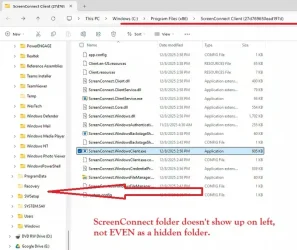
I appreciate all the attention to this. I want to share one more detail - the computer in question now has an app called ScreenConnect and I cannot seem to uninstall it or stop it completely.

What's so odd about it is that it appears under the Program Files (x86) folder but the folder itself isn't visible on Folder View.
ScreenConnect folder not visible.webp

My plan is to wipe the C: drive clean (as in delete the partition) and then let it reformat and reinstall Windows.
 

My Computers My Computers

  • At a glance

    Windows 1111th Gen Intel Core i5-1135G7 @ 2.40GHz8GB (not upgradeable)Intel Iris Xe Graphics
    OS
    Windows 11
    Computer type
    Laptop
    Manufacturer/Model
    Lenovo
    CPU
    11th Gen Intel Core i5-1135G7 @ 2.40GHz
    Motherboard
    LNVNB161216 (U3E1)
    Memory
    8GB (not upgradeable)
    Graphics Card(s)
    Intel Iris Xe Graphics
    Screen Resolution
    HD 1920 x 1080
    Hard Drives
    VMe SAMSUNG MZALQ256HBJD-00BL2 256GB
    Mouse
    Logitech MX2
    Internet Speed
    Very good, in most of my regular places
    Browser
    Chrome, Firefox, Edge (in that order)
    Antivirus
    Norton 360
  • At a glance

    Windows 10AMD Ryzen 5 4500 6-Core ProcessorCorsair DDR4-2132 (1066 MHz) CMK16GX4M2B3200C...NVIDIA GeForce RTX 2080 Ti
    Operating System
    Windows 10
    Computer type
    PC/Desktop
    Manufacturer/Model
    Homebuilt in an old Dell case
    CPU
    AMD Ryzen 5 4500 6-Core Processor
    Motherboard
    ASUS PRIME B550M-A (AM4)
    Memory
    Corsair DDR4-2132 (1066 MHz) CMK16GX4M2B3200C16 (2x8GB)
    Graphics card(s)
    NVIDIA GeForce RTX 2080 Ti
    Monitor(s) Displays
    Samsung 27"
    Screen Resolution
    1920x1080
    Hard Drives
    500GB m.2 Samsung 980
    1TB WDC WD10EADX-00TDHB0
    1TB WDC WD1002FAEX-00Y9A0
    Case
    Old Dell Dimension Vista PC
If you didn't install ScreenConnect, you will want to certainly get rid of that!

I'm with others, I'd do as you plan and start from scratch!
 

My Computers My Computers

  • At a glance

    Win 11 Pro 25H2, Build 26200.8655Intel Core i5 1450064GB DDR4GeForce RTX 4060
    OS
    Win 11 Pro 25H2, Build 26200.8655
    Computer type
    PC/Desktop
    Manufacturer/Model
    Home Brew
    CPU
    Intel Core i5 14500
    Motherboard
    Gigabyte B760M G P WIFI
    Memory
    64GB DDR4
    Graphics Card(s)
    GeForce RTX 4060
    Sound Card
    Chipset Realtek
    Monitor(s) Displays
    LG 45" Ultragear, Acer 24" 1080p
    Screen Resolution
    5120x1440, 1920x1080
    Hard Drives
    Crucial P310 2TB 2280 PCIe Gen4 3D NAND NVMe M.2 SSD (O/S)
    Silicon Power 2TB US75 NVMe PCIe Gen4 M.2 2280 SSD (backup)
    Crucial BX500 2TB 3D NAND (2nd backup)
    Seagate 4TB Ironwolf, rotating HDD archive files
    External off-line backup Drives: 2 NVMe 4TB drives in external enclosures
    PSU
    Thermaltake Toughpower GF3 750W
    Case
    LIAN LI LANCOOL 216 E-ATX PC Case
    Cooling
    Lots of fans!
    Keyboard
    Microsoft Comfort Curve 2000
    Mouse
    Logitech G305
    Internet Speed
    Verizon FiOS 1GB
    Browser
    Firefox
    Antivirus
    Malware Bytes & Windows Defender Security
  • At a glance

    Win 11 Pro 25H2, Build 26200.8524Intel Core i5 1440032GB DDR5Intel 700 Embedded GPU
    Operating System
    Win 11 Pro 25H2, Build 26200.8524
    Computer type
    PC/Desktop
    Manufacturer/Model
    Home Brew
    CPU
    Intel Core i5 14400
    Motherboard
    Gigabyte B760M DS3H AX
    Memory
    32GB DDR5
    Graphics card(s)
    Intel 700 Embedded GPU
    Sound Card
    Realtek Embedded
    Monitor(s) Displays
    27" HP 1080p
    Screen Resolution
    1920x1080
    Hard Drives
    Crucial P310 2TB 2280 PCIe Gen4 eD NAND PCIe SSD
    Samsung EVO 990 2TB NVMe Gen4 SSD
    Samsung 2TB SATA SSD
    PSU
    Thermaltake Smart BM3 650W
    Case
    Okinos Micro ATX Case
    Cooling
    Fans
    Keyboard
    Microsoft Comfort Curve 2000
    Mouse
    Logitech G305
    Internet Speed
    Verizon FiOS 1GB
    Browser
    Firefox
    Antivirus
    Malware Bytes & Windows Defender Security

Latest Support Threads

Back
Top Bottom