JavaScript is disabled. For a better experience, please enable JavaScript in your browser before proceeding.
You are using an out of date browser. It may not display this or other websites correctly.
You should upgrade or use an
alternative browser .
ICue and Corsair K70 Pro keyboard help
I'm trying to set up a *very* basic keyboard lighting configuration. The K70 keyboard has a button in the far upper-left corner that lets you step through your configurations. I've watched several Youtube video tutorials on the iCue software and they all seem to start by assuming you know how to a basic color and then save that to the keyboard hardware. They immediately want to show you how to do animation.
Windows Build/Version
latest windows 11
Last edited: Apr 6, 2023
Windows 11 Pro Intel Core i9-13900KS (6.0 GHz Turbo) 64GB DDR5 5200MHz Kingston FURY Beast MSI GeForce RTX 3070 8GB Windows 11 Pro PC/Desktop Digital Storm - custom Intel Core i9-13900KS (6.0 GHz Turbo) ASUS ROG Maximus Z790 Hero 64GB DDR5 5200MHz Kingston FURY Beast MSI GeForce RTX 3070 8GB Integrated 1 (Dell) 43" 4K 100% scale 1TB SSD m.2 / 12TB HDD 3.5" / 2TB SSD m.2 / 4TB SSD 2.5" 850W Corsair RMx Series (Modular) (80 Plus Gold) Velox liquid AIO triple fan Corsair K70 MX-Blue Razer V2 20Kdpi gaming 1.2Gbps Firefox Defender
Well-known member
Pro User
VIP
I use iCue, but with one of their all-in-one liquid coolers.
Maybe this:
It appears that an iCue compliant keyboard will remember settings. That's certainly true for the coolers.
I don't let iCue launch at startup. I bring it up to change settings, or to monitor temperatures.
The
manual for the keyboard also shows some hotkeys to set RGB effects without iCue. Example: Fn (to the right of the right Alt key) plus 0 sets static color. Multiple presses cycles through the colors.
Last edited: Apr 7, 2023
Windows 11 26300.9278 Amd Threadripper 7970X 128GB (4 X 32) G.Skill DDR5 6400 (RDIMM) Gigabyte RTX 4090 OC Windows 11 26300.9278 PC/Desktop homebuilt Amd Threadripper 7970X Gigabyte TRX50 Aero D Rev. 1.0 128GB (4 X 32) G.Skill DDR5 6400 (RDIMM) Gigabyte RTX 4090 OC none (USB to speakers), Realtek Innocn 32" OLED 3840 X 2160 @ 60Hz Crucial T700 2TB M.2 NVME SSD BeQuiet! Straight Power 12 1500W Lian Li 011 Dynamic Evo XL SilverStone Technology XE360-TR5, with 3 Phanteks T30 fans Cherry KC 500 MX LP (mechanical) Logitech M500s (wired) 2000/250 Mbps (down/up) xFinity gateway
windows 11 26300.9278 Intel I9-13900K 64GB G.Skill DDR5-6000 Gigabyte RTX 3090 ti windows 11 26300.9278 PC/Desktop homebuilt Intel I9-13900K Asus RoG Strix Z690-E 64GB G.Skill DDR5-6000 Gigabyte RTX 3090 ti built in Realtek Philips 27E1N8900 27" OLED 3840 X 2160 @60Hz WDC SN850 1TB eVGA SuperNOVA 1300 GT Lian Li 011 Dynamic Evo Corsair iCUE H150i ELITE CAPELLIX Liquid CPU Cooler Cherry Streaming (wired) Logitech M500s (wired)
Well-known member
Thread Starter
Thanks. The link is broken but I can probably find that one myself.
Windows 11 Pro Intel Core i9-13900KS (6.0 GHz Turbo) 64GB DDR5 5200MHz Kingston FURY Beast MSI GeForce RTX 3070 8GB Windows 11 Pro PC/Desktop Digital Storm - custom Intel Core i9-13900KS (6.0 GHz Turbo) ASUS ROG Maximus Z790 Hero 64GB DDR5 5200MHz Kingston FURY Beast MSI GeForce RTX 3070 8GB Integrated 1 (Dell) 43" 4K 100% scale 1TB SSD m.2 / 12TB HDD 3.5" / 2TB SSD m.2 / 4TB SSD 2.5" 850W Corsair RMx Series (Modular) (80 Plus Gold) Velox liquid AIO triple fan Corsair K70 MX-Blue Razer V2 20Kdpi gaming 1.2Gbps Firefox Defender
Well-known member
Pro User
VIP
Thanks.
Windows 11 26300.9278 Amd Threadripper 7970X 128GB (4 X 32) G.Skill DDR5 6400 (RDIMM) Gigabyte RTX 4090 OC Windows 11 26300.9278 PC/Desktop homebuilt Amd Threadripper 7970X Gigabyte TRX50 Aero D Rev. 1.0 128GB (4 X 32) G.Skill DDR5 6400 (RDIMM) Gigabyte RTX 4090 OC none (USB to speakers), Realtek Innocn 32" OLED 3840 X 2160 @ 60Hz Crucial T700 2TB M.2 NVME SSD BeQuiet! Straight Power 12 1500W Lian Li 011 Dynamic Evo XL SilverStone Technology XE360-TR5, with 3 Phanteks T30 fans Cherry KC 500 MX LP (mechanical) Logitech M500s (wired) 2000/250 Mbps (down/up) xFinity gateway
windows 11 26300.9278 Intel I9-13900K 64GB G.Skill DDR5-6000 Gigabyte RTX 3090 ti windows 11 26300.9278 PC/Desktop homebuilt Intel I9-13900K Asus RoG Strix Z690-E 64GB G.Skill DDR5-6000 Gigabyte RTX 3090 ti built in Realtek Philips 27E1N8900 27" OLED 3840 X 2160 @60Hz WDC SN850 1TB eVGA SuperNOVA 1300 GT Lian Li 011 Dynamic Evo Corsair iCUE H150i ELITE CAPELLIX Liquid CPU Cooler Cherry Streaming (wired) Logitech M500s (wired)
Well-known member
Thread Starter
Windows 11 Pro Intel Core i9-13900KS (6.0 GHz Turbo) 64GB DDR5 5200MHz Kingston FURY Beast MSI GeForce RTX 3070 8GB Windows 11 Pro PC/Desktop Digital Storm - custom Intel Core i9-13900KS (6.0 GHz Turbo) ASUS ROG Maximus Z790 Hero 64GB DDR5 5200MHz Kingston FURY Beast MSI GeForce RTX 3070 8GB Integrated 1 (Dell) 43" 4K 100% scale 1TB SSD m.2 / 12TB HDD 3.5" / 2TB SSD m.2 / 4TB SSD 2.5" 850W Corsair RMx Series (Modular) (80 Plus Gold) Velox liquid AIO triple fan Corsair K70 MX-Blue Razer V2 20Kdpi gaming 1.2Gbps Firefox Defender
Well-known member
Thread Starter
I worked on this for over an hour last night and thought I had it until I did a cold boot this morning and the keyboard was dark and the key to step through the profiles did nothing. Then I started iCue and the keyboard lit up with the default profile and I could step through the three profiles I made.
Windows 11 Pro Intel Core i9-13900KS (6.0 GHz Turbo) 64GB DDR5 5200MHz Kingston FURY Beast MSI GeForce RTX 3070 8GB Windows 11 Pro PC/Desktop Digital Storm - custom Intel Core i9-13900KS (6.0 GHz Turbo) ASUS ROG Maximus Z790 Hero 64GB DDR5 5200MHz Kingston FURY Beast MSI GeForce RTX 3070 8GB Integrated 1 (Dell) 43" 4K 100% scale 1TB SSD m.2 / 12TB HDD 3.5" / 2TB SSD m.2 / 4TB SSD 2.5" 850W Corsair RMx Series (Modular) (80 Plus Gold) Velox liquid AIO triple fan Corsair K70 MX-Blue Razer V2 20Kdpi gaming 1.2Gbps Firefox Defender
Well-known member
Pro User
VIP
I don't have a Corsair keyboard. This is what I get for my AIO cooler:
The "profile" feature is accessed from the "home" screen.
Windows 11 26300.9278 Amd Threadripper 7970X 128GB (4 X 32) G.Skill DDR5 6400 (RDIMM) Gigabyte RTX 4090 OC Windows 11 26300.9278 PC/Desktop homebuilt Amd Threadripper 7970X Gigabyte TRX50 Aero D Rev. 1.0 128GB (4 X 32) G.Skill DDR5 6400 (RDIMM) Gigabyte RTX 4090 OC none (USB to speakers), Realtek Innocn 32" OLED 3840 X 2160 @ 60Hz Crucial T700 2TB M.2 NVME SSD BeQuiet! Straight Power 12 1500W Lian Li 011 Dynamic Evo XL SilverStone Technology XE360-TR5, with 3 Phanteks T30 fans Cherry KC 500 MX LP (mechanical) Logitech M500s (wired) 2000/250 Mbps (down/up) xFinity gateway
windows 11 26300.9278 Intel I9-13900K 64GB G.Skill DDR5-6000 Gigabyte RTX 3090 ti windows 11 26300.9278 PC/Desktop homebuilt Intel I9-13900K Asus RoG Strix Z690-E 64GB G.Skill DDR5-6000 Gigabyte RTX 3090 ti built in Realtek Philips 27E1N8900 27" OLED 3840 X 2160 @60Hz WDC SN850 1TB eVGA SuperNOVA 1300 GT Lian Li 011 Dynamic Evo Corsair iCUE H150i ELITE CAPELLIX Liquid CPU Cooler Cherry Streaming (wired) Logitech M500s (wired)
Well-known member
Thread Starter
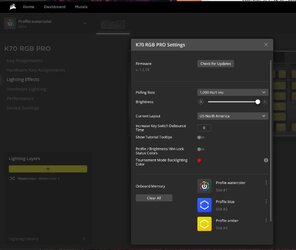
This is what I did. Works after I start iCue but not after a cold boot.
Windows 11 Pro Intel Core i9-13900KS (6.0 GHz Turbo) 64GB DDR5 5200MHz Kingston FURY Beast MSI GeForce RTX 3070 8GB Windows 11 Pro PC/Desktop Digital Storm - custom Intel Core i9-13900KS (6.0 GHz Turbo) ASUS ROG Maximus Z790 Hero 64GB DDR5 5200MHz Kingston FURY Beast MSI GeForce RTX 3070 8GB Integrated 1 (Dell) 43" 4K 100% scale 1TB SSD m.2 / 12TB HDD 3.5" / 2TB SSD m.2 / 4TB SSD 2.5" 850W Corsair RMx Series (Modular) (80 Plus Gold) Velox liquid AIO triple fan Corsair K70 MX-Blue Razer V2 20Kdpi gaming 1.2Gbps Firefox Defender
Well-known member
Pro User
VIP
I don't know whether a profile should "stick", once set.
Windows 11 26300.9278 Amd Threadripper 7970X 128GB (4 X 32) G.Skill DDR5 6400 (RDIMM) Gigabyte RTX 4090 OC Windows 11 26300.9278 PC/Desktop homebuilt Amd Threadripper 7970X Gigabyte TRX50 Aero D Rev. 1.0 128GB (4 X 32) G.Skill DDR5 6400 (RDIMM) Gigabyte RTX 4090 OC none (USB to speakers), Realtek Innocn 32" OLED 3840 X 2160 @ 60Hz Crucial T700 2TB M.2 NVME SSD BeQuiet! Straight Power 12 1500W Lian Li 011 Dynamic Evo XL SilverStone Technology XE360-TR5, with 3 Phanteks T30 fans Cherry KC 500 MX LP (mechanical) Logitech M500s (wired) 2000/250 Mbps (down/up) xFinity gateway
windows 11 26300.9278 Intel I9-13900K 64GB G.Skill DDR5-6000 Gigabyte RTX 3090 ti windows 11 26300.9278 PC/Desktop homebuilt Intel I9-13900K Asus RoG Strix Z690-E 64GB G.Skill DDR5-6000 Gigabyte RTX 3090 ti built in Realtek Philips 27E1N8900 27" OLED 3840 X 2160 @60Hz WDC SN850 1TB eVGA SuperNOVA 1300 GT Lian Li 011 Dynamic Evo Corsair iCUE H150i ELITE CAPELLIX Liquid CPU Cooler Cherry Streaming (wired) Logitech M500s (wired)
Well-known member
Thread Starter
OK. This is clear as mud. There's "Lighting Effects" and then there's "Hardware" and both have the same menus for how you want the keyboard lit. Last night I did it using Lighting Effects, and just now I re-did it using Hardware. Same selections as last night though. THIS time it worked and even survived multiple cold boots without needing to run iCue. Guess I'm out of the woods guys.
Windows 11 Pro Intel Core i9-13900KS (6.0 GHz Turbo) 64GB DDR5 5200MHz Kingston FURY Beast MSI GeForce RTX 3070 8GB Windows 11 Pro PC/Desktop Digital Storm - custom Intel Core i9-13900KS (6.0 GHz Turbo) ASUS ROG Maximus Z790 Hero 64GB DDR5 5200MHz Kingston FURY Beast MSI GeForce RTX 3070 8GB Integrated 1 (Dell) 43" 4K 100% scale 1TB SSD m.2 / 12TB HDD 3.5" / 2TB SSD m.2 / 4TB SSD 2.5" 850W Corsair RMx Series (Modular) (80 Plus Gold) Velox liquid AIO triple fan Corsair K70 MX-Blue Razer V2 20Kdpi gaming 1.2Gbps Firefox Defender
Well-known member
Pro User
VIP
Happy to hear it.
Windows 11 26300.9278 Amd Threadripper 7970X 128GB (4 X 32) G.Skill DDR5 6400 (RDIMM) Gigabyte RTX 4090 OC Windows 11 26300.9278 PC/Desktop homebuilt Amd Threadripper 7970X Gigabyte TRX50 Aero D Rev. 1.0 128GB (4 X 32) G.Skill DDR5 6400 (RDIMM) Gigabyte RTX 4090 OC none (USB to speakers), Realtek Innocn 32" OLED 3840 X 2160 @ 60Hz Crucial T700 2TB M.2 NVME SSD BeQuiet! Straight Power 12 1500W Lian Li 011 Dynamic Evo XL SilverStone Technology XE360-TR5, with 3 Phanteks T30 fans Cherry KC 500 MX LP (mechanical) Logitech M500s (wired) 2000/250 Mbps (down/up) xFinity gateway
windows 11 26300.9278 Intel I9-13900K 64GB G.Skill DDR5-6000 Gigabyte RTX 3090 ti windows 11 26300.9278 PC/Desktop homebuilt Intel I9-13900K Asus RoG Strix Z690-E 64GB G.Skill DDR5-6000 Gigabyte RTX 3090 ti built in Realtek Philips 27E1N8900 27" OLED 3840 X 2160 @60Hz WDC SN850 1TB eVGA SuperNOVA 1300 GT Lian Li 011 Dynamic Evo Corsair iCUE H150i ELITE CAPELLIX Liquid CPU Cooler Cherry Streaming (wired) Logitech M500s (wired)
Well-known member
Thread Starter
Yeah, and the various tutorials were of no help either.
Windows 11 Pro Intel Core i9-13900KS (6.0 GHz Turbo) 64GB DDR5 5200MHz Kingston FURY Beast MSI GeForce RTX 3070 8GB Windows 11 Pro PC/Desktop Digital Storm - custom Intel Core i9-13900KS (6.0 GHz Turbo) ASUS ROG Maximus Z790 Hero 64GB DDR5 5200MHz Kingston FURY Beast MSI GeForce RTX 3070 8GB Integrated 1 (Dell) 43" 4K 100% scale 1TB SSD m.2 / 12TB HDD 3.5" / 2TB SSD m.2 / 4TB SSD 2.5" 850W Corsair RMx Series (Modular) (80 Plus Gold) Velox liquid AIO triple fan Corsair K70 MX-Blue Razer V2 20Kdpi gaming 1.2Gbps Firefox Defender