Image Preview in context menu...


rezpower

Well-known member
Member
VIP
Local time
10:57 AM
Posts
402
OS
Windows
On windows 10 I was using SageThumbs to have a preview of images in my context menu. SageThumbs dose no longer work with Windows 11. So I am using ACDsee's Picaview and it's working fine. The only problem is that I can see the preview in the second Context menu (After choosing "Show More Options") and not on the primary one. I was wondering if there is anyway to add the preview on the first one?

here is how it works now:

I right click on an image and first menu opens:


Then I click on "Show more options" and I finally get my image preview:


It would be great if I could find a stand alone software that would give image preview when hovering mouse over the image!
 
Last edited:

My Computer My Computer

At a glance

WindowsIntel i7-12800HX32 GB DDR5 4800 MHz dual-channelNVIDIA® GeForce RTX™ 3070 Ti
OS
Windows
Computer type
Laptop
Manufacturer/Model
Lenovo Legion 7i
CPU
Intel i7-12800HX
Memory
32 GB DDR5 4800 MHz dual-channel
Graphics Card(s)
NVIDIA® GeForce RTX™ 3070 Ti
Sound Card
Steinberg UR44
Hard Drives
1 TB SSD (M.2 NVMe PCIe 4.0 x4
2 TB SSD Samsung 980 PRO NNMe
Browser
Firefox
Antivirus
Windows Defender + Malwarebytes
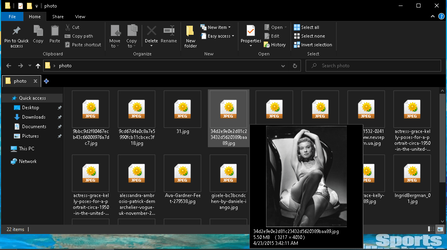
Btw there is a software that dose exactly what I want. It's called QTTabBar. Once you install it , if you hover your mouse pointer on top of an image, you will see a preview of the image (not in context menu, which is even better)
Untitled5.png

But I don't need the other options of that software. So maybe it would be possible to extract only this part or find a similar software!
 

My Computer My Computer

At a glance

WindowsIntel i7-12800HX32 GB DDR5 4800 MHz dual-channelNVIDIA® GeForce RTX™ 3070 Ti
OS
Windows
Computer type
Laptop
Manufacturer/Model
Lenovo Legion 7i
CPU
Intel i7-12800HX
Memory
32 GB DDR5 4800 MHz dual-channel
Graphics Card(s)
NVIDIA® GeForce RTX™ 3070 Ti
Sound Card
Steinberg UR44
Hard Drives
1 TB SSD (M.2 NVMe PCIe 4.0 x4
2 TB SSD Samsung 980 PRO NNMe
Browser
Firefox
Antivirus
Windows Defender + Malwarebytes
Explorer Patcher restores 1-tier context menus.
 

My Computer My Computer

At a glance

Windows 11
OS
Windows 11
Explorer Patcher restores 1-tier context menus.
Thanks Anixx. I know that. But I really like the windows 11 new context menu and it's shortcuts and would like to keep it.
I think the best option is hidden somewhere in QTTabBar. I need to find which dll is responsible for the image preview and try to use that.
Help would of course be appreciated.
 

My Computer My Computer

At a glance

WindowsIntel i7-12800HX32 GB DDR5 4800 MHz dual-channelNVIDIA® GeForce RTX™ 3070 Ti
OS
Windows
Computer type
Laptop
Manufacturer/Model
Lenovo Legion 7i
CPU
Intel i7-12800HX
Memory
32 GB DDR5 4800 MHz dual-channel
Graphics Card(s)
NVIDIA® GeForce RTX™ 3070 Ti
Sound Card
Steinberg UR44
Hard Drives
1 TB SSD (M.2 NVMe PCIe 4.0 x4
2 TB SSD Samsung 980 PRO NNMe
Browser
Firefox
Antivirus
Windows Defender + Malwarebytes

Latest Support Threads

Back
Top Bottom