INACCESSIBLE_BOOT_DEVICE during upgrade to Windows 11


Rheinvalor001

Member
Local time
1:33 PM
Posts
3
OS
Windows 10
Hey guys, may I ask for help

This happened during Windows 11 Installation (I used the Installation Assistant to upgrade) and I’ve faced this error, when my device restarted it shows the error INACCESSIBLE_BOOT_DEVICE, i tried disabling VMD on my BIOS,

But it unsuccessfully installed Windows 11, leading me to undoing system changes, now it went back to Windows 10, unable to boot, tried opening the VMD on again and boots normally

What should I do when I’m upgrading to Windows 11? To prevent this from happening.

P.S. I want to try and upgrade through Windows Update, but i’m fearing that the error may show up again…

Thanks!
 
Windows Build/Version
Windows 10, Version 22H2 (OS Build 19045.6456)

My Computer My Computer

At a glance

Windows 1011th Gen Intel(R) Core(TM) i5-11400H64GBIntel(R) UHD Graphics; NVIDIA GeForce RTX 305...
OS
Windows 10
Computer type
Laptop
Manufacturer/Model
Acer
CPU
11th Gen Intel(R) Core(TM) i5-11400H
Memory
64GB
Graphics Card(s)
Intel(R) UHD Graphics; NVIDIA GeForce RTX 3050 Laptop GPU
Welcome to the forum.
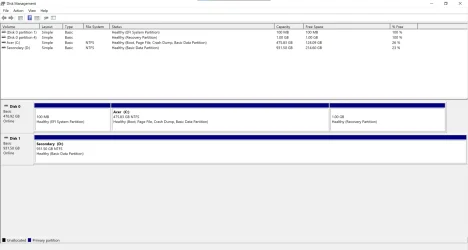
Please post a screenshot of disk management.
 

My Computers My Computers

  • At a glance

    Windows 11 Pro 25H2 26200.8875i9-10900 10 core 20 threads32 gbnone-Intel UHD Graphics 630
    OS
    Windows 11 Pro 25H2 26200.8875
    Computer type
    PC/Desktop
    Manufacturer/Model
    Dell Optiplex 7080
    CPU
    i9-10900 10 core 20 threads
    Motherboard
    DELL 0J37VM
    Memory
    32 gb
    Graphics Card(s)
    none-Intel UHD Graphics 630
    Sound Card
    Integrated Realtek
    Monitor(s) Displays
    Benq 27
    Screen Resolution
    2560x1440
    Hard Drives
    2x1tb Solidigm m.2 nvme /External drives 512gb Samsung m.2 sata+2tb Kingston m2.nvme
    PSU
    500w
    Case
    MT
    Cooling
    Dell Premium
    Keyboard
    Logitech wired
    Mouse
    Logitech wireless
    Internet Speed
    so slow I'm too embarrassed to tell
    Browser
    #1 Edge #2 Firefox
    Antivirus
    Defender+MWB Premium
  • At a glance

    Windows 11 Pro 24H2 26200.8875AMD Ryzen 7 6800U32 gbintegrated
    Operating System
    Windows 11 Pro 24H2 26200.8875
    Computer type
    PC/Desktop
    Manufacturer/Model
    Beelink Mini PC SER5
    CPU
    AMD Ryzen 7 6800U
    Memory
    32 gb
    Graphics card(s)
    integrated
    Sound Card
    integrated
    Monitor(s) Displays
    Benq 27
    Screen Resolution
    2560x1440
    Hard Drives
    1TB Crucial nvme
    Keyboard
    Logitech wired
    Mouse
    Logitech wireless
    Internet Speed
    still too embarrassed to tell
    Browser
    Firefox
    Antivirus
    Defender
    Other Info
    System 3 is non compliant Dell 9020 i7-4770/24gb ram Win11 PRO 26200.8875
Please run these scripts > post share links


1) Tune up plus:


2) Disk par info:


3) Disk management:


4) V2 log collector:


My Computer My Computer

At a glance

Windows 10Intel(R) Core(TM) i7-4800MQ CPU @ 2.70GHz16 GB Total: Manufacturer : Samsung MemoryTyp...NVIDIA Quadro K3100M; Intel(R) HD Graphics 4600
OS
Windows 10
Computer type
Laptop
Manufacturer/Model
HP
CPU
Intel(R) Core(TM) i7-4800MQ CPU @ 2.70GHz
Motherboard
Product : 190A Version : KBC Version 94.56
Memory
16 GB Total: Manufacturer : Samsung MemoryType : DDR3 FormFactor : SODIMM Capacity : 8GB Speed : 1600
Graphics Card(s)
NVIDIA Quadro K3100M; Intel(R) HD Graphics 4600
Sound Card
IDT High Definition Audio CODEC; PNP Device ID HDAUDIO\FUNC_01&VEN_111D&DEV_76E0
Hard Drives
Model Hitachi HTS727575A9E364
Antivirus
Microsoft Defender
Other Info
Mobile Workstation

Attachments

  • 1760679562799.webp
    1760679562799.webp
    49.1 KB · Views: 3

My Computer My Computer

At a glance

Windows 1011th Gen Intel(R) Core(TM) i5-11400H64GBIntel(R) UHD Graphics; NVIDIA GeForce RTX 305...
OS
Windows 10
Computer type
Laptop
Manufacturer/Model
Acer
CPU
11th Gen Intel(R) Core(TM) i5-11400H
Memory
64GB
Graphics Card(s)
Intel(R) UHD Graphics; NVIDIA GeForce RTX 3050 Laptop GPU
Have you checked your boot order in the BIOS?
 

My Computers My Computers

  • At a glance

    Windows 11 ProIntel Core i9-10900XCorsair 64 GB (4 x 16 GB) CMW64GX4M4C3000C15 ...GIGABYTE GeForce GTX 1660 Super Mini ITX 6 GB OC
    OS
    Windows 11 Pro
    Computer type
    PC/Desktop
    Manufacturer/Model
    Stigg's Build
    CPU
    Intel Core i9-10900X
    Motherboard
    GIGABYTE X299X DESIGNARE 10G
    Memory
    Corsair 64 GB (4 x 16 GB) CMW64GX4M4C3000C15 Vengeance RGB Pro 3000Mhz DDR4
    Graphics Card(s)
    GIGABYTE GeForce GTX 1660 Super Mini ITX 6 GB OC
    Sound Card
    Realtek ALC1220
    Monitor(s) Displays
    Samsung 27" FHD LED FreeSync Gaming Monitor (LS27F350FHEXXY)
    Screen Resolution
    1920 x 1080
    Hard Drives
    Samsung 970 Pro Series 1TB M.2 2280 NVMe SSD
    Western Digital Red Pro WD8003FFBX-68B9AN0 8 TB, 7200 RPM, SATA-III
    Western Digital Red Pro WD8003FFBX-68B9AN0 8 TB, 7200 RPM, SATA-III
    PSU
    Corsair HX1200 1200W 80 Plus Platinum
    Case
    Fractal Design Define 7 Black Solid Case
    Cooling
    Noctua NH-D15 Chromax Black
    Keyboard
    Razer Ornata V2
    Mouse
    Razer DeathAdder Essential
    Internet Speed
    FTTN 100Mbps / 40Mbps
    Browser
    Mozilla Firefox
    Antivirus
    N/A
    Other Info
    Logitech BRIO 4k Ultra HD USB-C Webcam
  • At a glance

    Windows 10 ProCore i7-8750HSK Hynix 32 GB (2 x 16 GB) HMA82GS6CJR8N-VK 1...NVIDIA GeForce GTX 1070
    Operating System
    Windows 10 Pro
    Computer type
    Laptop
    Manufacturer/Model
    ASUS ROG Zephyrus M GM501GS
    CPU
    Core i7-8750H
    Motherboard
    Zephyrus M GM501GS
    Memory
    SK Hynix 32 GB (2 x 16 GB) HMA82GS6CJR8N-VK 16 GB DDR4-2666 DDR4 SDRAM
    Graphics card(s)
    NVIDIA GeForce GTX 1070
    Sound Card
    Realtek ALC294
    Monitor(s) Displays
    AU Optronics B156HAN07.1 [15.6" LCD]
    Screen Resolution
    1920 x 1080
    Hard Drives
    Samsung MZVKW512HMJP-00000 512 GB, PCI-E 3.0 x4
    Samsung SSD 860 QVO 4TB 4 TB, SATA-III
    PSU
    N/A
    Case
    N/A
    Cooling
    N/A
    Keyboard
    PC/AT Enhanced PS2 Keyboard (101/102-Key)
    Mouse
    Razer DeathAdder Essential
    Internet Speed
    FTTN 100Mbps / 40Mbps
    Browser
    Mozilla Firefox
    Antivirus
    N/A
    Other Info
    USB2.0 HD UVC Webcam
That DM looks normal. Here are the things I know can cause such a problem. It could be any one of them but I'm leaning toward it being #1.

1. An upgrade rewrites the BCD data (no matter if the upgrade is performed by windows update, the installation assistant, or you). BCD is your bootloader.

2. I also know that the 11th gen i5 requires access to the proper storage controller drivers if RAID or VMD is enabled in the bios. Those drivers are called Intel Rapid Storage Controller.

3. I also read that if one goes into an upgrade with Bitlocker or Drive Encryption enabled that it can cause problems.
---------------------
Personally, if it were me, I would back up my personal data (unless you use a MS account and are syncing documents, desktop, pictures, and videos to Ondrive. In that case your files should be preserved) and do a clean install. I would change my disk mode in UEFI bios to AHCI with no RAID or VMD. Then boot from the installation usb drive. Doing so will make the Windows 11 install media SEE your drive.

Otherwise you will have to download the IRST driver package from Acer for your device, unzip the package and copy the drivers to another usb drive. Start the install process with both usb drives connected. During the install process you insert the drivers during the step when you see "add driver" Then the install will continue. Changing the bios setting is so much easier and less messy.
----------------------
That said, if you're absolutely determined you can perform the upgrade again & try to fix the problem if boot fails again. You will need a Windows 11 install usb drive to perform these steps.

Before starting the upgrade, Disable Bootlocker or Device Encryption in Windows 10 first. If the upgrade completes and it does not boot, try these fixes one at a time, trying to boot after each one. If it is not fixed, keep booting from the install disk to try the next possible fix.
NOTE: You will have to have already downloaded the drivers needed for step 3.
Go to Acer and download the Intel Rapid Storage Controller driver package for your device .Unzip it and copy the drivers to a flash drive

Fix 1. Insert a Windows 11 install usb and boot from it.
  • Choose Repair your computerTroubleshootStartup Repair. Let it scan and attempt automatic fixes.
Fix 2. Repair the BCD

From the recovery environment:

Open command prompt, type one at a time
bootrec /fixmbr
bootrec /fixboot
bootrec /scanos
bootrec /rebuildbcd

Fix 3. Load missing storage controller drivers using DISM.

From recovery, open Command Prompt and type:
dism /image:C:\ /add-driver /driver:D:\Drivers\iaStorAC.inf
(spaces after C:\ and after add-driver)
(Replace D:\Drivers\Drivername with the actual full path to the driver on the usb)

There are a number of drivers in the IRST driver package so do that for each one.
If anyone sees any mistakes in these commands, please let me know, I've only done this once.


Good Luck.
 

My Computers My Computers

  • At a glance

    Windows 11 Pro 25H2 26200.8875i9-10900 10 core 20 threads32 gbnone-Intel UHD Graphics 630
    OS
    Windows 11 Pro 25H2 26200.8875
    Computer type
    PC/Desktop
    Manufacturer/Model
    Dell Optiplex 7080
    CPU
    i9-10900 10 core 20 threads
    Motherboard
    DELL 0J37VM
    Memory
    32 gb
    Graphics Card(s)
    none-Intel UHD Graphics 630
    Sound Card
    Integrated Realtek
    Monitor(s) Displays
    Benq 27
    Screen Resolution
    2560x1440
    Hard Drives
    2x1tb Solidigm m.2 nvme /External drives 512gb Samsung m.2 sata+2tb Kingston m2.nvme
    PSU
    500w
    Case
    MT
    Cooling
    Dell Premium
    Keyboard
    Logitech wired
    Mouse
    Logitech wireless
    Internet Speed
    so slow I'm too embarrassed to tell
    Browser
    #1 Edge #2 Firefox
    Antivirus
    Defender+MWB Premium
  • At a glance

    Windows 11 Pro 24H2 26200.8875AMD Ryzen 7 6800U32 gbintegrated
    Operating System
    Windows 11 Pro 24H2 26200.8875
    Computer type
    PC/Desktop
    Manufacturer/Model
    Beelink Mini PC SER5
    CPU
    AMD Ryzen 7 6800U
    Memory
    32 gb
    Graphics card(s)
    integrated
    Sound Card
    integrated
    Monitor(s) Displays
    Benq 27
    Screen Resolution
    2560x1440
    Hard Drives
    1TB Crucial nvme
    Keyboard
    Logitech wired
    Mouse
    Logitech wireless
    Internet Speed
    still too embarrassed to tell
    Browser
    Firefox
    Antivirus
    Defender
    Other Info
    System 3 is non compliant Dell 9020 i7-4770/24gb ram Win11 PRO 26200.8875
That DM looks normal. Here are the things I know can cause such a problem. It could be any one of them but I'm leaning toward it being #1.

1. An upgrade rewrites the BCD data (no matter if the upgrade is performed by windows update, the installation assistant, or you). BCD is your bootloader.

2. I also know that the 11th gen i5 requires access to the proper storage controller drivers if RAID or VMD is enabled in the bios. Those drivers are called Intel Rapid Storage Controller.

3. I also read that if one goes into an upgrade with Bitlocker or Drive Encryption enabled that it can cause problems.
---------------------
Personally, if it were me, I would back up my personal data (unless you use a MS account and are syncing documents, desktop, pictures, and videos to Ondrive. In that case your files should be preserved) and do a clean install. I would change my disk mode in UEFI bios to AHCI with no RAID or VMD. Then boot from the installation usb drive. Doing so will make the Windows 11 install media SEE your drive.

Otherwise you will have to download the IRST driver package from Acer for your device, unzip the package and copy the drivers to another usb drive. Start the install process with both usb drives connected. During the install process you insert the drivers during the step when you see "add driver" Then the install will continue. Changing the bios setting is so much easier and less messy.
----------------------
That said, if you're absolutely determined you can perform the upgrade again & try to fix the problem if boot fails again. You will need a Windows 11 install usb drive to perform these steps.

Before starting the upgrade, Disable Bootlocker or Device Encryption in Windows 10 first. If the upgrade completes and it does not boot, try these fixes one at a time, trying to boot after each one. If it is not fixed, keep booting from the install disk to try the next possible fix.
NOTE: You will have to have already downloaded the drivers needed for step 3.
Go to Acer and download the Intel Rapid Storage Controller driver package for your device .Unzip it and copy the drivers to a flash drive

Fix 1. Insert a Windows 11 install usb and boot from it.
  • Choose Repair your computerTroubleshootStartup Repair. Let it scan and attempt automatic fixes.
Fix 2. Repair the BCD

From the recovery environment:

Open command prompt, type one at a time
bootrec /fixmbr
bootrec /fixboot
bootrec /scanos
bootrec /rebuildbcd

Fix 3. Load missing storage controller drivers using DISM.

From recovery, open Command Prompt and type:
dism /image:C:\ /add-driver /driver:D:\Drivers\iaStorAC.inf
(spaces after C:\ and after add-driver)
(Replace D:\Drivers\Drivername with the actual full path to the driver on the usb)

There are a number of drivers in the IRST driver package so do that for each one.
If anyone sees any mistakes in these commands, please let me know, I've only done this once.


Good Luck.
Thanks, @glasskuter will look into this.
 

My Computer My Computer

At a glance

Windows 1011th Gen Intel(R) Core(TM) i5-11400H64GBIntel(R) UHD Graphics; NVIDIA GeForce RTX 305...
OS
Windows 10
Computer type
Laptop
Manufacturer/Model
Acer
CPU
11th Gen Intel(R) Core(TM) i5-11400H
Memory
64GB
Graphics Card(s)
Intel(R) UHD Graphics; NVIDIA GeForce RTX 3050 Laptop GPU
When available please update the progress with post #3.
 

My Computer My Computer

At a glance

Windows 10Intel(R) Core(TM) i7-4800MQ CPU @ 2.70GHz16 GB Total: Manufacturer : Samsung MemoryTyp...NVIDIA Quadro K3100M; Intel(R) HD Graphics 4600
OS
Windows 10
Computer type
Laptop
Manufacturer/Model
HP
CPU
Intel(R) Core(TM) i7-4800MQ CPU @ 2.70GHz
Motherboard
Product : 190A Version : KBC Version 94.56
Memory
16 GB Total: Manufacturer : Samsung MemoryType : DDR3 FormFactor : SODIMM Capacity : 8GB Speed : 1600
Graphics Card(s)
NVIDIA Quadro K3100M; Intel(R) HD Graphics 4600
Sound Card
IDT High Definition Audio CODEC; PNP Device ID HDAUDIO\FUNC_01&VEN_111D&DEV_76E0
Hard Drives
Model Hitachi HTS727575A9E364
Antivirus
Microsoft Defender
Other Info
Mobile Workstation
Open command prompt, type one at a time
bootrec /fixmbr
bootrec /fixboot
bootrec /scanos
bootrec /rebuildbcd

Do not use the following commands, because that's all outdated stuff not used on UEFI/GPT systems.

bootsect (e.g. bootsect /nt60 sys)
  • Updates the boot code on MBR-style disks by writing new boot code to the MBR and/or Volume Boot Records (VBRs).
  • Not applicable to GPT disks, since GPT uses the EFI System Partition (ESP) with EFI boot files, not MBR/VBR boot code.

bootrec /fixmbr
  • Writes a standard Windows MBR to the first sector of the disk (sector 0).
  • Only relevant for MBR disks; GPT disks don’t use an MBR for booting (they just have a “protective MBR” to prevent legacy tools from misidentifying the disk).

bootrec /fixboot
  • Writes a new boot sector (VBR) to the system partition.
  • Only meaningful on BIOS/MBR setups; UEFI/GPT systems use the EFI System Partition (ESP) instead of a boot sector.
  • In Windows 10 (version 1709 and later) and Windows 11, the bootrec /fixboot command no longer works in the Windows Recovery Environment (WinRE), regardless of whether the disk uses GPT or MBR. Running the command results in an "Access is denied" error.

bootrec /scanos
  • Scans all disks for Windows installations that are not in the BCD store (Boot Configuration Data).
  • It only reports what it finds — it does not add them to the BCD store automatically.

bootrec /rebuildbcd
  • Scans all disks for Windows installations that are not in the BCD store.
  • It then gives you the option to add them into the BCD store.

⚠️ Limitations of bootrec /rebuildbcd
  • bootrec /rebuildbcd only manipulates the BCD database itself.
  • It does not recreate the actual boot files (like bootmgfw.efi or bootmgr) — that’s what the bcdboot command does.
  • If the system partition’s boot files are missing or corrupted, bootrec /rebuildbcd alone won’t fix that.


How to use the BCDBOOT command on a UEFI/GPT system
Post #17.
 
Last edited:

My Computers My Computers

  • At a glance

    Windows 11 ProAMD Ryzen 9 9950X3DKingston FURY Beast 64GB (2x32GB) DDR5 6000MT/sASUS TUF Gaming Radeon RX 9070 OC Edition 16G...
    OS
    Windows 11 Pro
    Computer type
    PC/Desktop
    CPU
    AMD Ryzen 9 9950X3D
    Motherboard
    ASRock B650E Taichi Lite
    Memory
    Kingston FURY Beast 64GB (2x32GB) DDR5 6000MT/s
    Graphics Card(s)
    ASUS TUF Gaming Radeon RX 9070 OC Edition 16GB GDDR6
    Hard Drives
    Solidigm P44 Pro 2TB M.2 NVMe SSD
  • At a glance

    Windows 11 HomeIntel Core Ultra 9 275HX64GB (2x 32GB) DDR5-6400NVIDIA GeForce RTX 5080 16GB GDDR7 Laptop GPU
    Operating System
    Windows 11 Home
    Computer type
    Laptop
    Manufacturer/Model
    Lenovo Legion Pro 7i Gen 10 16"
    CPU
    Intel Core Ultra 9 275HX
    Memory
    64GB (2x 32GB) DDR5-6400
    Graphics card(s)
    NVIDIA GeForce RTX 5080 16GB GDDR7 Laptop GPU
    Hard Drives
    2x 1TB M.2 NVMe SSD (SK Hynix)
Hey guys, may I ask for help

This happened during Windows 11 Installation (I used the Installation Assistant to upgrade) and I’ve faced this error, when my device restarted it shows the error INACCESSIBLE_BOOT_DEVICE, i tried disabling VMD on my BIOS,

But it unsuccessfully installed Windows 11, leading me to undoing system changes, now it went back to Windows 10, unable to boot, tried opening the VMD on again and boots normally

What should I do when I’m upgrading to Windows 11? To prevent this from happening.

P.S. I want to try and upgrade through Windows Update, but i’m fearing that the error may show up again…

Thanks!
I have this happen every time I try to do an in place update, which is basically what you are doing. After windows 11 undoes the update, If I run the update a second time, it always succeeds. I have not been able to determine the cause after spending some time debugging. Don't know if this quite applies to your case.
 

My Computers My Computers

  • At a glance

    Windows 11 ProIntel Core i9 14900K 5800/4500 P/E all core96GB (2x48) G.skill Ripjaws 6800 MT/s DDR5Asus ROG Strix 4070 Ti OC
    OS
    Windows 11 Pro
    Computer type
    PC/Desktop
    Manufacturer/Model
    DIY Photoshop/Audio/Game/tinker
    CPU
    Intel Core i9 14900K 5800/4500 P/E all core
    Motherboard
    Asus ROG Maximus Z790 Dark Hero
    Memory
    96GB (2x48) G.skill Ripjaws 6800 MT/s DDR5
    Graphics Card(s)
    Asus ROG Strix 4070 Ti OC
    Sound Card
    Bowers & Wilkins 606 S3 speakers; Audiolabs 7000a integrated amp; RSL 10S Mk2 sub; Creative Pebble Pro Minimilist
    Monitor(s) Displays
    Eizo CG2730 ColorEdge, ViewSonic VP2768, i1 Display Pro calibration puck
    Screen Resolution
    2560 x 1440p x 2
    Hard Drives
    WDC SN850X 4TB nvme, SN850 1TB nvme, SK-Hynix 2 TB P41 nvme,. Sabrent USB-C DS-SC5B 5-bay docking station: 6TB WDC Black, 6TB Ironwolf Pro; 2x 2TB WDC Black HDD
    PSU
    850W Seasonic Vertex PX-850 ATX 3.0/PCI-E 5.0
    Case
    Fractal Design North XL Mesh, Black Walnut
    Cooling
    EK Nucleus black 360 AIO w/Phanteks T30-120 fans, 2 Noctua NF-A14 Chromax case fan, 1 T30-120 fan cooling memory
    Keyboard
    Keychron Q3 Max TKL with custom GMK Redsuns Red Samuri keycaps, TX Stabs
    Mouse
    Logitech G305 wireless gaming
    Internet Speed
    575 Mb/s down | 25 Mb/s up
    Browser
    Firefox
    Antivirus
    Defender, Macrium Reflect X
    Other Info
    Phangkey Amaterasu V2 Desk Mat
  • At a glance

    Apple M1
    Computer type
    Laptop
    Manufacturer/Model
    💻 Apple 13" Macbook Pro 2020 (m1)
    CPU
    Apple M1
    Screen Resolution
    2560x1600
    Browser
    Firefox
Boot from Windows 11 Installation Media:
  1. Insert the Media (DVD/USB) in your PC and restart.
  2. Boot from the media.
  3. Select Repair Your Computer.
Select Troubleshoot.
  1. Choose Command Prompt from the menu:
Type in the command:
Diskpart

Type in the command:
List disk (Note which disk is your Boot drive number mine is 0)

Type in the command:
Sel disk 0

Type in the command:
List vol (Note which volume is the EFI partition mine is 4, usually 100MB or 200MB partition without assigned letter)

Type in the command:
Sel vol 4

Type in the command:
assign letter=V:

Type in the command:
Exit

Type in the command:
V:

After you have assigned a drive letter Using Diskpart You can format the EFI partition:
Example: if you assigned a letter V to the partition the command would be:

format V: /FS:FAT32

Type in the command:
bcdboot C:\windows /s V: /f UEFI

Let us know if this work. In most cases this fixed any UEFI BCD issues for me.
 

My Computer My Computer

At a glance

Win 11 Pro Insider Beta (26220.8925), Kali LinuxAMD Ryzen 5 5600H16GB (2x8GB) Dual ChannelNvidia RTX 3050
OS
Win 11 Pro Insider Beta (26220.8925), Kali Linux
Computer type
Laptop
Manufacturer/Model
HP Victus 15
CPU
AMD Ryzen 5 5600H
Memory
16GB (2x8GB) Dual Channel
Graphics Card(s)
Nvidia RTX 3050
Monitor(s) Displays
1080p IPS 144Hz (Laptop Screen) + 3x 1080p 60Hz screens
Screen Resolution
4x 1920x1080 monitors
Hard Drives
M.2 NVMe 512GB Samsung - PCIe 4.0x4 - Main system drive

USB-A and USB-C M.2 NVMe Enclosure with NVMe SSSTC 256GB - NVM Express 1.3 - Ventoy with all install files and all ISO images i use.

USB External SSD Kingston XS100 1TB - USB 3.2 Gen 2 - WindowsToGo (Clone of my existing Sytem), and all games I play.

USB External SSHD Seagate FireCuda 2TB - USB 3.0 - For Macrium system images, data, photos, stays always safe at home
PSU
200W
Cooling
Zalman ZM-NC3 Cooling pad
Keyboard
Dell KM7120W
Mouse
Dell KM7120W
Internet Speed
1Gb/s down / 500Mb/s up
Browser
Chrome
Antivirus
Windows Defender
I would first backup the previous Windows installation so I can restore if anything goes wrong. Then I would download and install latest IRST (Intel Rapid Storage Technology) drivers from Intel so Setup won't try to update them and just proceed. This hopefully will prevent the Inaccessible Boot Device error. Then I would proceed with the upgrade.
 

My Computers My Computers

  • At a glance

    Windows 11 Pro 23H2 (5699), 25H2 (8875)Mobile DualCore Intel Core 2 Duo T7250, 2000 MHz4GBMobile Intel(R) GMA 4500M (Mobile 4 series)
    OS
    Windows 11 Pro 23H2 (5699), 25H2 (8875)
    Computer type
    Laptop
    Manufacturer/Model
    Acer Extensa 5630EZ
    CPU
    Mobile DualCore Intel Core 2 Duo T7250, 2000 MHz
    Motherboard
    Acer Extensa 5630
    Memory
    4GB
    Graphics Card(s)
    Mobile Intel(R) GMA 4500M (Mobile 4 series)
    Sound Card
    Realtek ALC268 @ Intel 82801IB ICH9 - High Definition Audio Controller
    Monitor(s) Displays
    1
    Screen Resolution
    1280x800
    Hard Drives
    Samsung SSD 850 EVO 250GB SATA Device (250 GB, SATA-III)
    Internet Speed
    VDSL 50 Mbps
    Browser
    MICROSOFT EDGE
    Antivirus
    WINDOWS DEFENDER
    Other Info
    Legacy MBR installation, no TPM, no Secure Boot, no WDDM 2.0 graphics drivers, no SSE4.2, cannot get more unsupported ;) This is only my test laptop. I had installed Windows 11 here before upgrading my main PC. For my main PC I use everyday see my 2nd system specs.
  • At a glance

    Windows 11 Pro v25H2 (build 26200.8875)Intel Core-i7 3770 3.40GHz s1155 (3rd generat...2x Kingston Hyper-X Blu 8GB DDR3-1600GIGABYTE GeForce RTX 3050 WINDFORCE OC V2 6GB...
    Operating System
    Windows 11 Pro v25H2 (build 26200.8875)
    Computer type
    PC/Desktop
    Manufacturer/Model
    Custom-built PC
    CPU
    Intel Core-i7 3770 3.40GHz s1155 (3rd generation)
    Motherboard
    Asus P8H61 s1155 ATX
    Memory
    2x Kingston Hyper-X Blu 8GB DDR3-1600
    Graphics card(s)
    GIGABYTE GeForce RTX 3050 WINDFORCE OC V2 6GB (GV-N3050WF2OCV2-6GD)
    Sound Card
    Realtek HD audio (ALC887)
    Monitor(s) Displays
    Sony Bravia KDL-19L4000 19" LCD TV via VGA
    Screen Resolution
    1440x900 32-bit 60Hz
    Hard Drives
    WD Blue SA510 2.5 1000GB SSD as system disk, Western Digital Caviar Purple 4TB SATA III (WD40PURZ) as second
    PSU
    Thermaltake Litepower RGB 550W Full Wired
    Case
    SUPERCASE MIDI-TOWER
    Cooling
    Deepcool Gamma Archer CPU cooler, 1x 8cm fan at the back
    Keyboard
    Mitsumi 101-key PS/2
    Mouse
    Sunnyline OptiEye PS/2
    Internet Speed
    100Mbps
    Browser
    Microsoft Edge, Mozilla Firefox
    Antivirus
    Microsoft Windows Defender
    Other Info
    Legacy BIOS (MBR) installation, no TPM, no Secure Boot, WDDM 3.0 graphics drivers, WEI score 7.4
Agree with Thorenzz as rebuilding the boot partition has fixed inaccessible boot device during upgrades.

However there can be multiple causes.

The log files may have useful information.


In addition run > post a share link


a) upgrade_failure_info


b) dism /online /get-drivers /format:table >c:\drivers.txt
 

My Computer My Computer

At a glance

Windows 10Intel(R) Core(TM) i7-4800MQ CPU @ 2.70GHz16 GB Total: Manufacturer : Samsung MemoryTyp...NVIDIA Quadro K3100M; Intel(R) HD Graphics 4600
OS
Windows 10
Computer type
Laptop
Manufacturer/Model
HP
CPU
Intel(R) Core(TM) i7-4800MQ CPU @ 2.70GHz
Motherboard
Product : 190A Version : KBC Version 94.56
Memory
16 GB Total: Manufacturer : Samsung MemoryType : DDR3 FormFactor : SODIMM Capacity : 8GB Speed : 1600
Graphics Card(s)
NVIDIA Quadro K3100M; Intel(R) HD Graphics 4600
Sound Card
IDT High Definition Audio CODEC; PNP Device ID HDAUDIO\FUNC_01&VEN_111D&DEV_76E0
Hard Drives
Model Hitachi HTS727575A9E364
Antivirus
Microsoft Defender
Other Info
Mobile Workstation
Boot from Windows 11 Installation Media:
  1. Insert the Media (DVD/USB) in your PC and restart.
  2. Boot from the media.
  3. Select Repair Your Computer.
Select Troubleshoot.
  1. Choose Command Prompt from the menu:
Type in the command:
Diskpart

Type in the command:
List disk (Note which disk is your Boot drive number mine is 0)

Type in the command:
Sel disk 0

Type in the command:
List vol (Note which volume is the EFI partition mine is 4, usually 100MB or 200MB partition without assigned letter)

Type in the command:
Sel vol 4

Type in the command:
assign letter=V:

Type in the command:
Exit

Type in the command:
V:

After you have assigned a drive letter Using Diskpart You can format the EFI partition:
Example: if you assigned a letter V to the partition the command would be:

format V: /FS:FAT32

Type in the command:
bcdboot C:\windows /s V: /f UEFI

Let us know if this work. In most cases this fixed any UEFI BCD issues for me.
I forgot to say to do this after you upgrade to win 11, and you are unable to boot. ;)
 

My Computer My Computer

At a glance

Win 11 Pro Insider Beta (26220.8925), Kali LinuxAMD Ryzen 5 5600H16GB (2x8GB) Dual ChannelNvidia RTX 3050
OS
Win 11 Pro Insider Beta (26220.8925), Kali Linux
Computer type
Laptop
Manufacturer/Model
HP Victus 15
CPU
AMD Ryzen 5 5600H
Memory
16GB (2x8GB) Dual Channel
Graphics Card(s)
Nvidia RTX 3050
Monitor(s) Displays
1080p IPS 144Hz (Laptop Screen) + 3x 1080p 60Hz screens
Screen Resolution
4x 1920x1080 monitors
Hard Drives
M.2 NVMe 512GB Samsung - PCIe 4.0x4 - Main system drive

USB-A and USB-C M.2 NVMe Enclosure with NVMe SSSTC 256GB - NVM Express 1.3 - Ventoy with all install files and all ISO images i use.

USB External SSD Kingston XS100 1TB - USB 3.2 Gen 2 - WindowsToGo (Clone of my existing Sytem), and all games I play.

USB External SSHD Seagate FireCuda 2TB - USB 3.0 - For Macrium system images, data, photos, stays always safe at home
PSU
200W
Cooling
Zalman ZM-NC3 Cooling pad
Keyboard
Dell KM7120W
Mouse
Dell KM7120W
Internet Speed
1Gb/s down / 500Mb/s up
Browser
Chrome
Antivirus
Windows Defender
Back
Top Bottom