Install Proofing Pack for MS Office 2016 Standard 32-bit


DrR3EMAN2026

New member
Local time
12:22 PM
Posts
5
OS
.
Hi,

Yes, it looks great but if you don't mind, tell me how to install the Proofing Pack for MS Office 2016 Standard 32-bit. I tried back and forth changing languages in Windows - English primary, then Romanian secondary, then reversed it again - i work better in English.

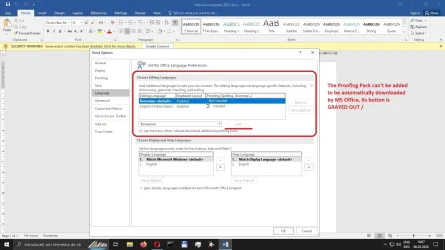
Ofcourse I tried to install it in MS Office 2016 Std. 32-bit first but as you see in below attached images, the button for adding the Proofing Language Pack is grayed out that meaning it is inactive.

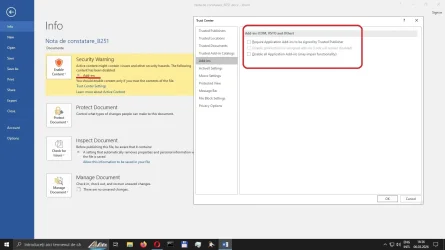
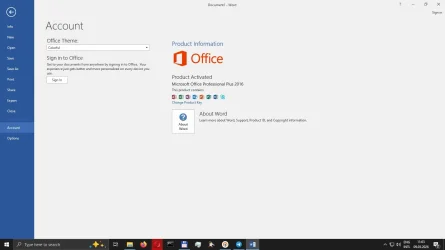
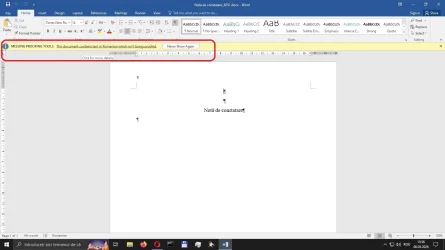
From when i begun working in this file in Romanian language from time to time it shows me that 3rd image with Security Warning from Trusted Center->Add-ins section and it won't disapear until I get lowest possible setting for Add-ins, ActiveX, Macro. Ofcourse no real effect over Language Pack I observed until now even i restarted MS Office 2016.


Best regards,
Dr.Freeman
 

Attachments
  • 1.Proofing-4-MSOFFICE-2016-STD-32bit_1.webp
    1.Proofing-4-MSOFFICE-2016-STD-32bit_1.webp
    46.3 KB · Views: 1
  • 2.Proofing-4-MSOFFICE-2016-STD-32bit_2.webp
    2.Proofing-4-MSOFFICE-2016-STD-32bit_2.webp
    82.5 KB · Views: 1
  • 3.Proofing-4-MSOFFICE-2016-STD-32bit_3.webp
    3.Proofing-4-MSOFFICE-2016-STD-32bit_3.webp
    57 KB · Views: 2

My Computer

System One

  • OS
    .
    Hard Drives
    1TB Seagate
Hi,

I downloaded 3 version of proofing tools in 3 different moments in time for MS Office Standard Edition, 32-bit, x86 and don't work none of it.

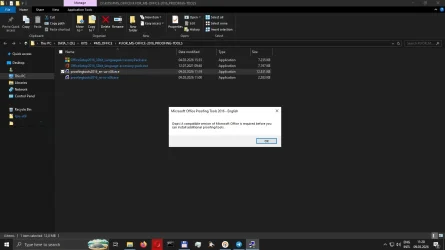
I was under impression that MS Office versions - Standard, Pro, Pro Plus - will accept any proofing pack on target platform Software - 32-bit, x86 - but I could be wrong as again I tried to install that proofing pack - @Hornblower409 - thank you for that 2016 proofing pack link, I only found effectively only 365 proofing packs - and all of it gives me same error message:


"Oops! A compatible version of MS Office is required before you can install additional proofing tools."

Download Microsoft Office Proofing Tools 2016 - English from Official Microsoft Download Center (2nd image) - yes, I provided it in English for convenience, it's the the same message in my language, too.

proofingtools2016_en-us-x86.exe
=============================================


But searching the Internet I found a MS page about WHY none of the language packs can't install - either x86, 32-bit or x64 - it has something to do with installer technology used at that time for installing MS Office 2016 Standard, Professional Pro Plus:


Still I can't imagine that isn't any proofing pack for MS Office 2016 Professional Pro Plus in existence on the face of the Earth.
 

Attachments

  • 4.Proofing-4-MSOFFICE-2016-PRO-PLUS-32bit_4.webp
    4.Proofing-4-MSOFFICE-2016-PRO-PLUS-32bit_4.webp
    34.4 KB · Views: 1
  • 5.Proofing-4-MSOFFICE-2016-PRO-PLUS-32bit_5.webp
    5.Proofing-4-MSOFFICE-2016-PRO-PLUS-32bit_5.webp
    60.6 KB · Views: 1

My Computer

System One

  • OS
    .
    Hard Drives
    1TB Seagate

My Computers

System One System Two

  • OS
    macOS 14.x (plus Windows 11, Debian, FreeBSD for ARM64)
    Computer type
    Laptop
    Manufacturer/Model
    MacBook Pro M1 MAX
    CPU
    Apple M1 Max (T6001) - 8 performance 2 efficiency cores
    Memory
    32GB LPDDR5
    Graphics Card(s)
    Apple M1 Max (32-core)
    Hard Drives
    a) 1TB SSD + + 1TB SD Card + external SSD Drives
    Browser
    1. Safari 2. DuckDuckGo
    Antivirus
    -
  • Operating System
    Windows 11 Pro, plus VirtualBox VMs: various Windows & Linux
    Computer type
    Laptop
    Manufacturer/Model
    Microsoft Surface Laptop Studio
    CPU
    i7
    Memory
    32GB
    Hard Drives
    1TB SSD, plus external SSDs for Virtual Machines etc.
    Browser
    1. MS Edge 2. DuckDuckGo
    Antivirus
    Defender

My Computer

System One

  • OS
    Windows 10, Windows 11
    Computer type
    PC/Desktop
Yes, that's one of the message. when it is run from those 365 Language packs:

===================

Update for Microsoft Office 2016 Language Interface Pack (KB3115095) 32-Bit Edition​


gives as similar reply but with a bigger window.

The content of message and its presentation differ a little but its meaning is the same: the Language Service Pack and the software/ MS Office 2016 Pro Plus aren't compatible.

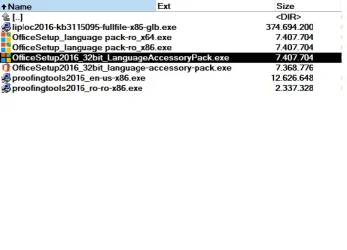
Attached are all Language Service Pack versions found for my MS Office 2016 Professional Plus, it is obvious after the size that exist some similarities between the files.

I'm stuck, I do not know what to do.
 

Attachments

  • 6.Proofing-4-MSOFFICE-2016-PRO-PLUS-32bit_6.webp
    6.Proofing-4-MSOFFICE-2016-PRO-PLUS-32bit_6.webp
    23 KB · Views: 1

My Computer

System One

  • OS
    .
    Hard Drives
    1TB Seagate
Try posting your question on the Microsoft Q&A Forum? (See my previous comment).
 

My Computer

System One

  • OS
    Windows 10, Windows 11
    Computer type
    PC/Desktop
please try
on the start menu right click your office program
the Word menu entry should do, right click that.

on the right click menu, click open as Administrator
when word opens in Administrator mode
you should now have access to the areas that are greyed out

now you should be able to install the updates you require.
best of luck Steve ..
 

My Computers

System One System Two

  • OS
    Windows 11 Home
    Computer type
    PC/Desktop
    Manufacturer/Model
    HP 24" AiO
    CPU
    Ryzen 7 5825u
    Motherboard
    HP
    Memory
    64GB DDR4 3200
    Graphics Card(s)
    Ryzen 7 5825u
    Sound Card
    RealTek
    Monitor(s) Displays
    24" HP AiO
    Screen Resolution
    1920 x 1080 @60 Hz
    Hard Drives
    1TB WD Blue SN580 M2 SSD Partitioned.
    2x 1TB USB HDD External Backup/Storage.
    PSU
    90W external power brick
    Case
    24" All in One
    Cooling
    Default Air Cooling
    Keyboard
    HP WiFi UK extended
    Mouse
    HP WiFi 3 Button
    Internet Speed
    1GB full fibre
    Browser
    Edge & Firefox
    Antivirus
    AVG Internet Security/Windows Defender
    Other Info
    Mainly Open Source Software
  • Operating System
    Ubuntu 22.04.5 LTS
    Computer type
    Laptop
    Manufacturer/Model
    Dell 13" Latitude 2017
    CPU
    i5 7200u
    Motherboard
    Dell
    Memory
    16GB DDR4
    Graphics card(s)
    Intel
    Sound Card
    Intel
    Monitor(s) Displays
    13" Dell Laptop
    Hard Drives
    250GB Crucial 2.5" SSD
    Mouse
    Generic WiFi 3 button
    Internet Speed
    WiFi only
    Browser
    Firefox
    Antivirus
    ClamAV TK
    Other Info
    Mainly Open Source Software
@XxXxX - I tried, no change at all. My user is also Administrator on this PC. I'll try to throw a question to MS Support on their Q&A forum as Hornblower409 suggested
 

My Computer

System One

  • OS
    .
    Hard Drives
    1TB Seagate
Back
Top Bottom