
Navigation
Install the app
How to install the app on iOS
Follow along with the video below to see how to install our site as a web app on your home screen.
Note: This feature may not be available in some browsers.
More options
Style variation
System
Light
Dark
You are using an out of date browser. It may not display this or other websites correctly.
You should upgrade or use an alternative browser.
You should upgrade or use an alternative browser.
Solved install windows 11 with a local account instead of a microsoft account
- Thread starter cokedude
- Start date

Is there a way to install windows 11 with a local account instead of a microsoft account?
Welcome to ElevenForum.

Step #19, here...

Clean Install Windows 11
This tutorial will show you step by step on how to clean install Windows 11 at boot on your PC with or without an Internet connection and setup with a local account or Microsoft account. Windows 11 has all the power and security of Windows 10 with a redesigned and refreshed look. It also comes...
 www.elevenforum.com
My Computers
-
At a glance
Win 11 Home ♦♦♦26300.9445 ♦♦♦♦♦♦♦26H2AMD Ryzen 7 3700XG.Skill (F4-3200C14D-16GTZKW)EVGA RTX 2070 (08G-P4-2171-KR)- OS
- Win 11 Home ♦♦♦26300.9445 ♦♦♦♦♦♦♦26H2
- Computer type
- PC/Desktop
- Manufacturer/Model
- Built by Ghot® [May 2020]
- CPU
- AMD Ryzen 7 3700X
- Motherboard
- Asus Pro WS X570-ACE (BIOS 5302)
- Memory
- G.Skill (F4-3200C14D-16GTZKW)
- Graphics Card(s)
- EVGA RTX 2070 (08G-P4-2171-KR)
- Sound Card
- Realtek ALC1220P / ALC S1220A
- Monitor(s) Displays
- Dell U3011 30"
- Screen Resolution
- 2560 x 1600
- Hard Drives
- 2x Samsung 860 EVO 500GB,
WD 4TB Black FZBX - SATA III,
WD 8TB Black FZBX - SATA III,
DRW-24B1ST CD/DVD Burner
- PSU
- PC Power & Cooling 750W Quad EPS12V
- Case
- Cooler Master ATCS 840 Tower
- Cooling
- CM Hyper 212 EVO (push/pull)
- Keyboard
- Ducky DK9008 Shine II Blue LED
- Mouse
- Logitech Optical M-100
- Internet Speed
- 300/300
- Browser
- Firefox (latest)
- Antivirus
- Bitdefender Total Security
- Other Info
- Speakers: Klipsch Pro Media 2.1
-
At a glance
Windows XP Pro 32bit w/SP3AMD Athlon 64 X2 5000+ (OC'd @ 3.2Ghz)TWIN2X2048-6400C4DHX (2 x 1GB, DDR2 800)EVGA 256-P2-N758-TR GeForce 8600GT SSC- Operating System
- Windows XP Pro 32bit w/SP3
- Computer type
- PC/Desktop
- Manufacturer/Model
- Built by Ghot® (not in use)
- CPU
- AMD Athlon 64 X2 5000+ (OC'd @ 3.2Ghz)
- Motherboard
- ASUS M2N32-SLI Deluxe Wireless Edition
- Memory
- TWIN2X2048-6400C4DHX (2 x 1GB, DDR2 800)
- Graphics card(s)
- EVGA 256-P2-N758-TR GeForce 8600GT SSC
- Sound Card
- Onboard
- Monitor(s) Displays
- ViewSonic G90FB Black 19" Professional (CRT)
- Screen Resolution
- up to 2048 x 1536
- Hard Drives
- WD 36GB 10,000rpm Raptor SATA
Seagate 80GB 7200rpm SATA
Lite-On LTR-52246S CD/RW
Lite-On LH-18A1P CD/DVD Burner
- PSU
- PC Power & Cooling Silencer 750 Quad EPS12V
- Case
- Generic Beige case, 80mm fans
- Cooling
- ZALMAN 9500A 92mm CPU Cooler
- Keyboard
- Logitech Classic Keybooard 200
- Mouse
- Logitech Optical M-BT96a
- Internet Speed
- 300/300
- Browser
- Firefox 3.x ??
- Antivirus
- Symantec (Norton)
- Other Info
- Still assembled, still runs. Haven't turned it on for 15 years?

- Local time
- 6:19 AM
- Posts
- 394
- OS
- Windows 11 Pro 25H2 build 26200.9168
Hi cokedude,
See step 21 here:
www.elevenforum.com
Kind regards,
tecknot
See step 21 here:
Clean Install Windows 11
This tutorial will show you step by step on how to clean install Windows 11 at boot on your PC with or without an Internet connection and setup with a local account or Microsoft account. Windows 11 has all the power and security of Windows 10 with a redesigned and refreshed look. It also comes...
www.elevenforum.com
Kind regards,
tecknot
My Computer
At a glance
Windows 11 Pro 25H2 build 26200.9168Intel i7 8750H @ 2.2 GHz16 GB (all Samsung) DDR4-3200 SODIMM (non-ECC...Intel UHD Graphics 630 & NVIDIA Quadro P600
- OS
- Windows 11 Pro 25H2 build 26200.9168
- Computer type
- Laptop
- Manufacturer/Model
- Lenovo ThinkPad Workstation P72
- CPU
- Intel i7 8750H @ 2.2 GHz
- Motherboard
- Lenovo 01YU291
- Memory
- 16 GB (all Samsung) DDR4-3200 SODIMM (non-ECC) PCIe 3
- Graphics Card(s)
- Intel UHD Graphics 630 & NVIDIA Quadro P600
- Sound Card
- Realtek ALC3286 & Focusrite Saffire 24 Pro DSP
- Monitor(s) Displays
- 17.3"
- Screen Resolution
- 3840x2160
- Hard Drives
- 1TB SSD Samsung 860 EVO SATA 3
1TB SSD Samsung 970 EVO M.2 NVMe PCIe 3 x 4
2TB SSD Samsung 990 PRO M.2 NVMe PCIe 3 x 4
- PSU
- 230W
- Cooling
- fan
- Keyboard
- UltraNav
- Mouse
- Kensington wireless Orbit
- Internet Speed
- 640Mbps
- Browser
- DuckDuckGo and Firefox
- Antivirus
- Defender
- Other Info
- CM246 Chipset

Welcome to Eleven Forum.Is there a way to install windows 11 with a local account instead of a microsoft account?
Yes, in fact I've just clean installed 23H2 today without connecting to the internet or using a Microsoft account.
At the initial setup screen after installing W11, press Shift+F10. This opens a command prompt. Type the command (note: there are no spaces in this command)
OOBE\BypassNROThe PC will restart and this time you'll see the option to skip connecting to the internet. You'll then be able to set it up with a local account.
Last edited:
My Computers
-
At a glance
Windows 11 HomeAMD Athlon Silver 3050U8GBRadeon Graphics- OS
- Windows 11 Home
- Computer type
- Laptop
- Manufacturer/Model
- Acer Aspire 3 A315-23-R9VY
- CPU
- AMD Athlon Silver 3050U
- Memory
- 8GB
- Graphics Card(s)
- Radeon Graphics
- Monitor(s) Displays
- laptop screen
- Screen Resolution
- 1366x768 native resolution, up to 2560x1440 with Radeon Virtual Super Resolution
- Hard Drives
- 1TB Samsung EVO 870 SSD (from April 2026: 250GB EVO 850)
- Internet Speed
- 150 Mbps
- Browser
- Edge, Firefox
- Antivirus
- Defender
- Other Info
- UPDATE - 11 April 2026: due to lid hinges starting to break up this laptop has been retired from active duty. The OS with all software and files has been migrated to my System Seven in 'Other systems' to carry on as my general purpose 'main machine'.
I've now clean installed 25H2 and used Garlin's scripts to update Secure Boot to CA 2023 and revoke the PCA 2011 certificates. It's new role is to test secure boot issues.
Info for 2021-2026:
fully 'Windows 11 ready' laptop. Windows 10 C: partition migrated from my old unsupported 'main machine' then upgraded to 11. A test migration ran Insider builds for 2 months. When 11 was released on 5th October 2021 it was re-imaged back to 10 and was offered the upgrade in Windows Update on 20th October. Windows Update offered the 22H2 Feature Update on 20th September 2022. It got the 23H2 Feature Update on 4th November 2023 through Windows Update, 24H2 on 3rd October 2024 through Windows Update by setting the Target Release Version for 24H2, and 25H2 on 30th September 2025 through Windows Update by setting the Target Release Version for 25H2.
-
At a glance
Windows 11 ProIntel® Core™ i5-520M8GB(integrated graphics) Intel HD Graphics- Operating System
- Windows 11 Pro
- Computer type
- Laptop
- Manufacturer/Model
- Dell Latitude E4310
- CPU
- Intel® Core™ i5-520M
- Motherboard
- 0T6M8G
- Memory
- 8GB
- Graphics card(s)
- (integrated graphics) Intel HD Graphics
- Screen Resolution
- 1366x768
- Hard Drives
- 500GB Crucial MX500 SSD
- Browser
- Firefox, Edge
- Antivirus
- Defender
- Other Info
- unsupported machine: Legacy bios, MBR, TPM 1.2, upgraded from W10 to W11 using W10/W11 hybrid install media workaround.
In-place upgrade to 22H2 using ISO and a workaround.
Feature Update to 23H2 by manually installing the Enablement Package.
In-place upgrade to 24H2 using hybrid 23H2/24H2 install media.
Upgraded to 25H2 by Enablement Package.
Also running Insider Experimental 263xx and 29xxx builds and Windows 10 as native boot .vhdx.
-
My SYSTEM THREE is a Dell Latitude 5410, i7-10610U, 32GB RAM, 512GB NVMe ssd, supported device running Windows 11 Pro.
My SYSTEM FOUR was a 2-in-1 convertible Lenovo Yoga 11e (1st gen) type 20DA, Celeron N2930, 8GB RAM, 256GB ssd. Unsupported device. This has now been sold. It has been replaced by my System Eight.
My SYSTEM FIVE is a Dell Latitude 3190 2-in-1, Pentium Silver N5030, 8GB RAM, 1TB NVMe ssd, supported device running Windows 11 Pro, plus Insider Beta, Experimental 263xx and 29xxx builds (and a few others) as a native boot .vhdx.
My SYSTEM SIX is a Dell Latitude 5550, Core Ultra 7 165H, 64GB RAM, 1TB NVMe SSD, supported device, Windows 11 Pro, Hyper-V host machine. Updated to 25H2 on 30th September 2025.
My SYSTEM SEVEN is a Lenovo Thinkpad T580, 1920x1080 touchscreen, Intel Core i7-8650U, 16GB RAM, 512GB NVMe SSD + 2nd 512GB NVMe SSD, a supported device for Windows 11. This is my current general purpose 'main machine'. The installed Windows 11 Home from my System One has been migrated to this machine. As its new home has an existing digital licence for Pro I've been able to upgrade the migrated OS from Home to Pro.
My SYSTEM EIGHT is a 2-in-1 convertible Lenovo Yoga 11e (5th gen) type 20LN, Celeron N4120, 8GB RAM, 512GB NVMe ssd, a supported device for Windows 11. Currently running Windows 11 Pro, plus Insider Beta, Experimental 263xx and 29xxx builds as native boot vhdx.

Or you can simply install Windows 11 and when asked for your Microsoft account credentials, enter a bogus email address and password.
E.G. fred@bear.com Password=bear
You will then see a message,
E.G. fred@bear.com Password=bear
You will then see a message,
There was an error and you will then continue on to create a Local account.My Computer
At a glance
Windows 11 ProRyzen 9 3900XG-Skill RipjawsV F4-3600C18 (16GB x 2)Gigabyte RX 5700 XT Gaming OC
- OS
- Windows 11 Pro
- Computer type
- PC/Desktop
- CPU
- Ryzen 9 3900X
- Motherboard
- ASUS ROG Strix X570-E Gaming
- Memory
- G-Skill RipjawsV F4-3600C18 (16GB x 2)
- Graphics Card(s)
- Gigabyte RX 5700 XT Gaming OC
- Sound Card
- Realtek ALC1220P
- Monitor(s) Displays
- ASUS VE278 (x 2)
- Screen Resolution
- 1920x1080
- Hard Drives
- Samsung 850 Pro 256GB
Samsung 970 Pro NVMe 512GB (x 2)
ST10000VN0004 10TB (x 2)
ST10000VN0008 10TB (x 2)
ST4000VN000 4TB (x 2)
- PSU
- Corsair HX1000
- Case
- Corsair Carbide 400R
- Cooling
- AMD Wraith Prism (Stock)
- Keyboard
- Logitech G213
- Mouse
- Logitech G502
- Internet Speed
- 100Mbps down / 40Mbps up
- Browser
- Firefox - Chrome - Edge
- Antivirus
- Windows Defender - Clamwin

- Local time
- 2:19 PM
- Posts
- 4,018
- OS
- Windows 11 Home 25H2
That’s not working - the system cannot find the path specified - are those first two zeros numbers or capital O? I didn’t leave any spaces.Welcome to Eleven Forum.
Yes, in fact I've just clean installed 23H2 today without connecting to the internet or using a Microsoft account.
At the initial setup screen after installing W11, press Shift+F10. This opens a command prompt. Type the command (note: there are no spaces in this command)OOBE\BypassNRO
The PC will restart and this time you'll see the option to skip connecting to the internet. You'll then be able to set it up with a local account.
Edit - this did work - it’s capital O
Dur! Of course it’s letter O - out of box experience
Last edited:
My Computers
-
At a glance
Windows 11 Home 25H2Core i5-1035G132gb- OS
- Windows 11 Home 25H2
- Computer type
- Laptop
- Manufacturer/Model
- HP Pavilion 14-ce3606sa
- CPU
- Core i5-1035G1
- Memory
- 32gb
- Hard Drives
- Samsung 870 evo sata ssd
- Cooling
- Could be better
- Internet Speed
- 50 mbps Starlink
- Browser
- Firefox
- Other Info
- Originally came installed with a 500gb H10 Optane ssd
-
At a glance
Windows 11 HomeIntel Core i5-1035G116gb- Operating System
- Windows 11 Home
- Computer type
- Laptop
- Manufacturer/Model
- HP Pavilion ce3606sa
- CPU
- Intel Core i5-1035G1
- Memory
- 16gb
- Hard Drives
- Hynix Gold P31 2TB
- Internet Speed
- 200mbps Starlink
- Browser
- Firefox
- Antivirus
- Defender
- Local time
- 2:19 PM
- Posts
- 4,018
- OS
- Windows 11 Home 25H2
This didn’t work. It just asks you to make a new ms account.Or you can simply install Windows 11 and when asked for your Microsoft account credentials, enter a bogus email address and password.
E.G. fred@bear.com Password=bear
You will then see a message,There was an errorand you will then continue on to create a Local account.
Last edited:
My Computers
-
At a glance
Windows 11 Home 25H2Core i5-1035G132gb- OS
- Windows 11 Home 25H2
- Computer type
- Laptop
- Manufacturer/Model
- HP Pavilion 14-ce3606sa
- CPU
- Core i5-1035G1
- Memory
- 32gb
- Hard Drives
- Samsung 870 evo sata ssd
- Cooling
- Could be better
- Internet Speed
- 50 mbps Starlink
- Browser
- Firefox
- Other Info
- Originally came installed with a 500gb H10 Optane ssd
-
At a glance
Windows 11 HomeIntel Core i5-1035G116gb- Operating System
- Windows 11 Home
- Computer type
- Laptop
- Manufacturer/Model
- HP Pavilion ce3606sa
- CPU
- Intel Core i5-1035G1
- Memory
- 16gb
- Hard Drives
- Hynix Gold P31 2TB
- Internet Speed
- 200mbps Starlink
- Browser
- Firefox
- Antivirus
- Defender

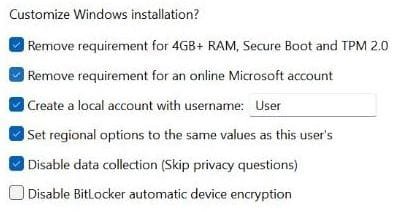
Is there a way to install windows 11 with a local account instead of a microsoft account?
Rufus - Free download and install on Windows | Microsoft Store
Rufus is a utility that helps format and create bootable USB flash drives, such as USB keys/pendrives, memory sticks, etc. • Official site: https://rufus.ie • Source Code: https://github.com/pbatard/rufus • ChangeLog: https://github.com/pbatard/rufus/blob/master/ChangeLog.txt
apps.microsoft.com
My Computer
At a glance
Home2FH2CanAMD Ryzen 5 8600G (07/24)2x32GB Kingston FURY DDR5 5600 MHz CL36 @5200...ASROCK Radeon RX 6600 Challenger D 8G @48FPS ...
- OS
- Home2FH2Can
- Computer type
- PC/Desktop
- CPU
- AMD Ryzen 5 8600G (07/24)
- Motherboard
- ASROCK B650M-HDV/M.2 (07/24) BIOS 4.43 AGESA ComboAM5 1.3.0.1b Patch A (07/26)
- Memory
- 2x32GB Kingston FURY DDR5 5600 MHz CL36 @5200 CL40 (07/24)
- Graphics Card(s)
- ASROCK Radeon RX 6600 Challenger D 8G @48FPS (08/24)
- Sound Card
- Creative Sound BlasterX AE-5 Plus (05/24)
- Monitor(s) Displays
- 24" Philips 24M1N3200ZS/00 (05/24)
- Screen Resolution
- 1920×1080@165Hz via DP1.4
- Hard Drives
- Kingston KC3000 NVMe 2TB (05/24)
ADATA XPG GAMMIX S11 Pro 512GB (07/19)
- PSU
- Seasonic Core GM 550 Gold (04/24)
- Case
- Fractal Design Define 7 Mini with 3x Noctua NF-P14s/12@555rpm (04/24)
- Cooling
- Noctua NH-U12S with Noctua NF-P12 (04/24)
- Keyboard
- HP Pavilion Wired Keyboard 300 (07/24) + Rabalux 76017 Parker (01/24)
- Mouse
- Logitech M330 Silent Plus (07/26)
- Internet Speed
- 500/100 Mbps via RouterOS (05/21) & TCP Optimizer
- Browser
- Edge, Brave for YouTube, LibreWolf for FB
- Antivirus
- NextDNS blocking 1/3 Traffic
- Other Info
- Phone: Motorola Moto G86 (02/26)
Backup: Hasleo Backup Suite (PreOS)
Headphones: Sennheiser RS170 (09/10)
Chair: Huzaro Force 4.4 Grey Mesh (05/24)
Notifier: Xiaomi Mi Band 9 Milanese (10/24)
FlexCore USB-C 3.2 Gen 1 (M) to LAN (F) (08/25)
Oddly, I've found that you have to type the command all in capitals.That’s not working - the system cannot find the path specified....
OOBE\BYPASSNRO - works fine
OOBE\BypassNRO - can't find path
My Computers
-
At a glance
Windows 11 HomeAMD Athlon Silver 3050U8GBRadeon Graphics- OS
- Windows 11 Home
- Computer type
- Laptop
- Manufacturer/Model
- Acer Aspire 3 A315-23-R9VY
- CPU
- AMD Athlon Silver 3050U
- Memory
- 8GB
- Graphics Card(s)
- Radeon Graphics
- Monitor(s) Displays
- laptop screen
- Screen Resolution
- 1366x768 native resolution, up to 2560x1440 with Radeon Virtual Super Resolution
- Hard Drives
- 1TB Samsung EVO 870 SSD (from April 2026: 250GB EVO 850)
- Internet Speed
- 150 Mbps
- Browser
- Edge, Firefox
- Antivirus
- Defender
- Other Info
- UPDATE - 11 April 2026: due to lid hinges starting to break up this laptop has been retired from active duty. The OS with all software and files has been migrated to my System Seven in 'Other systems' to carry on as my general purpose 'main machine'.
I've now clean installed 25H2 and used Garlin's scripts to update Secure Boot to CA 2023 and revoke the PCA 2011 certificates. It's new role is to test secure boot issues.
Info for 2021-2026:
fully 'Windows 11 ready' laptop. Windows 10 C: partition migrated from my old unsupported 'main machine' then upgraded to 11. A test migration ran Insider builds for 2 months. When 11 was released on 5th October 2021 it was re-imaged back to 10 and was offered the upgrade in Windows Update on 20th October. Windows Update offered the 22H2 Feature Update on 20th September 2022. It got the 23H2 Feature Update on 4th November 2023 through Windows Update, 24H2 on 3rd October 2024 through Windows Update by setting the Target Release Version for 24H2, and 25H2 on 30th September 2025 through Windows Update by setting the Target Release Version for 25H2.
-
At a glance
Windows 11 ProIntel® Core™ i5-520M8GB(integrated graphics) Intel HD Graphics- Operating System
- Windows 11 Pro
- Computer type
- Laptop
- Manufacturer/Model
- Dell Latitude E4310
- CPU
- Intel® Core™ i5-520M
- Motherboard
- 0T6M8G
- Memory
- 8GB
- Graphics card(s)
- (integrated graphics) Intel HD Graphics
- Screen Resolution
- 1366x768
- Hard Drives
- 500GB Crucial MX500 SSD
- Browser
- Firefox, Edge
- Antivirus
- Defender
- Other Info
- unsupported machine: Legacy bios, MBR, TPM 1.2, upgraded from W10 to W11 using W10/W11 hybrid install media workaround.
In-place upgrade to 22H2 using ISO and a workaround.
Feature Update to 23H2 by manually installing the Enablement Package.
In-place upgrade to 24H2 using hybrid 23H2/24H2 install media.
Upgraded to 25H2 by Enablement Package.
Also running Insider Experimental 263xx and 29xxx builds and Windows 10 as native boot .vhdx.
-
My SYSTEM THREE is a Dell Latitude 5410, i7-10610U, 32GB RAM, 512GB NVMe ssd, supported device running Windows 11 Pro.
My SYSTEM FOUR was a 2-in-1 convertible Lenovo Yoga 11e (1st gen) type 20DA, Celeron N2930, 8GB RAM, 256GB ssd. Unsupported device. This has now been sold. It has been replaced by my System Eight.
My SYSTEM FIVE is a Dell Latitude 3190 2-in-1, Pentium Silver N5030, 8GB RAM, 1TB NVMe ssd, supported device running Windows 11 Pro, plus Insider Beta, Experimental 263xx and 29xxx builds (and a few others) as a native boot .vhdx.
My SYSTEM SIX is a Dell Latitude 5550, Core Ultra 7 165H, 64GB RAM, 1TB NVMe SSD, supported device, Windows 11 Pro, Hyper-V host machine. Updated to 25H2 on 30th September 2025.
My SYSTEM SEVEN is a Lenovo Thinkpad T580, 1920x1080 touchscreen, Intel Core i7-8650U, 16GB RAM, 512GB NVMe SSD + 2nd 512GB NVMe SSD, a supported device for Windows 11. This is my current general purpose 'main machine'. The installed Windows 11 Home from my System One has been migrated to this machine. As its new home has an existing digital licence for Pro I've been able to upgrade the migrated OS from Home to Pro.
My SYSTEM EIGHT is a 2-in-1 convertible Lenovo Yoga 11e (5th gen) type 20LN, Celeron N4120, 8GB RAM, 512GB NVMe ssd, a supported device for Windows 11. Currently running Windows 11 Pro, plus Insider Beta, Experimental 263xx and 29xxx builds as native boot vhdx.
Don't know what you did, but it works for me and has done many times.This didn’t work. It just asks you to make a new ms account.
Watch my poorly edited video in full screen mode, it's only 2 mins long:
The above was installing Windows 11 23H2 freshly downloaded from Microsoft.
Last edited:
My Computer
At a glance
Windows 11 ProRyzen 9 3900XG-Skill RipjawsV F4-3600C18 (16GB x 2)Gigabyte RX 5700 XT Gaming OC
- OS
- Windows 11 Pro
- Computer type
- PC/Desktop
- CPU
- Ryzen 9 3900X
- Motherboard
- ASUS ROG Strix X570-E Gaming
- Memory
- G-Skill RipjawsV F4-3600C18 (16GB x 2)
- Graphics Card(s)
- Gigabyte RX 5700 XT Gaming OC
- Sound Card
- Realtek ALC1220P
- Monitor(s) Displays
- ASUS VE278 (x 2)
- Screen Resolution
- 1920x1080
- Hard Drives
- Samsung 850 Pro 256GB
Samsung 970 Pro NVMe 512GB (x 2)
ST10000VN0004 10TB (x 2)
ST10000VN0008 10TB (x 2)
ST4000VN000 4TB (x 2)
- PSU
- Corsair HX1000
- Case
- Corsair Carbide 400R
- Cooling
- AMD Wraith Prism (Stock)
- Keyboard
- Logitech G213
- Mouse
- Logitech G502
- Internet Speed
- 100Mbps down / 40Mbps up
- Browser
- Firefox - Chrome - Edge
- Antivirus
- Windows Defender - Clamwin
- Local time
- 2:19 PM
- Posts
- 4,018
- OS
- Windows 11 Home 25H2
Strange as I didn't type it all in capitals and it worked ha ha. Unless it appeared in capitals even though I didn't use caps?Oddly, I've found that you have to type the command all in capitals.
OOBE\BYPASSNRO - works fine
OOBE\BypassNRO - can't find path
My Computers
-
At a glance
Windows 11 Home 25H2Core i5-1035G132gb- OS
- Windows 11 Home 25H2
- Computer type
- Laptop
- Manufacturer/Model
- HP Pavilion 14-ce3606sa
- CPU
- Core i5-1035G1
- Memory
- 32gb
- Hard Drives
- Samsung 870 evo sata ssd
- Cooling
- Could be better
- Internet Speed
- 50 mbps Starlink
- Browser
- Firefox
- Other Info
- Originally came installed with a 500gb H10 Optane ssd
-
At a glance
Windows 11 HomeIntel Core i5-1035G116gb- Operating System
- Windows 11 Home
- Computer type
- Laptop
- Manufacturer/Model
- HP Pavilion ce3606sa
- CPU
- Intel Core i5-1035G1
- Memory
- 16gb
- Hard Drives
- Hynix Gold P31 2TB
- Internet Speed
- 200mbps Starlink
- Browser
- Firefox
- Antivirus
- Defender

- Local time
- 8:19 AM
- Posts
- 1,998
- OS
- Win-7-10-11Pro's
Hi,
I let rufus do all the typing hehe
I let rufus do all the typing hehe
My Computer
At a glance
Win-7-10-11Pro's10900k & 9940x & 5930kTrident-Z Royal 4000c16 2x16gb & Trident-Z 36...Titan Xp & 1080ti FTW3 & evga 980ti gaming
- OS
- Win-7-10-11Pro's
- Computer type
- PC/Desktop
- Manufacturer/Model
- Acer 17" Nitro 7840sn/ 2x16gb 5600c40/ 4060/ stock 1tb-os/ 4tb sn850x
- CPU
- 10900k & 9940x & 5930k
- Motherboard
- z490-Apex & x299-Apex & x99-Sabertooth
- Memory
- Trident-Z Royal 4000c16 2x16gb & Trident-Z 3600c16 4x8gb & 3200c14 4x8gb
- Graphics Card(s)
- Titan Xp & 1080ti FTW3 & evga 980ti gaming
- Sound Card
- Onboard Realtek x3
- Monitor(s) Displays
- 1-AOC G2460PG 24"G-Sync 144Hz/ 2nd 1-ASUS VG248QE 24"/ 3rd LG 43" series
- Screen Resolution
- 1920-1080 not sure what the t.v is besides 43" class scales from 1920-1080 perfectly
- Hard Drives
- 2-WD-sn850x 4tb/ 970evo+500gb/ 980 pro 2tb.
- PSU
- 1000p2 & 1200p2 & 850p2
- Case
- D450 x2 & 1 Test bench in cherry Entertainment center
- Cooling
- Custom water loops x3 with 2x mora 360mm rads only 980ti gaming air cooled
- Keyboard
- G710+x3
- Mouse
- Redragon x3
- Internet Speed
- xfinity gigabyte
- Browser
- Firefox
- Antivirus
- mbam pro

- Local time
- 1:19 PM
- Posts
- 5,956
- Location
- Hafnarfjörður IS
- OS
- Windows XP,11 Linux Fedora Rawhide pre-release 46
Not sure on Windows home but on Enterprise when asked for an account choose other ways to login ->choose domain and then it carries on with a local account. On Pro / Workstation editions the old nobody@nobody.com email trick stil works.
Cheers
jimbo
Cheers
jimbo
My Computer
At a glance
Windows XP,11 Linux Fedora Rawhide pre-releas...2 X Intel i7
- OS
- Windows XP,11 Linux Fedora Rawhide pre-release 46
- Computer type
- PC/Desktop
- CPU
- 2 X Intel i7
- Screen Resolution
- 4KUHD X 2

Important: We are trying to trick Windows that we don't have an internet connection and to let us create a local account. Obviously it won't work if we are already connected to the internet! Disable Wi-Fi or disconnect the LAN cable and then try the
oobe\bypassnro command again (no need to type in capitals). Stay disconnected until you have successfully created the local account and you have login to the desktop.My Computers
-
At a glance
Windows 11 Pro 23H2 (7582), 25H2 (9445)Mobile DualCore Intel Core 2 Duo T7250, 2000 MHz4GBMobile Intel(R) GMA 4500M (Mobile 4 series)- OS
- Windows 11 Pro 23H2 (7582), 25H2 (9445)
- Computer type
- Laptop
- Manufacturer/Model
- Acer Extensa 5630EZ
- CPU
- Mobile DualCore Intel Core 2 Duo T7250, 2000 MHz
- Motherboard
- Acer Extensa 5630
- Memory
- 4GB
- Graphics Card(s)
- Mobile Intel(R) GMA 4500M (Mobile 4 series)
- Sound Card
- Realtek ALC268 @ Intel 82801IB ICH9 - High Definition Audio Controller
- Monitor(s) Displays
- 1
- Screen Resolution
- 1280x800
- Hard Drives
- Samsung SSD 850 EVO 250GB SATA Device (250 GB, SATA-III)
- Internet Speed
- 802.11g wireless 54 Mbps
- Browser
- MICROSOFT EDGE
- Antivirus
- WINDOWS DEFENDER
- Other Info
- Legacy MBR installation, no TPM, no Secure Boot, no WDDM 2.0 graphics drivers, no SSE4.2, cannot get more unsupported ;) This is only my test laptop. I had installed Windows 11 here before upgrading my main PC. For my main PC I use everyday see my 2nd system specs.
-
At a glance
Windows 11 Pro v25H2 (build 26200.9445)Intel Core-i7 3770 3.40GHz s1155 (3rd generat...2x Kingston Hyper-X Blu 8GB DDR3-1600GIGABYTE GeForce RTX 3050 WINDFORCE OC V2 6GB...- Operating System
- Windows 11 Pro v25H2 (build 26200.9445)
- Computer type
- PC/Desktop
- Manufacturer/Model
- Custom-built PC
- CPU
- Intel Core-i7 3770 3.40GHz s1155 (3rd generation)
- Motherboard
- Asus P8H61 s1155 ATX
- Memory
- 2x Kingston Hyper-X Blu 8GB DDR3-1600
- Graphics card(s)
- GIGABYTE GeForce RTX 3050 WINDFORCE OC V2 6GB (GV-N3050WF2OCV2-6GD)
- Sound Card
- Realtek HD audio (ALC887)
- Monitor(s) Displays
- Sony Bravia KDL-19L4000 19" LCD TV via VGA
- Screen Resolution
- 1440x900 32-bit 60Hz
- Hard Drives
- WD Blue SA510 2.5 1000GB SSD as system disk, Western Digital Caviar Purple 4TB SATA III (WD40PURZ) as second
- PSU
- Thermaltake Litepower RGB 550W Full Wired
- Case
- SUPERCASE MIDI-TOWER
- Cooling
- Deepcool Gamma Archer CPU cooler, 1x 8cm fan at the back
- Keyboard
- Mitsumi 101-key PS/2
- Mouse
- Microsoft Compact Optical Mouse
- Internet Speed
- 802.11ac 5GHz wireless 260Mpbs
- Browser
- Microsoft Edge, Mozilla Firefox
- Antivirus
- Microsoft Windows Defender
- Other Info
- Legacy BIOS (MBR) installation, no TPM, no Secure Boot, WDDM 3.0 graphics drivers, WEI score 7.4

If you have an Internet connection and it is not convenient to disconnect it during setup, here is another method you can use on the Pro edition of Windows:Important: We are trying to trick Windows that we don't have an internet connection and to let us create a local account. Obviously it won't work if we are already connected to the internet! Disable Wi-Fi or disconnect the LAN cable and then try theoobe\bypassnrocommand again (no need to type in capitals). Stay disconnected until you have successfully created the local account and you have login to the desktop.
Proceed with installation of Windows until you arrive at a screen where you have a choice to "Set up for personal use" or "Set up for work or school", select "Set up for work or school" and click on "Next".
On the next screen, select "Sign-in options", then "Domain join instead". Don't worry, we are not joining a domain!
On the next screen, supply the local username that you want to create and then continue through setup as normal.
My Computers
-
At a glance
Win11 Pro 26H2 (Release Preview)Intel i7-14650HX32 GBNo GPU - Built-in Intel Graphics- OS
- Win11 Pro 26H2 (Release Preview)
- Computer type
- PC/Desktop
- Manufacturer/Model
- Acemagic Matrix M5
- CPU
- Intel i7-14650HX
- Memory
- 32 GB
- Graphics Card(s)
- No GPU - Built-in Intel Graphics
- Sound Card
- Integrated
- Monitor(s) Displays
- Varies as machine will often be moved to locations with different monitors
- Screen Resolution
- Varies
- Hard Drives
- 1 x 1TB Gen 4 NVMe SSD
- PSU
- 120W Power Brick
- Keyboard
- Corsair K70 Max RGB Magnetic Keyboard
- Mouse
- Logitech MX Master 3
- Internet Speed
- 1Gb Up / 1 Gb Down
- Browser
- Edge
- Antivirus
- Windows Defender
-
At a glance
Win11 Pro 26H2 (Release Preview)Intel i7-1255U16 GBIntel Iris Xe Graphics- Operating System
- Win11 Pro 26H2 (Release Preview)
- Computer type
- Laptop
- Manufacturer/Model
- Lenovo ThinkBook 13x Gen 2
- CPU
- Intel i7-1255U
- Memory
- 16 GB
- Graphics card(s)
- Intel Iris Xe Graphics
- Sound Card
- Realtek® ALC3306-CG codec
- Monitor(s) Displays
- 13.3-inch IPS Display
- Screen Resolution
- WQXGA (2560 x 1600)
- Hard Drives
- 4 TB 4 x 4 NVMe SSD
- PSU
- USB-C / Thunderbolt 4 Power / Charging Using an Anker 160W Charger
- Keyboard
- Backlit, spill resistant keyboard
- Mouse
- Buttonless Glass Precision Touchpad
- Internet Speed
- 1Gb Up / 1Gb Down
- Browser
- Edge
- Antivirus
- Windows Defender
- Other Info
- WiFi 6e / Bluetooth 5.1 / Facial Recognition / Fingerprint Sensor / ToF (Time of Flight) Human Presence Sensor
One more method that does not care whether you have an Internet connection or not:
You can use an autounattend.xml answer file. Normally, such a file is used to automate the installation of Windows. However, you can create an answer file that simply allows you to create a local user account and does nothing else. To use the answer file, simply copy the contents of the below example into a text file, name the file "autounattend.xml", and drop it onto the root of your Windows installation media. If you use dual partition installation media, put the file on the first partition.
You can use an autounattend.xml answer file. Normally, such a file is used to automate the installation of Windows. However, you can create an answer file that simply allows you to create a local user account and does nothing else. To use the answer file, simply copy the contents of the below example into a text file, name the file "autounattend.xml", and drop it onto the root of your Windows installation media. If you use dual partition installation media, put the file on the first partition.
XML:
<?xml version="1.0" encoding="utf-8"?>
<!--
Notes about this answer file:

The purpose of this answer file is to create a local user account whether or not an Internet connection is available.

It includes a Windows 10 / 11 Pro key.

It will create a local user account named "WinUser" with a full name of "Windows User" and a password of "Password1".

END OF NOTES
-->
<unattend xmlns="urn:schemas-microsoft-com:unattend">
    <settings pass="windowsPE">
        <component name="Microsoft-Windows-Setup" processorArchitecture="amd64" publicKeyToken="31bf3856ad364e35" language="neutral" versionScope="nonSxS" xmlns:wcm="http://schemas.microsoft.com/WMIConfig/2002/State" xmlns:xsi="http://www.w3.org/2001/XMLSchema-instance">
            <ImageInstall>
                <OSImage>
                    <InstallFrom>
                        <Path>\install.wim</Path>
                    </InstallFrom>
                </OSImage>
            </ImageInstall>
            <UserData>
                <ProductKey>
                    <Key>VK7JG-NPHTM-C97JM-9MPGT-3V66T</Key>
                </ProductKey>
                <AcceptEula>true</AcceptEula>
            </UserData>
        </component>
    </settings>
    <settings pass="oobeSystem">
        <component name="Microsoft-Windows-Shell-Setup" processorArchitecture="amd64" publicKeyToken="31bf3856ad364e35" language="neutral" versionScope="nonSxS" xmlns:wcm="http://schemas.microsoft.com/WMIConfig/2002/State" xmlns:xsi="http://www.w3.org/2001/XMLSchema-instance">
            <UserAccounts>
                <LocalAccounts>
                    <LocalAccount wcm:action="add">
                        <Password>
                            <Value>UABhAHMAcwB3AG8AcgBkADEAUABhAHMAcwB3AG8AcgBkAA==</Value>
                            <PlainText>false</PlainText>
                        </Password>
                        <DisplayName>Windows User</DisplayName>
                        <Group>Administrators</Group>
                        <Name>WinUser</Name>
                    </LocalAccount>
                </LocalAccounts>
            </UserAccounts>
            <OOBE>
                <HideWirelessSetupInOOBE>true</HideWirelessSetupInOOBE>
                <UnattendEnableRetailDemo>false</UnattendEnableRetailDemo>
                <HideEULAPage>true</HideEULAPage>
                <HideOEMRegistrationScreen>true</HideOEMRegistrationScreen>
                <HideOnlineAccountScreens>true</HideOnlineAccountScreens>
                <ProtectYourPC>1</ProtectYourPC>
            </OOBE>
        </component>
    </settings>
</unattend>
My Computers
-
At a glance
Win11 Pro 26H2 (Release Preview)Intel i7-14650HX32 GBNo GPU - Built-in Intel Graphics- OS
- Win11 Pro 26H2 (Release Preview)
- Computer type
- PC/Desktop
- Manufacturer/Model
- Acemagic Matrix M5
- CPU
- Intel i7-14650HX
- Memory
- 32 GB
- Graphics Card(s)
- No GPU - Built-in Intel Graphics
- Sound Card
- Integrated
- Monitor(s) Displays
- Varies as machine will often be moved to locations with different monitors
- Screen Resolution
- Varies
- Hard Drives
- 1 x 1TB Gen 4 NVMe SSD
- PSU
- 120W Power Brick
- Keyboard
- Corsair K70 Max RGB Magnetic Keyboard
- Mouse
- Logitech MX Master 3
- Internet Speed
- 1Gb Up / 1 Gb Down
- Browser
- Edge
- Antivirus
- Windows Defender
-
At a glance
Win11 Pro 26H2 (Release Preview)Intel i7-1255U16 GBIntel Iris Xe Graphics- Operating System
- Win11 Pro 26H2 (Release Preview)
- Computer type
- Laptop
- Manufacturer/Model
- Lenovo ThinkBook 13x Gen 2
- CPU
- Intel i7-1255U
- Memory
- 16 GB
- Graphics card(s)
- Intel Iris Xe Graphics
- Sound Card
- Realtek® ALC3306-CG codec
- Monitor(s) Displays
- 13.3-inch IPS Display
- Screen Resolution
- WQXGA (2560 x 1600)
- Hard Drives
- 4 TB 4 x 4 NVMe SSD
- PSU
- USB-C / Thunderbolt 4 Power / Charging Using an Anker 160W Charger
- Keyboard
- Backlit, spill resistant keyboard
- Mouse
- Buttonless Glass Precision Touchpad
- Internet Speed
- 1Gb Up / 1Gb Down
- Browser
- Edge
- Antivirus
- Windows Defender
- Other Info
- WiFi 6e / Bluetooth 5.1 / Facial Recognition / Fingerprint Sensor / ToF (Time of Flight) Human Presence Sensor
Your unattend example, is this intended for a WinPE build?<settings pass="windowsPE">
I ask because I have not used an unattend file before and I noticed the above in the example file you posted.
My Computer
At a glance
Windows 11 ProRyzen 9 3900XG-Skill RipjawsV F4-3600C18 (16GB x 2)Gigabyte RX 5700 XT Gaming OC
- OS
- Windows 11 Pro
- Computer type
- PC/Desktop
- CPU
- Ryzen 9 3900X
- Motherboard
- ASUS ROG Strix X570-E Gaming
- Memory
- G-Skill RipjawsV F4-3600C18 (16GB x 2)
- Graphics Card(s)
- Gigabyte RX 5700 XT Gaming OC
- Sound Card
- Realtek ALC1220P
- Monitor(s) Displays
- ASUS VE278 (x 2)
- Screen Resolution
- 1920x1080
- Hard Drives
- Samsung 850 Pro 256GB
Samsung 970 Pro NVMe 512GB (x 2)
ST10000VN0004 10TB (x 2)
ST10000VN0008 10TB (x 2)
ST4000VN000 4TB (x 2)
- PSU
- Corsair HX1000
- Case
- Corsair Carbide 400R
- Cooling
- AMD Wraith Prism (Stock)
- Keyboard
- Logitech G213
- Mouse
- Logitech G502
- Internet Speed
- 100Mbps down / 40Mbps up
- Browser
- Firefox - Chrome - Edge
- Antivirus
- Windows Defender - Clamwin
- Local time
- 2:19 PM
- Posts
- 333
- OS
- Windows 11 build 26200.8973 / WSL 2 running Ubuntu
Just disable your internet connection and it installs fine with a local account. As Windows does not install the drivers for my laptops wireless card, I have no choice but to install with a local account.
My Computers
-
At a glance
Windows 11 build 26200.8973 / WSL 2 running U...Intel i7-1355U16GBIntel Iris XE- OS
- Windows 11 build 26200.8973 / WSL 2 running Ubuntu
- Computer type
- Laptop
- Manufacturer/Model
- Dell Inspiron 14 5430
- CPU
- Intel i7-1355U
- Motherboard
- Dell 0GMW80
- Memory
- 16GB
- Graphics Card(s)
- Intel Iris XE
- Sound Card
- Realtek
- Monitor(s) Displays
- Dell 14", LG 32" Curved Wide screen monitor and LG Ultrawide 26"
- Screen Resolution
- 1920 x 1200 @ 60Hz, 1920 x 1080 @ 100Hz and 2560 x 1080 @ 60Hz
- Hard Drives
- Samsung 990 Pro 1TB NVME Gen 4 M.2 SSD
- PSU
- Dell
- Case
- Dell
- Cooling
- Dell
- Keyboard
- Dell KM3322W
- Mouse
- Dell Trackpad or Dell KM3322W
- Internet Speed
- 900mb down / 400mb up FTTP
- Browser
- Edge 151.0.4129.59
- Antivirus
- Windows Defender
- Other Info
- Windows 365
1Password
1TB OneDrive
Outlook Classic
Visual Studio Code running in WSL
Python 3.14
Samsung Magician
Garmin Express
Dell TB16 Thunderbolt dock
WSL
WEI Score: 8.3
-
At a glance
Windows 11Core i5 - 1035G48GBIntel Iris Plus- Operating System
- Windows 11
- Computer type
- Tablet
- Manufacturer/Model
- Microsoft Surface Pro 7
- CPU
- Core i5 - 1035G4
- Motherboard
- Microsoft
- Memory
- 8GB
- Graphics card(s)
- Intel Iris Plus
- Monitor(s) Displays
- Surface touch
- Screen Resolution
- 2736 x 1824
- Hard Drives
- 128GB
- PSU
- Microsoft
- Case
- Microsoft Keyboard
- Cooling
- None
- Keyboard
- Microsoft Surface Keyboard
- Mouse
- Microsoft Arc Intellimouse
- Internet Speed
- 900mb / 400mb FTTP
- Browser
- Edge
- Antivirus
- Windows Defender

I reinstalled Windows 11 Pro a few months ago on my laptop. The setup didn't install a driver for the WiFi. It refused to continue without the Internet connected. I had to connect to the Ethernet port to continue. I could have bypassed this requirement but I chose not to.Just disable your internet connection and it installs fine with a local account. As Windows does not install the drivers for my laptops wireless card, I have no choice but to install with a local account.
When it asked me to log into my Microsoft account I used: Username = username & Password = password
This login failed so I got the message."Oops, something went wrong". I was then asked to create a local account.
I have doing it this way to get around the requirement for a Microsoft account for 2 or 3 years now. It has never failed.
My Computers
-
At a glance
Windows 11 Pro 25H2 (26200.6901)AMD Ryzen 7 6800H with Radeon 680M GPU (486MB...Crucial DDR5-4800 (2400MHz) 32GB (2 x 16GB)NVIDIA RTX 3060 Laptop (6GB RAM)- OS
- Windows 11 Pro 25H2 (26200.6901)
- Computer type
- Laptop
- Manufacturer/Model
- ASUS TUF Gaming A15 (2022)
- CPU
- AMD Ryzen 7 6800H with Radeon 680M GPU (486MB RAM)
- Memory
- Crucial DDR5-4800 (2400MHz) 32GB (2 x 16GB)
- Graphics Card(s)
- NVIDIA RTX 3060 Laptop (6GB RAM)
- Sound Card
- n/a
- Monitor(s) Displays
- 15.6-inch
- Screen Resolution
- 1920x1080 300Hz
- Hard Drives
- 2 x Samsung 990 Evo Plus (2TB M.2 NVME SSD)
- PSU
- n/a
- Mouse
- Wireless Mouse M510
- Internet Speed
- 2100Mbps/300Mbps
- Browser
- Firefox
- Antivirus
- Malwarebytes
-
At a glance
Windows 11 Pro 25H2 (26200.8246)AMD Ryzen 7 5700X3DG.SKILL Flare X 32GB (2x16GB) DDR4ASUS ROG-STRIX-RTX3060TI-08G-V2-GAMING (RTX 3...- Operating System
- Windows 11 Pro 25H2 (26200.8246)
- Computer type
- PC/Desktop
- Manufacturer/Model
- Custom build
- CPU
- AMD Ryzen 7 5700X3D
- Motherboard
- ASUS ROG Strix B550-F Gaming WiFi II
- Memory
- G.SKILL Flare X 32GB (2x16GB) DDR4
- Graphics card(s)
- ASUS ROG-STRIX-RTX3060TI-08G-V2-GAMING (RTX 3060-Ti, 8GB RAM)
- Monitor(s) Displays
- Samsung G50D IPS 27"
- Screen Resolution
- 1440p/180Hz
- Hard Drives
- SAMSUNG 990 EVO Plus (2TB] M.2 NVME SSD
SAMSUNG 990 EVO Plus (4TB) M.2 NVME SSD
- PSU
- Corsair RM750x (750 watts)
- Case
- Cooler Master MasterCase 5
- Cooling
- Scythe Mugen 6
- Keyboard
- Logitech K520 (MK540 keyboard/mouse combo)
- Mouse
- Logitech M310 (MK540 keyboard/mouse combo)
- Internet Speed
- 2100 Mbps down / 300 Mbps up
- Browser
- Firefox, Edge, Chrome
- Antivirus
- Malwarebytes (Premium)
- Other Info
- ASUS Blu-ray Burner BW-16D1HT (SATA) || Western Digital Easystore 20TB USB 3.0 external hard drive used with Acronis True Image 2025 backup software || HP OfficeJet Pro 6975 Printer/Scanner
No, it's for Windows 10 or 11. The reference to Windows PE is because Windows Setup runs on Windows PE.Your unattend example, is this intended for a WinPE build?
I ask because I have not used an unattend file before and I noticed the above in the example file you posted.
My Computers
-
At a glance
Win11 Pro 26H2 (Release Preview)Intel i7-14650HX32 GBNo GPU - Built-in Intel Graphics- OS
- Win11 Pro 26H2 (Release Preview)
- Computer type
- PC/Desktop
- Manufacturer/Model
- Acemagic Matrix M5
- CPU
- Intel i7-14650HX
- Memory
- 32 GB
- Graphics Card(s)
- No GPU - Built-in Intel Graphics
- Sound Card
- Integrated
- Monitor(s) Displays
- Varies as machine will often be moved to locations with different monitors
- Screen Resolution
- Varies
- Hard Drives
- 1 x 1TB Gen 4 NVMe SSD
- PSU
- 120W Power Brick
- Keyboard
- Corsair K70 Max RGB Magnetic Keyboard
- Mouse
- Logitech MX Master 3
- Internet Speed
- 1Gb Up / 1 Gb Down
- Browser
- Edge
- Antivirus
- Windows Defender
-
At a glance
Win11 Pro 26H2 (Release Preview)Intel i7-1255U16 GBIntel Iris Xe Graphics- Operating System
- Win11 Pro 26H2 (Release Preview)
- Computer type
- Laptop
- Manufacturer/Model
- Lenovo ThinkBook 13x Gen 2
- CPU
- Intel i7-1255U
- Memory
- 16 GB
- Graphics card(s)
- Intel Iris Xe Graphics
- Sound Card
- Realtek® ALC3306-CG codec
- Monitor(s) Displays
- 13.3-inch IPS Display
- Screen Resolution
- WQXGA (2560 x 1600)
- Hard Drives
- 4 TB 4 x 4 NVMe SSD
- PSU
- USB-C / Thunderbolt 4 Power / Charging Using an Anker 160W Charger
- Keyboard
- Backlit, spill resistant keyboard
- Mouse
- Buttonless Glass Precision Touchpad
- Internet Speed
- 1Gb Up / 1Gb Down
- Browser
- Edge
- Antivirus
- Windows Defender
- Other Info
- WiFi 6e / Bluetooth 5.1 / Facial Recognition / Fingerprint Sensor / ToF (Time of Flight) Human Presence Sensor
Similar threads

- Replies
- 7
- Views
- 645

- Replies
- 7
- Views
- 2K

- Replies
- 37
- Views
- 3K


- Replies
- 23
- Views
- 2K

Latest Support Threads
-
Preparing for next major Windows 11 update, but I have some questions?
- Started by fleurdemer
- Replies: 2
-
Need ISO for Windows 11 Insider Preview 10.0.25120.1010 with Windows 11 Team Edition included
- Started by Windows10ISGOAT
- Replies: 0
-
-


Latest Tutorials
-
 Accessibility Change Lock View Shortcut for Magnifier Zoom on Multiple Displays in Windows 11
- Started by Brink
- Replies: 0
-
 Personalization Enable or Disable "Customize menu" Tip in Windows 11
- Started by Brink
- Replies: 0
-
 Personalization Add or Remove "Customize menu" on Context Menu in Windows 11
- Started by Brink
- Replies: 0
-
 Accessibility Enable or Disable Magnifier Zoom per Display in Windows 11
- Started by Brink
- Replies: 0
-
