Solved installed 11pro, can not login, claims password must be reset? also showing my user name sdown, why?


sdowney717

Well-known member
Member
VIP
Local time
5:58 AM
Posts
1,335
OS
windows 11
we were given an ASUS and ACER laptop. Wife plans to use this ACER laptop. I just installed win11 pro, the install wiped the drive.
I used an install I downloaded from MS on a usb I made, and that usb I have used couple of time and it worked

Windows 11 installed,
It asked do you want to go online and find updates, said ok, let it connect to my wifi.
It went thru a few personalization screens, then got to a login screen, and I am totally stuck, pictures show what is happening, and how dos it even know who I am?
Never seen this happen on installs for windows 11, and I have done more than 10 over years.
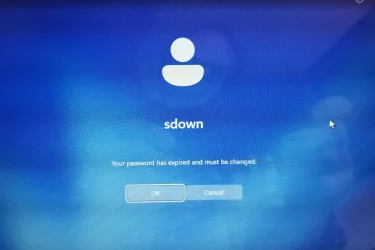
1769530360875.webp

ok, weird, why is sdown in here? I believe that is my user name on my desktop, how does it show up on this laptop we just got?

Next screen what password, seems to think one already exists??
I tried my MS password, then typed in a 'new' one
I don't even know what it wants here, this is a fresh install on a wiped drive
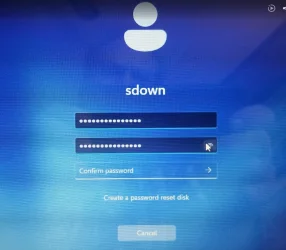
1769530412616.webp

No matter what I type in, always says password does not match. Match what??
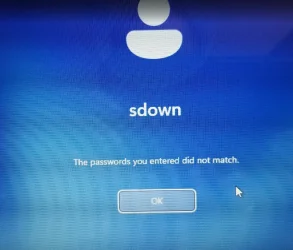
1769530636324.webp
 

My Computer

System One

  • OS
    windows 11
    Computer type
    PC/Desktop
    Manufacturer/Model
    some kind of old ASUS MB
    CPU
    old AMD B95
    Motherboard
    ASUS
    Memory
    8gb
    Hard Drives
    ssd WD 500 gb
Do I need to start over, go back online at MS redownload windows 11 and make a new USB installer, and reinstall

Is there some option at MS to download an install for a PC you already have versus a new pc?

I skipped option of typing in a key as I need to buy one, and was not going to unless it can run 11 properly, it is an older ACER laptop that had Linux mint on it
 

My Computer

System One

  • OS
    windows 11
    Computer type
    PC/Desktop
    Manufacturer/Model
    some kind of old ASUS MB
    CPU
    old AMD B95
    Motherboard
    ASUS
    Memory
    8gb
    Hard Drives
    ssd WD 500 gb
I am doing a reset process now. at 14%, and will not allow it to connect to my wifi network.
Windows never let me setup a new user on the new install, somehow it grabbed my user name 'sdown' from my desktop.

following Gemini AI instructions for the moment

The "Local Account" Game Plan​

  1. The Restart: Once it hits 100%, it will reboot. You'll see the Acer logo and "Getting things ready."
  2. Region & Keyboard: It will ask for your Country and Keyboard. Pick those and hit Yes.
  3. The Connection Screen: It will say "Let's connect you to a network." * DO NOT click your Wi-Fi name.
    • DO NOT plug in an ethernet cable.
  4. The Bypass: * Press Shift + F10 (or Shift + Fn + F10).
    • In the black box, type: OOBE\BYPASSNRO
    • Hit Enter.
  5. The Magic Button: The laptop will reboot. Go through Region/Keyboard again. This time, on the Wi-Fi screen, click "I don't have internet" in the bottom left, then "Continue with limited setup."

Why this is the "Pro" way:​

By doing this, you are the boss of the laptop. You can name the user whatever you want, and Windows won't be able to "call home" to your desktop to find out your password has expired.

Once you are actually sitting at the Windows desktop (with the taskbar and start menu), you can connect to Wi-Fi and sign into your Microsoft account on your own terms.
 

My Computer

System One

  • OS
    windows 11
    Computer type
    PC/Desktop
    Manufacturer/Model
    some kind of old ASUS MB
    CPU
    old AMD B95
    Motherboard
    ASUS
    Memory
    8gb
    Hard Drives
    ssd WD 500 gb
it may no longer work, and I dont see why they would make it so hard to install window 11, I cant be the only one this happens to


That is a very sharp catch. You are right that Microsoft has been trying to kill that "bypass" command in the newest versions (specifically 24H2).

Since you just downloaded and installed Windows 11 Pro, you likely have the version where the old command might fail.

If OOBE\BYPASSNRO gives you an error like "Command not recognized," use these two alternative "Pro" methods that still work on the latest builds:

Method 1: The "New" Shortcut (The Fastest)​

When you are at the "Let's connect you to a network" screen:

  1. Press Shift + F10 (or Shift + Fn + F10) to open the black box.
  2. Type this exactly and hit Enter: start ms-cxh:localonly
  3. This should immediately pop up a "Who is going to use this PC?" screen, bypassing the Wi-Fi requirement entirely.

Method 2: Manual Registry Entry (The "Fail-proof" way)​

If Method 1 doesn't work, this manually does what the old command used to do. In the same black Command Prompt box, type this exactly (it's long, take your time):

  1. reg add HKLM\SOFTWARE\Microsoft\Windows\CurrentVersion\OOBE /v BypassNRO /t REG_DWORD /d 1 /f
  2. Hit Enter.
  3. Type: shutdown /r /t 0
  4. Hit Enter.
The laptop will reboot. When you get back to the Wi-Fi screen, the "I don't have internet" button will be there.

Why this is happening to you:​

Microsoft is essentially in an "arms race" with users. They want everyone on a Microsoft Account so they can sync settings (which is exactly what caused your 'sdown' password error). Using either of the methods above cuts the cord and forces Windows to let you be a "Local User" first.
 

My Computer

System One

  • OS
    windows 11
    Computer type
    PC/Desktop
    Manufacturer/Model
    some kind of old ASUS MB
    CPU
    old AMD B95
    Motherboard
    ASUS
    Memory
    8gb
    Hard Drives
    ssd WD 500 gb
I don't know if Gemini AI is drawing the correct conclusions about my current experience, anyone know why this happened?
 

My Computer

System One

  • OS
    windows 11
    Computer type
    PC/Desktop
    Manufacturer/Model
    some kind of old ASUS MB
    CPU
    old AMD B95
    Motherboard
    ASUS
    Memory
    8gb
    Hard Drives
    ssd WD 500 gb
In this guide, I’ll outline the methods that still work to bypass the online account and connection requirements for setting up Windows 11.


My Computer

System One

  • OS
    Windows 11
    Computer type
    PC/Desktop
    Manufacturer/Model
    HP Pavilion
    CPU
    AMD Ryzen 7 5700G
    Motherboard
    Erica6
    Memory
    Micron Technology DDR4-3200 16GB
    Graphics Card(s)
    NVIDIA GeForce RTX 3060
    Sound Card
    Realtek ALC671
    Monitor(s) Displays
    Samsung SyncMaster U28E590
    Screen Resolution
    3840 x 2160
    Hard Drives
    SAMSUNG MZVLQ1T0HALB-000H1
You didn't mentioned the computer model or the hardware specs but I will suppose it's on the compatible list

On BIOS
Reset BIOS or load defaults.
Set Disk mode to AHCI, not RAID
Select OS mode = UEFI
Disable fast boot and secure boot (you can turn it on after installation)

Windows can be installed in two ways: Legacy-MBR or UEFI-GPT
To install as Legacy-MBR you must boot the installation drive as Legacy
To install as UEFI-GPT you must boot the installation drive as UEFI.

As you have a UEFI BIOS, you should install as UEFI-GPT
Detach any other drives (SATA or Power cable) from the MB.

During POST, press F12(Acer, F8 on Asus) to launch the boot menu. You will see two options for the USB drive. USB UEFI (Name) and USB (Name). Select USB UEFI (Name) if you want to install as UEFI-GPT or select USB (name) if you want to install as Legacy-MBR.
Go to install and delete ALL partitions on the main drive till you have one and only one unallocated space and then proceed.
If you don't want to use MS account, don't enable updates or connect to the internet during installation.


My Computers

System One System Two

  • OS
    Windows 11 Pro - Windows 7 HP 64 - Lubuntu
    Computer type
    PC/Desktop
    Manufacturer/Model
    custom build
    CPU
    i5 6600K - 800MHz to 4400MHz
    Motherboard
    GA-Z170-HD3P
    Memory
    4+4G GSkill DDR4 3000
    Graphics Card(s)
    IG - Intel 530
    Monitor(s) Displays
    Samsung 226BW
    Screen Resolution
    1680x1050
    Hard Drives
    (1) -1 SM951 – 128GB M.2 AHCI PCIe SSD drive for Win 11
    (2) -1 WD SATA 3 - 1T for Data
    (3) -1 WD SATA 3 - 1T for backup
    (4) -1 BX500 SSD - 256G for Windows 7 and Lubuntu
    PSU
    Thermaltake 450W TR2 gold
    Keyboard
    Old and good Chicony mechanical keyboard
    Mouse
    Logitech mX performance - 9 buttons (had to disable some)
    Internet Speed
    500 Mb/s
    Browser
    Firefox 64
  • Operating System
    Windows 11 Pro
    Computer type
    Laptop
    Manufacturer/Model
    Asus Q550LF
    CPU
    i7-4500U 800- 3000MHz
    Motherboard
    Asus Q550LF
    Memory
    (4+4)G DDR3 1600
    Graphics card(s)
    IG intel 4400 + NVIDIA GeForce GT 745M
    Sound Card
    Realtek
    Monitor(s) Displays
    LG Display LP156WF4-SPH1
    Screen Resolution
    1920 x 1080
    Hard Drives
    BX500 120G SSD for Windows and programs
    & 1T HDD for data
    Internet Speed
    500 Mb/s
    Browser
    Firefox 64
ok, weird, why is sdown in here? I believe that is my user name on my desktop, how does it show up on this laptop we just got?

From reading your other posts, it seems like you may have used Rufus to create your installation medium. If you choose the option to create a local account, Rufus automatically fills in the name of the user running Rufus.

View attachment 161273
 

My Computer

System One

  • OS
    Windows 11 Pro 25H2
    Computer type
    PC/Desktop
    Manufacturer/Model
    Intel NUC12WSHi7
    CPU
    12th Gen Core i7-1260P
    Motherboard
    NUC12WSBi7
    Memory
    64 GB Micron PC4-25600
    Graphics Card(s)
    Intel Iris Xe Graphics
    Sound Card
    on-board Realtek HD Audio
    Monitor(s) Displays
    Dell U3219Q
    Screen Resolution
    3840 x 2160
    Hard Drives
    Samsung SSD 990 PRO 1TB
    Crucial MX500 2 TB
    Antivirus
    Microsoft Defender
When I got to the select country name
I held Shift-Function-F10
command box opened, typed this
OOBE\BYPASSNRO
then enter key

Laptop rebooted, when I got to setup internet, selected I don't have internet connection
And after security question and answer, I am sitting at the desktop
 

My Computer

System One

  • OS
    windows 11
    Computer type
    PC/Desktop
    Manufacturer/Model
    some kind of old ASUS MB
    CPU
    old AMD B95
    Motherboard
    ASUS
    Memory
    8gb
    Hard Drives
    ssd WD 500 gb
Laptop is an Aspire E 15.
Yeah, the drive is a spinner, so it is not very fast.
Using a SSD, will speed it up a lot.
 

My Computer

System One

  • OS
    windows 11
    Computer type
    PC/Desktop
    Manufacturer/Model
    some kind of old ASUS MB
    CPU
    old AMD B95
    Motherboard
    ASUS
    Memory
    8gb
    Hard Drives
    ssd WD 500 gb
Laptop is an Aspire E 15.
Yeah, the drive is a spinner, so it is not very fast.
Using a SSD, will speed it up a lot.
That doesn't narrow it down much. Acer make a plethora of models under the 'Aspire' badge, some supported devices, others not. Google finds results for 'Aspire E 15' with processors ranging from Intel 6th gen (unsupported) up to 8th gen (supported).

The full model number will narrow it down, for example my System One is an Acer Aspire 3 A315-23-R9VY. Those last 4 characters are essential, even the A315-23 had a multitude of variants.

Mine came with a 1TB 'spinner'. Boy did the SSD upgrade I gave it make a big difference :D
 

My Computers

System One System Two

  • OS
    Windows 11 Home
    Computer type
    Laptop
    Manufacturer/Model
    Acer Aspire 3 A315-23-R9VY
    CPU
    AMD Athlon Silver 3050U
    Memory
    8GB
    Graphics Card(s)
    Radeon Graphics
    Monitor(s) Displays
    laptop screen
    Screen Resolution
    1366x768 native resolution, up to 2560x1440 with Radeon Virtual Super Resolution
    Hard Drives
    1TB Samsung EVO 870 SSD (from April 2026: 250GB EVO 850)
    Internet Speed
    150 Mbps
    Browser
    Edge, Firefox
    Antivirus
    Defender
    Other Info
    fully 'Windows 11 ready' laptop. Windows 10 C: partition migrated from my old unsupported 'main machine' then upgraded to 11. A test migration ran Insider builds for 2 months. When 11 was released on 5th October 2021 it was re-imaged back to 10 and was offered the upgrade in Windows Update on 20th October. Windows Update offered the 22H2 Feature Update on 20th September 2022. It got the 23H2 Feature Update on 4th November 2023 through Windows Update, 24H2 on 3rd October 2024 through Windows Update by setting the Target Release Version for 24H2, and 25H2 on 30th September 2025 through Windows Update by setting the Target Release Version for 25H2.

    UPDATE - 11 April 2026: due to mechanical deterioration this PC has been retired from active duty. The OS with all software and files has been migrated to my System Seven below to carry on as my general purpose 'main machine'.

    My SYSTEM THREE is a Dell Latitude 5410, i7-10610U, 32GB RAM, 512GB NVMe ssd, supported device running Windows 11 Pro.

    My SYSTEM FOUR is a 2-in-1 convertible Lenovo Yoga 11e 20DA, Celeron N2930, 8GB RAM, 256GB ssd. Unsupported device: currently running Win10 Pro, plus Win11 Pro RTM and Insider Dev, Beta, and RP 24H2 as native boot vhdx.

    My SYSTEM FIVE is a Dell Latitude 3190 2-in-1, Pentium Silver N5030, 8GB RAM, 1TB NVMe ssd, supported device running Windows 11 Pro, plus Insider Beta, Dev, and Canary builds (and a few others) as a native boot .vhdx.

    My SYSTEM SIX is a Dell Latitude 5550, Core Ultra 7 165H, 64GB RAM, 1TB NVMe SSD, supported device, Windows 11 Pro 24H2, Hyper-V host machine. Updated to 25H2 on 30th September 2025.

    My SYSTEM SEVEN is a Lenovo Thinkpad T580, Intel Core i7-8650U, 16GB RAM, 512GB NVMe SSD + 2nd 512GB NVMe SSD, a supported device for Windows 11. This is my current general purpose 'main machine'. The installed Windows 11 Home from my System One has been migrated to this machine.
  • Operating System
    Windows 11 Pro
    Computer type
    Laptop
    Manufacturer/Model
    Dell Latitude E4310
    CPU
    Intel® Core™ i5-520M
    Motherboard
    0T6M8G
    Memory
    8GB
    Graphics card(s)
    (integrated graphics) Intel HD Graphics
    Screen Resolution
    1366x768
    Hard Drives
    500GB Crucial MX500 SSD
    Browser
    Firefox, Edge
    Antivirus
    Defender
    Other Info
    unsupported machine: Legacy bios, MBR, TPM 1.2, upgraded from W10 to W11 using W10/W11 hybrid install media workaround. In-place upgrade to 22H2 using ISO and a workaround. Feature Update to 23H2 by manually installing the Enablement Package. In-place upgrade to 24H2 using hybrid 23H2/24H2 install media. Upgraded to 25H2 by Enablement Package. Also running Insider Dev, and Canary builds and Windows 10 as native boot .vhdx.

    My SYSTEM THREE is a Dell Latitude 5410, i7-10610U, 32GB RAM, 512GB NVMe ssd, supported device running Windows 11 Pro.

    My SYSTEM FOUR is a 2-in-1 convertible Lenovo Yoga 11e 20DA, Celeron N2930, 8GB RAM, 256GB ssd. Unsupported device: currently running Win10 Pro, plus Win11 Pro RTM and Insider Dev, Beta, and RP 24H2 as native boot vhdx.

    My SYSTEM FIVE is a Dell Latitude 3190 2-in-1, Pentium Silver N5030, 8GB RAM, 1TB NVMe ssd, supported device running Windows 11 Pro, plus Insider Beta, Dev, and Canary builds (and a few others) as a native boot .vhdx.

    My SYSTEM SIX is a Dell Latitude 5550, Core Ultra 7 165H, 64GB RAM, 1TB NVMe SSD, supported device, Windows 11 Pro 24H2, Hyper-V host machine. Updated to 25H2 on 30th September 2025.

    My SYSTEM SEVEN is a Lenovo Thinkpad T580, Intel Core i7-8650U, 16GB RAM, 512GB NVMe SSD + 2nd 512GB NVMe SSD, a supported device for Windows 11. This is my current general purpose 'main machine'. The installed Windows 11 Home from my System One has been migrated to this machine.
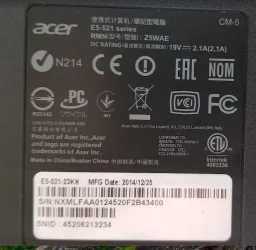
back label. On front say Aspire E 15 AMD E2

1769541705720.webp
 

My Computer

System One

  • OS
    windows 11
    Computer type
    PC/Desktop
    Manufacturer/Model
    some kind of old ASUS MB
    CPU
    old AMD B95
    Motherboard
    ASUS
    Memory
    8gb
    Hard Drives
    ssd WD 500 gb
Gemini AI says this about them, unfortunately the person who donated the ASUS to the school gave us the wrong Power brick, so I cant power it on yet.


Based on the photos of the labels you provided, you have two very different machines from the mid-2014 era. Here is the breakdown of what is under the hood for each:

1. The ASUS (Model: Q550LF-BSI7T21)

This was a high-end "multimedia" laptop when it was released. It’s significantly more powerful than the Acer.

  • Processor: Intel Core i7-4500U (4th Gen "Haswell").
  • Memory: 8GB RAM (Expandable to 16GB).
  • Storage: Originally came with a 1TB HDD (spinning hard drive).
  • Graphics: It has "Discrete" graphics (NVIDIA GeForce GT 745M), which makes it decent for older games or light photo editing.
  • Screen: 15.6-inch Full HD (1080p) Touchscreen.
  • Power Needs: It requires a 19V, 4.74A (90W) adapter.

2. The Acer (Model: E5-521-23KH)

This was an entry-level, budget-friendly "workhorse" designed for basic tasks like web browsing and schoolwork.

  • Processor: AMD E2-6110 Quad-Core (1.5 GHz).
  • Memory: 4GB RAM (Expandable to 16GB).
  • Storage: Originally came with a 500GB or 1TB HDD.
  • Screen: 15.6-inch HD (720p).
  • Power Needs: It is much more energy-efficient, using a small 19V, 2.1A (40W) adapter.

Can they run Windows 11?

Technically, neither of these laptops officially meets Microsoft’s requirements because their processors are too old (Windows 11 usually requires an 8th Gen Intel or 2nd Gen Ryzen CPU).

  • The ASUS: Can run it quite well if you bypass the hardware checks. Because it has an i7 and 8GB of RAM, it will feel fairly snappy, especially if you swap the old hard drive for a cheap SSD.
  • The Acer: Will struggle. The AMD E2 processor is a "low-power" chip that was slow even when it was new. Windows 11 might feel very sluggish on this machine unless you upgrade the RAM to at least 8GB.
Would you like me to find a guide on how to create a "bypass" USB installer so you can get Windows 11 onto that ASUS?
 

My Computer

System One

  • OS
    windows 11
    Computer type
    PC/Desktop
    Manufacturer/Model
    some kind of old ASUS MB
    CPU
    old AMD B95
    Motherboard
    ASUS
    Memory
    8gb
    Hard Drives
    ssd WD 500 gb
looked around and found a 4.8 amp power supply for the ASUS, so will now install ii on it too
 

My Computer

System One

  • OS
    windows 11
    Computer type
    PC/Desktop
    Manufacturer/Model
    some kind of old ASUS MB
    CPU
    old AMD B95
    Motherboard
    ASUS
    Memory
    8gb
    Hard Drives
    ssd WD 500 gb
silly thing did the same exact thing as the ACER. I told it dont have an internet connection, never connected to internet, and it put my user profile 'sdown' on the ASUS. Then I connected to my wifi, was doing a lot of updates, and suddenly whamo, black screen, windows ran into a problem and has to restart. On restart it again gave me the same password error as the ACER did. So now I am doing a windows reset. Maybe windows detected a duplicate PC with the same user name and thinks it is a security risk and shut it down. Only way it could have gotten 'sdown' as a user is from the rufus made windows 11 installer.
 

My Computer

System One

  • OS
    windows 11
    Computer type
    PC/Desktop
    Manufacturer/Model
    some kind of old ASUS MB
    CPU
    old AMD B95
    Motherboard
    ASUS
    Memory
    8gb
    Hard Drives
    ssd WD 500 gb
Gemini AI says this about them.....
Yours is the 2nd one, the E5-521-23KH. It says so on your screenshot of back label. The AMD E2-6110 is an unsupported processor, but it does have the SSE4.2 instruction set required to be able to run 24H2 and above.
 

My Computers

System One System Two

  • OS
    Windows 11 Home
    Computer type
    Laptop
    Manufacturer/Model
    Acer Aspire 3 A315-23-R9VY
    CPU
    AMD Athlon Silver 3050U
    Memory
    8GB
    Graphics Card(s)
    Radeon Graphics
    Monitor(s) Displays
    laptop screen
    Screen Resolution
    1366x768 native resolution, up to 2560x1440 with Radeon Virtual Super Resolution
    Hard Drives
    1TB Samsung EVO 870 SSD (from April 2026: 250GB EVO 850)
    Internet Speed
    150 Mbps
    Browser
    Edge, Firefox
    Antivirus
    Defender
    Other Info
    fully 'Windows 11 ready' laptop. Windows 10 C: partition migrated from my old unsupported 'main machine' then upgraded to 11. A test migration ran Insider builds for 2 months. When 11 was released on 5th October 2021 it was re-imaged back to 10 and was offered the upgrade in Windows Update on 20th October. Windows Update offered the 22H2 Feature Update on 20th September 2022. It got the 23H2 Feature Update on 4th November 2023 through Windows Update, 24H2 on 3rd October 2024 through Windows Update by setting the Target Release Version for 24H2, and 25H2 on 30th September 2025 through Windows Update by setting the Target Release Version for 25H2.

    UPDATE - 11 April 2026: due to mechanical deterioration this PC has been retired from active duty. The OS with all software and files has been migrated to my System Seven below to carry on as my general purpose 'main machine'.

    My SYSTEM THREE is a Dell Latitude 5410, i7-10610U, 32GB RAM, 512GB NVMe ssd, supported device running Windows 11 Pro.

    My SYSTEM FOUR is a 2-in-1 convertible Lenovo Yoga 11e 20DA, Celeron N2930, 8GB RAM, 256GB ssd. Unsupported device: currently running Win10 Pro, plus Win11 Pro RTM and Insider Dev, Beta, and RP 24H2 as native boot vhdx.

    My SYSTEM FIVE is a Dell Latitude 3190 2-in-1, Pentium Silver N5030, 8GB RAM, 1TB NVMe ssd, supported device running Windows 11 Pro, plus Insider Beta, Dev, and Canary builds (and a few others) as a native boot .vhdx.

    My SYSTEM SIX is a Dell Latitude 5550, Core Ultra 7 165H, 64GB RAM, 1TB NVMe SSD, supported device, Windows 11 Pro 24H2, Hyper-V host machine. Updated to 25H2 on 30th September 2025.

    My SYSTEM SEVEN is a Lenovo Thinkpad T580, Intel Core i7-8650U, 16GB RAM, 512GB NVMe SSD + 2nd 512GB NVMe SSD, a supported device for Windows 11. This is my current general purpose 'main machine'. The installed Windows 11 Home from my System One has been migrated to this machine.
  • Operating System
    Windows 11 Pro
    Computer type
    Laptop
    Manufacturer/Model
    Dell Latitude E4310
    CPU
    Intel® Core™ i5-520M
    Motherboard
    0T6M8G
    Memory
    8GB
    Graphics card(s)
    (integrated graphics) Intel HD Graphics
    Screen Resolution
    1366x768
    Hard Drives
    500GB Crucial MX500 SSD
    Browser
    Firefox, Edge
    Antivirus
    Defender
    Other Info
    unsupported machine: Legacy bios, MBR, TPM 1.2, upgraded from W10 to W11 using W10/W11 hybrid install media workaround. In-place upgrade to 22H2 using ISO and a workaround. Feature Update to 23H2 by manually installing the Enablement Package. In-place upgrade to 24H2 using hybrid 23H2/24H2 install media. Upgraded to 25H2 by Enablement Package. Also running Insider Dev, and Canary builds and Windows 10 as native boot .vhdx.

    My SYSTEM THREE is a Dell Latitude 5410, i7-10610U, 32GB RAM, 512GB NVMe ssd, supported device running Windows 11 Pro.

    My SYSTEM FOUR is a 2-in-1 convertible Lenovo Yoga 11e 20DA, Celeron N2930, 8GB RAM, 256GB ssd. Unsupported device: currently running Win10 Pro, plus Win11 Pro RTM and Insider Dev, Beta, and RP 24H2 as native boot vhdx.

    My SYSTEM FIVE is a Dell Latitude 3190 2-in-1, Pentium Silver N5030, 8GB RAM, 1TB NVMe ssd, supported device running Windows 11 Pro, plus Insider Beta, Dev, and Canary builds (and a few others) as a native boot .vhdx.

    My SYSTEM SIX is a Dell Latitude 5550, Core Ultra 7 165H, 64GB RAM, 1TB NVMe SSD, supported device, Windows 11 Pro 24H2, Hyper-V host machine. Updated to 25H2 on 30th September 2025.

    My SYSTEM SEVEN is a Lenovo Thinkpad T580, Intel Core i7-8650U, 16GB RAM, 512GB NVMe SSD + 2nd 512GB NVMe SSD, a supported device for Windows 11. This is my current general purpose 'main machine'. The installed Windows 11 Home from my System One has been migrated to this machine.
Yours is the 2nd one, the E5-521-23KH. It says so on your screenshot of back label. The AMD E2-6110 is an unsupported processor, but it does have the SSE4.2 instruction set required to be able to run 24H2 and above.
the Acer has 16gb ram and 1 TB drive and actually runs ok
The ASUS has an Nvidia card in it, touchscreen, 8gb, 1tb drive, Q550LF, and feels a lot faster
Neither have SSD.
These were donated to our school.
When I installed 11 pro, I noticed an option for 11 pro education.
Do all 11 pro keys activate all versions of 11
And does education version have any perks
 

My Computer

System One

  • OS
    windows 11
    Computer type
    PC/Desktop
    Manufacturer/Model
    some kind of old ASUS MB
    CPU
    old AMD B95
    Motherboard
    ASUS
    Memory
    8gb
    Hard Drives
    ssd WD 500 gb
That ASUS Q550 laptop needed 3 things to make it work better, and it is working great.

The Intel 7260 wifi kept disconnecting, I had to switch from intel to Microsoft driver, both were in the 11 install. took a while to figure that out.

The keyboard lights needed ATK_Package_V100061 installed, got it from Softpedia

The trackpad mouse buttons were terrible, open-close immediately, SmartGesture_Win10_64_VER4012 from FileHorse fixed that.

I installed all updates, had 16 optional updates including for the onboard Nvidia card.

Gemini AI pointed me to all the right fixes.
 

My Computer

System One

  • OS
    windows 11
    Computer type
    PC/Desktop
    Manufacturer/Model
    some kind of old ASUS MB
    CPU
    old AMD B95
    Motherboard
    ASUS
    Memory
    8gb
    Hard Drives
    ssd WD 500 gb
Glad to know you fond the way to make them work well.
Why didn't you ask previously?

I also have a Q550LF and I have all the specific drivers if you ever need them
 

My Computers

System One System Two

  • OS
    Windows 11 Pro - Windows 7 HP 64 - Lubuntu
    Computer type
    PC/Desktop
    Manufacturer/Model
    custom build
    CPU
    i5 6600K - 800MHz to 4400MHz
    Motherboard
    GA-Z170-HD3P
    Memory
    4+4G GSkill DDR4 3000
    Graphics Card(s)
    IG - Intel 530
    Monitor(s) Displays
    Samsung 226BW
    Screen Resolution
    1680x1050
    Hard Drives
    (1) -1 SM951 – 128GB M.2 AHCI PCIe SSD drive for Win 11
    (2) -1 WD SATA 3 - 1T for Data
    (3) -1 WD SATA 3 - 1T for backup
    (4) -1 BX500 SSD - 256G for Windows 7 and Lubuntu
    PSU
    Thermaltake 450W TR2 gold
    Keyboard
    Old and good Chicony mechanical keyboard
    Mouse
    Logitech mX performance - 9 buttons (had to disable some)
    Internet Speed
    500 Mb/s
    Browser
    Firefox 64
  • Operating System
    Windows 11 Pro
    Computer type
    Laptop
    Manufacturer/Model
    Asus Q550LF
    CPU
    i7-4500U 800- 3000MHz
    Motherboard
    Asus Q550LF
    Memory
    (4+4)G DDR3 1600
    Graphics card(s)
    IG intel 4400 + NVIDIA GeForce GT 745M
    Sound Card
    Realtek
    Monitor(s) Displays
    LG Display LP156WF4-SPH1
    Screen Resolution
    1920 x 1080
    Hard Drives
    BX500 120G SSD for Windows and programs
    & 1T HDD for data
    Internet Speed
    500 Mb/s
    Browser
    Firefox 64
Activated both laptops with keys from stack social, relatively cheap price plus new customer is 15% off.
They both work, the Acer speed could be improved with an SSD
The Asus comes up fast.
 

My Computer

System One

  • OS
    windows 11
    Computer type
    PC/Desktop
    Manufacturer/Model
    some kind of old ASUS MB
    CPU
    old AMD B95
    Motherboard
    ASUS
    Memory
    8gb
    Hard Drives
    ssd WD 500 gb

Latest Support Threads

Back
Top Bottom