Installing REALTEK drivers gives unwanted effects on headphones (volume comp/limit)


kvebe

Well-known member
Member
Local time
11:04 PM
Posts
29
OS
Windows 11
Hello all,

Thank you for reading.

Using Windows 11 on my Z790-A mobo. Realtek S1220A Codec.
Playing music to my headphones -without- any driver for Realtek and/or DTS, works OK.
But I miss some handy functionalities when not using that drivers/software.

But when I install the drivers for that board (6.09399.1 from ASUS or later versions (latest 6.0.9611.1) I get strange results.
Playback via headset sounds not as good:
At the start, a fraction of a second, it sounds max volume and then limits it to a reasonable level.
At soft passages, the volume is gained and when the passages are more loud it "switches" back to more normal volume.
I would describe it as a very bad set compressor/limiter....

Does anyone have guidelines for this or similar experiences?

Thank you very much,
Regards
Kees
 

My Computer My Computer

At a glance

Windows 11I7-13700K32GeForce 1660 Super
OS
Windows 11
Computer type
PC/Desktop
Manufacturer/Model
Custom made
CPU
I7-13700K
Motherboard
PRIME Z790-A WIFI
Memory
32
Graphics Card(s)
GeForce 1660 Super
Sound Card
On board
Monitor(s) Displays
Dell P2314H
Screen Resolution
HD
Hard Drives
SSD
Cooling
Yes :-)
Antivirus
ESET
Using Windows Search look for - Change System Sounds

Click on Playback tab - select your audio device - > Proprieties -> Advanced - uncheck Enable Audio Enhancement Next, select Spatial Sound - and make sure is Off.

While installing the drivers - does it also install its own software for managing sound?

If you prefer audio enhancements, this usually does a better job:


You can also get it via Windows Store - just search FXSound
 

My Computer My Computer

At a glance

WinDOS 25H2Intel & AMDSO-DIMM SK Hynix 15.8 GB Dual-Channel DDR4-26...nVidia RTX 2060 6GB Mobile GPU (TU106M)
OS
WinDOS 25H2
Computer type
Laptop
CPU
Intel & AMD
Memory
SO-DIMM SK Hynix 15.8 GB Dual-Channel DDR4-2666 (2 x 8 GB) 1329MHz (19-19-19-43)
Graphics Card(s)
nVidia RTX 2060 6GB Mobile GPU (TU106M)
Sound Card
Onbord Realtek ALC1220
Screen Resolution
1920 x 1080
Hard Drives
1x Samsung PM981 NVMe PCIe M.2 512GB / 1x Seagate Expansion ST1000LM035 1TB
Hi Neves,

Thank you for reacting.
Enhancements are off already.
And yes, there is some software installed.

Kees
 

My Computer My Computer

At a glance

Windows 11I7-13700K32GeForce 1660 Super
OS
Windows 11
Computer type
PC/Desktop
Manufacturer/Model
Custom made
CPU
I7-13700K
Motherboard
PRIME Z790-A WIFI
Memory
32
Graphics Card(s)
GeForce 1660 Super
Sound Card
On board
Monitor(s) Displays
Dell P2314H
Screen Resolution
HD
Hard Drives
SSD
Cooling
Yes :-)
Antivirus
ESET
Well the Realtek drivers are definitively the cause.
Tried every Realtek setting, cleaning drivers first, uninstalled Voicemeeter, etc etc but only the headset is acting like a weird thing with Realtek drivers. Multiple headsets tried.
Windows (generic) drivers work OK.
Strange that no-one has e3xperienced it here ?
Everyone -who is using Realtek drivers- have not this issue??

Kees
 

My Computer My Computer

At a glance

Windows 11I7-13700K32GeForce 1660 Super
OS
Windows 11
Computer type
PC/Desktop
Manufacturer/Model
Custom made
CPU
I7-13700K
Motherboard
PRIME Z790-A WIFI
Memory
32
Graphics Card(s)
GeForce 1660 Super
Sound Card
On board
Monitor(s) Displays
Dell P2314H
Screen Resolution
HD
Hard Drives
SSD
Cooling
Yes :-)
Antivirus
ESET

My Computer My Computer

At a glance

Windows 11I7-13700K32GeForce 1660 Super
OS
Windows 11
Computer type
PC/Desktop
Manufacturer/Model
Custom made
CPU
I7-13700K
Motherboard
PRIME Z790-A WIFI
Memory
32
Graphics Card(s)
GeForce 1660 Super
Sound Card
On board
Monitor(s) Displays
Dell P2314H
Screen Resolution
HD
Hard Drives
SSD
Cooling
Yes :-)
Antivirus
ESET
At the start, a fraction of a second, it sounds max volume and then limits it to a reasonable level.
At soft passages, the volume is gained and when the passages are more loud it "switches" back to more normal volume.

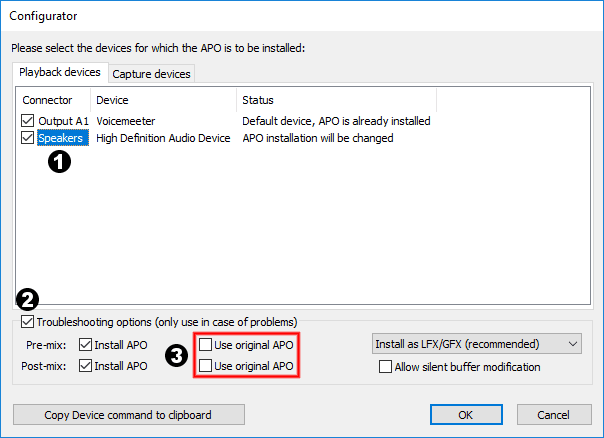
This type of "issue" is usually a feature defined & controlled by an APO function - like an audio/sound normalizer or loudness equalizer (based on above description). Could even be related to one of the functions you use. Don't know how that function is labeled so try disabling anything from the software - see what's causing that. Not aware of any automated feature - acting out like that at a driver level. This type of features are usually controlled/controllable by an APO software. You should be able to solve this with:


By bypassing the internal APO with EQ's APO, which is done though the Configurator - like so:

UseOriginalAPO.png


This will act like audio enhancements - but at same time, not so much. As in - if you don't have to mess with the Equalizer (or add any extra features) - just leave it like that and it should sound like the Generic Audio driver. Personally, i actually use it to solve a Windows Audio issue (to put it like that - cause it's a fault in the way the audio was designed to work on Windows). As in: Ending the Windows Audio Quality Debate

- basically, you just have to install Equalizer APO - and set the Preamplification to -4 dB (as detailed in above post/topic) - and that design flaw is mitigated.

Other than that - i use only the Realtek Audio Console (which offers a basic management - tho covers all my needs - since it even has a setting for Headphones Power - so i can still get a clean sound at pretty high volume without using some APO or other software with a Gain feature).

PS.Realtek Audio drivers - especially OEM vs Microsoft - are a bit of a lottery (you just have to roll the dice and keep trying - till you find one that works). On a HP laptop - the Windows Generic driver works best. On a MSI laptop - the OEM driver works best (using any other driver - brakes AUDIO).
 

My Computer My Computer

At a glance

WinDOS 25H2Intel & AMDSO-DIMM SK Hynix 15.8 GB Dual-Channel DDR4-26...nVidia RTX 2060 6GB Mobile GPU (TU106M)
OS
WinDOS 25H2
Computer type
Laptop
CPU
Intel & AMD
Memory
SO-DIMM SK Hynix 15.8 GB Dual-Channel DDR4-2666 (2 x 8 GB) 1329MHz (19-19-19-43)
Graphics Card(s)
nVidia RTX 2060 6GB Mobile GPU (TU106M)
Sound Card
Onbord Realtek ALC1220
Screen Resolution
1920 x 1080
Hard Drives
1x Samsung PM981 NVMe PCIe M.2 512GB / 1x Seagate Expansion ST1000LM035 1TB

Latest Support Threads

Back
Top Bottom