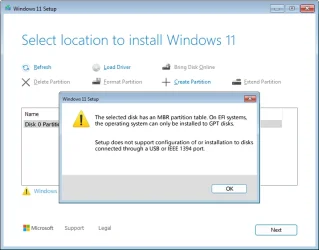
I create an usb win11 installation with Rufus few months ago but I don't remember what I choose in the "Partition Schemes"
When I run the installation(boot from the usb)I get an error
The selected disk has an MBR partition table.On EFI systems,the operation can only be installed on GPT disks
Setup does not support configuration of or installation on disks connected through a USB or IEEE 1394 port
What does this mean?
That I choose the wrong option in Rufus or what
When I boot back to windows(current installation)and check the disk on which windows is installed on
Right click on the drive=>Properties=>Hardware=>select the drive=>Properties=>Volume=>Populate=>in Partition Style it says GUID partition Table(GPT)
So why does it say that the partition table during the installation is MBR
The options to format the partition are grayed out
Does it mean I create the installation with Rufus by using the wrong partition scheme?
When I run the installation(boot from the usb)I get an error
The selected disk has an MBR partition table.On EFI systems,the operation can only be installed on GPT disks
Setup does not support configuration of or installation on disks connected through a USB or IEEE 1394 port
What does this mean?
That I choose the wrong option in Rufus or what
When I boot back to windows(current installation)and check the disk on which windows is installed on
Right click on the drive=>Properties=>Hardware=>select the drive=>Properties=>Volume=>Populate=>in Partition Style it says GUID partition Table(GPT)
So why does it say that the partition table during the installation is MBR
The options to format the partition are grayed out
Does it mean I create the installation with Rufus by using the wrong partition scheme?
My Computer
At a glance
Windows 1114700HX64GBRTX 4070
- OS
- Windows 11
- Computer type
- Laptop
- Manufacturer/Model
- MSI Sword 17 HX
- CPU
- 14700HX
- Memory
- 64GB
- Graphics Card(s)
- RTX 4070