Insufficient space on destination drive


jimhow4545

Well-known member
Member
Local time
7:07 AM
Posts
169
OS
Wind 11 Pro 24H2 (Dev Channel)/23H2Beta (offline)
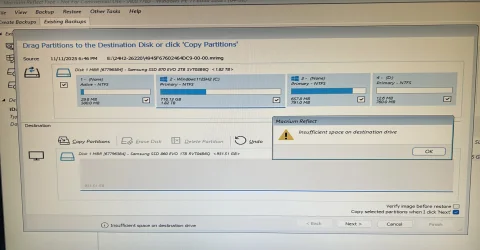
I can’t restore from an image file because of this. Warning:

Insufficient space on destination drive

What am I doing wrong here?
 

Attachments

  • IMG_4731.webp
    IMG_4731.webp
    1 MB · Views: 2

My Computer My Computer

At a glance

Wind 11 Pro 24H2 (Dev Channel)/23H2Beta (offl...2 Intel Xeon 5680120 GbMSI(Nvidia) GeForce GTX 970
OS
Wind 11 Pro 24H2 (Dev Channel)/23H2Beta (offline)
Computer type
PC/Desktop
Manufacturer/Model
DELL T7500
CPU
2 Intel Xeon 5680
Memory
120 Gb
Graphics Card(s)
MSI(Nvidia) GeForce GTX 970
Monitor(s) Displays
Dell S2719DGF
Screen Resolution
2560 x 1440 (155Hz)
Hard Drives
Samsung 2TB 870 (24H2 Device)
Samsung 1TB 860 (23H2 Beta)
PSU
Dell 1100W
Antivirus
Premium Malwarebyte, AdwCleaner (Malwarebyte)
You are trying to copy a 1.82TB partition onto a <1TB partition.
Some imaging utilities have special capabilities that allow them to do just that as long as the occupied space of the image is smaller than the destination.
I suggest that you look in the Help for that utility to find out the procedure required for such circumstances.
e.g.
Restore Partitions with Resize and Reorder - Macrium Software
and there might be useful guidance in
Macrium: image and restore to smaller drive - Ten Forums

I cannot remember if you first need to copy the system partition across to the target or not. It's ages since I've worked with MBR disks.


Denis
 
Last edited:

My Computer My Computer

At a glance

Windows 11 Home x64 Version 25H2 Build 26200....
OS
Windows 11 Home x64 Version 25H2 Build 26200.8037
You are trying to copy a 1.82TB partition onto a <1TB partition.
Some imaging utilities have special capabilities that allow them to do just that as long as the occupied space of the image is smaller than the destination.
I suggest that you look in the Help for that utility to find out the procedure required for such circumstances.
e.g.
Restore Partitions with Resize and Reorder - Macrium Software
and there might be useful guidance in
Macrium: image and restore to smaller drive - Ten Forums

I cannot remember if you first need to copy the system partition across to the target or not. It's ages since I've worked with MBR disks.


Denis
1. I made an image backup (McCrium free version 8.0) from Samsung 2TB SSD and stored it on 1TB drive. The image file is less than 750 GB.

2. I shutdown down the computer and and disconnected the 2TB SSD offline and connected the Samsung 1TB SSD and the hard drive that contains the backup image file.

3. I plugged the usb memory stick that contains McCrium Rescue Media Bootup and powered up the computer.

4. I followed The McCrium screen after the bootup to try the restore and got that warning.
 

My Computer My Computer

At a glance

Wind 11 Pro 24H2 (Dev Channel)/23H2Beta (offl...2 Intel Xeon 5680120 GbMSI(Nvidia) GeForce GTX 970
OS
Wind 11 Pro 24H2 (Dev Channel)/23H2Beta (offline)
Computer type
PC/Desktop
Manufacturer/Model
DELL T7500
CPU
2 Intel Xeon 5680
Memory
120 Gb
Graphics Card(s)
MSI(Nvidia) GeForce GTX 970
Monitor(s) Displays
Dell S2719DGF
Screen Resolution
2560 x 1440 (155Hz)
Hard Drives
Samsung 2TB 870 (24H2 Device)
Samsung 1TB 860 (23H2 Beta)
PSU
Dell 1100W
Antivirus
Premium Malwarebyte, AdwCleaner (Malwarebyte)
I know.
The fact remains that:-
You are trying to copy a 1.82TB partition onto a <1TB partition.
It's the partition size not the image size that is relevant.

You will need to follow their instructions for such a case.


Denis
 
Last edited:

My Computer My Computer

At a glance

Windows 11 Home x64 Version 25H2 Build 26200....
OS
Windows 11 Home x64 Version 25H2 Build 26200.8037
It's the partition size not the image size that is relevant.
 

My Computer My Computer

At a glance

Windows 11 Home x64 Version 25H2 Build 26200....
OS
Windows 11 Home x64 Version 25H2 Build 26200.8037
I had to drag and drop to the destination and fiddling with Auto Size. Now it’s restoring.

Last time I had no issue with this because I made an image file from 1TB SSD and restored to another 1TB SSD. Now I know what is going.
 

My Computer My Computer

At a glance

Wind 11 Pro 24H2 (Dev Channel)/23H2Beta (offl...2 Intel Xeon 5680120 GbMSI(Nvidia) GeForce GTX 970
OS
Wind 11 Pro 24H2 (Dev Channel)/23H2Beta (offline)
Computer type
PC/Desktop
Manufacturer/Model
DELL T7500
CPU
2 Intel Xeon 5680
Memory
120 Gb
Graphics Card(s)
MSI(Nvidia) GeForce GTX 970
Monitor(s) Displays
Dell S2719DGF
Screen Resolution
2560 x 1440 (155Hz)
Hard Drives
Samsung 2TB 870 (24H2 Device)
Samsung 1TB 860 (23H2 Beta)
PSU
Dell 1100W
Antivirus
Premium Malwarebyte, AdwCleaner (Malwarebyte)

Latest Support Threads

Back
Top Bottom